
Perkenalan
The Kmise 3D DELAY pedal is an analog delay effect designed for electric guitars and bass. It provides a warm, natural classic delay tone, suitable for various musical styles. This manual provides essential information for the proper setup, operation, and maintenance of your pedal.
Informasi Keselamatan
- Ensure the pedal is connected to a DC 9V power supply with the correct polarity (center negative). Incorrect power supply can damage the unit.
- Jangan biarkan pedal terkena air, kelembapan, atau suhu ekstrem.
- Hindari menjatuhkan atau memberikan pedal pada benturan keras.
- Disconnect the power supply when not in use or during cleaning.
- Jauhkan dari jangkauan anak-anak.
Isi Paket
Silakan periksa paket untuk memastikan semua item ada:
- Kmise 3D DELAY Guitar Pedal
- User Manual (dokumen ini)
- Note: A DC 9V power adapter is not included and must be purchased separately.
Produk Selesaiview
The Kmise 3D DELAY pedal features a compact design with intuitive controls for shaping your delay sound.

Gambar 1: Depan view of the Kmise 3D DELAY pedal, showing the input, output, control knobs, and footswitch.
Kontrol dan Koneksi:
- Tombol CAMPURAN: Adjusts the balance between the dry (unaffected) signal and the wet (effected) signal.
- Tombol TUNDA: Controls the delay time, from short slap-back echoes to long, atmospheric repeats.
- F.BACK Knob (Feedback): Determines the number of repeats. Higher settings result in more echoes.
- MASUKAN Jack: Connect your guitar or the output of another effect pedal here.
- Jack KELUARAN: Hubungkan ke Anda amplifier or the input of another effect pedal.
- DC 9V Masukan: For connecting a standard DC 9V power adapter (center negative).
- Sakelar kaki: Toggles the effect on/off. The LED indicates the effect status (on/off).

Gambar 2: Atas-bawah view highlighting the MIX, DELAY, and F.BACK control knobs, along with the input and output labels.
Pengaturan
- Sambungan Daya:
Connect a standard DC 9V power adapter (center negative) to the DC 9V input jack on the pedal. Ensure the power supply meets the pedal's requirements to prevent damage.
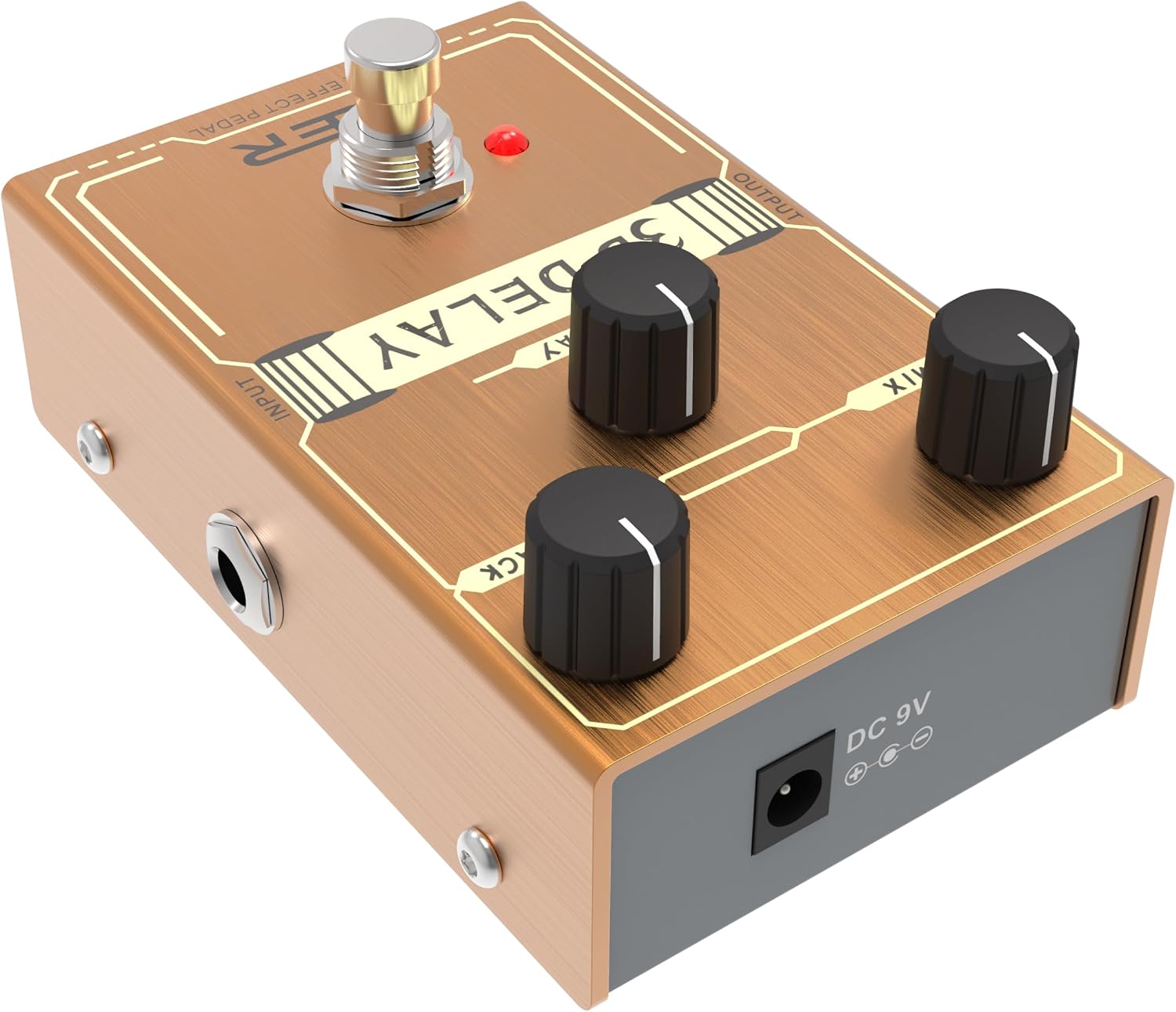
Gambar 3: Sisi view showing the DC 9V power input jack.
- Koneksi Audio:
- Hubungkan gitar Anda (atau output dari pedal sebelumnya) ke MASUKAN jack of the 3D DELAY pedal.
- Hubungkan KELUARAN jack of the 3D DELAY pedal to your amplifier (or the input of a subsequent pedal).
- Pengaturan Awal: Sebelum menyalakan amplifier, set the volume on your amplifier ke level rendah.
Mengoperasikan Pedal
- Nyalakan: Once all connections are secure, plug in your DC 9V power adapter. The pedal's LED will illuminate when the effect is active.
- Melibatkan Efek: Press the footswitch to toggle the delay effect on or off. The LED will light up when the effect is engaged.
- Adjusting the Delay:
- Gunakan MENUNDA knob to set the desired delay time.
- Sesuaikan F.KEMBALI knob to control the number of repeats. Lower settings produce fewer repeats, while higher settings create a longer, more sustained echo.
- Itu MENCAMPUR knob blends the dry signal with the delayed signal. Start with the MIX knob at a lower setting and gradually increase it to find your preferred balance.
- Bypass Sejati: The 3D DELAY pedal features true bypass, meaning that when the effect is disengaged, your guitar's signal passes directly through the pedal without any tonal coloration.
Pemeliharaan
- Pembersihan: Gunakan kain lembut dan kering untuk membersihkan permukaan pedal. Jangan gunakan pembersih abrasif atau pelarut.
- Penyimpanan: Simpan pedal di tempat yang kering dan sejuk, jauh dari sinar matahari langsung dan suhu ekstrem.
- Perawatan Kabel: Regularly check all cables for damage and ensure secure connections.
Penyelesaian Masalah
| Masalah | Kemungkinan Penyebab | Larutan |
|---|---|---|
| Tidak ada suara saat pedal ditekan. |
|
|
| Suara lemah atau terdistorsi. |
|
|
| Suara bising atau dengungan yang berlebihan. |
|
|
Spesifikasi
- Model: 3D DELAY
- Jenis Efek: Penundaan Analog
- Catu Daya: DC 9V (kutub negatif di tengah)
- Undian saat ini: Not specified in provided data, but typically low for analog pedals.
- Masukan: 1/4" Monaural Jack
- Keluaran: 1/4" Monaural Jack
- Jalan pintas: Bypass benar
- Bahan: Logam casing
- Ukuran: Approximately 5 x 3 x 2 inches (Package Dimensions, actual pedal size is smaller)
- Berat: Sekitar 8 ons
Garansi dan Dukungan
Kmise products are designed for reliability and performance. For warranty information, technical support, or service inquiries, please refer to the official Kmise webKunjungi situs web atau hubungi distributor lokal Anda. Simpan bukti pembelian Anda untuk klaim garansi.