
1. Pendahuluan
This manual provides detailed instructions for the installation, operation, and maintenance of your GIDERWEL 2.4GHz Wireless LED Controller with 4 Zone Remote Control Kit. This system is designed to control RGBW LED strip lights, offering dimming, color changing, and multi-zone control capabilities.
Isi Paket:
- 2x RGBW LED Controllers (Model C04RF)
- 1x RF Remote Control (requires 2x AAA batteries, not included)
- 1x Mounting Bracket for Remote Control
2. Produk Lebihview
The GIDERWEL 2.4GHz Wireless LED Controller system allows for flexible and convenient control of your RGBW LED lighting. It features a 4-zone remote control, enabling independent or synchronized control of multiple LED strip segments.

Image: The GIDERWEL RGBW LED Controller and its accompanying 4-zone RF remote control.
Fitur Utama:
- 4-Zone Remote Control: Independently manage LED lights in up to four distinct areas.
- Kontrol Grup: Pair multiple controllers to a single remote for simultaneous control of all connected LED strips.
- 2.4G Wireless Transmitting: Controllers can relay signals to other controllers within 98 feet (30 meters), extending the effective control range.
- Dimmable and Color Changing: Access 16 million colors and pure white light, with adjustable brightness for each color.
- Volume lebartage Dukungan: Compatible with DC5V, DC12V, and DC24V LED strip lights.
3. Pengaturan
3.1 Panduan Pengkabelan
Ensure all power is disconnected before wiring. The controller supports DC5V-DC24V input. The DC power socket is 5.5mm*2.5mm. Connect your RGBW LED strip to the output terminals, matching the V+, R, G, B, and W connections.
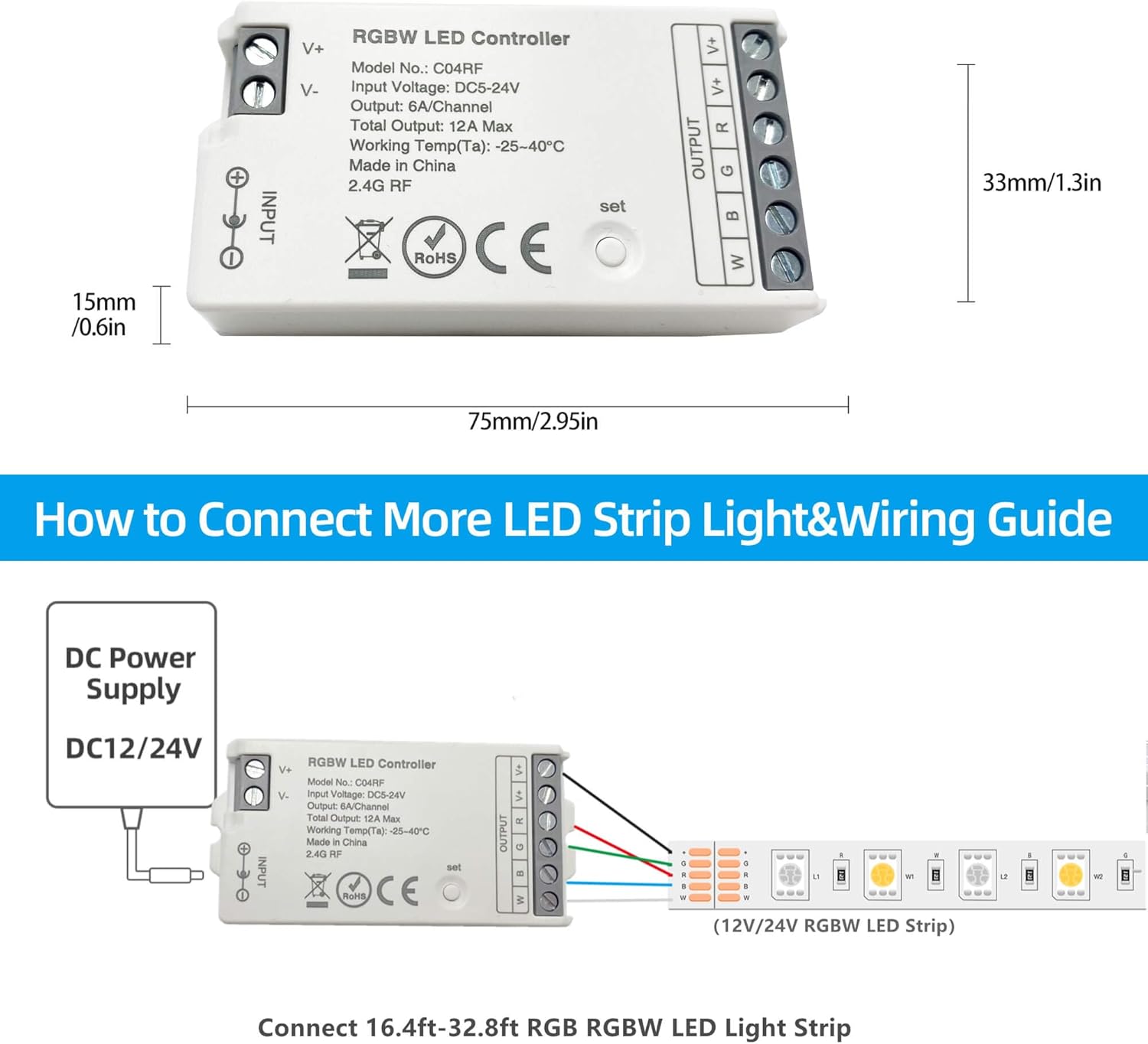
Image: Detailed wiring diagram showing connection of a DC power supply and an RGBW LED strip to the controller. Input is DC 5.5mm x 2.1mm plug or high power wired terminals. Output is 4 channel 5 wire for 6A/CH.
Penting: volumetagTegangan catu daya Anda harus sesuai dengan tegangan.tage requirement of your LED strip (e.g., use a DC12V power supply for a 12V LED strip).
3.2 Pairing the Remote Control with the Controller
To link the remote control to a controller, follow these steps:
- Ensure the LED strip is connected to the controller and the controller is powered off.
- Switch off the power to the LED controller. Wait for 10 seconds.
- Switch on the power to the LED controller.
- Within 3 seconds of powering on, short press the 'I' (Zone ON) button on the remote control 3 times for the desired zone (1, 2, 3, or 4).
- The LED strip will flash 3 times slowly, indicating successful linking.
Video: Demonstration of pairing the GIDERWEL RF remote control with an LED controller. The video shows the steps of powering off, waiting, powering on, and pressing the 'I' button three times to link the devices.
To unlink, repeat the process, but press the 'I' button 5 times quickly. The LED strip will flash 5 times quickly to confirm unlinking.
4. Petunjuk Pengoperasian
4.1 Fungsi Kontrol Jarak Jauh
Familiarize yourself with the buttons on the RF remote control:

Image: Diagram of the 4-Zone RF Remote Control, labeling buttons such as Master ON/OFF, Color Ring, Brightness +/-, Dynamic Modes, White Light, Color Temp/Saturation, Speed +/-, and Zone ON/OFF buttons.
- Guru HIDUP/MATI: Turns all linked lights on or off.
- Cincin Warna: Touch to select desired color.
- Kecerahan +/-: Mengatur tingkat kecerahan.
- M (Dynamic Modes): Berputar melalui berbagai mode pencahayaan dinamis.
- W (White Light): Activates pure white light mode.
- Color Temp / Saturation: Adjusts color temperature or saturation depending on the mode.
- Kecepatan +/-: Mengatur kecepatan mode dinamis.
- Zone 1-4 ON/OFF: Independently turns on/off or links/unlinks specific zones.
4.2 Kontrol 4-Zona
The remote allows you to control up to four independent zones. Each zone can have one or more controllers linked to it. This enables you to manage lighting in different rooms or areas separately.

Image: An illustration of a house floor plan divided into four zones (bedroom, dining room, kids room, living room), showing how one remote can control LED lights in these separate areas.
4.3 Pengendalian Kelompok
To control multiple controllers simultaneously, link them all to the same zone on your remote. Alternatively, use the Master ON/OFF button to control all zones at once.

Image: An exterior view of a house with LED lights in various colors, demonstrating how one remote control can manage all connected LED lights (C04RF Controllers) at the same time.
4.4 Dimming and Color Change
Use the color ring on the remote to select from 16 million colors. Press the 'W' button for pure white light. Adjust brightness using the Brightness +/- buttons. The system allows for fine-tuning of both color and intensity to create desired lighting moods.

Image: A bedroom setting illustrating the dimming capability from 100% to 1% brightness, and a color wheel graphic indicating 16 million colors available for selection.
5. Pemeliharaan
The GIDERWEL LED Controller and Remote Kit require minimal maintenance. Keep the devices clean and dry. Avoid exposing them to extreme temperatures or humidity. Replace remote control batteries (2x AAA) as needed.
6. Penyelesaian masalah
- Lampu tidak merespons:
- Check if the remote control batteries are installed correctly and have sufficient charge.
- Ensure the controller is properly powered and the LED strip is securely connected.
- Verify that the remote is correctly paired with the controller (refer to Section 3.2).
- Ensure the remote is within range of the controller.
- Incorrect colors or partial lighting:
- Confirm that the LED strip is an RGBW type and not just RGB, as this controller is designed for RGBW.
- Check all wiring connections between the LED strip and the controller for proper polarity and secure contact. Loose or incorrect wiring can cause color discrepancies.
- Kontrol intermiten:
- Reduce obstacles between the remote and the controller.
- Ensure no other 2.4GHz devices are causing interference.
7. Spesifikasi
| Fitur | Spesifikasi |
|---|---|
| Merek | GIDERWEL |
| Nama Model | Pesawat C04RF |
| Warna | Bahasa Inggris: RGBW |
| Teknologi Konektivitas | Frekuensi Radio (2.4 GHz) |
| Masukan Voltage | DC5V-DC24V |
| Arus Keluaran Maks | 6A/Channel, Total 12A Max |
| Jumlah Maksimum Perangkat yang Didukung | 4 (Zones) |
| Jangkauan Maksimum | 98 Kaki (30 meter) |
| Jenis Baterai Jarak Jauh | AAA (2 diperlukan) |
| Dimensi Pengontrol | Kira-kira 75mm x 33mm x 15mm (2.95 inci x 1.3 inci x 0.6 inci) |
8. Garansi dan Dukungan
This GIDERWEL product comes with a Garansi 1 Tahun from the date of purchase. For technical support, warranty claims, or further assistance, please contact GIDERWEL customer service through your retailer or visit the official GIDERWEL weblokasi.