
1. Lebihview
The Yunseity 5-Band EQ Preamp Equalizer is designed to enhance your audio experience in both home stereo and car audio systems. It features Bluetooth 5.0 connectivity, a vintage VU meter for real-time sound level display, and a 5-band graphic equalizer for precise sound tuning. The device includes balanced EQ audio preamplification and stereo 3.5mm AUX input and output options.

Gambar 1: Depan view of the Yunseity 5-Band EQ Preamp Penyeimbang.
2. Fitur Utama
- Equalizer Grafis 5-Band: Adjust audio frequencies at 100Hz, 400Hz, 800Hz, 4KHz, and 10KHz to compensate for speaker deficiencies and optimize soundstage. Each band is processed independently by an op-amp.
- Konektivitas Bluetooth 5.0: Seamlessly connect your devices wirelessly for audio streaming.
- Anggurtage VU Meter: Features large 45mm VU meters driven by a dedicated chip, providing accurate real-time sound level display and dynamic visual feedback.
- Bypass Design: Allows direct audio output from input to output without EQ preamplification, preserving the original sound.
- Kontrol Saldo: Compensates for left and right channel imbalances across all outputs, ensuring accurate soundstage positioning.
- Konstruksi Tahan Lama: Full aluminum alloy case and aluminum knurled knobs ensure good shielding performance. All I/O interfaces are gold-plated to maintain original sound quality and minimize loss.
- Aplikasi Luas: Compact size and DC 5V power supply make it portable and suitable for home stereos, computer speakers, amplifiers, and car audio systems.

Gambar 2: Rinci view of the 5-band EQ controls and VU meters.

Figure 3: The vintage VU meters dynamically displaying sound levels.
3. Komponen dan Kontrol Produk
3.1 Kontrol Panel Depan
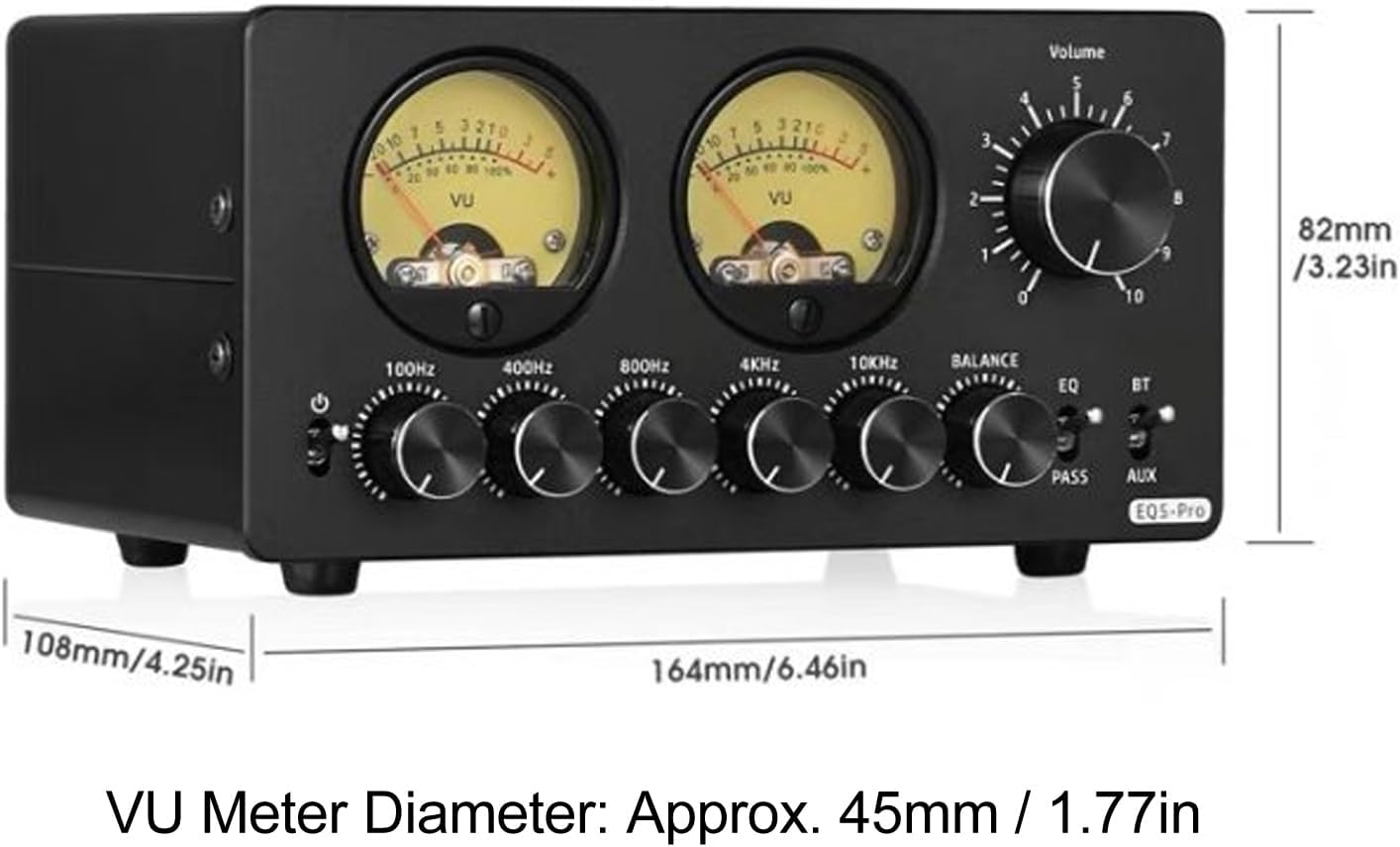
Figure 4: Front panel with labeled controls.
- Saklar daya: Menyalakan atau mematikan unit.
- VU Meters (L/R): Displays left and right channel audio levels.
- Tombol Volume: Menyesuaikan volume keluaran keseluruhan.
- 5 Bands EQ Adjustment Knobs: Individual controls for 100Hz, 400Hz, 800Hz, 4KHz, and 10KHz frequencies.
- Balance Adjustment Knob: Adjusts the balance between left and right audio channels.
- EQ/Bypass Selector Switch: Toggles between EQ mode (active equalization) and Bypass mode (direct signal pass-through).
- AUX Input Selector Switch: Selects between Bluetooth and AUX (3.5mm) input sources.
3.2 Sambungan Panel Belakang
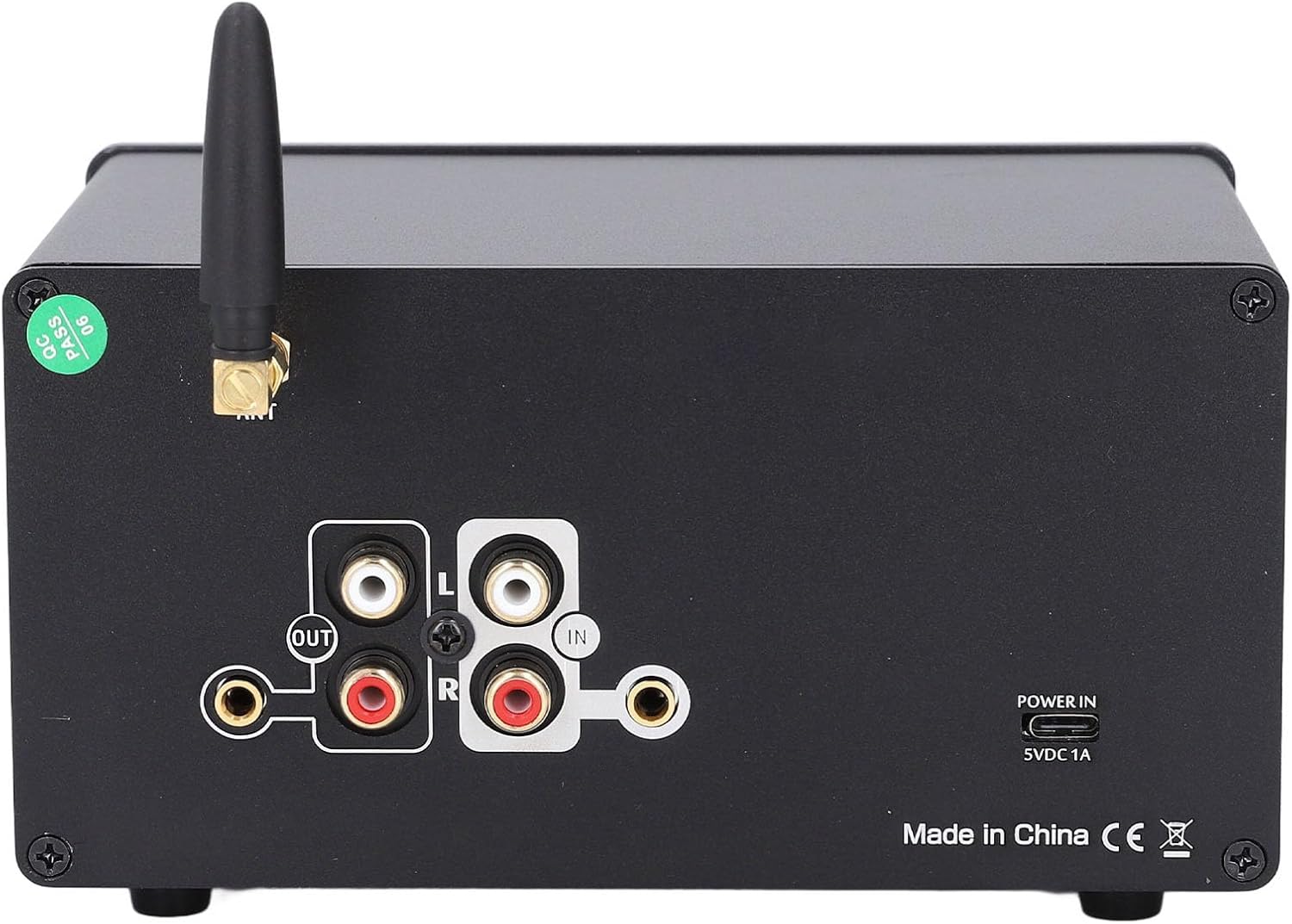
Figure 5: Rear panel with labeled input/output connections.
- ANT (Antena): Untuk penerimaan sinyal Bluetooth.
- IN (RCA/3.5mm AUX): Koneksi input audio.
- OUT (RCA/3.5mm AUX): Koneksi output audio.
- POWER IN (5VDC 1A): Port masukan daya.
4. Petunjuk Penyiapan
- Sambungan Daya: Connect the provided DC 5V 1A power adapter to the "POWER IN" port on the rear panel and then to a power outlet.
- Masukan Audio:
- Masukan RCA: Connect your audio source (e.g., CD player, media player) to the "IN" RCA ports (Red for Right, White for Left) on the rear panel.
- Masukan AUX 3.5mm: Connect your audio source (e.g., smartphone, tablet) to the "IN" 3.5mm AUX port on the rear panel.
- Masukan Bluetooth: Ensure the antenna is connected to the "ANT" port. Select Bluetooth input using the AUX Input Selector Switch on the front panel. Pair your device with the equalizer (refer to your device's Bluetooth pairing instructions).
- Keluaran Audio: Connect the equalizer's "OUT" RCA or 3.5mm AUX ports to your amplifier, active speakers, or headphone amppengangkat.
- Nyalakan: Flip the Power Switch on the front panel to the "ON" position. The VU meters should illuminate.
Video 1: Demonstrating the setup and features of the EQ5 PRO 5-Band EQ Equalizer with Bluetooth and VU Meter.
5. Petunjuk Pengoperasian
- Pemilihan Input: Use the AUX Input Selector Switch on the front panel to choose between Bluetooth (BT) or AUX (3.5mm) input.
- Penyesuaian Volume: Rotate the Volume Knob to increase or decrease the overall audio output level.
- Equalization (EQ) Mode:
- Ensure the EQ/Bypass Selector Switch is set to "EQ".
- Adjust the 5 Bands EQ Adjustment Knobs (100Hz, 400Hz, 800Hz, 4KHz, 10KHz) to tailor the sound to your preference. Turning a knob clockwise increases the gain for that frequency band, while turning it counter-clockwise decreases it.
- Modus Bypass: Flip the EQ/Bypass Selector Switch to "PASS" to bypass the equalizer and output the audio signal directly without any processing.
- Penyesuaian Saldo: Use the Balance Adjustment Knob to fine-tune the left and right channel balance, ensuring the soundstage terpusat.
- VU Meter Monitoring: Observe the VU meters to monitor the real-time audio levels.
Video 2: Demonstration of the Upgraded EQ5 Tone 5-Band Bluetooth EQ Equalizer with VU Meter in operation.
6. Pemeliharaan
- Pembersihan: Gunakan kain lembut dan kering untuk membersihkan bagian luar unit. Hindari penggunaan bahan kimia keras atau bahan abrasif.
- Ventilasi: Pastikan unit memiliki ventilasi yang memadai untuk mencegah panas berlebih. Jangan menghalangi lubang ventilasi apa pun.
- Penyimpanan: When not in use for extended periods, store the equalizer in a cool, dry place away from direct sunlight and extreme temperatures.
- Koneksi: Periksa semua sambungan kabel secara berkala untuk memastikannya aman dan bebas dari kerusakan.
7. Penyelesaian masalah
| Masalah | Kemungkinan Penyebab | Larutan |
|---|---|---|
| Tidak ada daya | Adaptor daya tidak terhubung atau rusak; Saklar daya dimatikan. | Ensure power adapter is securely connected and functional. Turn the Power Switch to ON. |
| Tidak ada keluaran suara | Incorrect input/output connections; Volume too low; Incorrect input source selected; EQ/Bypass switch in "PASS" mode with no signal. | Check all audio cables. Increase volume. Select the correct input source. Ensure the EQ/Bypass switch is in "EQ" mode or that a signal is present in "PASS" mode. |
| Suara terdistorsi | Volume too high; EQ settings too extreme; Faulty cables. | Reduce volume. Adjust EQ knobs to a moderate level. Check and replace cables if necessary. |
| Masalah koneksi Bluetooth | Perangkat tidak dalam mode pemasangan; Di luar jangkauan; Gangguan. | Ensure the equalizer is in Bluetooth mode and your device is in pairing mode. Move devices closer. Reduce interference from other wireless devices. |
| Meter VU tidak bergerak | No audio signal; Unit off. | Ensure an audio signal is playing through the unit. Check power. |
8. Spesifikasi
- Nomor Model Barang: Yunseityuvwmnzke52
- Berat Barang: 2.07 pon
- Dimensi Paket: 8.46x7.4x3.9 inci
- EQ Bands: 5 (100Hz, 400Hz, 800Hz, 4KHz, 10KHz)
- Versi Bluetooth: 5.0
- Masukan/Keluaran: Stereo RCA, 3.5mm AUX
- Catu Daya: Tegangan DC5V 1A
- VU Meter Diameter: Kira-kira 45 mm / 1.77 inci
9. Garansi dan Dukungan
This product is covered by a standard return policy, typically 30 days from the date of purchase. For specific warranty details, technical support, or service inquiries, please refer to the seller's information or contact the manufacturer directly. Keep your purchase receipt for warranty claims.