
1. Pendahuluan
Thank you for choosing the CinusLinus 4x360° Green Laser Level with Tripod. This device is designed to provide precise and reliable leveling and alignment for various indoor and outdoor construction, renovation, and DIY projects. Please read this manual thoroughly before use to ensure safe and optimal operation.
2. Informasi Keselamatan
PERINGATAN: RADIASI LASER
This product is a Class II laser device with a power output of <1mW. Direct exposure to the laser beam can cause eye injury. Always follow these safety guidelines:
- Jangan menatap langsung ke sinar laser.
- Do not direct the laser beam at people or animals.
- Avoid using the laser level in direct sunlight or environments with intense natural light, as this can impair laser visibility and potentially cause eye strain.
- Jauhkan perangkat dari jangkauan anak-anak.
- Do not attempt to modify or disassemble the laser level.
- Use only the specified power source and charging cables.
3. Isi Paket
Pastikan semua barang lengkap dan dalam kondisi baik saat membongkar kemasan:
- 1 x CinusLinus 4x360° Green Laser Level
- 1 x 47.46'' Aluminum Tripod
- 1 x 360° Rotary Base Mini Tripod
- 1 x Wall Mounted Panel/Holder
- 1 x Small Lift Table
- 1 x Portable Tool Kit
- 1 x Magnetic Wall-mounting Bracket
- 1 x Green Target Card
- 1 x Smart Remote Control
- 2 x Baterai Isi Ulang (4800mAh)
- 1 x Kabel Pengisian USB-C
- 1 x Panduan Pengguna (dokumen ini)
4. Pengaturan
4.1 Pemasangan dan Pengisian Baterai
The laser level comes with two 4800mAh rechargeable batteries, each providing approximately 8 hours of operation. The battery compartment is located at the bottom of the laser level.
- Buka penutup ruang baterai.
- Insert a charged battery, ensuring correct polarity.
- Tutup penutup ruang baterai dengan rapat.
Untuk mengisi daya baterai:
- Pengisian Internal: Connect the USB-C charging cable to the port on the laser level. The battery indicator on the device will show charging status.
- Pengisian Eksternal: Each battery pack also features a USB-C port, allowing for direct charging without being inserted into the laser level.
4.2 Tripod Assembly and Mounting
The included aluminum tripod offers adjustable height and versatile mounting options.

Figure 4.2.1: Tripod Components Overview
- Extend the Tripod Legs: Loosen the leg lock knobs and extend the legs to the desired height. Secure the knobs. The tripod can extend from 16.14 inches to 46.45 inches.
- Adjust Height (Center Column): Use the manual crank and height lock knob to raise or lower the center column for fine height adjustments.
- Mount the Laser Level: The laser level has a 1/4-inch thread on its base.
- Directly to Tripod: Screw the laser level onto the tripod's mounting plate.
- Using Magnetic Bracket: Attach the magnetic bracket to the laser level via the 1/4-inch thread. The bracket features strong magnets for attaching to metal surfaces and can be pivoted 360°.
- Using Wall Mounted Panel/Holder or Small Lift Table: These accessories provide additional versatility for mounting and height adjustment.
- Menyetel Tripod agar Stabil: Use the built-in bubble level on the tripod head to ensure the tripod is level before mounting the laser level.

Figure 4.2.2: Tripod Height Adjustments
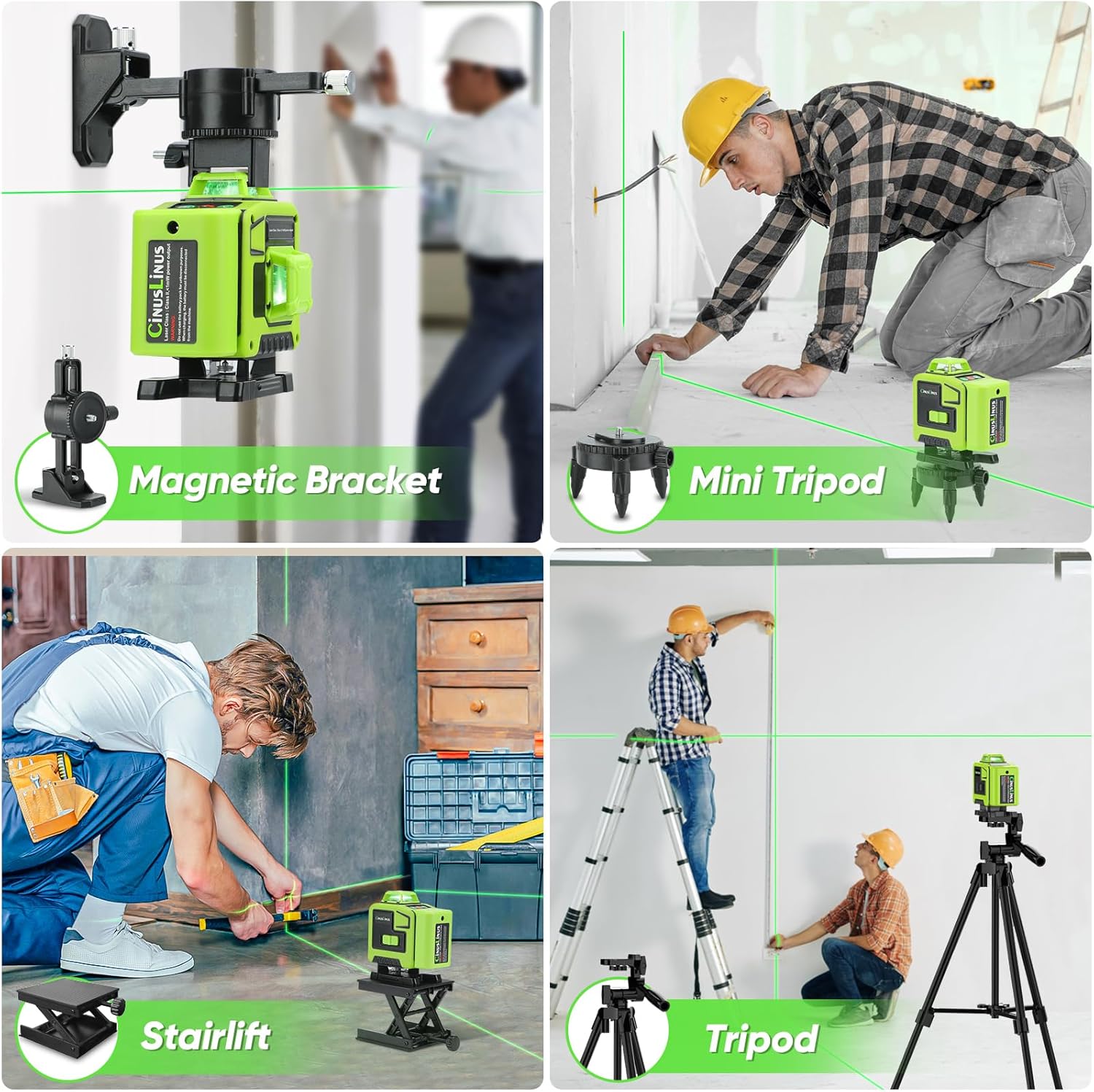
Figure 4.2.3: Various Mounting Options
5. Operasi
5.1 Menghidupkan/Mematikan dan Mode
The laser level features a main power switch and control buttons on the top panel.

Figure 5.1.1: Operating Modes
- Power On/Self-Leveling Mode: Slide the main switch to the 'unlock' position. The tool will automatically enter self-leveling mode, adjusting horizontally within a ±4° range. If the tilt exceeds 4°, the green laser will flash, and an auditory signal will be issued.
- Modus Manual: To engage manual mode, press and hold the central function button (often labeled with a lightbulb or mode icon) for a prolonged period. In this mode, the laser lines can be projected at any angle without self-leveling.
- Modus pulsa: A brief tap of the central function button activates pulse mode. This mode is designed for use with a laser receiver (not included) in diminished light scenarios or for extended range. Note: Brightness adjustment cannot be used simultaneously with pulse mode.
5.2 Laser Line Control and Brightness Adjustment
The laser level projects 2x360° horizontal planes and 2x360° vertical planes, providing comprehensive coverage.

Figure 5.2.1: 4x360° Laser Lines for Full Layout
- Horizontal Lines (H button): Press the "H" button to cycle through and activate/deactivate horizontal laser planes.
- Vertical Lines (V button): Press the "V" button to cycle through and activate/deactivate vertical laser planes.
- Penyesuaian Kecerahan: The "H" button can increase the green laser brightness, and the "V" button can decrease it. Adjust the brightness to suit various indoor lighting environments for energy efficiency and optimal visibility.
5.3 Operasi Kontrol Jarak Jauh
The included remote control allows for convenient operation of the laser level from a distance.
- The remote control features buttons corresponding to the laser level's functions (H for horizontal, V for vertical, and a mode button).
- Use the remote to activate/deactivate laser lines and switch between modes without directly touching the device.

Figure 5.3.1: Remote Control Functionality
6. Pemeliharaan
- Pembersihan: Regularly wipe the laser level and tripod with a soft, dry cloth. Do not use abrasive cleaners or solvents. Keep the laser apertures clean to ensure clear beam projection.
- Penyimpanan: Store the device and its accessories in the portable tool kit in a cool, dry place, away from direct sunlight and extreme temperatures.
- Perawatan Baterai: Charge batteries fully before long-term storage. If storing for extended periods, recharge every 3-6 months to maintain battery health.
7. Penyelesaian masalah
| Masalah | Kemungkinan Penyebab | Larutan |
|---|---|---|
| Laser lines are flashing and beeping in self-leveling mode. | The device is tilted beyond its ±4° self-leveling range. | Place the laser level on a flatter surface or adjust the tripod legs until the device is within its self-leveling range. Wait 4-8 seconds for stabilization. |
| Laser lines are not visible or appear dim. |
|
|
| Pengendali jarak jauh tidak berfungsi. |
|
|
| Tripod tidak stabil atau bergoyang. |
|
|

Figure 7.1: Optimal Usage Environments
8. Spesifikasi
| Fitur | Detil |
|---|---|
| Merek | Bahasa Indonesia: CinusLinus |
| Model | B0DCJ2FTJC |
| Kelas Laser | Kelas II, daya keluaran <1mW |
| Warna Laser | Hijau |
| Konfigurasi Laser | 4x360° (2 Horizontal, 2 Vertikal) |
| Indoor Visibility Range | Hingga 165 kaki |
| Rentang Self-Leveling | ±4° |
| Jenis Baterai | Dapat diisi ulang (4800mAh) |
| Daya Tahan Baterai | Kurang lebih 8 jam per baterai. |
| Port Pengisian Daya | USB-C (on device and battery packs) |
| Rentang Tinggi Tripod | 16.14 inci hingga 46.45 inci |
| Bahan | Akrilonitril Butadiena Stirena (ABS) |
| Mode Operasi | Self-Leveling, Manual Tilt Line, Pulse Mode |
| Aksesoris yang disertakan | Tripod, Mini Tripod, Wall Mount, Lift Table, Magnetic Bracket, Target Card, Remote Control, 2 Batteries, USB-C Cable, Tool Kit |
9. Garansi dan Dukungan
For warranty information and customer support, please refer to the documentation included with your purchase or contact CinusLinus customer service directly. Specific warranty terms may vary by region and retailer.