
1. Pendahuluan
The LEOBOG HI75C Pro is a 75% TKL mechanical wireless keyboard designed for versatility and performance. It features an aluminum alloy case, tri-mode connectivity (Bluetooth 5.0, 2.4GHz wireless, and USB-C wired), RGB backlighting, a multi-functional knob, and hot-swappable switches. This manual provides detailed instructions for setting up, operating, and maintaining your keyboard.

Figure 1: LEOBOG HI75C Pro Mechanical Wireless Keyboard Overview
2. Isi Paket
Verifikasi bahwa semua item ada dalam paket Anda:
- Keyboard Nirkabel Mekanik LEOBOG HI75C Pro
- Penarik Keycap
- Kabel USB (Tipe-C)
- Replace Switch (Spare Switches)
3. Fitur Produk
The LEOBOG HI75C Pro keyboard incorporates several advanced features for an enhanced user experience:
- Aluminium Alloy Cover: Provides superior heat dissipation, robustness, and durability. Features an exquisite powder coating process for a luxurious feel and fingerprint resistance.
- Desain Gasket: Significantly reduces cavity noise and improves typing sound for a satisfying low-noise experience.
- Koneksi 3 Mode: Supports Bluetooth 5.0, 2.4GHz wireless, and USB wired connections, allowing connection to up to five devices simultaneously.
- Tata Letak 75%: An 81-key layout that balances concise design with full functionality, saving desk space.
- RGB Backlit: Features 16.8 million RGB lighting colors with 17 lighting effects and 10 music rhythm modes.
- Dual-Mode Knob: A multi-functional knob for precise control over volume (office mode) and lighting brightness (game mode).
- High Speed Response: Equipped with an advanced gaming keyboard chip for a response speed of up to 2.8ms.
- Sakelar yang Dapat Ditukar Saat Panas: Memungkinkan penggantian sakelar dengan mudah tanpa perlu menyolder.
- Baterai 4000mAh: Provides extended usage time, approximately one month without backlighting.

Figure 2: Key features of the LEOBOG HI75C Pro keyboard.

Figure 3: Diagram illustrating the multi-layered gasket structure for sound dampen.

Figure 4: Ergonomic keycap height design for comfortable typing.
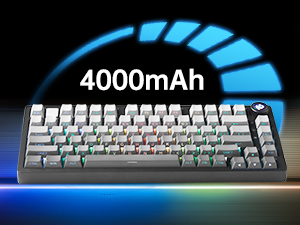
Figure 5: The keyboard is equipped with a 4000mAh battery.
4. Pengaturan dan Konektivitas
The LEOBOG HI75C Pro offers three connection modes: wired, 2.4GHz wireless, and Bluetooth. Use the switch on the side of the keyboard to select your desired mode.
4.1 Koneksi Kabel
- Ensure the mode switch on the side of the keyboard is set to the wired (USB-C) position.
- Connect the provided USB-C cable to the keyboard and to an available USB port on your computer.
- Keyboard akan otomatis dikenali dan siap digunakan.
4.2 Koneksi Nirkabel 2.4GHz
- Ensure the mode switch on the side of the keyboard is set to the 2.4GHz wireless position.
- Colokkan penerima USB 2.4GHz ke port USB yang tersedia di komputer Anda.
- Keyboard seharusnya terhubung secara otomatis. Jika tidak, tekan FN + ~ untuk memulai pemasangan.
4.3 Koneksi Bluetooth 5.0
- Ensure the mode switch on the side of the keyboard is set to the Bluetooth position.
- Pada perangkat Anda (PC, Mac, Android, iOS), aktifkan Bluetooth dan cari perangkat baru.
- Tekan dan tahan FN+1, FN+2, atau FN+3 for 3-5 seconds to enter pairing mode for BT1, BT2, or BT3 respectively. The indicator light will flash.
- Select "LEOBOG HI75C Pro" from the list of available Bluetooth devices on your device.
- Once connected, the indicator light will stop flashing. You can switch between paired Bluetooth devices using FN + 1/2/3.

Figure 6: The keyboard supports Type-C wired, 2.4GHz wireless, and Bluetooth connections.
Video 1: Official LEOBOG overview of the HI75C Pro Mechanical Gaming Keyboard, showcasing desain dan fiturnya.
5. Operasi
5.1 Lampu Latar RGB
The keyboard features extensive RGB backlighting with 17 preset lighting effects. Additionally, it offers 10 music rhythm RGB lighting modes that synchronize with audio output. You can adjust lighting effects and brightness using the multi-functional knob or dedicated key combinations. To turn off the lights, use the knob in game mode.
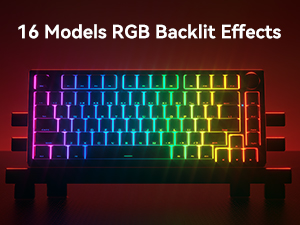
Figure 7: The keyboard offers 16 models of RGB backlit effects.
5.2 Dual-Mode Knob Control
The multi-functional knob allows for quick adjustments based on the selected mode:
- Beralih Mode: Tekan dan tahan kenop untuk beralih antara Mode Kantor dan Mode Permainan.
- Mode Kantor: When the indicator light is continuously on, the keyboard is in office mode. Rotate the knob to adjust the system volume.
- Mode Permainan: When the indicator light is breathing, the keyboard is in game mode. Rotate the knob to adjust the lighting brightness.

Figure 8: The multi-functional knob for volume and lighting control.
5.3 Sakelar yang Dapat Ditukar Saat Panas
The LEOBOG HI75C Pro supports hot-swappable 3-pin/5-pin mechanical switches, allowing you to easily change switches without soldering. This feature enables customization of typing feel and sound.

Figure 9: The keyboard features hot-swappable switches for customization.
6. Pemeliharaan
6.1 Pembersihan
Untuk menjaga performa dan tampilan optimal, bersihkan keyboard Anda secara teratur:
- Lepaskan keyboard dari semua sumber listrik sebelum membersihkan.
- Gunakan kain lembut dan bebas serat untuk sedikit membersihkannya.ampened with water or a mild cleaning solution to wipe the keycaps and case.
- Untuk pembersihan lebih mendalam, gunakan penarik penutup tombol yang disediakan untuk melepas penutup tombol dan bersihkan bagian bawahnya dengan udara bertekanan atau sikat kecil.
- Pastikan keyboard benar-benar kering sebelum menyambungkannya kembali.
6.2 Penggantian Tutup Tombol dan Sakelar
The hot-swappable design allows for easy replacement of keycaps and switches:
- Gunakan penarik penutup tombol yang disediakan untuk melepaskan penutup tombol secara perlahan.
- Use a switch puller (not included, but often comes with replacement switches) to carefully remove switches. Grip the switch firmly and pull straight up.
- Align the pins of the new switch with the holes on the PCB and press down gently until it clicks into place. Ensure pins are not bent.
- Pasang penutup tombol yang diinginkan ke batang sakelar yang baru.
7. Penyelesaian masalah
7.1 Masalah Konektivitas
- Tidak ada koneksi: Ensure the mode switch on the side of the keyboard is set correctly for wired, 2.4GHz, or Bluetooth.
- 2.4GHz Disconnection: Re-plug the USB receiver. Try pairing again by pressing FN + ~.
- Pemutusan Bluetooth: Ensure Bluetooth is enabled on your device. Re-enter pairing mode on the keyboard (FN + 1/2/3) and re-select the keyboard on your device.
- Gangguan: Move the keyboard closer to the receiver/device or away from other wireless devices that might cause interference.
7.2 Perangkat Lunak dan Firmware
For advanced customization, macro programming, and firmware updates, please visit the official LEOBOG website or authorized distributors' websites. Ensure you download the correct software/firmware version specifically for the LEOBOG HI75C Pro model to avoid compatibility issues.
7.3 Pencahayaan RGB Tidak Berfungsi
- Check if the keyboard is in Game Mode, where the knob controls brightness. Rotate the knob to increase brightness.
- Ensure the battery is sufficiently charged if using wireless mode.
- If using software, verify that lighting effects are enabled and configured correctly.
8. Spesifikasi
| Fitur | Detil |
|---|---|
| Nomor Model | HI75C PRO |
| Dimensi Produk | 12.97x5.35x1.74 inci |
| Berat Barang | 3.41 pon |
| Teknologi Konektivitas | Bluetooth, USB-C, Nirkabel 2.4GHz |
| Deskripsi Papan Ketik | Mekanis |
| Perangkat yang Kompatibel | Konsol Game, Laptop, PC, Ponsel Pintar, Tablet |
| Fitur Khusus | Tombol Layar yang Dapat Disesuaikan, Ergonomis, Dapat Diganti Cepat (Hot-Swappable), Tombol Pintas dan Tombol Media, Tombol yang Dapat Diprogram |
| Backlighting Keyboard | Bahasa Inggris: RGB |
| Baterai | 1 A battery required (included), 4000mAh |
9. Garansi dan Dukungan
LEOBOG provides a Garansi 2 tahun for the HI75C Pro Mechanical Wireless Keyboard, covering manufacturing defects from the date of purchase. For warranty claims, technical assistance, or product inquiries, please contact LEOBOG customer support through their official websitus atau pengecer tempat produk dibeli.

Figure 10: LEOBOG customer service is available for support.