
Perkenalan
This manual provides comprehensive instructions for the assembly, operation, and maintenance of your HOFFREE HOGC-PUR402 Gaming Chair. Please read this manual thoroughly before assembly and use to ensure proper function and safety. Keep this manual for future reference.

Figure 1: HOFFREE HOGC-PUR402 Gaming Chair Overview
Informasi Keselamatan
Always assemble the chair according to the instructions provided. Ensure all parts are securely fastened before use. Do not exceed the maximum weight capacity of 400 pounds to maintain stability and safety. Keep children and pets away from the chair during assembly. Avoid standing on the chair or using it as a step stool. Do not use the chair if any parts are damaged or missing.
Isi Paket
Before beginning assembly, ensure all components are present and undamaged. Refer to the parts list below:
- Sandaran
- Bantalan Kursi dengan Sandaran Kaki yang Dapat Ditarik
- Sandaran Tangan (Kiri dan Kanan)
- Basis Bintang
- Roda (5 buah)
- Gas Lift Cylinder with Cover
- Plat Mekanisme
- Lumbar Support Pillow (with massage function)
- Bantal Sandaran Kepala
- Perangkat Keras Perakitan (sekrup, ring, kunci Allen)
Pengaturan dan Perakitan
Follow these steps to assemble your HOFFREE Gaming Chair. It is recommended to have two people for certain steps.
- Pasangkan Roda ke Basis: Masukkan kelima roda ke dalam lubang di ujung setiap kaki alas bintang. Dorong dengan kuat hingga berbunyi klik dan terpasang dengan benar.
- Pasang Gas Lift: Place the gas lift cylinder into the center hole of the star base. Cover it with the telescopic cover.
- Merakit Sandaran Kaki: Secure the footrest frame to the underside of the seat cushion using the provided screws and Allen wrench. Ensure it is firmly attached.
- Pasang Pelat Mekanisme: Align the mechanism plate with the screw holes on the underside of the seat cushion. Secure it with the appropriate screws, ensuring the front of the mechanism faces the front of the seat.
- Hubungkan Kursi ke Lift Gas: Carefully place the assembled seat cushion onto the gas lift cylinder, ensuring the center hole of the mechanism plate aligns with the top of the gas lift.
- Pasang Sandaran Tangan: Secure the armrests to the sides of the seat cushion and backrest using the designated screws. Pay attention to the 'L' (left) and 'R' (right) markings on the armrests.
- Pasang Sandaran: Align the backrest with the mounting brackets on the seat cushion and armrests. Secure it with screws.
- Install Lumbar and Headrest Pillows: Attach the lumbar support pillow and headrest pillow using their elastic straps and buckles. The lumbar pillow has a USB cable for its massage function.
Video 1: HOFFREE Leather Gaming Chair Installation Guide. This video demonstrates the step-by-step assembly process for the gaming chair, including attaching the base, casters, gas lift, footrest, mechanism, armrests, and backrest.
Petunjuk Pengoperasian
1. Penyesuaian Ketinggian
To adjust the chair's height, pull the 'LIFT' lever located under the seat upwards. While pulling the lever, either stand up to raise the chair or remain seated to lower it. Release the lever to lock the height.
2. Fungsi Berbaring
The chair features a 90°-135° adjustable reclining backrest. To recline, pull the 'RCL' lever located on the side of the seat upwards and lean back to your desired angle. Release the lever to lock the backrest in position.

Figure 2: Reclining and Lift Levers
3. Sandaran Kaki yang Dapat Ditarik
To use the footrest, pull it out from under the seat. Flip the padded section over for comfort. To retract, flip the padded section back and slide the footrest completely under the seat.
4. Bluetooth 5.3 Speakers
The chair is equipped with dual Bluetooth 5.3 wireless audio speakers integrated into the backrest. To connect, ensure the speakers are powered on (if applicable, check for a power button or USB connection). Activate Bluetooth on your device (smartphone, tablet, computer) and search for available devices. Select the HOFFREE chair from the list to pair. Enjoy immersive audio for gaming, music, or movies.

Figure 3: Dual Bluetooth 5.3 Speakers
5. Massage Lumbar Pillow
The lumbar support pillow features a USB-powered massage function. Connect the USB cable from the pillow to a compatible USB power source (e.g., computer, power bank, USB wall adapter). Use the inline switch on the cable to turn the massage function on or off. This helps alleviate back pain and provides comfort during long sessions.

Figure 4: Massage Lumbar Pillow
Video 2: HOFFREE Gaming Chairs with Speakers and Massage. This video highlights the features of the gaming chair, including the integrated speakers and the massage function of the lumbar pillow.
6. Sandaran Lengan Penghubung
The armrests are designed to move in conjunction with the backrest when reclining, providing continuous support for your arms and elbows at various angles. This ensures comfort whether you are sitting upright or fully reclined.

Figure 5: Linkage Armrests
Pemeliharaan
- Pembersihan: Bersihkan kursi dengan kain lembut dan kering.amp kain. Untuk noda yang lebih membandel, gunakan larutan sabun lembut dan segera keringkan. Hindari bahan kimia keras atau pembersih abrasif.
- Pengencang: Periodically check all screws and bolts to ensure they are tight. Retighten as necessary to maintain stability and safety.
- Kastor: Jaga kebersihan roda dari debu dan kotoran untuk memastikan pergerakan yang lancar.
- Perawatan Kain: Hindari paparan sinar matahari langsung dalam waktu lama untuk mencegah pemudaran warna dan kerusakan material.
Penyelesaian Masalah
- Kursinya goyang: Check all assembly screws and bolts. Ensure they are tightened securely. Verify the gas lift is properly seated in the base and mechanism.
- Kursi tidak dapat diatur ketinggiannya: Pastikan tuas pengangkat gas terpasang sepenuhnya. Jika masalah berlanjut, tabung pengangkat gas mungkin perlu diganti.
- Backrest does not recline/lock: Check the recline lever for proper engagement. Ensure no obstructions are preventing movement.
- Bluetooth speakers not connecting: Ensure the speakers are powered on and your device's Bluetooth is enabled. Move your device closer to the chair. Try unpairing and re-pairing the device.
- Fungsi pijat tidak berfungsi: Verify the USB cable is securely connected to both the pillow and a working power source. Check the inline switch is in the 'on' position.
Spesifikasi
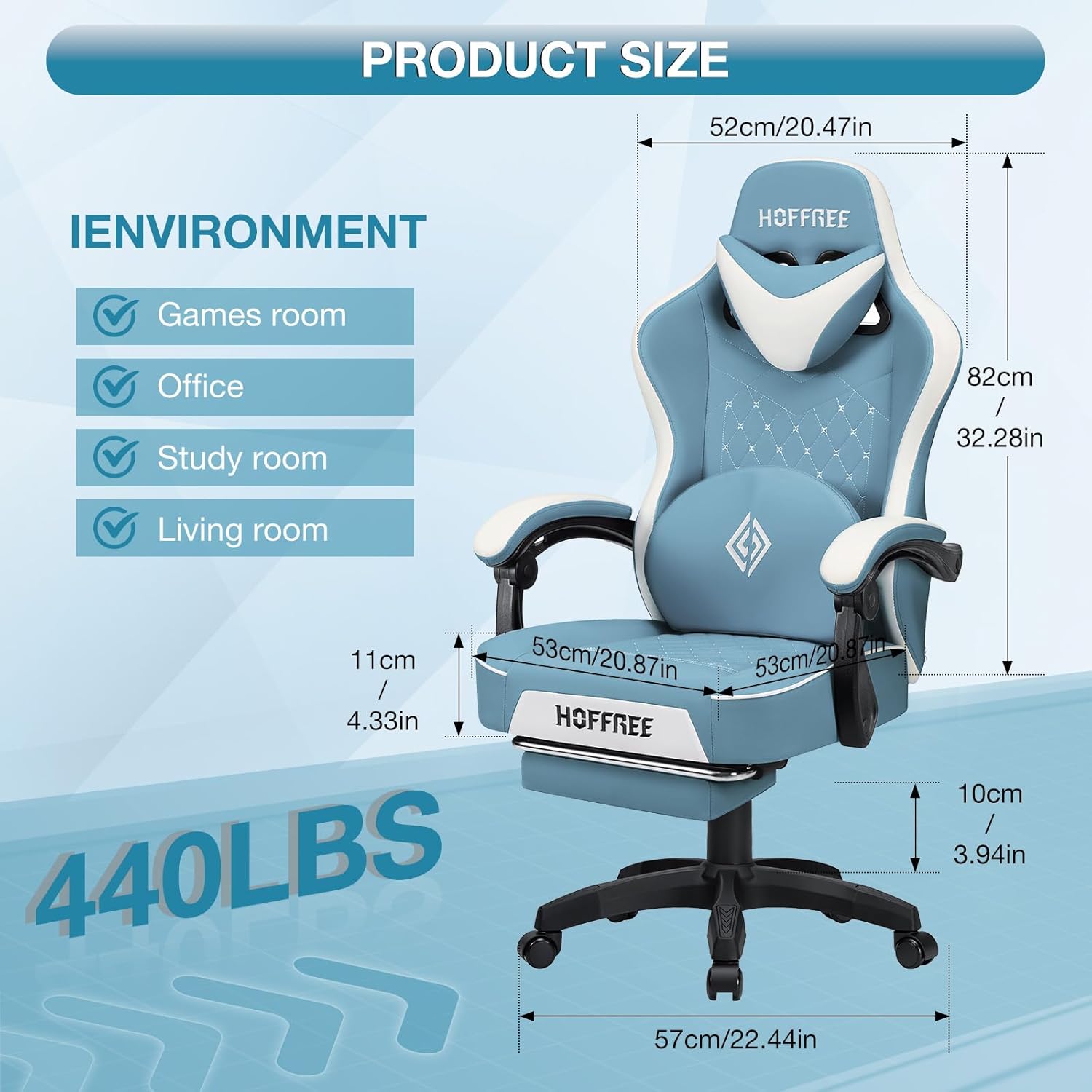
Gambar 6: Dimensi Produk
| Fitur | Detil |
|---|---|
| Merek | BEBAS |
| Nama Model | HOGC-PUR402 |
| Warna | Stone Blue+white (variant shown in images is black) |
| Dimensi Produk | 20.87"Panjang x 20.87"Lebar x 51.57"T |
| Rekomendasi Berat Maksimum | 400 pon |
| Bahan | Leather (PU), Metal, Cotton, Foam |
| Fitur Khusus | Big and Tall, Ergonomic, Heavy Duty, Reclining, Speakers, Massage Lumbar Pillow, Footrest |
| Jumlah Posisi Berbaring | 3 Position (90°, 105°, 135°) |
| Versi Bluetooth | 5.3 |
| Berat Barang | 42.6 pon |
Garansi dan Dukungan
For warranty information, product support, or to purchase replacement parts, please contact HOFFREE customer service directly. Refer to your purchase documentation for specific warranty terms and contact details.