
1. Pendahuluan
This manual provides essential instructions for the safe and effective operation, setup, and maintenance of your ARCCAPTAIN 185A 3-in-1 Welding Machine. This versatile unit supports Flux Core MIG, Lift TIG, and Stick (MMA) welding processes, operating on a 110V power supply. Please read this manual thoroughly before using the welder to ensure proper function and safety.
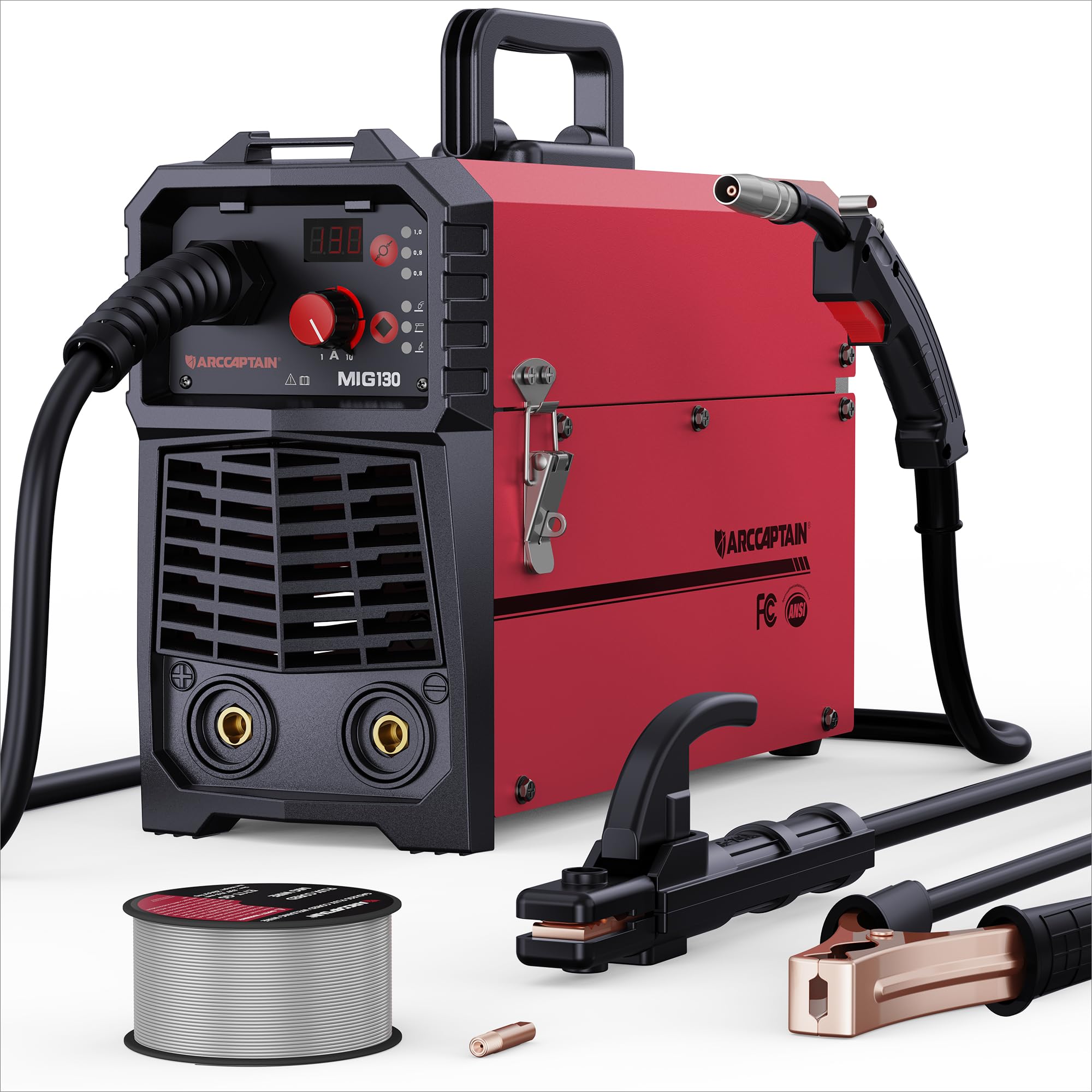
Figure 1: ARCCAPTAIN 185A 3-in-1 Welding Machine. This image displays the compact design of the welder, highlighting its control panel and connection points.
2. Informasi Keselamatan
Operasi pengelasan melibatkan risiko yang signifikan. Selalu patuhi tindakan pencegahan keselamatan berikut untuk mencegah cedera atau kerusakan.
- Sengatan listrik: Welding current can cause fatal electric shock. Ensure proper grounding, wear dry gloves, and inspect cables for damage. Never touch live electrical parts.
- Asap dan Gas: Welding fumes and gases can be hazardous to your health. Work in a well-ventilated area or use an approved respirator. Keep your head out of the fumes.
- Sinar Busur: Arc rays can burn eyes and skin. Always wear a welding helmet with appropriate shade, safety glasses, and protective clothing (long sleeves, heavy gloves).
- Kebakaran dan Ledakan: Percikan api las dan logam panas dapat menyebabkan kebakaran. Jauhkan bahan yang mudah terbakar dari area pengelasan. Sediakan alat pemadam api ringan.
- Bagian Panas: Welded materials and equipment can remain hot for extended periods. Use insulated gloves and allow parts to cool before handling.
- Kebisingan: Kebisingan yang berlebihan dapat merusak pendengaran. Gunakan pelindung telinga jika tingkat kebisingan tinggi.
- Pace Makers: Magnetic fields from high currents can affect pacemakers. Consult your doctor before welding.
3. Isi Paket
Verifikasi bahwa semua item yang tercantum di bawah ini ada dalam paket Anda:
- ARCCAPTAIN 185A Welding Machine
- Senter MIG
- Tanah Clamp dengan Kabel
- Electrode Holder (Stick) with Cable
- Flux Core Wire Spool (e.g., 2 lb .030" flux core wire)
- Contact Tips (e.g., spare .030" and .035" tips)
- Tali bahu
- User Manual (dokumen ini)
4. Pengaturan
4.1 Sambungan Daya
Connect the welder to a dedicated 110V AC power outlet. Ensure the circuit can handle the machine's maximum amperage (185A). Use an appropriate extension cord if necessary, ensuring it is rated for the required current and voltage.
4.2 Wire Installation (MIG/Flux Core)
- Open the wire feeder compartment.
- Letakkan gulungan kawat pada dudukan gulungan, pastikan gulungan dapat berputar dengan bebas.
- Masukkan kawat melalui tabung pemandu dan ke dalam mekanisme rol penggerak.
- Close the drive roller tension arm, adjusting tension as needed (too loose will cause slipping, too tight will deform wire).
- Remove the contact tip from the MIG torch.
- With the welder powered on and in MIG mode, press the wire feed button (or trigger the torch) to feed the wire through the torch liner until it exits the torch nozzle.
- Reinstall the correct size contact tip for your wire diameter.
4.3 Ground Clamp Koneksi
Hubungkan kabel groundamp cable to the appropriate terminal on the welder (usually marked with a ground symbol or "-"). Securely attach the ground clamp to the workpiece or a clean, bare metal portion of the work table. A good ground connection is critical for stable arc and weld quality.
4.4 Torch/Electrode Holder Connection
- Obor MIG: Connect the MIG torch cable to the designated MIG connector on the front panel. Ensure it is securely tightened.
- Stick Electrode Holder: For Stick welding, connect the electrode holder cable to the positive (+) terminal and the ground clamp to the negative (-) terminal for most common electrodes (DCEN). Consult electrode manufacturer specifications for polarity.
- Lift TIG Torch: For Lift TIG, a separate TIG torch (not included) is required. Connect the TIG torch to the negative (-) terminal and the ground clamp to the positive (+) terminal (DCEP) for most applications.
5. Operasi
Before operating, ensure all safety precautions are followed and appropriate personal protective equipment (PPE) is worn.
5.1 Panel Kontrol Selesaiview
The control panel typically features a mode selection button, current/voltage adjustment knobs, and a digital display. Refer to the specific layout on your machine for exact button functions.
5.2 MIG Welding (Flux Core)
- Select MIG mode on the control panel.
- Set the wire diameter and material type if your machine has this feature. The welder may automatically suggest initial settings.
- Sesuaikan voltage and wire feed speed according to the material thickness and wire type. Start with recommended settings and fine-tune as needed.
- Position the MIG torch at the start of the weld joint, maintaining a consistent stick-out.
- Press the torch trigger to initiate the arc and begin welding. Maintain a steady travel speed and torch angle.
- Lepaskan pelatuk untuk menghentikan pengelasan.
5.3 Angkat Pengelasan TIG
Note: A TIG torch and appropriate consumables (tungsten electrode, gas lens, collet) are required and sold separately.
- Select Lift TIG mode.
- Connect the TIG torch and ground clamp dengan polaritas yang benar.
- Setel yang diinginkan amperage for your material thickness.
- Gently touch the tungsten electrode to the workpiece to establish a circuit, then lift it slightly to initiate the arc.
- Maintain a consistent arc length and travel speed.
5.4 Pengelasan Batang (MMA)
- Select Stick (MMA) mode.
- Hubungkan pemegang elektroda dan kabel ground.amp with correct polarity for your chosen electrode type.
- Insert the electrode into the holder.
- Mengatur amperage based on the electrode diameter and material thickness.
- Strike the electrode against the workpiece to initiate the arc, then maintain a consistent arc length and travel speed.
6. Pemeliharaan
Regular maintenance ensures optimal performance and extends the lifespan of your welding machine.
- Pembersihan: Periodically clean the interior of the machine using dry compressed air to remove dust and metal particles. Ensure the machine is unplugged before cleaning.
- Pemeriksaan Kabel: Regularly inspect all welding cables, torch, and ground clamp for cuts, fraying, or loose connections. Replace damaged components immediately.
- Bahan habis pakai: Replace MIG contact tips, nozzles, and TIG tungstens/collets as they wear out. Ensure the correct size and type are used.
- Pengumpan Kawat: Clean the drive rollers and wire guide tubes to prevent wire feeding issues. Check drive roller tension.
- Penyimpanan: Simpan mesin las di lingkungan yang bersih dan kering, terlindungi dari debu dan kelembapan.
7. Penyelesaian masalah
Lihat tabel di bawah untuk mengetahui masalah umum dan solusi potensialnya.
| Masalah | Kemungkinan Penyebab | Larutan |
|---|---|---|
| Tidak ada daya untuk mesin | Power switch off, circuit breaker tripped, loose power cord | Turn on switch, reset breaker, check power cord connection |
| Tidak ada busur | Poor ground connection, incorrect settings, damaged torch/electrode holder, wrong polarity | Ensure clean ground connection, verify settings, inspect cables, check polarity |
| Poor weld quality (porosity, spatter) | Incorrect settings (voltage/WFS/amperage), dirty workpiece, worn consumables, improper technique | Adjust settings, clean workpiece, replace consumables, refine welding technique |
| Masalah pengumpanan kawat (MIG) | Incorrect drive roller tension, clogged liner, wrong contact tip size, tangled wire spool | Adjust tension, clean/replace liner, use correct tip, untangle wire |
| Overheating/Thermal overload | Exceeding duty cycle, insufficient ventilation | Allow machine to cool, ensure adequate airflow around the unit |
8. Spesifikasi
Key technical specifications for the ARCCAPTAIN 185A Welding Machine:
- Model: Tukang Las Mig
- Masukan Voltage: Tegangan AC 110V
- Arus Keluaran: 185A (Maks)
- Proses Pengelasan: Flux Core MIG, Lift TIG, Stick (MMA)
- Pabrikan: ARCCAPTAIN
- Dimensi Paket: Ukuran 52.83x31.62x22.86 cm
- Berat Barang: 3.18 kg
- ASIN: B0DF7XT858
9. Garansi dan Dukungan
For warranty information, technical support, or service inquiries, please contact ARCCAPTAIN customer service. Details can typically be found on the official ARCCAPTAIN website or through your purchase documentation. Please have your model number (Mig Welder) and ASIN (B0DF7XT858) ready when contacting support.
You can visit the ARCCAPTAIN store for more information: ARCCAPTAIN Store