
TVB
Generic TV Bingo and Horseracing Game (Model TVB) Instruction Manual
Your Guide to Setup and Operation
1. Pendahuluan
The Generic TV Bingo and Horseracing Game (Model TVB) is a game arcade designed for group play, featuring two distinct games: TV Bingo and Horse Race TV. This device connects to your television via an HDMI cable, providing an interactive gaming experience. It is recommended for use with television screens 40 inches and larger.

Figure 1: The TV Bingo and Horseracing Game device, remote control, and example game screens.
2. Pengaturan
Follow these steps to set up your TV Bingo and Horseracing Game device:
- Buka kemasan Perangkat: Carefully remove the game arcade and its components from the packaging. Ensure all included items, such as the remote control and HDMI cable, are present.
- Hubungkan ke TV: Locate an available HDMI port on your television. Plug one end of the included HDMI cable into the game arcade and the other end into the HDMI port on your TV.
- Nyalakan: Connect the game arcade to a power source using the provided USB cable. The device will power on automatically.
- Pilih Masukan: Using your TV remote, select the corresponding HDMI input channel to display the game interface.

Figure 2: Connecting the game device to a TV's HDMI port.
3. Petunjuk Pengoperasian
The game arcade offers two primary games: TV Bingo and Horse Race TV. Use the included remote control to navigate menus and control gameplay.
3.1. TV Bingo Game
The TV Bingo game draws, calls, and displays randomly selected bingo numbers directly on your TV screen. The interface is designed for clarity and ease of reading.
- Number Drawing: Numbers can be drawn manually using the remote or automatically with a selectable timer.
- Masterboard: A digital masterboard displays all called numbers. The last four drawn numbers are also shown for quick reference.
- Audio Announcements: Numbers are audibly announced through your TV's audio system. You can select between a male or female announcer voice.
- Bingo Cards: Physical bingo cards are not included with the device.

Figure 3: The TV Bingo game screen displaying called numbers.
3.2. Horse Race TV Game
Experience live-action horseracing on your TV with the Horse Race TV game. This game supports any number of players.
- Horse Selection: Players can select from six horses to win, place, or show.
- Race Progression: Horses advance randomly, one or two positions per call, until the first, second, and third place winners cross the finish line.
- Penilaian: Each winning horse has a point value that can be recorded on an accompanying racing form (master form included on USB drive).
- Audio & Visual Cues: The game includes crowd sounds, audio announcements, and a leaderboard to display horse status for visual and hearing impaired users.
- Race Duration: Each race typically lasts about two minutes.
- Horse Race Bingo: An alternative mode allows players to stamp the winning horse for each race on a unique bingo card. PDF files for 25-set bingo cards are included on the USB drive.

Figure 4: The Horse Race TV game screen during a race.
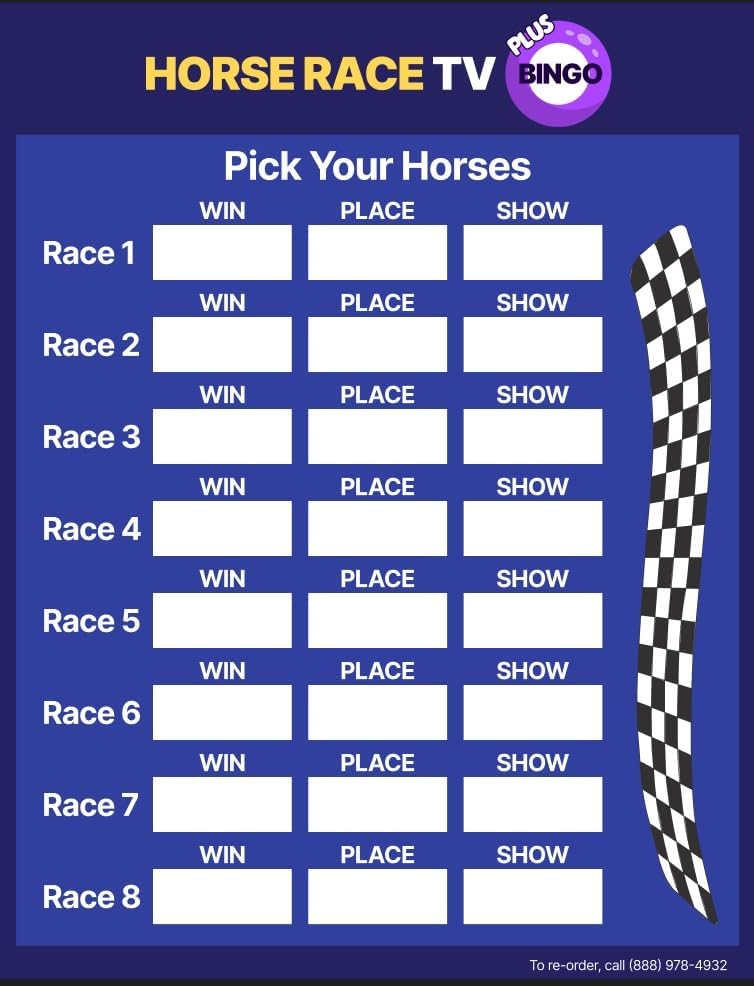
Gambar 5: Contohample racing form for tracking horse selections and winnings.
3.3. Video Demonstrasi Produk
Watch this video for a short demonstration of both the TV Bingo and Horse Race TV games.
Video 1: A short demonstration of the TV Bingo and Horse Race Game features.
4. Pemeliharaan
To ensure the longevity and optimal performance of your game arcade, follow these general maintenance guidelines:
- Pembersihan: Use a soft, dry cloth to clean the exterior of the device and remote control. Avoid using abrasive cleaners or solvents.
- Penyimpanan: Simpan perangkat di tempat yang sejuk dan kering, jauhkan dari sinar matahari langsung dan suhu ekstrem saat tidak digunakan.
- Perawatan Kabel: Handle the HDMI and USB cables carefully to prevent damage. Avoid sharp bends or excessive pulling.
5. Penyelesaian masalah
If you encounter issues with your TV Bingo and Horseracing Game, refer to the following common troubleshooting steps:
- Tidak Ditayangkan di TV:
- Ensure the HDMI cable is securely connected to both the game arcade and the TV.
- Pastikan TV Anda telah diatur ke sumber input HDMI yang benar.
- Check if the device is receiving power (indicated by any LED lights on the unit).
- Tidak ada suara:
- Confirm your TV's volume is not muted or set too low.
- Check the audio settings within the game menu.
- Kendali Jarak Jauh Tidak Merespons:
- Ensure there are no obstructions between the remote and the game arcade.
- Replace the batteries in the remote control if necessary.
- Game membeku atau crash:
- Restart the game arcade by disconnecting and reconnecting the power.
- Jika masalah berlanjut, hubungi dukungan pelanggan.
6. Spesifikasi
| Fitur | Detil |
|---|---|
| Merek | Umum |
| Nomor Model | TVB |
| Pabrikan | Briteworx |
| Dimensi Barang | 4x4x1 inci |
| Berat Barang | 0.5 pon |
| Jenis Bahan | Plastik |
| Sumber Daya | USB |
| Komponen yang Termasuk | Kontrol Jarak Jauh |
| Jumlah Pemain | Hingga 50 |
| Mode Operasi | Buku petunjuk |
| Perakitan Diperlukan | TIDAK |
7. Garansi & Dukungan
The TV Bingo and Horseracing Game includes a 1st year warranty and support from Briteworx. After the initial year, additional years of warranty and game updates can be purchased annually. These extended plans may include software and product updates, phone support, and device replacement if needed. The annual extended warranty is not required for the product to continue functioning, as the game arcade is designed for long-term use.
Dokumen Terkait - TVB
 |
Manuel de configuration de la caméra HD-TVI 1080P TruVision Ce manuel de configuration fournit des instructions détaillées pour les caméras HD-TVI 1080P TruVision d'Interlogix. Il couvre la programmation, les arborescences de menus, et les réglages essentiels tels que l'exposition, la balance des blancs, la réduction du bruit et les options spéciales pour optimiser les performances de votre système de surveillance. |
 |
TruVision 11/31 Series IP Camera Firmware V5.2 FP12 Release Notes | Interlogix Official release notes for Interlogix TruVision 11/31 Series IP Camera Firmware V5.2 FP12, detailing new features, improvements, and supported camera models. |
 |
Interlogix TruVision IR Bullet Camera TVB-2203/TVB-4203 Installation Guide Installation guide for the Interlogix TruVision IR Bullet Camera models TVB-2203 and TVB-4203. Covers product overview, camera description, installation steps, programming, specifications, and regulatory information. |
 |
TruVision IP Surveillance Cameras and Recorders | Aritech Product Catalog Explore the comprehensive range of TruVision IP cameras, network video recorders (NVRs), and surveillance solutions from Aritech. Featuring advanced technology for robust security and unmatched performance in commercial applications. |
 |
Panduan Pengguna dan Spesifikasi Soundbar TruAudio SB-SLIM-44P Panduan pengguna lengkap untuk soundbar TruAudio SB-SLIM-44P, mencakup informasi pemasangan, kabel, spesifikasi, dan garansi. Pelajari cara mengatur dan mengoptimalkan pengalaman audio home theater Anda. |
 |
TVB-2 Instruction Sheet - Test Verification Box Instruction sheet for the Ikonix USA TVB-2 Test Verification Box, detailing technical specifications, test conditions, and usage instructions for electrical safety testing. |