
Perkenalan
The Apple Watch Ultra 2 is a robust and feature-rich smartwatch designed for sports, adventure, and daily use. It combines advanced health monitoring, precise GPS capabilities, cellular connectivity, and a durable titanium case to support a wide range of activities and provide essential information at a glance. This manual provides detailed instructions for setting up, operating, maintaining, and troubleshooting your device.
Apa yang ada di dalam kotak
Upon unboxing your Apple Watch Ultra 2, verify that all components are present:
- Apple Watch Ultra 2 (GPS + Cellular)
- Band (Black Titanium Milanese Loop - Large)
- USB-C Magnetic Fast Charging Cable
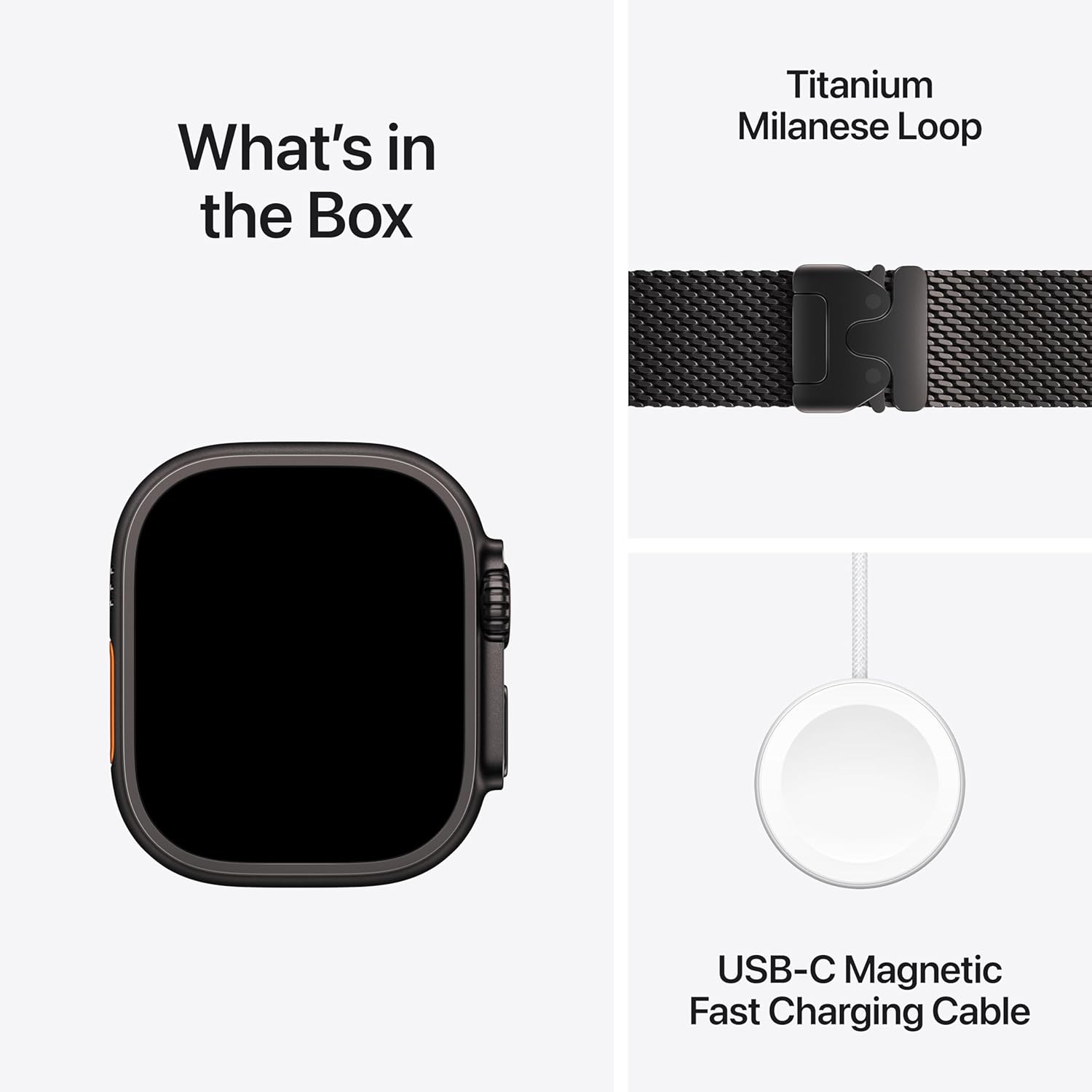
Image: The contents of the Apple Watch Ultra 2 packaging, showing the watch, the Milanese Loop band, and the USB-C magnetic fast charging cable.
Produk Selesaiview
The Apple Watch Ultra 2 features a 49mm corrosion-resistant titanium case and a sapphire front crystal for enhanced durability. It includes a large Digital Crown and a customizable Action button for intuitive control.

Gambar: Sebuah overview of the Apple Watch Ultra 2, detailing its 49mm titanium case, precision dual-frequency GPS, 36-hour battery life, and customizable Action button.
Fitur Utama:
- Desain kokoh: 49mm titanium case, sapphire front crystal, and 100m water resistance.
- Always-On Retina Display: Superbright display for clear visibility in various conditions.
- Precision Dual-Frequency GPS: Enhanced accuracy for location tracking.
- Tombol Tindakan: Tombol yang dapat disesuaikan untuk akses cepat ke fungsi yang diinginkan.
- Konektivitas Seluler: Make calls, send texts, and stream music without your iPhone.
- Daya Tahan Baterai Lebih Lama: Up to 36 hours in normal use, 72 hours in Low Power Mode.
Pengaturan
Initial Pairing with iPhone:
- Pastikan iPhone Anda telah diperbarui ke versi iOS terbaru dan Bluetooth telah diaktifkan.
- Power on your Apple Watch Ultra 2 by pressing and holding the side button until the Apple logo appears.
- Place your Apple Watch near your iPhone. A pairing screen will appear on your iPhone. Tap 'Continue'.
- Posisikan iPhone Anda sehingga Apple Watch muncul di layar. viewPencari. Ini akan memasangkan perangkat.
- Follow the on-screen instructions on both your iPhone and Apple Watch to complete the setup, including setting up cellular service if desired.
Operating Your Apple Watch Ultra 2
Tombol Putar Digital dan Tombol Samping:
- Mahkota Digital: Putar untuk menggulir, memperbesar, atau menyesuaikan nilai. Tekan sekali untuk membuka tampilan jam atau daftar aplikasi. Tekan dua kali untuk beralih di antara aplikasi yang baru saja digunakan. Tekan dan tahan untuk mengaktifkan Siri.
- Tombol Samping: Press once to open the Dock (recently used apps). Press and hold to access emergency services, Medical ID, or power options.
Tombol Tindakan:
The Action button (orange button on the left side) can be customized to quickly access various functions such as starting a workout, marking a Compass Waypoint, or initiating a dive. Customize its function in the Watch app on your iPhone.
Navigasi Tampilan:
- Mengetuk: Pilih item atau buka aplikasi.
- Geser: Navigate through notifications, glances, or app pages.
- Force Touch (Press and Hold): Access additional options within certain apps.

Image: The Apple Watch Ultra 2 display showcasing a complex watch face with various data points including tide levels, weather, and time.
Fitness and Activity Tracking
The Apple Watch Ultra 2 offers comprehensive tracking for various activities, providing detailed metrics and insights.
For Runners:
- Precision dual-frequency GPS for accurate route and distance tracking.
- Automatic track detection and advanced running form metrics.
- Customizable workouts with warmups, recovery intervals, and cool-downs.
For Cyclists:
- View speed, heart rate, and elevation in workout views.
- Live Activity integration with iPhone for real-time metrics.
- Connects to Bluetooth accessories like power meters for advanced data.
For Hikers:
- Offline maps for navigation without cellular service.
- Compass app with heading, elevation, longitude, and latitude.
- Compass Waypoints and Backtrack features for navigation and retracing steps.
For Swimmers and Divers:
- Automatic stroke detection, lap count, splits, and custom workouts.
- Open water route mapping in workout summaries.
- Full dive computer capabilities with the Oceanic+ app, sensing depth to 40 meters and water temperature. Certified EN13319.
- Tides app for shoreline conditions.

Image: Two Apple Watch Ultra 2 devices displaying detailed metrics for a running workout (left) and a cycling workout (right), including heart rate, duration, and speed.

Image: A person running outdoors, with the Apple Watch Ultra 2 visible on their wrist, demonstrating its use during physical activity.
Advanced Health and Safety Features
The Apple Watch Ultra 2 integrates several health monitoring and safety features:
- Aplikasi EKG: Take an electrocardiogram to check for signs of atrial fibrillation.
- Aplikasi Oksigen Darah: Measure your blood oxygen saturation. (Note: For wellness purposes only, not medical use.)
- Pemberitahuan Irama Jantung Tidak Teratur: Receive alerts for potential heart rhythm irregularities.
- Pelacakan Tidur: Pantau pola tidurtages and receive notifications for potential sleep apnea.
- Deteksi Jatuh: Automatically connects to emergency services if a hard fall is detected and you are unresponsive.
- Deteksi Tabrakan: Automatically connects to emergency services in the event of a severe car crash.
- SOS darurat: Press and hold the side button to quickly call emergency services or activate a siren.
Pemeliharaan dan Perawatan
To ensure the longevity and optimal performance of your Apple Watch Ultra 2, follow these care guidelines:
- Pembersihan: Regularly clean your watch and band with a soft, lint-free cloth. For the watch, slightly dampen the cloth with fresh water if necessary. Avoid using soaps or abrasive materials.
- Pengeringan: After exposure to water, dry your Apple Watch thoroughly with a soft, non-abrasive cloth.
- Hindari Suhu Ekstrem: Do not expose your watch to extreme heat or cold.
- Pengisian daya: Use only the provided USB-C Magnetic Fast Charging Cable. Ensure the charging area is dry.
- Perawatan Pita: Follow specific cleaning instructions for your band material. The Milanese Loop can be wiped with a damp kain.
Penyelesaian Masalah
If you encounter issues with your Apple Watch Ultra 2, try these common troubleshooting steps:
- Tonton Tidak Merespons: Force restart by holding both the Digital Crown and the side button for at least 10 seconds until the Apple logo appears.
- Masalah Penyandingan: Ensure Bluetooth is on your iPhone, both devices are charged, and try restarting both.
- Baterai Terkuras dengan Cepat: Check for background app refresh, reduce screen brightness, or enable Low Power Mode.
- Apps Not Working: Ensure your watchOS is up to date. Try restarting the app or reinstalling it.
- Cellular Connectivity Problems: Verify your cellular plan is active and your watch is within network coverage.
Spesifikasi
| Fitur | Detil |
|---|---|
| Nomor Model | MX5V3LW/A |
| Ukuran Kasus | ukuran 49mm |
| Bahan Kasus | Bahan |
| Menampilkan | Always-On Retina |
| Tahan Air | 100m (Certified EN13319 for diving) |
| Bahasa Indonesia: GPS | Precision Dual-Frequency GPS (Built-in) |
| Konektivitas | Cellular, 802.11n Wi-Fi, Bluetooth |
| Daya Tahan Baterai (Penggunaan Normal) | Hingga 36 jam |
| Battery Life (Low Power Mode) | Hingga 72 jam |
| Penyimpanan Internal | 64 GB |
| Sistem Operasi | jam tangan |
| Berat Barang | 12 ons |
Garansi dan Dukungan
Apple provides various support options for your Apple Watch Ultra 2. For detailed warranty information, service options, and technical assistance, please refer to the official Apple support websitus atau hubungi layanan pelanggan Apple.
Consider AppleCare+ for extended coverage and accidental damage protection. AppleCare+ offers expert technical support and hardware coverage, including unlimited incidents of accidental damage protection, each subject to a service fee.
Video: An informational video explaining the benefits and services offered by AppleCare+ for Apple products, including repair and replacement options.
Untuk bantuan lebih lanjut, kunjungi Apple Store di Amazon or the official Apple Support weblokasi.