
1. Produk Lebihview
The eXtremeRate RISE V3 Remap Kit is designed to upgrade your existing PlayStation 5 (PS5) controller into a professional eSport elite controller. This kit adds two ergonomic, programmable back buttons to your controller, enhancing gameplay by allowing you to remap up to 15 different controller functions to these new buttons.
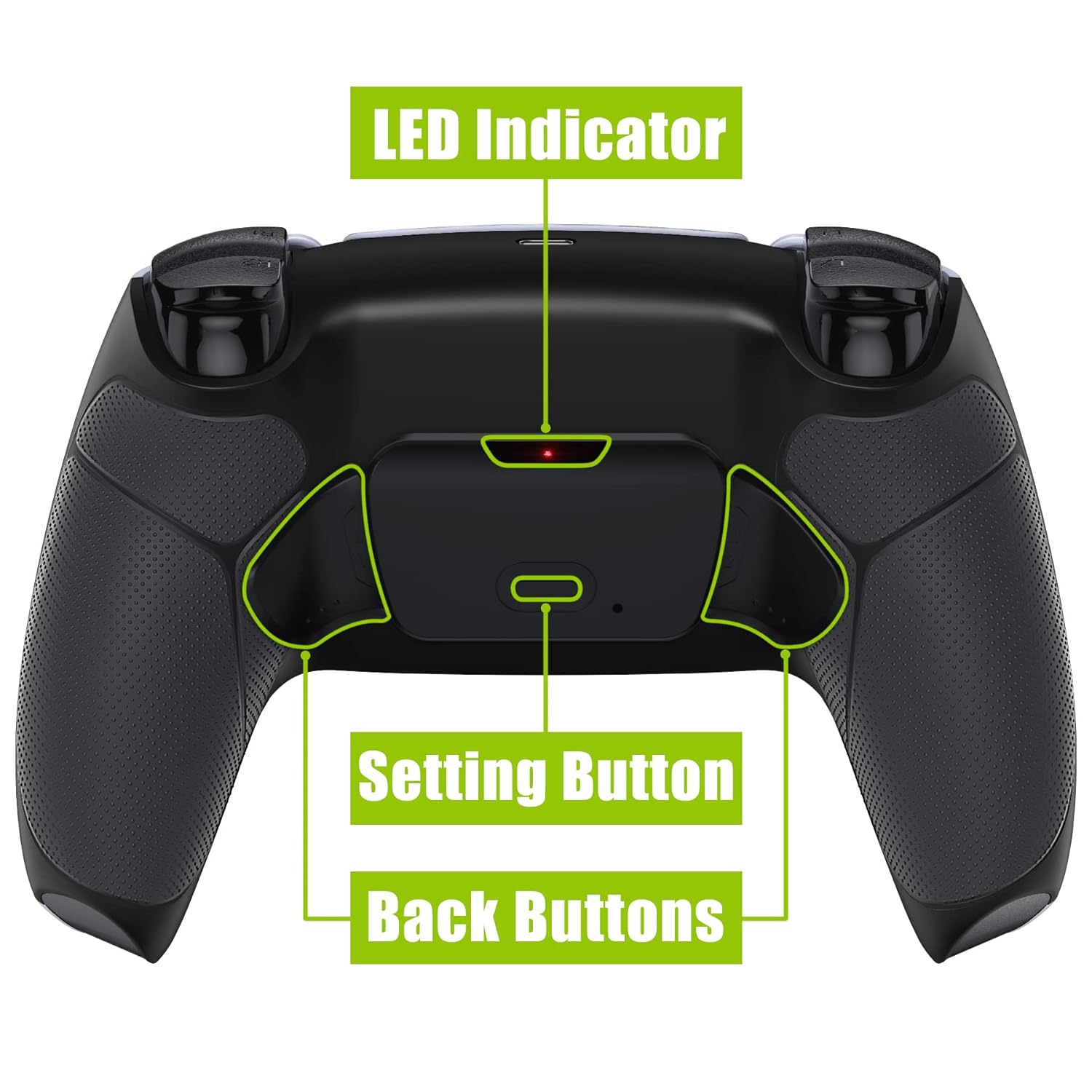
Image: PS5 controller with the RISE V3 Remap Kit installed, highlighting the back buttons and LED indicator.
2. Kompatibilitas
This RISE V3 Remap Kit is exclusively compatible with PS5 controllers featuring the BDM-030, BDM-040, or BDM-050 motherboard models. It is NOT compatible with BDM-010, BDM-020, or BDM-060 models.
2.1 How to Check Your Controller's BDM Model
To ensure compatibility, verify your PS5 controller's BDM model. You can do this by checking the shape of the side and the spring of the R2 trigger, or by disassembling your controller to inspect the mainboard model.

Image: Visual guide for identifying PS5 controller BDM models by examining the R2 trigger and internal components.
For a detailed visual guide on checking your controller's BDM model, please refer to the following video:
Video: Compatibility & Upgrade Guide V3: How To Check The Model Numbers BDM-030 040 050 for PS5 Controller. This video provides a step-by-step visual demonstration of how to identify your PS5 controller's BDM model to ensure compatibility with the eXtremeRate RISE V3 Remap Kit.
Alternatively, you can use the eXtremeRate online tool to check your controller's BDM model by connecting it to a PC. Pencarian untuk "extremerate check bdm for ps5 controller" or "fiE4BWSlBRI" on YouTube for instructions on using this tool.
Video: How to Check Your Controller's BDM Model for PS5 - eXtremeRate. This video demonstrates how to use the eXtremeRate online tool to quickly determine your PS5 controller's BDM model by connecting it to a computer.
3. Isi Paket
The eXtremeRate RISE V3 Remap Kit includes the following components:
- RISE V3 Remap Board
- Redesigned Bottom Shell with Rubberized Grip
- 2 Ergonomic Back Buttons (K1, K2)
- Flex Cables and Connectors
- Screwdrivers and Prying Tools
- Various Screws and Adhesives

Image: Contents of the eXtremeRate RISE V3 Remap Kit, including the back shell, remap board, back buttons, tools, and fasteners.
4. Instalasi
Installation of the eXtremeRate RISE V3 Remap Kit requires high hands-on skills. Soldering is optional depending on the desired functionality. It is recommended to watch the official installation video before attempting the process.
4.1 Catatan Pra-Instalasi
- Ensure your controller is powered off and disconnected from all devices.
- Bekerja di area yang bersih dan terang untuk mencegah hilangnya komponen-komponen kecil.
- Refer to the compatibility section to confirm your controller model.
4.2 Panduan Instalasi
For a comprehensive step-by-step installation guide, search for "eXtremeRate RISE Remap Kit V3 for PS5" or "oV_xGgwkf4A" on YouTube. The video will walk you through the disassembly of your PS5 controller, installation of the remap board and back buttons, and reassembly.
Video: eXtremeRate RISE Remap Kit for PS5 Controller - Plastic & Metal Buttons Version for Choose. This video provides a visual guide for installing the eXtremeRate RISE Remap Kit, demonstrating the process for both plastic and metal button versions.
5. Petunjuk Pengoperasian
5.1 Pemetaan Ulang Tombol
The RISE V3 Remap Kit allows you to assign up to 15 different buttons to the two back buttons (K1 and K2). These include X, O, Triangle, Square, Up, Down, Left, Right, L1, L2, R1, R2, L3, R3, and the Touchpad Button.

Image: The 15 buttons on a PS5 controller that can be remapped to the back buttons of the RISE V3 kit.
How to Remap Buttons:
- Press and hold the Setting Button (located on the back of the kit) for 3 seconds until the LED Indicator (also on the back) blinks slowly.
- Press the back button (K1 or K2) you wish to remap, then press the desired face button (e.g., X, O, Triangle, Square) or other controller button you want to assign.
- Press the Setting Button again to save the mapping. The LED Indicator will turn off, confirming the new mapping is saved.

Gambar: Detail view of the back of the PS5 controller with the RISE V3 Remap Kit, showing the LED indicator, setting button, and K1/K2 back buttons.
5.2 Charging the Modified Controller
After installing the RISE V3 Remap Kit, the controller's charging port may be affected, making it incompatible with the official PS5 controller charging dock. You can still charge the controller using a standard USB-C data cable. Alternatively, eXtremeRate offers a compatible charging base bracket for the official PS5 controller charging dock (CFI-ZDS1 model).
Video: eXtremeRate RiseDock: Extension Stand for Customized Controllers. This video explains how to charge a modified PS5 controller, including the use of a data cable or a compatible charging base bracket for the official PS5 charging dock.
6. Pemeliharaan
6.1 Petunjuk Pembersihan
It is recommended to clean the plastic components of the kit with a wipe dampened with water. If alcohol is used, ensure it is less than 70% alcohol and allow the product to dry in a ventilated area. Do not spray water or alcohol directly onto the product surface. Avoid using any other organic solvents for cleaning.

Image: Cleaning guidelines for plastic products, advising against direct spraying and use of strong solvents.
7. Spesifikasi
| Fitur | Detil |
|---|---|
| Merek | Tingkat Ekstrem |
| Model | RISE V3 Remap Kit |
| Kesesuaian | PS5 Controller BDM-030, BDM-040, BDM-050 |
| Tombol yang Dapat Diprogram | 2 Back Buttons (K1, K2) |
| Fungsi yang Dapat Ditetapkan | Up to 15 controller buttons (X, O, Triangle, Square, Up, Down, Left, Right, L1, L2, R1, R2, L3, R3, Touchpad Button) |
| Bahan | Plastik, Silikon |
| Tingkat Keterampilan Instalasi | High hands-on skills required; soldering optional |
8. Penyelesaian masalah
- Tombol Tidak Merespons: Double-check all flex cable connections during installation. Ensure they are securely seated.
- Remapping Issues: Ensure you are following the remapping procedure correctly (press and hold setting button, remap, then press setting button again to save).
- Pengontrol Tidak Mengisi Daya: If using an official charging dock, ensure you have the compatible eXtremeRate charging base bracket or use a standard USB-C cable.
- Kerusakan Fisik: If any components appear damaged during installation, cease assembly and contact customer support.
9. Garansi dan Dukungan
For warranty information, technical support, or further assistance, please visit the official eXtremeRate websitus web atau hubungi layanan pelanggan mereka secara langsung. Simpan bukti pembelian Anda untuk klaim garansi.
You can find more information and products from eXtremeRate at their Amazon store: eXtremeRate Amazon Store.


