
1. Pendahuluan
The BOYA V35 is a compact and easy-to-use 2.4GHz wireless microphone system designed for capturing clear, high-quality audio. It is ideal for content creators, journalists, and anyone needing a reliable wireless audio solution for cameras and camcorders with a 3.5mm input. This manual provides detailed instructions for setting up, operating, and maintaining your BOYA V35 system.
2. Apa yang ada di dalam kotak
Harap periksa isi paket untuk memastikan semua item ada:
- BY-V35 Transmitter (TX) x 2
- BY-V35 RX Receiver x 1
- BY-V35 Foam Windscreen x 2
- USB-C to USB-A Charging Cable x 1
- Kabel Audio TRS ke TRS 3.5 mm x 1
- Kotak Pengisian Daya x 1
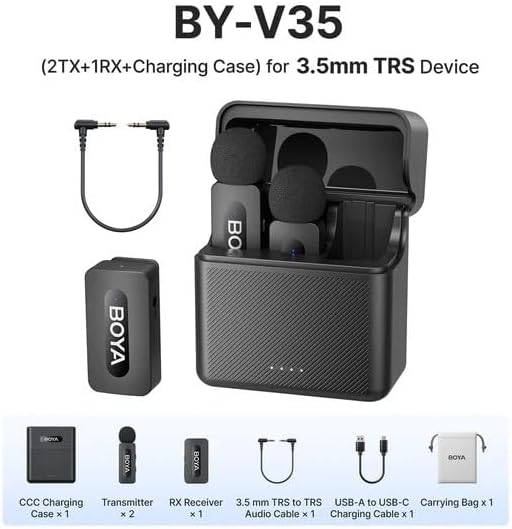
Gambar 2.1: Diagram showing all components included in the BOYA V35 package, including two transmitters, one receiver, a charging case, foam windscreens, and cables.
3. Produk Lebihview
3.1. Pemancar (TX)

Gambar 3.1: Depan view of the BY-V35 Transmitter with the foam windscreen attached, showing the BOYA logo and indicator light.

Gambar 3.2: Samping view of the BY-V35 Transmitter, illustrating the integrated clip for attachment to clothing and the foam windscreen.
The transmitter is a compact unit with an integrated microphone and clip. It features a power button, a status indicator light, and a USB-C charging port. The omnidirectional microphone is designed to capture sound from all directions.
3.2. Penerima (RX)

Gambar 3.3: Samping view of the BY-V35 Receiver, showing the USB-C port, power button, and 3.5mm output jack.
The receiver connects to your recording device (camera, camcorder). It includes a 3.5mm TRS output jack, a power button, a status indicator light, and a USB-C charging port. The receiver is designed for easy connection and stable signal reception.
3.3. Tempat Pengisian Daya
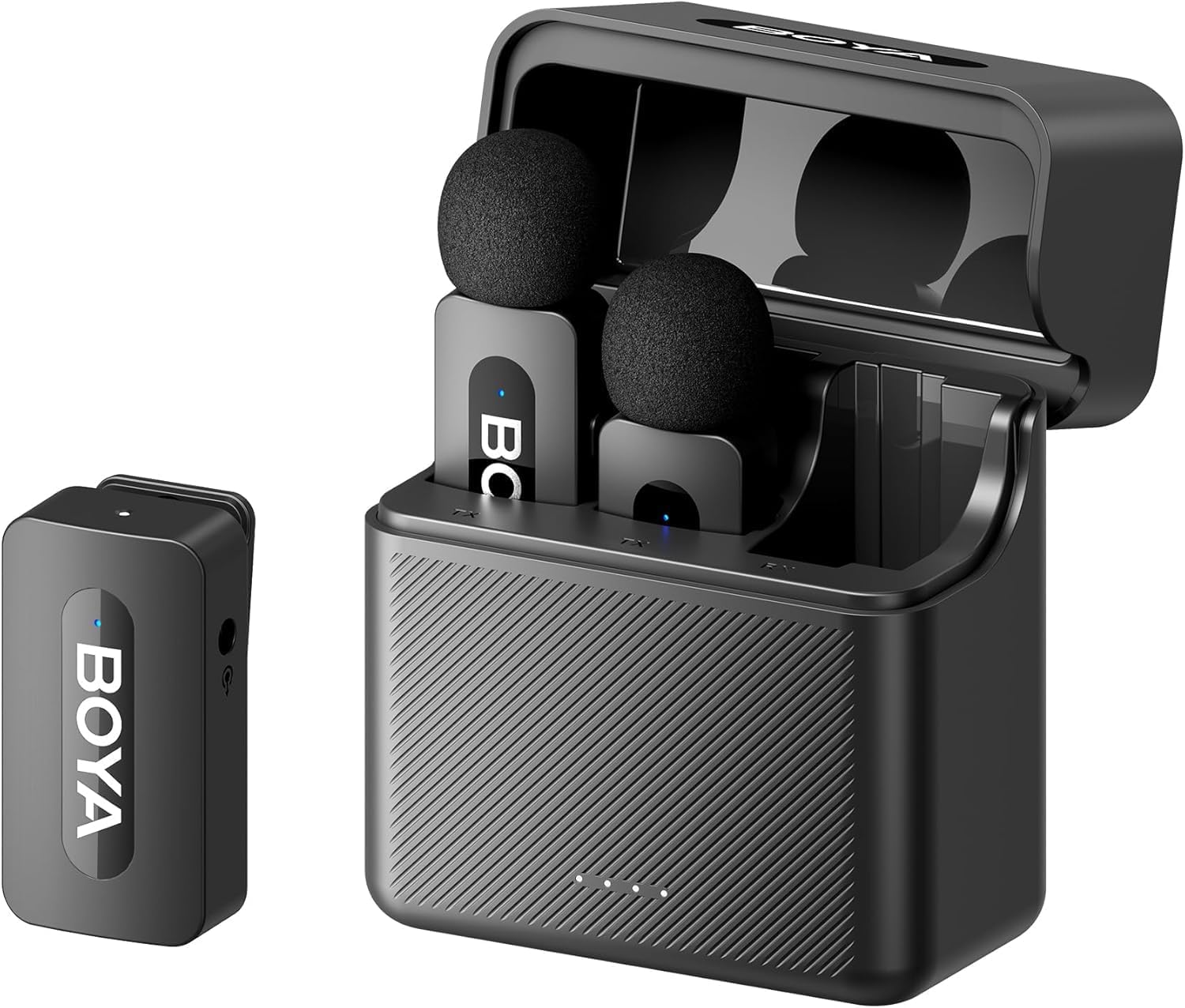
Gambar 3.4: The complete BOYA V35 system, including the charging case, two transmitters, and one receiver, ready for storage or charging.
The charging case provides convenient storage and charging for both transmitters and the receiver. It has its own USB-C charging port and LED indicators to show the charging status of the case and the devices inside.
4. Panduan Pengaturan
4.1. Mengisi Daya Perangkat
- Place the transmitters and receiver into the charging case.
- Connect the USB-C to USB-A charging cable to the charging case and a USB power adapter (not included).
- The LED indicators on the charging case will show the charging status. The device indicators will also light up during charging.
- Ensure all devices are fully charged before first use for optimal battery life.
4.2. Menghidupkan dan Memasangkan
- Press and hold the power button on both the transmitter(s) and the receiver for a few seconds until the indicator lights turn on.
- The devices will automatically attempt to pair. A solid blue light on both the transmitter and receiver indicates a successful connection. A blinking light indicates searching for a connection.
4.3. Menghubungkan ke Perangkat Perekam
- Connect one end of the 3.5mm TRS to TRS audio cable to the 3.5mm output jack on the BY-V35 receiver.
- Connect the other end of the 3.5mm TRS to TRS audio cable to the microphone input jack on your camera or camcorder.
- Ensure your recording device's audio input is set to external microphone if applicable.
4.4. Attaching the Transmitter
- Attach the foam windscreen to the transmitter's microphone to reduce wind noise and plosives.
- Use the integrated clip on the back of the transmitter to securely attach it to the speaker's clothing, ideally about 6-8 inches (15-20 cm) from the mouth.
5. Petunjuk Pengoperasian
5.1. Daya Hidup/Mati
To power on or off the transmitter or receiver, press and hold the power button for approximately 3 seconds. The indicator light will illuminate or turn off accordingly.
5.2. Merekam Audio
- Ensure the transmitter(s) and receiver are powered on and successfully paired (solid blue indicator light).
- Start recording on your connected camera or camcorder.
- Monitor the audio levels on your recording device to ensure proper sound capture.
5.3. Status Indicator Lights
- Biru Padat: Device is powered on and successfully paired.
- Berkedip Biru: Device is powered on and searching for a connection.
- Merah Pekat: Baterai lemah.
- Blinking Red (while charging): Pengisian sedang berlangsung.
- Solid Green (while charging): Terisi penuh.
6. Pemeliharaan
6.1. Pembersihan
- Bersihkan perangkat dengan kain lembut dan kering.
- Jangan gunakan bahan kimia keras atau pembersih abrasif.
- Ensure the foam windscreens are clean and free of debris. Replace if damaged.
6.2. Penyimpanan
- Store the BOYA V35 system in its charging case when not in use to protect it from dust and damage.
- Simpan di tempat sejuk dan kering, jauh dari sinar matahari langsung dan suhu ekstrim.
6.3. Perawatan Baterai
- Charge the devices regularly, even if not used frequently, to maintain battery health.
- Avoid fully discharging the batteries for extended periods.
7. Penyelesaian masalah
| Masalah | Kemungkinan Penyebab | Larutan |
|---|---|---|
| Tidak ada suara atau volume rendah | Devices not powered on; Not paired; Incorrect cable connection; Recording device volume too low. | Ensure TX and RX are on and paired. Check 3.5mm cable connection. Increase recording device's input volume. |
| Kualitas suara buruk (suara statis, putus-putus) | Interference; Out of range; Low battery; Damaged windscreen. | Move closer to the receiver. Charge devices. Replace windscreen. Avoid strong electromagnetic fields. |
| Perangkat tidak berpasangan | Devices too far apart; Interference; One device not powered on. | Ensure TX and RX are close to each other. Power cycle both devices. Check battery levels. |
| Kotak pengisi daya tidak mengisi daya perangkat. | Charging case battery empty; Poor contact; Faulty cable. | Charge the charging case. Ensure devices are correctly seated. Try a different USB-C cable. |
8. Spesifikasi
| Fitur | Detil |
|---|---|
| Merek | ANAK LAKI |
| Nomor Model | OLEH-V35 |
| Teknologi Konektivitas | Nirkabel 2.4GHz |
| Jenis Konektor | 3.5 mm Jack |
| Pola Kutub | Segala arah |
| Rentang Frekuensi | Frekuensi 20Hz-16kHz |
| Signal-to-Noise Ratio | 80dB |
| Sumber Daya | Bertenaga Baterai |
| Berat Barang | 0.2 Kilograms (approximate, for entire kit) |
| Dimensi Barang | 6.1 x 2.2 x 3.4 inches (approximate, for entire kit) |
| Perangkat yang Kompatibel | Kamera video, Kamera |
9. Garansi dan Dukungan
Untuk informasi garansi dan dukungan teknis, silakan merujuk ke situs web resmi BOYA webKunjungi situs web atau hubungi distributor lokal Anda. Simpan bukti pembelian Anda untuk klaim garansi.