Perkenalan
Thank you for choosing the Chefhandy Baby Wipe Warmer. This device is designed to provide warm, moist, and sanitized wipes for your baby's comfort during diaper changes. Please read this manual thoroughly before use to ensure proper operation and maintenance.

Image: The Chefhandy Baby Wipe Warmer in green, featuring a digital display and control buttons on the lid.
Petunjuk Keselamatan Penting
- Baca semua petunjuk sebelum menggunakan alat ini.
- Jangan merendam unit di dalam air atau cairan lainnya.
- Cabut dari stopkontak saat tidak digunakan dan sebelum membersihkan.
- Jangan beroperasi dengan kabel atau steker yang rusak.
- Jauhkan dari jangkauan anak-anak.
- Gunakan hanya sesuai petunjuk untuk menghangatkan tisu basah bayi.
- Pastikan unit diletakkan di permukaan yang stabil dan rata.
- Jangan halangi lubang ventilasi.
Komponen Produk
The Chefhandy Baby Wipe Warmer consists of the following main parts:
- Main Unit with Lid
- Control Panel (Auto, Sanitize, Night Light, Power buttons, Digital Display)
- Wipe Dispensing Slot
- Adaptor Daya
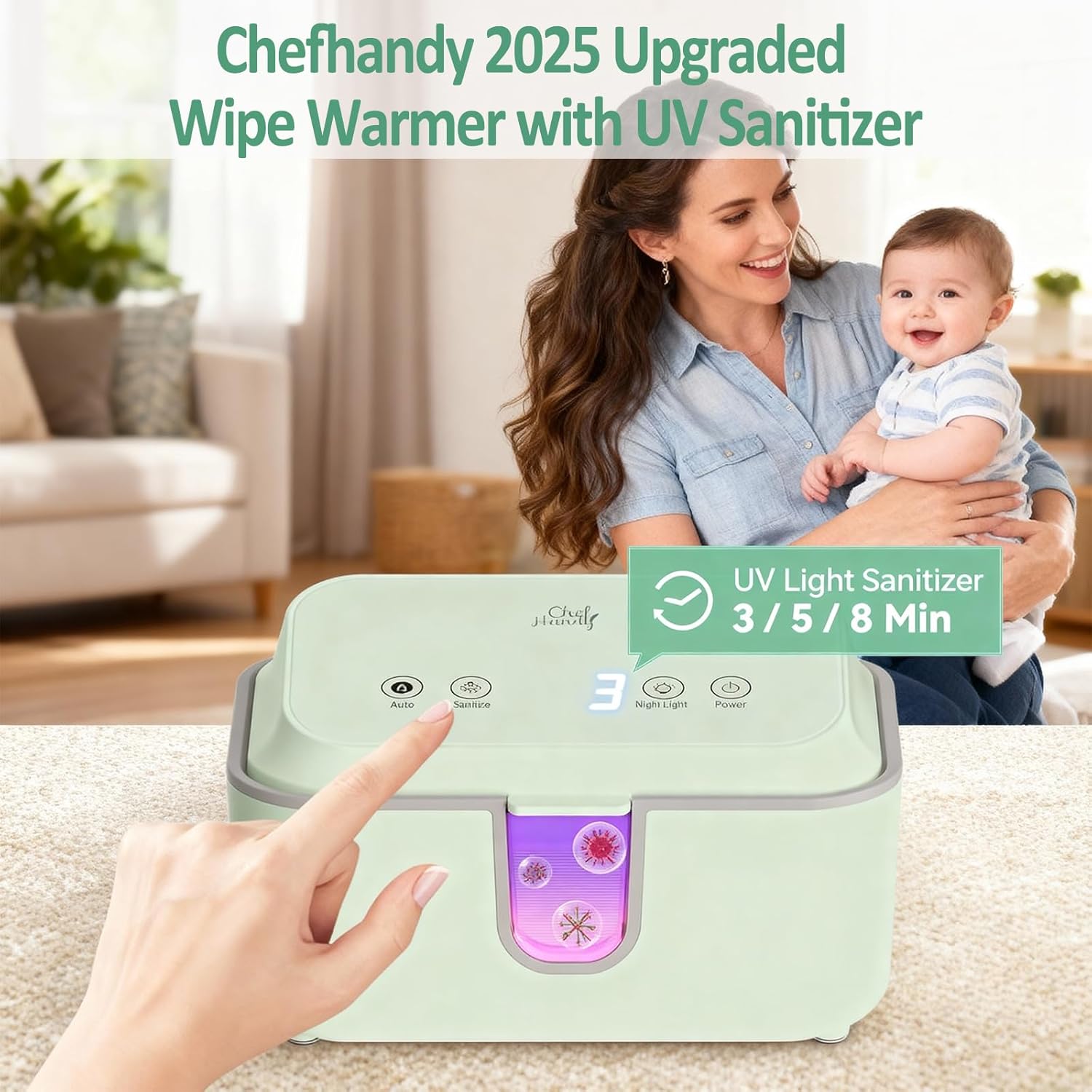
Image: Diagram illustrating the various components and features of the wipe warmer, including the control panel and wipe dispensing area.
Petunjuk Pengaturan
- Bongkar Unitnya: Carefully remove the wipe warmer from its packaging.
- Penempatan: Place the unit on a flat, stable, and dry surface, away from water sources.
- Hubungkan Daya: Plug the power adapter into the unit, then into a standard electrical outlet.
- Muat Tisu Basah:
- Open the lid of the warmer.
- Place a full pack of baby wipes (up to 100 wipes) into the warmer, preferably with their original packaging to maintain moisture.
- Pull the first wipe through the dispensing slot on the lid.
- Tutup rapat.

Image: A hand loading a pack of baby wipes into the open Chefhandy wipe warmer, demonstrating the large capacity.
Petunjuk Pengoperasian
Daya Hidup/Mati
- Tekan tombol Kekuatan button once to turn the unit on. The digital display will illuminate.
- Untuk mematikan, tekan dan tahan tombol Kekuatan tombol selama 3 detik.

Image: A close-up of a finger pressing the power button on the control panel of the wipe warmer.
Kontrol Suhu
The unit offers three temperature modes:
- Mode 1: 100°F (38°C)
- Mode 2: 113°F (45°C)
- Mode 3: 131°F (55°C)
Tekan tombol Mobil button repeatedly to cycle through the temperature settings. The selected temperature will be displayed on the digital screen.

Image: The Chefhandy wipe warmer displaying different temperature ranges (100-109°F, 113-122°F, 131-140°F) with arrows indicating surround heating.
Pembersih Sinar UV
The integrated UV light sanitizer helps ensure wipes are clean. There are three sanitization duration options:
- 3 menit (default)
- 5 menit
- 8 menit
Tekan tombol Membersihkan button. The digital screen will display "3" for 3 minutes. Press the button again to cycle through 5 and 8 minutes. The UV light will activate for the selected duration.
Nomor Pendirian EPA: 97442-CHN-1.

Image: A close-up of a finger pressing the sanitize button on the control panel of the wipe warmer, with a visual representation of germs being eliminated.
Fungsi Lampu Malam
Activate the night light for visibility during nighttime diaper changes without needing bright room lights.
- Tekan tombol Lampu Malam button once to turn the night light on.
- Press it again to turn the night light off.

Image: The Chefhandy wipe warmer with its night light illuminated, positioned next to a baby's crib in a dimly lit room, facilitating nighttime diaper changes.
Mengeluarkan Tisu
Wipes are dispensed from the top slot. The transparent window allows you to monitor the remaining wipe quantity.

Gambar: Close-up view of the transparent window on the front of the wipe warmer, showing the "Baby Wipes" label and the UV light glow.
Pemeliharaan dan Perawatan
- Pembersihan: Unplug the unit before cleaning. Wipe the exterior with a soft, damp kain. Jangan gunakan pembersih abrasif atau merendam unit di dalam air.
- Wipe Moisture: The surround heating system is designed to maintain wipe moisture. For best results, keep wipes in their original packaging inside the warmer.
- Penyimpanan: If storing for an extended period, unplug the unit, empty any wipes, clean it, and store in a cool, dry place.
Panduan mengatasi masalah
| Masalah | Kemungkinan Penyebab | Larutan |
|---|---|---|
| Unit tidak menyala. | Tidak terpasang; masalah stopkontak; unit tidak berfungsi. | Ensure power cord is securely plugged into unit and outlet. Test outlet with another device. If problem persists, contact customer support. |
| Tisu basah tidak hangat. | Incorrect temperature setting; unit not on long enough; lid not closed properly. | Check temperature setting and adjust if necessary. Allow 1-2 hours for wipes to reach desired temperature. Ensure lid is fully closed. |
| Tisu basah mulai mengering. | Lid not closed properly; wipes not in original packaging; low moisture content in wipes. | Ensure lid is securely closed after each use. Keep wipes in their original packaging inside the warmer. Consider using wipes with higher moisture content. |
| UV sanitizer not working. | Sanitize button not pressed; unit malfunction. | Press the Sanitize button to activate. Ensure a duration is selected. If still not working, contact customer support. |
Spesifikasi Produk
- Nomor Model: BWW-G7300
- Dimensi Produk: 8.2x5.5x3.5 inci
- Berat Barang: 1.5 pon
- Komposisi Bahan: ABS
- Mode Pemanasan: 3 (100°F, 113°F, 131°F)
- Pembersih: UV Light with 3/5/8 minute options (EPA Establishment Number: 97442-CHN-1)
- Fitur Tambahan: Night Light, Silent Operation, Transparent Window, One-Handed Operation
- Kapasitas: Up to 100 wipes
Garansi dan Dukungan
Chefhandy products come with a manufacturer's warranty. For specific warranty details, please refer to the warranty card included with your purchase or visit the official Chefhandy weblokasi.
If you experience any issues or have questions regarding your Chefhandy Baby Wipe Warmer, please contact our customer support team:
- Dukungan online: Kunjungi Chefhandy Store on Amazon.
- E-mail: dukungan@chefhandy.com
- Telepon: Nomor telepon 1-800-XXX-XXXX
Please have your model number (BWW-G7300) and purchase date ready when contacting support.