
HOFFREE N103-Max
HOFFREE N103-Max Gaming Chair User Manual
Model: N103-Max
1. Pendahuluan
Thank you for choosing the HOFFREE N103-Max Gaming Chair. This ergonomic gaming chair is designed to provide comfort and an immersive experience with its integrated Bluetooth speakers, customizable RGB LED lighting, massage function, and retractable footrest. This manual provides essential information for assembly, operation, maintenance, and troubleshooting to ensure optimal use of your chair.

Image 1.1: HOFFREE N103-Max Gaming Chair (Purple+Black)
This image displays the HOFFREE N103-Max Gaming Chair in its purple and black color scheme, highlighting its ergonomic design, integrated RGB LED lighting along the edges, and the lumbar support pillow with massage function. Musical notes are depicted around the chair, indicating its Bluetooth speaker capability. The chair also features a headrest pillow and a retractable footrest.
2. Informasi Keselamatan
Please read and understand all safety instructions before assembling and using the chair. Failure to follow these instructions may result in injury or damage to the product.
- Assembly required. Ensure all components are correctly installed before use.
- Jangan melebihi kapasitas berat 397 lbs (180 kg).
- Keep fingers and other body parts clear of moving parts when adjusting the chair's position, especially during recline and height adjustments.
- Always use the chair as intended. Avoid standing on the chair or using it as a step stool.
- Pastikan kursi diletakkan di permukaan yang stabil dan rata.
- Jauhkan anak-anak dan hewan peliharaan dari kursi selama perakitan.
3. Isi Paket
Pastikan semua komponen lengkap dan tidak rusak sebelum memulai perakitan. Jika ada bagian yang hilang atau rusak, silakan hubungi dukungan pelanggan.
- Sandaran
- Tempat duduk
- Sandaran tangan (2)
- Silinder Pengangkat Gas
- Pangkalan Bintang Lima
- Kastor (5)
- Plat Mekanisme
- Bantal Sandaran Kepala
- Lumbar Support Pillow with Massage Function
- Pijakan Kaki yang Dapat Ditarik
- Kit Perangkat Keras (sekrup, ring, kunci Allen)
- Kontrol Jarak Jauh LED RGB
- Power Cable for RGB/Massage
4. Petunjuk Perakitan
Follow these general steps to assemble your HOFFREE N103-Max Gaming Chair. Refer to the detailed assembly guide included in your package for specific diagrams and screw placements.
- Pasangkan Roda ke Basis: Masukkan kelima roda ke dalam lubang pada alas berbentuk bintang lima hingga terkunci dengan aman dan berbunyi klik.
- Pasang Gas Lift: Tempatkan tabung gas lift ke dalam lubang tengah alas bintang lima.
- Pasang Pelat Mekanisme: Secure the mechanism plate to the underside of the seat base using the provided screws. Ensure the front of the mechanism faces the front of the seat.
- Hubungkan Kursi ke Lift Gas: Letakkan dudukan yang telah dirakit dengan hati-hati di atas silinder pengangkat gas.
- Pasang Sandaran: Align the backrest with the seat base and secure it using the designated screws.
- Pasang Sandaran Tangan: Attach the armrests to the sides of the seat and backrest using the appropriate screws.
- Pasang Sandaran Kaki: Install the retractable footrest mechanism to the underside of the seat.
- Position Pillows: Attach the headrest pillow and lumbar support pillow to the chair using their straps.
- Hubungkan Kabel: Connect the power cable for the RGB lights and massage function to a suitable USB power source (not included).

Image 4.1: Product Inner Design and Components
This image illustrates the internal construction of the HOFFREE gaming chair, highlighting key components such as the 3.5-inch shaped memory foam for comfort, the SGS certified gas lift for height adjustment, and the heavy-duty base designed to support weight up to 300 lbs. It provides a visual overview of the chair's robust build quality.
5. Petunjuk Pengoperasian
5.1 Chair Adjustments
- Penyesuaian Ketinggian Kursi: Pull the lever located on the right side of the seat upwards to adjust the seat height. Release the lever at the desired height.
- Sandaran Punggung Berbaring: Pull the lever on the left side of the seat upwards to recline the backrest. Lean back to the desired angle (90-135 degrees) and release the lever to lock it in place.
- Putar 360 Derajat: The chair features a full 360-degree swivel for easy movement and access.
- Sandaran kaki yang dapat ditarik: Tarik sandaran kaki dari bawah jok jika diperlukan. Dorong kembali sandaran kaki saat tidak digunakan.

Image 5.1: Flexible Chair Adjustments
This image visually demonstrates the various adjustment capabilities of the HOFFREE gaming chair. It shows the backrest reclining from a 90-degree comfortable work mode to a 135-degree rest mode, with intermediate positions for reading and watching movies. Icons indicate the backrest tilt adjustment, 360-degree swivel, and seat height adjustment. The retractable footrest is also shown extended.
5.2 Speaker Bluetooth
Kursi ini dilengkapi dengan dua speaker Bluetooth 5.3 untuk pengalaman audio yang imersif.
- Nyalakan: Ensure the chair's power cable is connected to a USB power source. The speakers will automatically enter pairing mode.
- Pasangan: On your device (smartphone, tablet, computer), enable Bluetooth and search for available devices. Select "HOFFREE Chair" (or similar name) from the list to pair.
- Pemutaran Audio: Setelah terhubung, audio dari perangkat Anda akan diputar melalui speaker kursi. Sesuaikan volume langsung dari perangkat yang terhubung.

Image 5.2: Bluetooth 5.3 Speakers
Gambar ini memberikan gambaran yang meledak view of the Bluetooth 5.3 speakers, illustrating their components and the concept of immersive audio enhancement. It highlights the advanced connectivity and faster data transfer speeds offered by Bluetooth 5.3, contributing to a superior gaming and music experience.
5.3 LED RGB Lights
The chair features customizable RGB LED lighting along its edges, controlled by a remote.
- Nyalakan: Ensure the chair's power cable is connected to a USB power source. The lights should illuminate.
- Menggunakan Jarak Jauh: Use the provided remote control to turn the lights on/off, change colors (358 RGB color options), adjust brightness, and select various lighting modes (e.g., static, flashing, fading).

Image 5.3: Customizable RGB LED Lights
This image displays three HOFFREE gaming chairs, each with different RGB LED lighting colors, illustrating the wide range of 358 customizable color options. The text emphasizes the ability to control these lights remotely, allowing users to match their gaming setup or mood.
5.4 Fungsi Pijat
The lumbar support pillow includes a two-point vibration massage function for relaxation.
- Pengaktifan: Ensure the chair's power cable is connected to a USB power source. The massage function is typically controlled via a small switch or button on the lumbar pillow itself or an attached cable.
- Operasi: Press the button to cycle through massage modes or turn the function on/off.

Image 5.4: Headrest and Massage Lumbar Support
Gambar ini memberikan gambaran detail view of the chair's headrest and lumbar support pillow. The headrest is designed to fit the neck curve and relieve cervical pressure. The lumbar pillow features two glowing points, indicating the two-point vibration massage function with a silent motor, intended to provide comfortable force for relaxation.
6. Pemeliharaan
Perawatan yang tepat akan memperpanjang umur dan menjaga penampilan kursi gaming Anda.
- Pembersihan: Usap permukaan kursi dengan kain lembut dan kering.amp kain. Untuk noda membandel, gunakan larutan sabun lembut dan segera lap hingga kering. Hindari bahan kimia keras atau pembersih abrasif.
- Kastor: Periksa dan bersihkan roda secara berkala untuk memastikan pergerakan yang lancar. Singkirkan rambut atau kotoran yang mungkin menumpuk.
- Perangkat keras: Periksa semua sekrup dan baut secara berkala untuk memastikan semuanya kencang. Kencangkan kembali jika perlu untuk menjaga stabilitas.
- Elektronik: Keep the Bluetooth speakers, RGB lights, and massage unit dry. Avoid exposing them to liquids.
7. Penyelesaian masalah
If you encounter issues with your HOFFREE N103-Max Gaming Chair, refer to the following common problems and solutions:
| Masalah | Kemungkinan Penyebab | Larutan |
|---|---|---|
| Kursi goyang atau tidak stabil | Sekrup longgar; lantai tidak rata | Periksa dan kencangkan semua sekrup perakitan. Pastikan kursi berada di permukaan yang rata. |
| Pengangkat gas tidak dapat menyesuaikan ketinggian. | Lever not engaged; gas lift malfunction | Ensure the lever is fully pulled. If issue persists, contact support for gas lift replacement. |
| Speaker Bluetooth tidak terhubung | Not powered; not in pairing mode; device too far | Ensure chair is powered. Check device's Bluetooth settings. Move device closer to chair. |
| Lampu RGB tidak berfungsi | Not powered; remote battery low; remote not aimed | Ensure chair is powered. Replace remote battery. Aim remote directly at the receiver. |
| Fungsi pijat tidak berfungsi | Not powered; switch off | Ensure chair is powered. Check the massage unit's power switch. |
| Footrest difficult to extend/retract | Mechanism obstruction; lack of lubrication | Check for obstructions. Apply a small amount of silicone lubricant to the sliding parts if needed. |
8. Spesifikasi
Detailed specifications for the HOFFREE N103-Max Gaming Chair:
- Model: N103-Max
- Merek: BEBAS
- Warna: Purple+Black
- Dimensi Produk (P x L x T): 17.72" x 23.62" x 51.57" (45cm x 60cm x 131cm)
- Kedalaman Kursi: 17.72 inci (45 cm)
- Lebar Sandaran Kursi: 32.28 inci (82 cm)
- Kapasitas Berat: 397 pon (180 kg)
- Berat Barang: 41.4 pon (18.78 kg)
- Kembali gaya: Kembali Padat
- Fitur Khusus: Foot Rest, Bluetooth Speakers, RGB LED Lights, Massage Function
- Jumlah Posisi Berbaring: 3 (90°, 105°, 120°, 135°)
- Memiringkan: Ya
- Mengisi Bahan: Sponge (Memory Foam)
- Bahan Pelapis: Kulit PVC
- Bahan Dasar: Nylon (Five-star base)
- Komponen yang Termasuk: Arm Rest, Headphone (referring to headrest pillow)
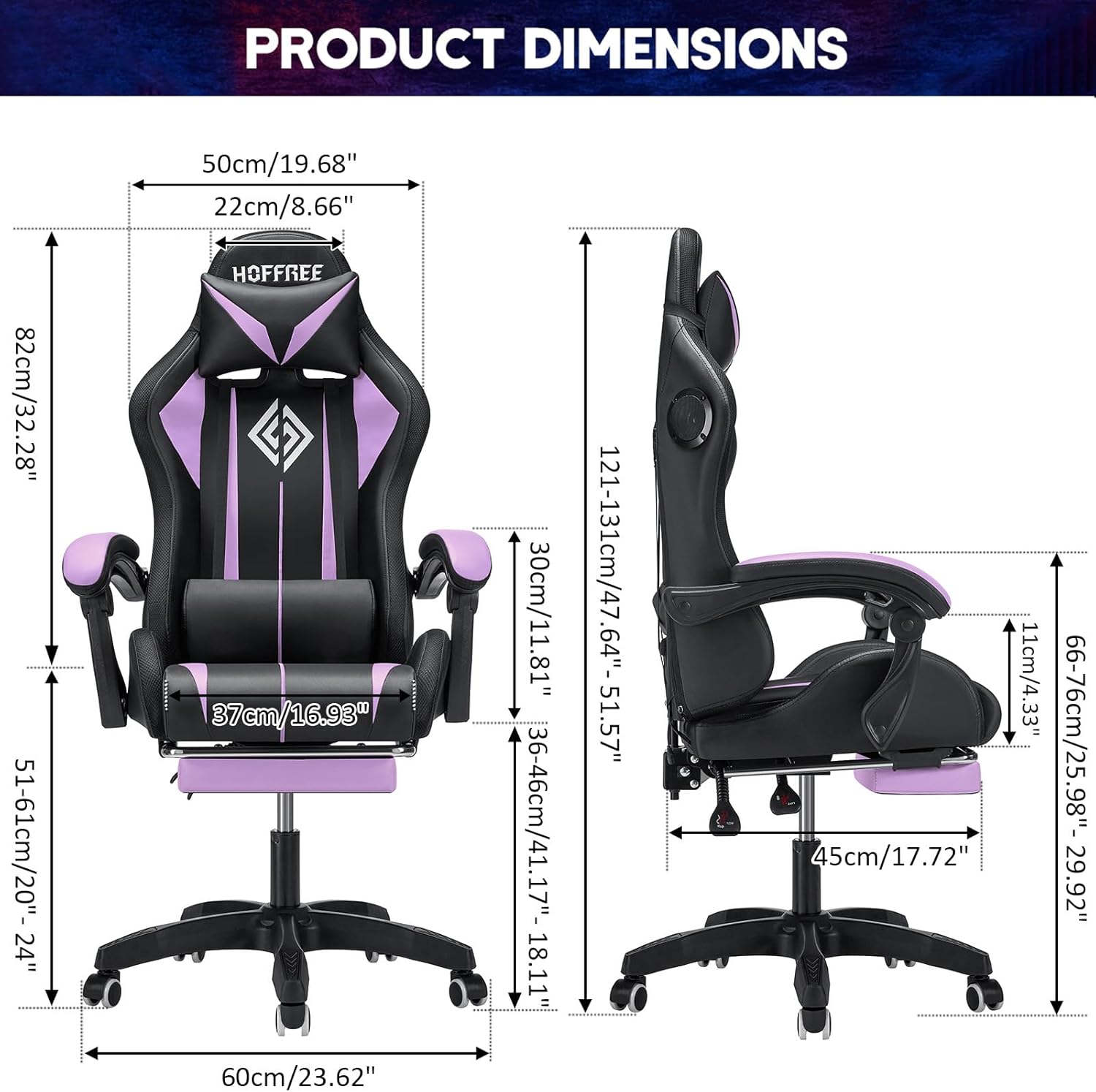
Gambar 8.1: Dimensi Produk
This image provides a comprehensive diagram of the HOFFREE gaming chair's dimensions. It includes measurements for overall height (adjustable from 47.64" to 51.57"), backrest height (32.28"), seat width (19.68"), seat depth (17.72"), and base width (23.62"), presented in both inches and centimeters for clarity.
9. Garansi dan Dukungan
HOFFREE provides a standard manufacturer's warranty for this product. Please refer to the warranty card included in your package for specific terms and conditions, including coverage duration and claim procedures. For technical support, missing parts, or warranty inquiries, please contact HOFFREE customer service through the retailer where the product was purchased or visit the official HOFFREE weblokasi.
Informasi Kontak: Refer to your purchase documentation or the HOFFREE official webKunjungi situs ini untuk detail dukungan pelanggan terbaru.