
Perkenalan
Welcome to the GOBOULT Mirage Smart Watch user manual. This guide provides detailed instructions on how to set up, operate, and maintain your new smartwatch. Please read this manual thoroughly to ensure optimal performance and longevity of your device.
Produk Selesaiview
The GOBOULT Mirage Smart Watch is a feature-rich device designed to enhance your daily life with advanced health monitoring, communication, and fitness tracking capabilities. It features a vibrant 1.39-inch HD display, Bluetooth calling, and a durable zinc alloy frame.
Fitur Utama:
- Layar HD 1.39 inci: Bright and clear screen with 500 nits brightness and 360x360 pixel resolution.
- Panggilan Bluetooth: Make and receive calls directly from your wrist with a built-in speaker and microphone.
- Pemantauan Kesehatan Komprehensif: Includes SpO2, heart rate, blood pressure, sleep tracking, breath training, and menstrual cycle tracking.
- 120+ Mode Olahraga: Track a wide range of physical activities with detailed metrics.
- Asisten Suara AI: Hands-free control and access to features.
- Tahan Air IP67: Designed to withstand splashes and dust.
- Tampilan Jam yang Dapat Disesuaikan: Over 300 cloud-based watch faces to personalize your device.
- Pemberitahuan pintar: Terima peringatan untuk panggilan, pesan, dan notifikasi aplikasi.
- Daya Tahan Baterai yang Lama: Hingga 7 hari penggunaan biasa.
Apa yang ada di dalam kotak:
- GOBOULT Mirage Smart Watch (Coal Black)
- Kabel Pengisian Daya
- Panduan Pengguna
- Kartu Garansi

Gambar: Lebih dariview of the GOBOULT Mirage Smart Watch highlighting its main features.
Panduan Pengaturan
1. Mengisi Daya Jam Tangan Pintar
- Hubungkan kabel pengisi daya magnetik ke pin pengisian daya di bagian belakang jam tangan pintar Anda.
- Colokkan ujung USB kabel ke adaptor daya USB standar (disarankan 5V/1A) atau port USB komputer.
- The watch display will show a charging indicator. A full charge takes approximately 120 minutes.
- Pastikan pin pengisian bersih dan kering sebelum pengisian untuk mencegah korosi.
2. Menghidupkan/Mematikan
- Nyalakan: Press and hold the side button (digital crown) for a few seconds until the GOBOULT logo appears.
- Matikan: From the watch face, swipe down to access quick settings, or navigate to the settings menu. Select "Power Off" and confirm. Alternatively, press and hold the side button until the power off option appears.
3. Memasangkan dengan Ponsel Pintar Anda
- Download the official GOBOULT companion app from your smartphone's app store (available for iOS and Android).
- Pastikan Bluetooth diaktifkan di ponsel cerdas Anda.
- Open the GOBOULT app and follow the on-screen instructions to create an account or log in.
- In the app, select "Add Device" or a similar option to search for your smartwatch.
- Select "GOBOULT Mirage" from the list of available devices.
- Konfirmasikan permintaan pemasangan pada telepon pintar dan jam tangan pintar Anda.
- Setelah dipasangkan, jam tangan akan menyinkronkan data dengan ponsel Anda, dan Anda dapat menyesuaikan pengaturan melalui aplikasi.
Petunjuk Pengoperasian
Navigasi Dasar:
- Layar sentuh: Geser ke kiri/kanan, atas/bawah untuk menavigasi menu dan notifikasi. Ketuk untuk memilih item.
- Digital Crown (Side Button):
- Tekan sekali: Return to the watch face from any screen, or wake the screen.
- Tekan dan tahan: Power on/off, or access the AI Voice Assistant (configurable).
- Memutar: Scroll through menus, lists, or adjust settings.
- Tombol Pintasan: The second physical button on the side can be customized for quick access to specific functions, such as launching sports modes.

Image: Digital crown and button functionalities for navigation and quick access.
Pemantauan Kesehatan
The GOBOULT Mirage Smart Watch offers a comprehensive suite of health tracking features. For accurate readings, ensure the watch is worn snugly on your wrist, about one finger's width from your wrist bone.
- Pemantauan Denyut Jantung: Jam tangan ini terus melacak detak jantung Anda. View data waktu nyata pada jam tangan atau tren terperinci dalam aplikasi.
- SpO2 (Blood Oxygen) Monitoring: Measure your blood oxygen levels on demand. Navigate to the SpO2 function on your watch and remain still for accurate results.
- Pemantauan Tekanan Darah: Access the blood pressure feature on your watch for readings.
- Pemantauan Tidur: Wear your watch to bed to track your sleep patterns, including deep sleep, light sleep, and awake times. Data is available in the app.
- Breath Training Mode: Follow guided breathing exercises to help reduce stress and improve relaxation.
- Pelacakan Aktivitas: Monitors steps, distance, and calories burned throughout the day.
- Pengingat Air Minum: Set reminders in the app to ensure you stay hydrated.
- Pengingat Sedentary: Dapatkan peringatan saat Anda tidak aktif terlalu lama, yang akan mendorong Anda untuk bergerak.
- Pelacakan Siklus Menstruasi: For female users, track and predict menstrual cycles through the companion app.

Image: The watch's health sensors and a summary of its health monitoring capabilities.
Mode Olahraga
The GOBOULT Mirage Smart Watch supports over 120 sports modes to accurately track your workouts. From running to yoga, you can monitor your performance and progress.
Using Sports Modes:
- Access the sports mode menu from the watch's main interface or by using the dedicated shortcut button.
- Scroll through the list and select your desired activity (e.g., Running, Cycling, Yoga, Cricket, Badminton, Basketball).
- Tap to start the activity. The watch will begin recording data such as duration, heart rate, calories burned, and distance (where applicable).
- To pause or end an activity, swipe right or press the side button and follow the on-screen prompts.
- Review your workout summaries on the watch or in detail within the companion app.

Image: The watch interface showing various sports modes and quick access options.
Panggilan Bluetooth & Notifikasi Cerdas
With Bluetooth 5.3 connectivity, your GOBOULT Mirage Smart Watch allows you to manage calls and receive notifications directly on your wrist.
Panggilan Bluetooth:
- Pastikan jam tangan Anda sudah terhubung dengan ponsel Anda melalui Bluetooth.
- Membuat panggilan: Akses papan tombol atau daftar kontak di jam tangan Anda untuk memulai panggilan.
- Menerima Panggilan: When a call comes in, the watch will display the caller ID. You can answer or reject the call directly from your wrist using the built-in speaker and microphone.
- Sinkronisasi Kontak: Synchronize your phone contacts with the watch through the companion app for easy access.
Pemberitahuan pintar:
- Enable app notifications in the GOBOULT companion app on your smartphone.
- Your watch will display incoming messages, social media alerts, and other app notifications.
- Geser ke atas atau ke bawah pada tampilan jam untuk view riwayat notifikasi Anda.

Image: Bluetooth calling features and interface on the smartwatch.

Image: Smart notifications and other quick access features like calculator and voice assistant.
Kustomisasi
Tampilan Jam:
Personalize your GOBOULT Mirage Smart Watch with over 300 cloud-based watch faces. You can change the watch face directly from the device or through the companion app.
- Sedang berjaga: From the watch face, press and hold the screen. Swipe left or right to browse available watch faces and tap to select.
- Melalui Aplikasi: Open the GOBOULT app, navigate to the watch face section, and explore a wider selection of designs. Download and apply your preferred watch face.

Gambar: Examples of customizable watch faces available for the smartwatch.
Fitur Tambahan
Asisten Suara AI:
Activate the AI Voice Assistant (compatible with Hey Siri and Ok Google) by long-pressing the digital crown or through a dedicated menu option. Use voice commands to perform various tasks hands-free.
Temukan Ponsel Saya:
If your paired smartphone is misplaced, use the "Find My Phone" feature on your watch to make it ring or vibrate, helping you locate it quickly.
- Go to the watch menu.
- Select the "Find Phone" option.
- The connected phone will ring or vibrate.
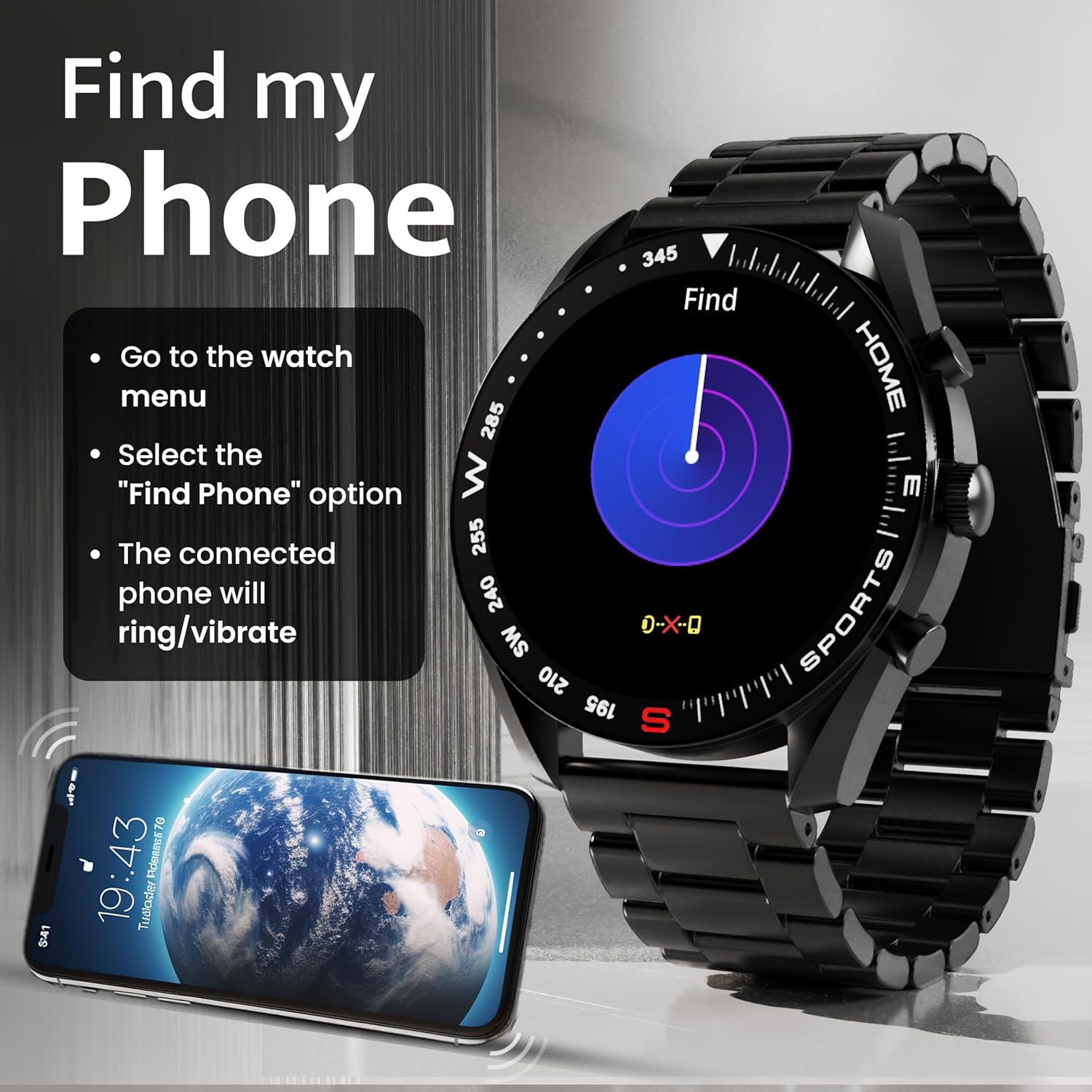
Image: How to use the 'Find My Phone' feature on the smartwatch.
Permainan Mini:
The watch includes several mini-games for entertainment, such as 2048, Battleship, Hamster, and Young Bird.

Gambar: Examples of mini-games available on the smartwatch.
Pemeliharaan
Cleaning Your Smart Watch:
- Bersihkan layar dan badan arloji dengan kain lembut dan tidak berbulu.
- Untuk kotoran membandel, sedikit dampBilas kain dengan air. Hindari penggunaan bahan kimia keras atau bahan abrasif.
- Clean the charging pins regularly with a dry cloth or cotton swab to ensure proper charging.
Tahan Air (IP67):
The GOBOULT Mirage Smart Watch is IP67 water-resistant, meaning it is protected against dust ingress and can withstand immersion in water up to 1 meter for up to 30 minutes. However, it is not suitable for swimming, showering with hot water, or diving. Avoid exposure to high-pressure water or corrosive liquids.

Image: Information regarding the IP67 water and dust resistance of the smartwatch.
Penyesuaian Tali:
The watch comes with a metallic strap adjustment tool. Refer to the included instructions or a professional for adjusting the strap length to ensure a comfortable and secure fit.

Image: The watch's zinc alloy frame and the metallic strap adjustment tool.
Penyelesaian Masalah
- Jam tidak menyala: Pastikan jam tangan terisi penuh. Sambungkan ke kabel pengisi daya dan biarkan mengisi daya setidaknya selama 30 menit sebelum mencoba menyalakannya kembali.
- Tidak dapat dipasangkan dengan telepon:
- Pastikan Bluetooth diaktifkan pada ponsel dan jam tangan Anda.
- Ensure the watch is within the Bluetooth range (up to 10 meters).
- Mulai ulang ponsel dan jam tangan pintar Anda.
- Hapus cache Bluetooth di ponsel Anda atau lupakan perangkat tersebut dan coba pasangkan lagi.
- Ensure the GOBOULT companion app is updated to the latest version.
- Data kesehatan yang tidak akurat: Pastikan jam tangan terpasang dengan pas di pergelangan tangan Anda, tidak terlalu ketat atau terlalu longgar. Bersihkan sensor di bagian belakang jam tangan. Hindari gerakan berlebihan selama pengukuran.
- Notifikasi tidak muncul:
- Check if notifications are enabled for the specific apps in the GOBOULT companion app.
- Ensure your phone's notification settings allow the GOBOULT app to display alerts.
- Pastikan jam tangan terhubung dengan benar ke ponsel Anda melalui Bluetooth.
- Masa pakai baterai pendek: Reduce screen brightness, disable unnecessary features like continuous heart rate monitoring if not needed, and limit the number of active notifications. Ensure the watch is fully charged.
- Layar sentuh tidak responsif: Restart jam tangan. Jika masalah berlanjut, pastikan layar bersih dan kering.
Spesifikasi
| Fitur | Detil |
|---|---|
| Nama Model | fatamorgana |
| Ukuran Layar | 1.39 inci HD |
| Resolusi Tampilan | 360 x 360 piksel |
| Kecerahan | 500 Nits Peak Brightness |
| Konektivitas | Bluetooth 5.3 |
| Tahan Air | Tingkat IP67 |
| Bahan Bingkai | Paduan Seng |
| Jenis Baterai | Polimer Litium |
| Daya Tahan Baterai Rata-rata | Hingga 7 Hari |
| Waktu Pengisian Daya | Sekitar 120 Menit |
| Kompatibilitas Sistem Operasi | Bahasa Indonesia: iOS, Android |
| Berat Barang | 106 gram |
| Komponen yang Termasuk | Smart Watch, Charging Cable, User Manual, Warranty Card |
Garansi dan Dukungan
Informasi Garansi:
Your GOBOULT Mirage Smart Watch comes with a manufacturer's warranty. Please refer to the included Warranty Card for specific terms, conditions, and duration of the warranty. Keep your purchase receipt as proof of purchase.
Dukungan Pelanggan:
If you encounter any issues or have questions not covered in this manual, please contact GOBOULT customer support. Contact details can typically be found on the Warranty Card or the official GOBOULT weblokasi.


