
Produk Selesaiview
The XO BE18 is a stereo audio wireless Bluetooth headset featuring RGB lighting. It is designed for immersive listening experiences and convenient communication, offering multiple playback modes including Bluetooth, AUX, TF card, and FM radio.
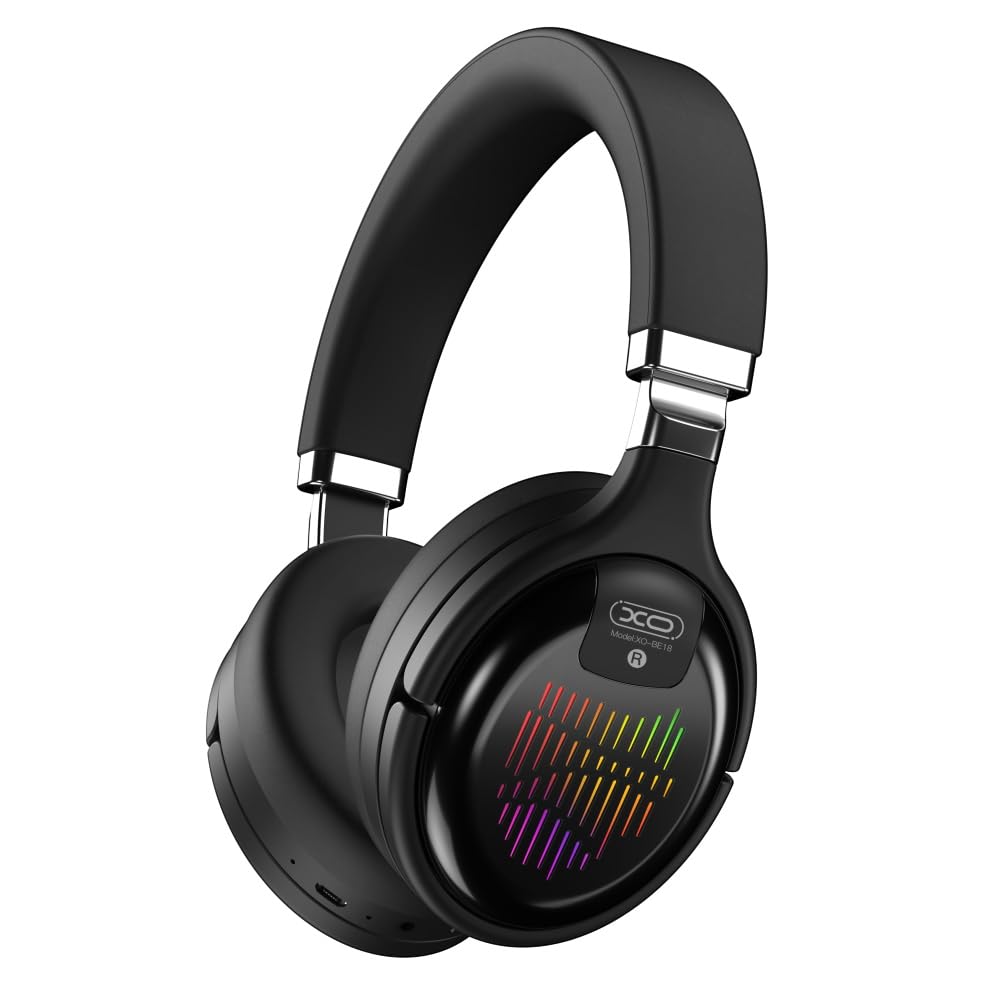
Image: The XO BE18 Wireless Bluetooth Headset, showcasing its over-ear design and integrated RGB lighting on the earcups.
Isi Paket
Pastikan semua item ada dalam paket:
- XO BE18 Wireless Bluetooth Headset
- Kabel Pengisian Daya
- User Manual (dokumen ini)

Image: The XO BE18 headset shown within its retail packaging, indicating the included accessories.
Pengaturan
Mengisi Daya Headset
- Temukan port pengisian daya pada headset.
- Connect the provided charging cable to the headset and a compatible USB power source (e.g., computer USB port, USB wall adapter).
- The LED indicator on the headset will typically show a specific color (e.g., red) during charging and change (e.g., turn off or blue) when fully charged.
- Pengisian penuh memerlukan waktu sekitar 2.5 jam.
Menyalakan/Mematikan
- Untuk menghidupkan: Press and hold the Power button for approximately 3-5 seconds until the LED indicator lights up and you hear an audible prompt.
- Untuk mematikan: Press and hold the Power button for approximately 3-5 seconds until the LED indicator turns off and you hear an audible prompt.
Petunjuk Pengoperasian
Pairing Bluetooth
- Pastikan headset dimatikan.
- Press and hold the Power button for approximately 5-7 seconds until the LED indicator flashes rapidly (e.g., alternating blue and red), indicating pairing mode.
- Pada perangkat Anda (ponsel pintar, tablet, komputer), aktifkan Bluetooth dan cari perangkat yang tersedia.
- Select "XO BE18" from the list of found devices.
- Once paired, the LED indicator will typically flash slowly or turn solid blue, and you will hear a confirmation tone.
Kontrol Dasar
The headset features various buttons for controlling audio playback and calls. Refer to the image below for button locations.

Gambar: Close-up view of the XO BE18 headset earcup, highlighting the control buttons and ports.
- Tombol Daya: Tekan dan tahan untuk menghidupkan/mematikan. Tekan sebentar untuk memutar/menjeda musik atau menjawab/mengakhiri panggilan.
- Volume Naik (+): Tekan sebentar untuk menaikkan volume. Tekan lama untuk lagu berikutnya.
- Volume Turun (-): Tekan sebentar untuk mengecilkan volume. Tekan lama untuk memutar lagu sebelumnya.
- Tombol Mode (M): Short press to switch between Bluetooth, AUX, TF card, and Radio modes.
Pencahayaan RGB
The headset features integrated RGB lighting on the earcups. This lighting typically activates automatically when the headset is powered on. Specific controls for the RGB lighting (if any) may be integrated with the mode button or a dedicated button not explicitly detailed.

Image: The XO BE18 headset displaying its colorful RGB lighting on the earcups.
Menggunakan Mikrofon
The built-in microphone allows for hands-free calls. When a call comes in, press the Power button once to answer. Press again to end the call.
Mode AUX
Connect an audio cable (not included) from your device's 3.5mm audio jack to the headset's AUX port to use it in wired mode. The headset does not require power in AUX mode.
Modus Kartu TF
Masukkan kartu TF (microSD) dengan audio. files into the designated slot. Use the Mode button to switch to TF card mode.
Modus Radio
Use the Mode button to switch to Radio mode. The headset will automatically scan for available FM radio stations.
Pemeliharaan
- Pembersihan: Gunakan kain lembut dan kering untuk membersihkan headset. Jangan gunakan pembersih abrasif atau pelarut.
- Penyimpanan: When not in use, store the headset in a cool, dry place. The headset features a portable folding design for compact storage.
- Perawatan Baterai: Untuk memperpanjang masa pakai baterai, hindari sering-sering menguras baterai sepenuhnya. Isi daya headset secara teratur, meskipun tidak digunakan terus-menerus.
- Paparan Air: Headset ini tidak tahan air. Hindari paparan air atau kelembapan berlebihan.

Image: The XO BE18 headset shown in its folded configuration, demonstrating its portable design.
Penyelesaian Masalah
| Masalah | Solusi yang mungkin |
|---|---|
| Headset tidak menyala. | Ensure the headset is fully charged. Connect to a power source and try again. |
| Tidak dapat dipasangkan dengan perangkat. |
|
| Tidak ada suara atau volume rendah. |
|
| Mikrofon tidak berfungsi. |
|
| Pencahayaan RGB tidak berfungsi. | Ensure the headset is powered on. If the issue persists, contact customer support. |
Spesifikasi
| Fitur | Detil |
|---|---|
| Nama Model | BE18 |
| Konektivitas | Nirkabel (Bluetooth V5.0) |
| Range Nirkabel | Sekitar 10 meter |
| Teknologi Audio | Hi-Fis Audio, Intelligent Noise Reduction |
| Penempatan Telinga | Di Telinga |
| Kontrol Kebisingan | Isolasi Suara |
| Mikropon | Sudah terpasang |
| Kapasitas Baterai | 250 mAh |
| Waktu Pemutaran Musik | Sekitar 4 jam |
| Panggil Waktu | Sekitar 4 jam |
| Waktu Pengisian Daya | Sekitar 2.5 jam |
| Waktu Siaga | Long Standby Capability |
| Daya Speaker | 3mW |
| Kepekaan | 94 ± 3dBm |
| Rasio S/N | >=75dB |
| Frekuensi Kerja | Frekuensi 20Hz-20kHz |
| Mainkan Mode | Bluetooth, AUX, TF Card, Radio |
| Protokol Bluetooth | A2DP, HSP, HFP |
| Dimensi (Paket) | Ukuran 195x195x80 mm |
| Warna | Hitam |

Image: A detailed table outlining the technical specifications and product information for the XO BE18 headset.
Garansi dan Dukungan
This product comes with a standard manufacturer's warranty. For specific warranty terms and conditions, please refer to the warranty card included in your product packaging or contact the retailer where you purchased the product.
For technical support or further assistance, please contact your retailer or visit the official XO websitus (jika tersedia).