
1. Pendahuluan
Thank you for choosing the ACEZUK 7000A Car Jump Starter & 150PSI Air Compressor. This device is a versatile tool designed for emergency vehicle jump-starting, tire inflation, and as a portable power bank. Please read this manual thoroughly before use to ensure safe and optimal operation. Keep this manual for future reference.

Image 1.1: The ACEZUK 7000A Car Jump Starter and Air Compressor, ready for use with jumper cables.
2. Petunjuk Keselamatan
Always observe the following safety precautions to prevent injury or damage to the device and your vehicle:
- Do not operate the jump starter if the battery clamps atau kabel rusak.
- Ensure proper polarity when connecting the jumper cables to the vehicle battery (red to positive, black to negative). Reverse polarity can cause sparks and damage.
- Jangan melakukan jumper pada aki yang beku.
- Jauhkan perangkat dari jangkauan anak-anak.
- Jangan biarkan perangkat terkena hujan atau suhu ekstrem.
- Hindari korsleting pada baterai.amps.
- Gunakan pelindung mata saat bekerja dengan aki kendaraan.
- Do not use the air compressor continuously for more than 10 minutes to prevent overheating. Allow it to cool down between uses.
- Simpan perangkat di tempat yang sejuk dan kering saat tidak digunakan.

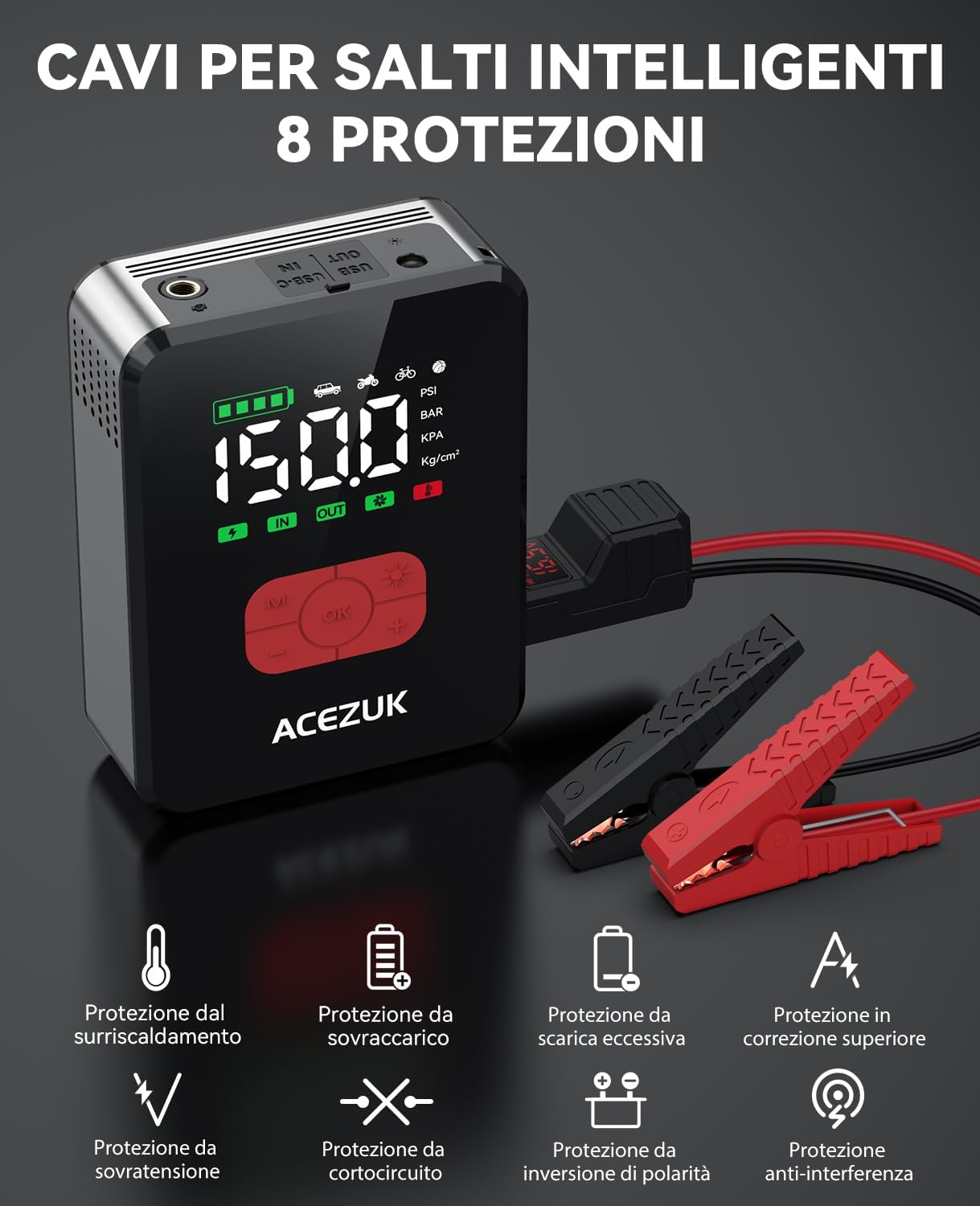
Image 2.1: The smart jumper cables feature 8 protection mechanisms for safe operation, including protection against overheating, overcharging, over-discharge, overcurrent, overvoltage, short circuits, reverse polarity, and anti-interference.
3. Isi Paket
Verifikasi bahwa semua item ada dalam paket:
- ACEZUK Jump Starter & Air Compressor Unit
- Kabel Jumper Cerdas
- Selang Udara
- Kabel Pengisi Daya USB Type-C
- Various Nozzle Adapters (for balls, bicycles, inflatable toys)
- Tas Penyimpanan
- User Manual (dokumen ini)

Image 3.1: The complete package contents, including the main unit, jumper cables, air hose, charging cable, various adapters, and a storage bag.
4. Produk Lebihview
Familiarize yourself with the components and controls of your ACEZUK device.
4.1 Unit Utama
- Layar LCD 3.4 inci: Shows battery level, tire pressure, and operating modes.
- Tombol Kontrol: M (Mode), OK (Power/Confirm), +/-(Adjust Pressure), Light (LED).
- Port Jump Start: For connecting smart jumper cables.
- Port Selang Udara: For connecting the air hose.
- Port Output USB (x2): Untuk mengisi daya perangkat eksternal.
- Type-C Input Port (x1): Untuk mengisi daya unit jump starter.
- Lampu LED: Integrated flashlight with multiple modes.

Image 4.1: The control panel of the ACEZUK device, highlighting the LCD display and function buttons.

Image 4.2: The device's display provides real-time information on battery level and tire pressure.
5. Pengaturan
5.1 Mengisi Daya Perangkat
Before first use, fully charge the ACEZUK jump starter. Connect the provided USB Type-C cable to the device's Type-C input port and a suitable USB power adapter (not included). The LCD display will show the charging status. A full charge is indicated when the battery icon is full.
Important: Ensure the device is fully charged before attempting to jump-start a vehicle.
6. Petunjuk Pengoperasian
6.1 Langsung Menghidupkan Kendaraan
- Pastikan alat jump starter terisi daya minimal 50%.
- Matikan sistem pengapian kendaraan Anda dan semua aksesori.
- Insert the smart jumper cable plug into the jump start port on the ACEZUK unit.
- Hubungkan tombol merah (+)amp ke terminal positif baterai kendaraan Anda.
- Hubungkan tombol hitam (-)amp ke terminal negatif baterai kendaraan Anda.
- Once connected, the smart cable indicator light will show its status. If it's green, it's safe to proceed. If it's red or flashing, check connections and battery status.
- Nyalakan mesin kendaraan Anda.
- Once the engine starts, immediately remove the jumper cables from the vehicle battery (black first, then red), and then disconnect the cable from the jump starter unit.
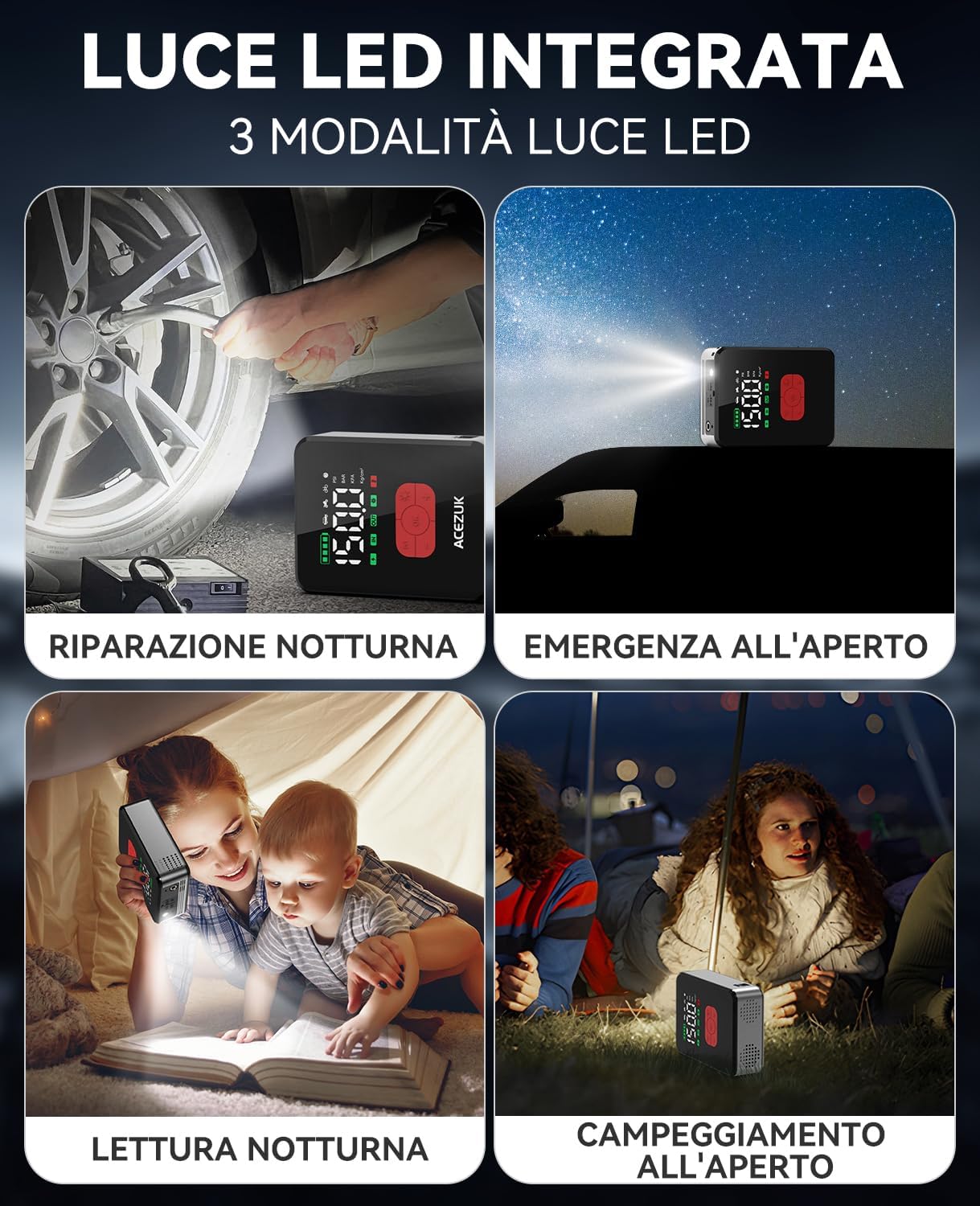
Image 6.1: The jump starter connected to a car battery, illustrating the correct setup for jump-starting.
6.2 Menggunakan Kompresor Udara
- Connect the air hose to the air hose port on the ACEZUK unit.
- Attach the other end of the air hose to the tire valve or use the appropriate nozzle adapter for other inflatables.
- Press the "OK" button briefly to turn on the compressor. The LCD will display the current pressure.
- Press the "M" button to cycle through inflation modes (Car, Motorcycle, Bicycle, Ball, Manual). Each mode has a preset pressure range.
- Use the "+" and "-" buttons to adjust the target pressure. Press briefly to change by small increments, or long-press for rapid adjustment.
- Press the "OK" button to start inflation. The compressor will automatically stop once the target pressure is reached.
- Disconnect the air hose from the tire/inflatable and the unit.
Note: Do not operate the compressor for more than 10 minutes continuously. Allow a 10-minute cool-down period after each 10 minutes of use.

Image 6.2: The device actively inflating a car tire using its integrated air compressor function.

Image 6.3: Step-by-step guide for using the air compressor to inflate a tire.

Gambar 6.4: Selesaiview of preset inflation modes and their respective pressure ranges.
6.3 Menggunakan Lampu LED
The integrated LED light has three modes: Bright, Strobe, and SOS.
- Press the Light button briefly to turn on the LED light (Bright mode).
- Press again to cycle through Strobe mode.
- Tekan untuk ketiga kalinya untuk mode SOS.
- Press a fourth time to turn off the LED light.
Gambar 6.5: Contohamples of the LED light's utility in various situations, including night repairs and outdoor activities.
6.4 Menggunakan sebagai Power Bank
The device can charge other electronic devices via its USB output ports.
- Connect your electronic device (smartphone, tablet, etc.) to one of the USB output ports using a compatible USB cable.
- The ACEZUK unit will automatically begin charging your device.

Image 6.6: The device functioning as a portable power bank, charging various electronic gadgets.
7. Pemeliharaan
- Clean the device with a dry, soft cloth. Do not use harsh chemicals or abrasive cleaners.
- Recharge the device every 3-6 months, even if not in use, to maintain battery health.
- Store the device in a cool, dry environment, away from direct sunlight and extreme temperatures.
- Inspect jumper cables and air hose for any damage before each use.
8. Penyelesaian masalah
| Masalah | Kemungkinan Penyebab | Larutan |
|---|---|---|
| Kendaraan tidak mau menyala setelah di-jump-start. | Low charge on jump starter; incorrect cable connection; vehicle battery severely damaged; other vehicle issues. | Ensure jump starter is fully charged. Check cable connections for correct polarity. If issues persist, consult a mechanic. |
| Kompresor udara tidak dapat memompa udara. | Air hose not properly connected; target pressure not set; device not turned on; hose or nozzle leak. | Ensure all connections are secure. Set target pressure and press OK to start. Check for leaks in the hose or nozzle. |
| Layar LCD kosong. | Device is off; battery is completely drained. | Press the OK button to turn on. Charge the device if the battery is drained. |
| Device not charging external devices. | Device battery low; incorrect USB cable; external device issue. | Charge the ACEZUK unit. Use a different USB cable or try another external device. |
9. Spesifikasi
| Fitur | Detil |
|---|---|
| Merek | ASEPUK |
| Nomor Model | Pesawat M06 |
| Arus Puncak | 7000A |
| Tekanan Kompresor Udara | Hingga 150 PSI |
| Jenis Baterai | ion litium |
| Jil.tage | 12 Volt |
| Jenis Kendaraan yang Kompatibel | Semua Mesin Bensin, hingga Mesin Diesel 12L |
| Lampu LED | 600 Lumens, 3 Modes (Bright, Strobe, SOS) |
| Menampilkan | LCD 3.4 inci |
| Berat | 1200 gram |
| Keluaran USB | 2 pelabuhan |
| Masukan Tipe-C | 1 pelabuhan |
10. Garansi dan Dukungan
ACEZUK products come with a standard manufacturer's warranty. For specific warranty details, please refer to the warranty card included in your package or contact ACEZUK customer support.
If you encounter any issues or have questions regarding your product, please contact our customer support team through the retailer where you purchased the product or visit the official ACEZUK websitus untuk informasi kontak.
Harap simpan bukti pembelian Anda untuk klaim garansi.