
1. Pendahuluan
Welcome to the user manual for your new Infinix Hot 50 Pro+ smartphone. This guide will help you understand the features and functions of your device, ensuring a smooth and enjoyable experience. Please read this manual carefully before using your phone.
Apa yang ada di dalam kotak
- Infinix Hot 50 Pro+ Device
- Power Adapter (Plug)
- Headset
- Penutup Pelindung
- Pelindung Layar
2. Perangkat Berakhirview
Familiarize yourself with the physical components of your Infinix Hot 50 Pro+.
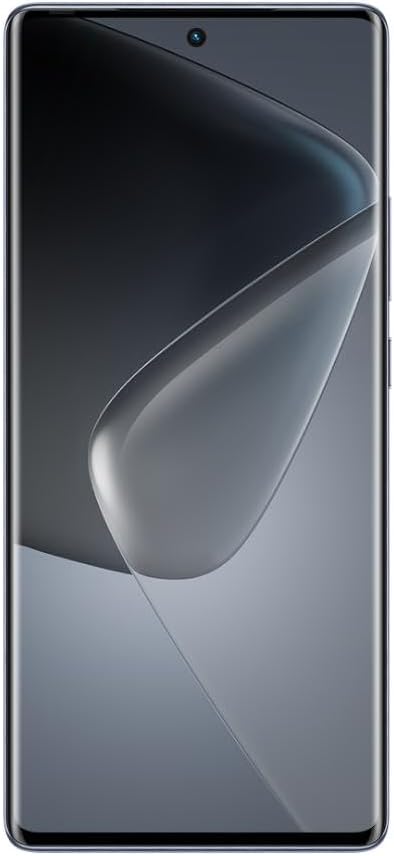
Gambar 2.1: Depan view of the Infinix Hot 50 Pro+ smartphone, featuring a large display and a small punch-hole front camera at the top center.
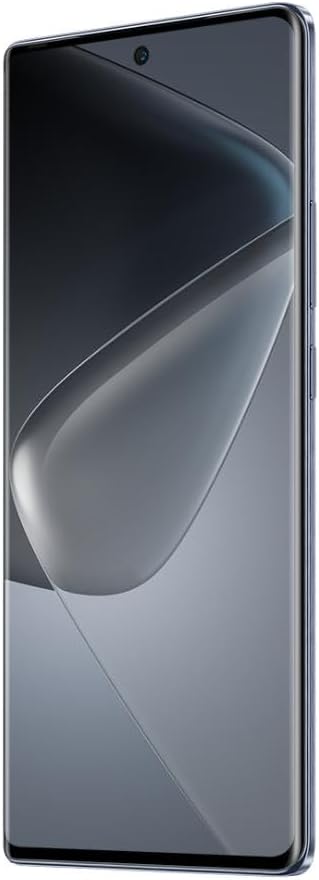
Gambar 2.2: Sisi view of the Infinix Hot 50 Pro+ smartphone, showcasing its thin design and the power and volume buttons on the right side.

Gambar 2.3: Kembali view of the Infinix Hot 50 Pro+ smartphone in sleek black, featuring a vertical triple camera array and the Infinix logo.
3. Pengaturan
3.1 Memasang Kartu SIM dan Kartu SD
- Temukan tempat kartu SIM di sisi perangkat Anda.
- Gunakan alat pelepas SIM yang disediakan untuk membuka baki.
- Letakkan kartu Nano-SIM dan/atau kartu microSD Anda ke dalam baki dengan kontak emas menghadap ke bawah. Pastikan keduanya terpasang dengan benar.
- Masukkan kembali baki ke dalam telepon dengan hati-hati.
3.2 Pengaktifan dan Pengaturan Awal
- Tekan dan tahan tombol Daya hingga logo Infinix muncul.
- Ikuti petunjuk di layar untuk memilih bahasa Anda, sambungkan ke jaringan Wi-Fi, dan atur akun Google Anda.
- Configure security settings, including fingerprint unlock (in-display fingerprint sensor) and a screen lock method (PIN, pattern, or password).
4. Petunjuk Pengoperasian
4.1 Navigasi Dasar
- Layar sentuh: Ketuk untuk memilih, usap untuk menggulir, cubit untuk memperbesar.
- Tombol Daya: Tekan untuk menghidupkan/mematikan layar, tekan dan tahan untuk mematikan atau memulai ulang.
- Tombol Volume: Sesuaikan volume media, volume panggilan, atau volume notifikasi.
- Sensor Sidik Jari Dalam Layar: Use your registered fingerprint to unlock the device.
4.2 Melakukan Panggilan dan Mengirim Pesan
- Buka Telepon Aplikasi untuk menekan nomor atau memilih kontak.
- Buka Pesan app to compose and send SMS/MMS messages.
4.3 Penggunaan Kamera
Your Infinix Hot 50 Pro+ features a versatile camera system.
- Buka Kamera aplikasi.
- Pilih mode yang Anda inginkan (Foto, Video, Potret, dll.).
- Ketuk tombol rana untuk mengambil foto atau memulai/menghentikan perekaman video.
4.4 Menghubungkan ke Jaringan
- Wifinya: Pergi ke Pengaturan > Jaringan & internet > Wi-FiAktifkan Wi-Fi, dan pilih jaringan untuk dihubungkan.
- Bluetooth dapat digunakan untuk berbagai keperluan, seperti: Pergi ke Pengaturan > Perangkat yang terhubung > BluetoothAktifkan Bluetooth, lalu pasangkan dengan perangkat di sekitar Anda.
- Data Seluler (4G): Pastikan kartu SIM Anda aktif dan data seluler diaktifkan di Pengaturan > Jaringan & internet > Jaringan seluler.
4.5 Mengisi Daya Perangkat
Connect the provided power adapter to your phone's charging port and plug it into a power outlet. The device supports 33W fast charging.
5. Pemeliharaan
5.1 Membersihkan Perangkat Anda
- Gunakan kain lembut dan tidak berbulu untuk menyeka layar dan panel belakang.
- Hindari penggunaan bahan kimia keras atau bahan abrasif.
- Jaga pelabuhan bebas dari debu dan kotoran.
5.2 Perawatan Baterai
- Hindari suhu ekstrem.
- Jangan sering membiarkan baterai benar-benar terkuras.
- Gunakan hanya aksesori pengisi daya asli atau yang bersertifikasi.
5.3 Pembaruan Perangkat Lunak
Periksa pembaruan perangkat lunak secara berkala untuk memastikan kinerja dan keamanan yang optimal. Kunjungi Pengaturan > Sistem > Pembaruan sistem.
5.4 Manajemen Penyimpanan
To manage your 256GB internal storage, go to Pengaturan > Penyimpanan. You can clear cache, uninstall unused apps, or move files to an external microSD card (if installed).
6. Penyelesaian masalah
Bagian ini membahas masalah umum yang mungkin Anda temui.
| Masalah | Solusi yang mungkin |
|---|---|
| Perangkat tidak menyala | Ensure the battery is charged. Connect to the charger for at least 10 minutes, then try powering on. If it still doesn't work, perform a force restart by holding the Power button for 10-15 seconds. |
| Aplikasi mogok atau macet | Bersihkan cache aplikasi (Pengaturan > Aplikasi > [Nama Aplikasi] > Penyimpanan & cache > Hapus cachePerbarui aplikasi dari Google Play Store. Jika masalah berlanjut, hapus instalan dan instal ulang aplikasi. |
| Tidak ada sinyal jaringan | Check if your SIM card is properly inserted. Restart the device. Ensure Airplane mode is off. Contact your network provider if the issue continues. |
| Sensor sidik jari tidak berfungsi | Pastikan jari Anda bersih dan kering. Daftarkan ulang sidik jari Anda di Pengaturan > Keamanan > Sidik Jari. |
| Device is slow or lagging | Tutup aplikasi yang tidak digunakan. Bersihkan cache dan sementara. files. Free up storage space. Restart the device. |
| Terlalu panas saat digunakan | Avoid using the phone while charging. Close resource-intensive applications. Reduce screen brightness. If overheating persists, contact support. |
Reset Pabrik (Pilihan Terakhir)
If severe software issues persist, you may need to perform a factory reset. Peringatan: Ini akan menghapus semua data di ponsel Anda. Cadangkan data penting sebelum melanjutkan. Pergi ke Pengaturan > Sistem > Opsi reset > Hapus semua data (reset pabrik).
7. Spesifikasi
Detailed technical specifications for the Infinix Hot 50 Pro+.
| Fitur | Detil |
|---|---|
| Sistem Operasi | Android 14 |
| Ukuran | Ukuran 19.6x9.6x5.4 cm |
| Berat | 400 gram |
| Nomor Model | Hot50Pro+ |
| Teknologi Seluler | 4G |
| Bahasa Indonesia: GPS | Terintegrasi |
| Fitur Khusus | Dual SIM, Touch Screen, In-Display Fingerprint Scanner |
| Soket Audio | 3.5 mm |
| Warna | Sleek Black |
| Kapasitas Baterai | 5000 mAh |
| RAM | 8 GB (RAM tambahan hingga 16 GB) |
| Model CPU | MediaTek Helio |
| Kecepatan CPU | 2.2 GHz |
| Penyimpanan Internal | 256 GB |
| Ukuran Layar | 6.78 inci |
| Jenis Tampilan | 3D Curved AMOLED, 120Hz Refresh Rate |
| Pengisian daya | Pengisian Cepat 33W |
| Suara | Dual Speakers with JBL Sound |
8. Garansi dan Dukungan
Your Infinix Hot 50 Pro+ comes with a standard manufacturer's warranty. Please refer to the warranty card included in your product packaging for specific terms and conditions, including warranty period and coverage details.
Dukungan Pelanggan
For technical assistance, service, or warranty claims, please contact Infinix customer support through their official website or the contact information provided in your warranty documentation. Keep your purchase receipt and device serial number handy when contacting support.


