
DEVAISE ABGY012
DEVAISE Ergonomic Mesh Desk Chair User Manual
Model: ABGY012
1. Produk Lebihview
The DEVAISE Ergonomic Mesh Desk Chair (Model ABGY012) is designed for comfort and support during extended periods of sitting. It features a breathable mesh design, adjustable lumbar support, a 3D adjustable headrest, and space-saving flip-up armrests. The chair is built with a durable metal frame and silent wheels, supporting a maximum weight of 300 pounds.

Gambar 1: Depan view of the DEVAISE Ergonomic Mesh Desk Chair.
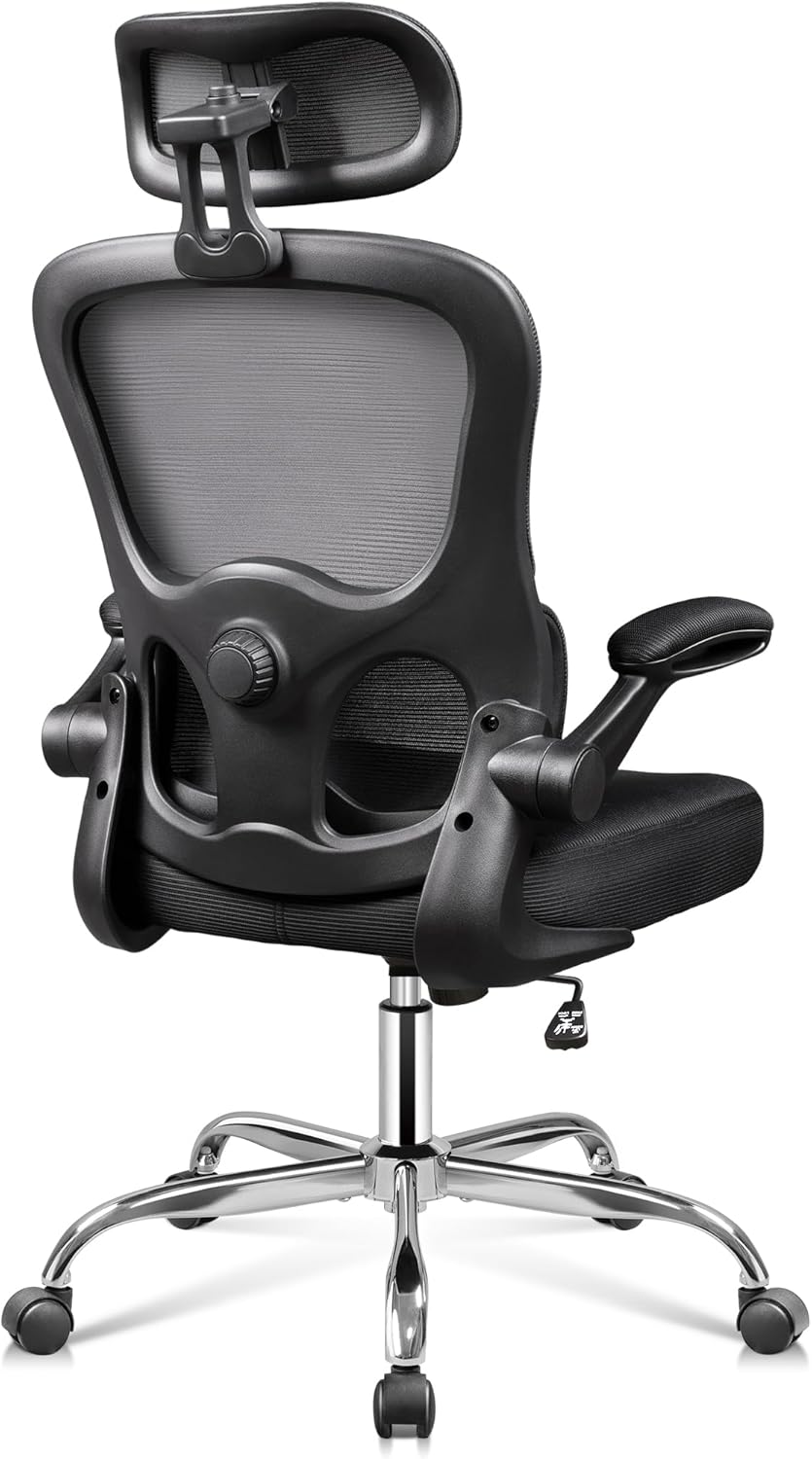
Gambar 2: Kembali view of the DEVAISE Ergonomic Mesh Desk Chair, highlighting the mesh backrest and lumbar support mechanism.
2. Informasi Keselamatan Penting
This product has a maximum weight capacity of 300 lbs. Always ensure that the chair is used within this limit. Be cautious when adjusting the headrest, lumbar support, and armrests to prevent any potential injuries. Always follow the assembly instructions carefully to ensure the stability and safety of the chair.
3. Pengaturan dan Perakitan
The DEVAISE Ergonomic Mesh Desk Chair is designed for easy assembly, typically taking around 20 minutes. While assembly can be done by one person, having a second person may assist with certain steps, such as attaching the arms to the backrest and seat cushion.
Langkah-Langkah Perakitan (Panduan Umum):
- Bongkar Komponen: Carefully remove all parts from the packaging and lay them out on a clean, flat surface. Verify all components are present against the included parts list.
- Pasangkan Roda ke Basis: Masukkan kelima roda ke dalam lubang di ujung setiap kaki alas kursi. Dorong dengan kuat hingga berbunyi klik dan terpasang dengan benar.
- Masukkan Gas Lift: Masukkan silinder gas pengangkat ke dalam lubang tengah pada alas kursi yang telah dirakit.
- Pasang Mekanisme ke Kursi: Secure the seat plate mechanism to the underside of the seat cushion using the provided screws. Ensure the front of the mechanism faces the front of the seat.
- Hubungkan Kursi ke Lift Gas: Place the assembled seat onto the gas lift cylinder, ensuring it is securely seated.
- Pasang Sandaran Tangan: Secure the armrests to the seat cushion and backrest using the designated screws.
- Pasang Sandaran: Connect the backrest to the seat mechanism and armrests.
- Pasang Sandaran Kepala: Slide the headrest into the top of the backrest and adjust to your preferred height.
Refer to the detailed assembly instructions included in your product packaging for specific diagrams and screw placements.
4. Petunjuk Pengoperasian
The DEVAISE Ergonomic Mesh Desk Chair offers multiple adjustment features to customize your seating experience for optimal comfort and support.
4.1. Penyesuaian Ketinggian Kursi
To adjust the seat height, locate the lever on the right side beneath the seat. Pull the lever upwards while taking your weight off the seat to raise it. To lower the seat, pull the lever upwards while remaining seated.

Figure 3: Location of the seat height adjustment lever.
4.2. Penyesuaian Dukungan Pinggang
The chair features separated-adjustable lumbar support. Use the knob located on the side of the backrest to adjust the depth of the lumbar support, allowing you to customize it to fit your waist and provide precise support for your lower back.
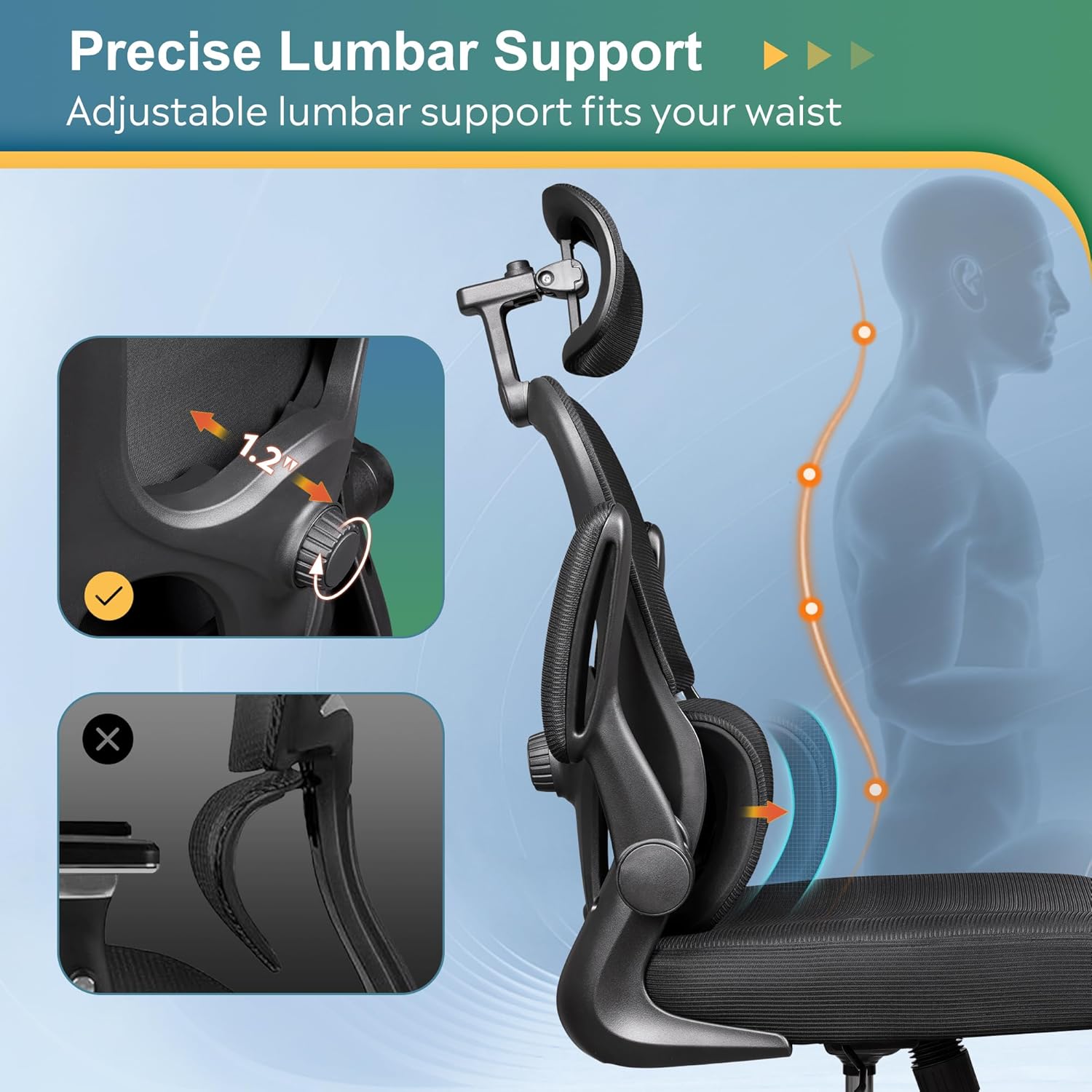
Figure 4: Adjusting the precise lumbar support with the side knob.

Figure 5: Close-up of the lumbar adjustment dial.
4.3. Penyesuaian Sandaran Kepala 3D
The 3D headrest can be adjusted in multiple ways for optimal neck and head support:
- Penyesuaian Ketinggian: Slide the headrest up or down to find the ideal height.
- Penyesuaian Kemiringan: Tilt the headrest forward or backward to support your head's natural curve.
- Rotasi: Rotate the headrest up to 55 degrees for personalized comfort.
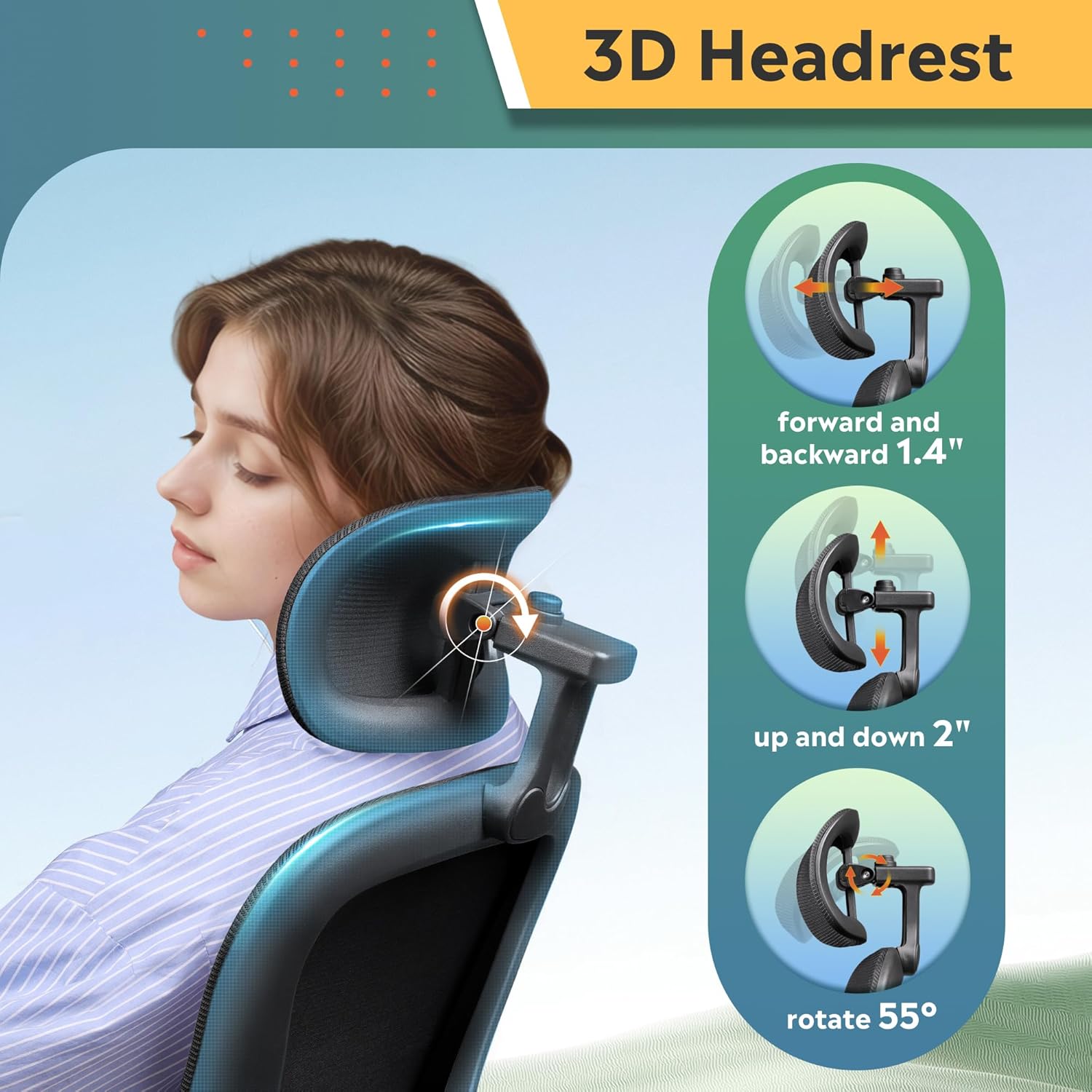
Figure 6: Illustrations of the 3D headrest's height, tilt, and rotation adjustments.

Figure 7: Close-up of the headrest adjustment mechanism.
4.4. Sandaran lengan yang bisa dilipat
The armrests can be flipped up by 90 degrees. This feature allows you to push the chair closer to your desk, saving space in smaller work areas, or to easily move the chair out of the way when not in use.

Figure 8: The chair demonstrating its 90-degree flip-up armrests for space-saving.

Figure 9: A user demonstrating the flip-up armrest feature.
4.5. Rocking and Tilt Function
The chair offers a 90-125° rocking tilt function. To activate the rocking motion, pull out the lever located on the left side beneath the seat. Push the lever in to lock the chair in an upright position. The tension of the rocking motion can be adjusted using the round knob located at the front underside of the seat.

Figure 10: The tilt tension adjustment knob located under the seat.
4.6. Fungsi Putar
The chair features BIFMA 5.1-Certified 360° swivel castors, allowing for smooth and silent movement across various floor types without causing damage.

Figure 11: The chair's durable base with 360° swivel casters.
5. Pemeliharaan
To maintain the longevity and appearance of your DEVAISE Ergonomic Mesh Desk Chair, follow these simple care instructions:
- Pembersihan: Bersihkan dengan iklanamp cloth. Avoid harsh chemicals or abrasive cleaners that may damage the mesh or frame.
- Pemeriksaan Rutin: Periksa semua sekrup dan baut secara berkala untuk memastikan semuanya kencang. Kencangkan kembali jika perlu untuk menjaga stabilitas dan keamanan.
- Perawatan Caster: Jaga agar roda kastor bebas dari rambut dan kotoran untuk memastikan pergerakan yang lancar.
6. Penyelesaian masalah
If you encounter any issues with your DEVAISE Ergonomic Mesh Desk Chair, please refer to the following common solutions or contact customer support.
- Kursi Berderit atau Bergoyang: Check all assembly screws and bolts. Tighten any loose fasteners. Ensure the chair is on a flat, even surface.
- Kesulitan Menyesuaikan Ketinggian: Ensure the height adjustment lever is fully engaged. If the gas lift is unresponsive, it may require replacement.
- Roda Tidak Bergulir dengan Lancar: Periksa roda kastor untuk melihat apakah ada kotoran yang terjebak (rambut, serat, dll.) dan bersihkan secara menyeluruh.
- Lumbar Support Not Adjusting: Verify the adjustment knob is turning freely and not obstructed.
For further assistance, please contact DEVAISE Customer Support.
7. Spesifikasi
| Fitur | Detil |
|---|---|
| Merek | MENYINGKIRKAN |
| Nama Model | ABGY012 Home Office Desk Chair |
| Warna | Hitam |
| Dimensi Produk | 24.8"Panjang x 26.57"Lebar x 47.05"T |
| Rekomendasi Berat Maksimum | 300 pon |
| Bahan | Foam (Seat), Foam & Mesh (Back) |
| Gaya Punggung | Split Back |
| Gaya Lengan | Rounded, Flip-up (90°) |
| Jumlah Posisi Berbaring | 1 (90-125° rocking tilt) |
| Roda | BIFMA 5.1-Certified 360° Swivel Castors |
| Berat Barang | 26.6 pon |
| Perakitan | Membutuhkan Majelis |
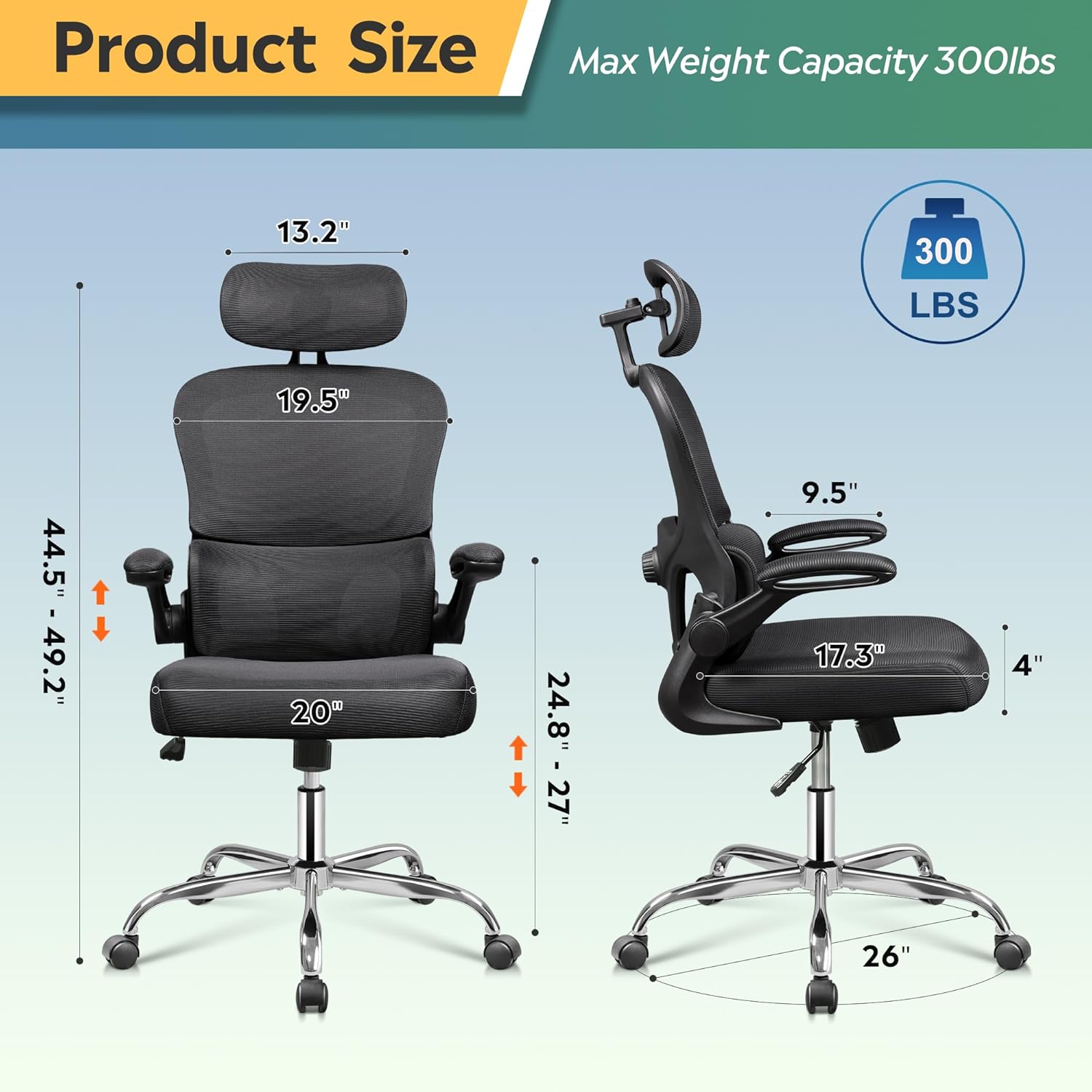
Figure 12: Detailed product dimensions and maximum weight capacity.
8. Video Produk Resmi
Watch the official product video from DEVAISE for a visual guide on the chair's features and functionality.
Video 1: DEVAISE office chair 012 - A demonstration of the chair's features and adjustments.
9. Garansi
The DEVAISE Ergonomic Mesh Desk Chair comes with a 2-year warranty, providing peace of mind for lasting quality and support.
10. Dukungan Pelanggan
For any questions, concerns, or assistance with your DEVAISE Ergonomic Mesh Desk Chair, please contact our customer support team:
- Weblokasi: Visit the official DEVAISE websitus untuk Tanya Jawab dan sumber daya dukungan.
- E-mail: Lihat kemasan produk Anda atau petunjuk resmi webSitus untuk email layanan pelanggan.
- Telepon: Lihat kemasan produk Anda atau petunjuk resmi webSitus untuk nomor telepon layanan pelanggan.
Ask a question about this manual
Ask about setup, troubleshooting, compatibility, parts, safety, or missing instructions. Manuals+ will review the question and use this page’s manual context to help answer it.