
1. Informasi Keselamatan Penting
Harap baca semua petunjuk dengan saksama sebelum perakitan dan penggunaan. Kegagalan mengikuti petunjuk ini dapat mengakibatkan cedera atau kerusakan pada produk.
- Always keep children and pets away from the desk when in motion.
- Use the child lock feature (if available) to prevent unintended height adjustments.
- Be aware of the anti-collision feature; do not force the desk to move if it encounters an obstacle.
- Ensure all cables are properly managed to avoid entanglement during height adjustments.
- Jangan membebani meja secara berlebihan. Kapasitas berat maksimum adalah 180 lbs (sekitar 120 kg).
- Only use the desk on a level surface.
2. Isi Paket
Pastikan semua komponen tersedia sebelum memulai perakitan. Jika ada komponen yang hilang atau rusak, silakan hubungi dukungan pelanggan.
- Desktop (0.6" thick, Rustic Brown)
- Kaki Meja (2)
- Bantalan Kaki (2)
- Crossbar/Frame Assembly
- Control Panel with LED Touchscreen
- Adaptor Daya dan Kabel
- Kait Headphone
- Assembly Hardware (screws, L-shaped installation tools)
- Panduan Pengguna
3. Petunjuk Perakitan
The DEVAISE ASJZ021 desk is designed for quick and simple assembly, typically within 15 minutes. All holes are pre-drilled, and accessories are clearly labeled.
Alat yang dibutuhkan:
- Obeng kepala Phillips (tidak termasuk)
- L-shaped installation tools (included)
Perakitan Langkah-demi-Langkah:
- Bongkar Komponen: Keluarkan semua bagian dari kemasan dengan hati-hati dan letakkan pada permukaan yang bersih dan lembut untuk mencegah goresan.
- Pasang Bantalan Kaki: Amankan bantalan kaki ke bagian bawah setiap kaki meja menggunakan sekrup yang disediakan.
- Merakit Rangka: Connect the desk legs to the crossbar/frame assembly. Ensure all connections are tight and secure.
- Lampirkan Desktop: Carefully place the desktop onto the assembled frame. Align the pre-drilled holes on the desktop with the frame. Secure the desktop to the frame using the provided screws.
- Instal Panel Kontrol: Mount the LED touchscreen control panel to the underside of the desktop in the designated location. Connect the control panel cable to the motor.
- Hubungkan Daya: Plug the power adapter into the desk's motor and then into a wall outlet.
- Pasang Pengait Headphone: Install the headphone hook to the side of the desk as desired.

Gambar: Meledak view of desk components illustrating the 15-minute quick installation process.
4. Petunjuk Pengoperasian
The DEVAISE ASJZ021 Electric Standing Desk features a tri-motor system for smooth and quiet height adjustments and a smart LED touchscreen controller.
Panel Kontrol Berakhirview:

Gambar: Detail view of the multi-function control panel with LED display, up/down arrows, memory presets (1, 2, 3), and 'S' button.
- Display LED: Shows the current desk height in real-time.
- Panah Atas/Bawah (▲ / ▼): Press and hold to adjust the desk height manually. Release to stop at the desired height.
- Pengaturan Memori Awal (1, 2, 3): Store and recall up to three personalized height settings.
- 'S' Button: Used for saving memory presets and activating the child lock function.
Penyesuaian Ketinggian:
The desk can be adjusted between 28.35 inches (sitting height) and 46.45 inches (standing height).

Image: Comparison of the desk at its minimum height of 28.35 inches and maximum height of 46.45 inches.
- Penyesuaian Manual: Press and hold the ▲ (Up) or ▼ (Down) button until the desk reaches your desired height.
- Mengatur Preset Memori:
- Adjust the desk to your preferred height using the Up/Down buttons.
- Press the 'S' button. The LED display will show 'S-'.
- Immediately press one of the memory buttons (1, 2, or 3). The display will show 'S-1', 'S-2', or 'S-3' to confirm the height is saved.
- Mengingat Pengaturan Memori Awal: Simply press the corresponding memory button (1, 2, or 3) once. The desk will automatically move to the saved height.
Operasi Tenang:
The tri-motor system operates quietly, typically below 50dB, ensuring minimal disruption in your workspace.

Image: Graphic illustrating the quiet operation of the desk, comparing its sound level (below 50dB) to soft breaths (10dB), whisper (25dB), and car horns (80dB).
5. Spesifikasi
Detailed technical specifications for the DEVAISE ASJZ021 Electric Standing Desk.
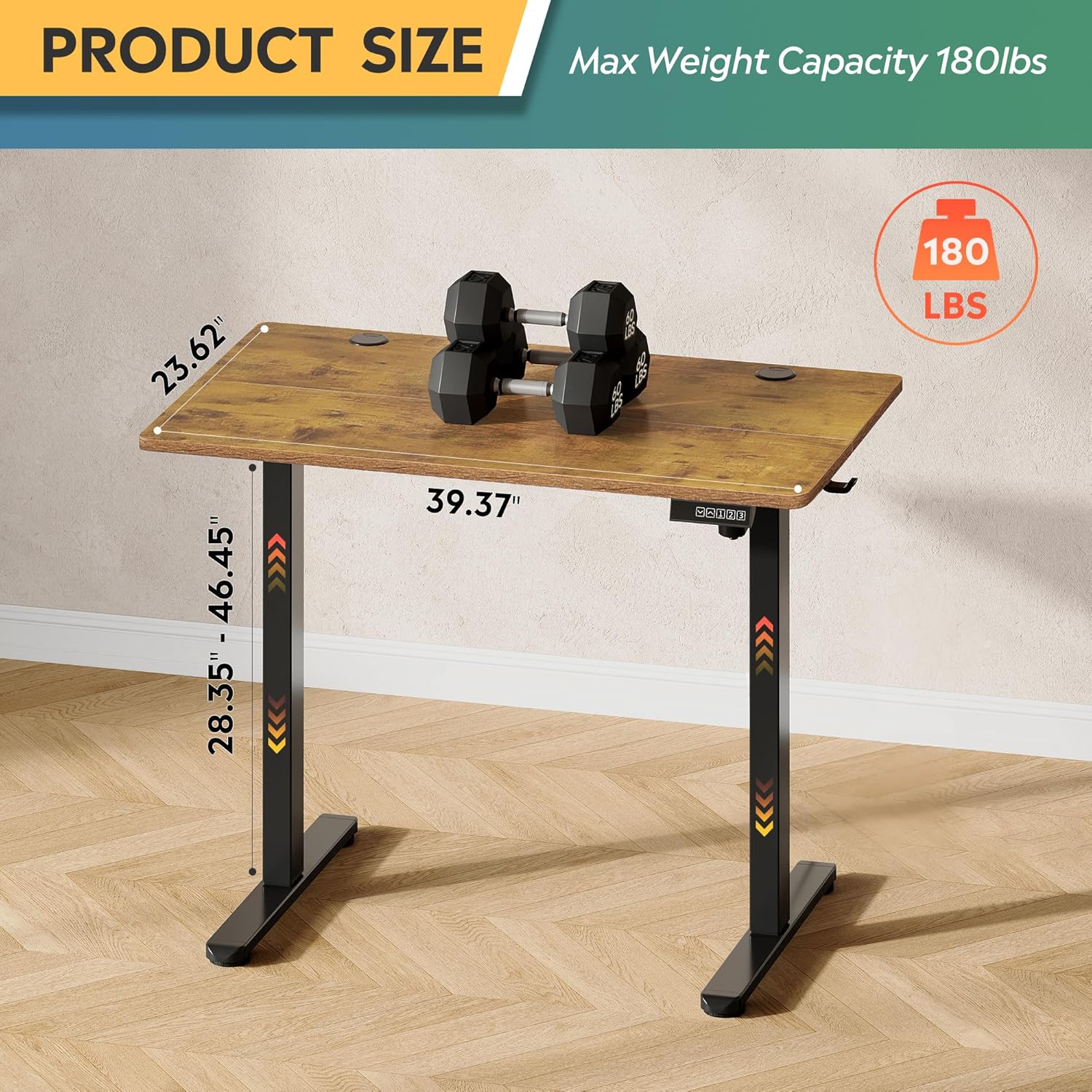
Image: Product dimensions (39.37"W x 23.62"D) and height range (28.35"-46.45"), highlighting the 180 lbs maximum weight capacity.
| Fitur | Spesifikasi |
|---|---|
| Nomor Model | ASJZ021 |
| Dimensi Produk (P x L x T) | 23.62"Panjang x 39.37"Lebar x 28.34"T |
| Tinggi Minimum | 28.35 inci |
| Tinggi Maksimum | 46.45 inci |
| Ketebalan Meja | 0.6 inci |
| Rekomendasi Berat Maksimum | 180 pon |
| Berat Barang | 37 pon |
| Mekanisme Pengangkatan | Electric (Tri-motor system) |
| Jumlah Posisi Ketinggian | 3 Preset Memori |
| Tingkat Kebisingan | <50dB |
| Jenis Bahan Atas | Kayu Rekayasa |
| Bahan Dasar | Besi |
| Warna | Rustic Brown (Desktop), Black (Base) |
| Fitur Khusus | Adjustable Height, Compact, Electric, LED Touchscreen |
6. Pemeliharaan
Regular maintenance helps ensure the longevity and optimal performance of your standing desk.
- Pembersihan: Usap permukaan meja dan bingkai dengan kain lembut.amp kain. Hindari bahan kimia keras atau pembersih abrasif yang dapat merusak lapisan akhir.
- Manajemen Kabel: Periodically check and organize cables to prevent them from snagging or getting pinched during height adjustments.
- Kekencangan Sekrup: Periksa semua sekrup dan baut secara berkala untuk memastikan semuanya tetap kencang. Kencangkan kembali jika perlu.
- Pemeriksaan Motor: Perhatikan apakah ada suara yang tidak biasa selama pengoperasian. Jika Anda menemukan masalah, lihat bagian pemecahan masalah atau hubungi dukungan.
7. Penyelesaian masalah
If you encounter any issues with your DEVAISE ASJZ021 Electric Standing Desk, please refer to the following common problems and solutions.
| Masalah | Kemungkinan Penyebab | Larutan |
|---|---|---|
| Meja tidak bergerak | Kabel daya terputus; Beban berlebih; Kesalahan motor | Check power connections. Reduce weight on desk. Unplug for 10 seconds, then plug back in. |
| Penyesuaian ketinggian tidak merata | Obstruction; Sensor issue | Clear any obstructions. Perform a reset (refer to control panel instructions or contact support). |
| Layar menampilkan kode kesalahan | Specific system error | Note the error code and consult the DEVAISE support webKunjungi situs web kami atau hubungi layanan pelanggan untuk panduan spesifik. |
| Desk stops moving unexpectedly | Anti-collision activated; Overheating protection | Check for obstructions. Allow the motor to cool down for 20 minutes before attempting to operate again. |
If the problem persists after attempting these solutions, please contact DEVAISE customer support.
8. Garansi dan Dukungan
DEVAISE is committed to providing quality products and customer satisfaction. Your purchase is backed by our support services.
- Dukungan Pelanggan: For any questions, concerns, or assistance with assembly or operation, please contact our 24/7 US-based support team. Refer to your purchase documentation for contact details.
- Informasi Garansi: Specific warranty terms and conditions may vary. Please refer to the warranty card included with your product or visit the official DEVAISE websitus untuk informasi lebih rinci.