
1. Pendahuluan
The Audizio Avola is a comprehensive audio system designed to provide a wide range of listening options. It integrates Internet Radio, DAB+, FM radio, a CD player, and Bluetooth connectivity into a single, elegant unit. This manual will guide you through the setup, operation, and maintenance of your Avola system, ensuring you can fully utilize its features for an optimal audio experience.
2. Petunjuk Keselamatan
- Catu Daya: Gunakan hanya adaptor daya yang disediakan. Pastikan tegangantage sesuai dengan persyaratan wilayah Anda.
- Air dan Kelembaban: Jangan biarkan unit terkena hujan, kelembapan, atau cairan. Hindari meletakkan benda berisi cairan, seperti vas bunga, di atas unit.
- Ventilasi: Pastikan ventilasi memadai di sekitar unit. Jangan halangi lubang ventilasi.
- Sumber Panas: Jauhkan unit dari sumber panas seperti radiator, pemanas, kompor, atau peralatan lain yang menghasilkan panas.
- Pembersihan: Disconnect the unit from the power supply before cleaning. Use a soft, dry cloth. Do not use liquid cleaners or aerosol cleaners.
- Pelayanan: Jangan mencoba memperbaiki unit sendiri. Serahkan semua perbaikan kepada teknisi yang berkualifikasi.
- CD player: Do not insert foreign objects into the CD tray. Handle CDs by their edges to avoid scratches.
3. Isi Paket
Verifikasi bahwa semua item ada dalam kemasan:
- 1x Audizio Avola Internet Radio
- 1x Kontrol Jarak Jauh
- 1x Adaptor Daya
- 1x Buku Panduan Pengguna (Panduan Memulai Cepat)

Image: Audizio Avola unit shown with its remote control and power adapter.
4. Produk Lebihview
4.1 Panel Depan

Gambar: Depan view of the Audizio Avola with the CD tray closed.
The front panel features the main display, control buttons, a CD tray, and input ports.
- Menampilkan: Layar berwarna untuk navigasi dan informasi.
- Tombol Kontrol: MENU, INFO, REC/DEL, PRESET/REPEAT, STANDBY, I/R, Play/Pause, Stop, Skip/Fast Forward/Rewind.
- Baki CD: Untuk memasukkan CD audio.
- Tombol TUNE/SELECT: Rotate to navigate menus, press to select.
- Tombol VOLUME: Menyesuaikan tingkat keluaran audio.
- Port USB: Untuk menghubungkan perangkat penyimpanan USB.
- Slot Kartu SD: Untuk memasukkan kartu memori SD.
- Masukan AUX: 3.5mm jack for external audio sources.
- Jack Headphone: Jack 3.5mm untuk mendengarkan secara pribadi.

Image: Close-up of the Audizio Avola front panel showing USB, SD, AUX, and headphone ports.
4.2 Panel Belakang
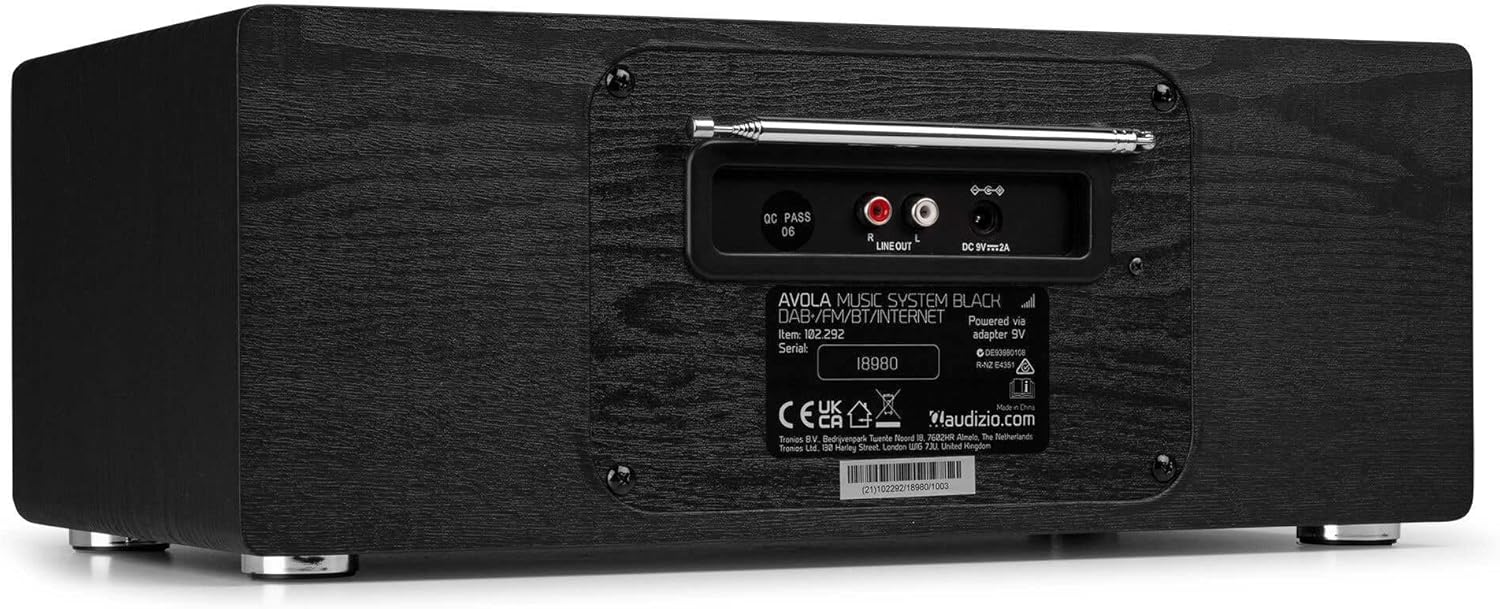
Gambar: Belakang view of the Audizio Avola, highlighting the antenna and connection ports.
Panel belakang menampung koneksi penting:
- Antena teleskopik: Untuk penerimaan radio DAB+ dan FM. Rentangkan sepenuhnya untuk sinyal terbaik.
- LINE OUT (RCA): Untuk terhubung ke eksternal amppenguat atau pengeras suara.
- DC 9V 2A Power Input: Untuk menghubungkan adaptor daya.
5. Pengaturan
5.1 Sambungan Daya
- Connect the power adapter to the DC 9V 2A input on the rear of the Avola unit.
- Hubungkan adaptor daya ke stopkontak dinding yang sesuai.
- The unit will enter standby mode. Press the STANDBY button on the unit or remote control to power on.
5.2 Pengaturan Antena
For optimal DAB+ and FM radio reception, fully extend the telescopic antenna located on the rear panel. Adjust its position for the best signal quality.
5.3 Initial Setup (WLAN Connection)
To access Internet Radio features, the Avola must be connected to a Wi-Fi network.
- Upon first power-on, the unit may prompt you to set up the network connection. If not, press MENU, navigate to 'System Settings' and then 'Network'.
- Select 'Wi-Fi Network' and choose 'Scan' to find available networks.
- Pilih jaringan Wi-Fi Anda dari daftar.
- Enter your Wi-Fi password using the TUNE/SELECT knob to navigate characters and press to confirm each character.
- Once connected, the display will show a Wi-Fi icon.
6. Mode Operasi
6.1 Radio Internet
Access thousands of radio stations worldwide via your Wi-Fi connection.
- Press the MENU button and select 'Internet Radio'.
- Anda dapat menelusuri stasiun berdasarkan lokasi, genre, atau mencari stasiun tertentu.
- Use the TUNE/SELECT knob to navigate and select.
- To save a station as a preset, press and hold the PRESET/REPEAT button until the preset menu appears, then select a preset number.

Image: The Audizio Avola display showing the Internet Radio interface.
Radio DAB+ 6.2
Digital Audio Broadcasting Plus offers high-quality digital radio.
- Press the MENU button and select 'DAB Radio'.
- Perangkat ini akan secara otomatis memindai stasiun DAB+ yang tersedia.
- Use the TUNE/SELECT knob to browse and select stations.
- Save presets as described for Internet Radio.
6.3 Radio FM
Listen to traditional analog FM radio broadcasts.
- Press the MENU button and select 'FM Radio'.
- Use the TUNE/SELECT knob to manually tune or press and hold to auto-scan for stations.
- Save presets as described for Internet Radio.
6.4 Pemutar CD
Play your favorite audio CDs.
- Press the MENU button and select 'CD Player'.
- Press the 'Open' button next to the CD tray to open it.
- Carefully place an audio CD onto the tray with the label side facing up.
- Press the 'Open' button again to close the tray. The unit will begin playing the CD automatically.
- Use the Play/Pause, Stop, and Skip buttons for playback control.
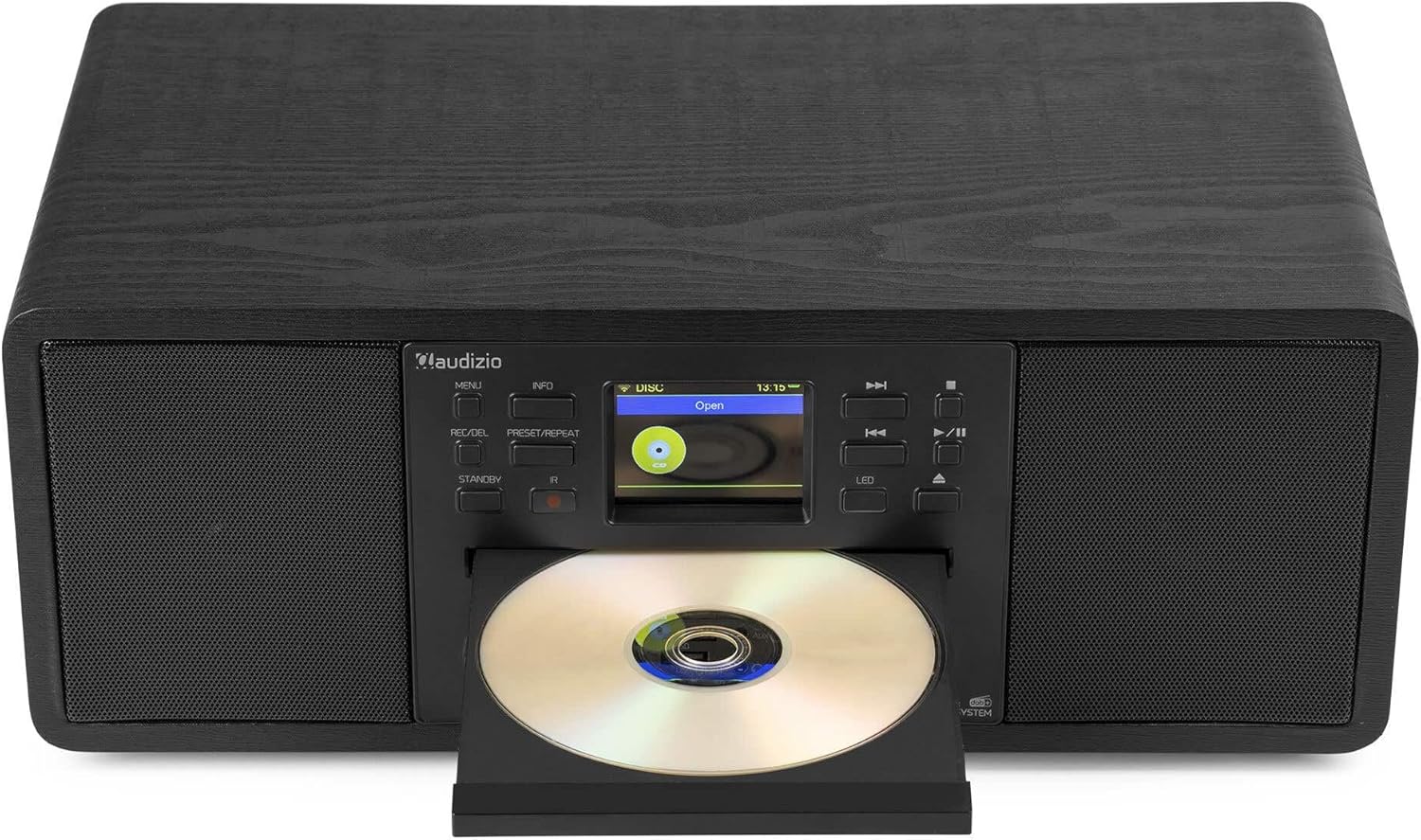
Image: The Audizio Avola with its CD tray open, ready for disc insertion.
6.5 Konektivitas Bluetooth
Stream audio wirelessly from your smartphone, tablet, or other Bluetooth-enabled devices.
- Press the MENU button and select 'Bluetooth'.
- The Avola will enter pairing mode and become discoverable.
- On your Bluetooth device, search for 'Audizio Avola' in the Bluetooth settings and select it to pair.
- Once connected, the display will show 'BT Connected'. You can now play audio from your device through the Avola.

Image: The Audizio Avola display indicating a successful Bluetooth connection.
6.6 Pemutaran USB/SD
Putar audio filedari drive USB atau kartu SD.
- Insert a USB drive into the USB port or an SD card into the SD card slot on the front panel.
- Press the MENU button and select 'USB' or 'SD' (the unit may automatically switch to the correct mode).
- Navigasi melalui Anda files and folders using the TUNE/SELECT knob.
- Press the TUNE/SELECT knob to play a selected track.
7. Pemeliharaan
- Membersihkan Unit: Use a soft, dry, lint-free cloth to clean the exterior of the unit. Do not use abrasive cleaners, waxes, or solvents.
- Pembersihan Lensa CD: If CD playback becomes erratic, use a commercially available CD lens cleaner disc to clean the laser lens.
- Penyimpanan: Jika menyimpan unit untuk jangka waktu yang lama, cabut dari sumber daya listrik dan simpan di tempat yang sejuk dan kering.
8. Penyelesaian masalah
| Masalah | Kemungkinan Penyebab | Larutan |
|---|---|---|
| Tidak ada daya | Adaptor daya tidak tersambung atau stopkontak rusak. | Periksa sambungan daya. Coba stopkontak lain. |
| Tidak ada suara | Volume terlalu rendah, fitur bisu diaktifkan, atau sumber yang dipilih salah. | Naikkan volume. Periksa apakah fitur bisu (mute) aktif. Pastikan sumber input yang benar telah dipilih. |
| Radio internet tidak terhubung. | Incorrect Wi-Fi password, weak signal, or network issue. | Re-enter Wi-Fi password. Move unit closer to router. Check router status. |
| DAB+/FM reception poor | Antena tidak diperpanjang atau berada di area dengan sinyal lemah. | Rentangkan sepenuhnya dan sesuaikan antena teleskopik. Coba posisikan ulang unit tersebut. |
| CD tidak dapat diputar | CD inserted incorrectly, dirty/scratched CD, or unsupported format. | Ensure CD is inserted label-side up. Clean or replace CD. Verify CD format (supports CD-DA, MP3). |
| Bluetooth tidak berpasangan | Device not in pairing mode, or Avola not discoverable. | Ensure both devices are in pairing mode. Check Bluetooth settings on your device. |
9. Spesifikasi
| Fitur | Spesifikasi |
|---|---|
| Nama Model | Avola |
| Nomor Barang | 102.292 |
| Dimensi (P x L x T) | Ukuran 45.8x25.8x19.7 cm |
| Berat | 4 kg |
| Masukan Daya | 220 Volt (via power adapter) |
| Speaker Output Power (Max) | 60Watt |
| Mode Keluaran Audio | Stereo |
| Format Audio yang Didukung | CD-DA, MP3 |
| Teknologi Konektivitas | WLAN, Bluetooth, AUX, RCA |
| Perangkat yang Kompatibel | MP3 Player, PC, Smartphone, Tablet |
| Warna | Hitam |
10. Garansi dan Dukungan
Audizio products are designed and manufactured to the highest standards. In the unlikely event of a problem with your product, please contact your retailer for assistance. Keep your proof of purchase for warranty claims. For further support or inquiries, please refer to the official Audizio websitus atau hubungi layanan pelanggan mereka.