
1. Informasi Keselamatan Penting
Harap baca semua petunjuk dengan saksama sebelum perakitan dan penggunaan. Simpan panduan ini untuk referensi di kemudian hari.
- Perakitan: Berhati-hatilah terhadap ujung yang tajam dan titik-titik yang dapat terjepit selama perakitan.
- Listrik: Ensure proper grounding and do not overload power outlets. Always unplug when not in use.
- Do not allow children to climb on the vanity desk or stool.
- Place the vanity on a stable, level surface.
2. Produk Lebihview
The KAI-ROAD Small Makeup Vanity Desk is designed for compact spaces, featuring an LED mirror, two storage drawers, a foldable side panel, and integrated power outlets. A matching stool is included for comfortable use.
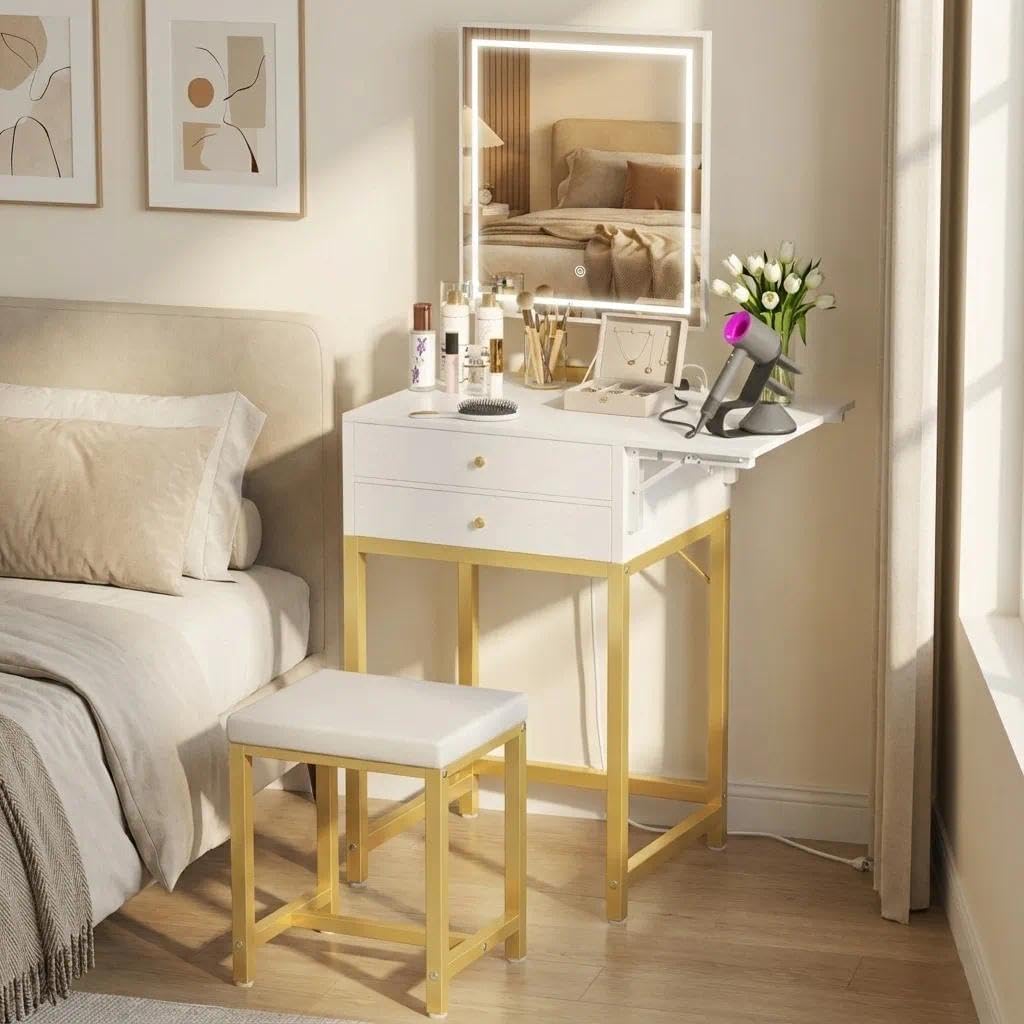
Image 2.1: KAI-ROAD Small Makeup Vanity Desk with LED Mirror and Stool. This image displays the complete vanity set, including the desk, mirror, and stool, positioned next to a bed in a bedroom setting.
2.1 Komponen
- Vanity Desk Frame (Metal)
- Desk Top with Drawers (Engineered Wood)
- Cermin LED
- Foldable Side Panel
- Power Outlet Unit (2 AC, 2 USB)
- Stool (Metal frame, Faux Leather seat)
- Perangkat Keras Perakitan
2.2 Dimensi
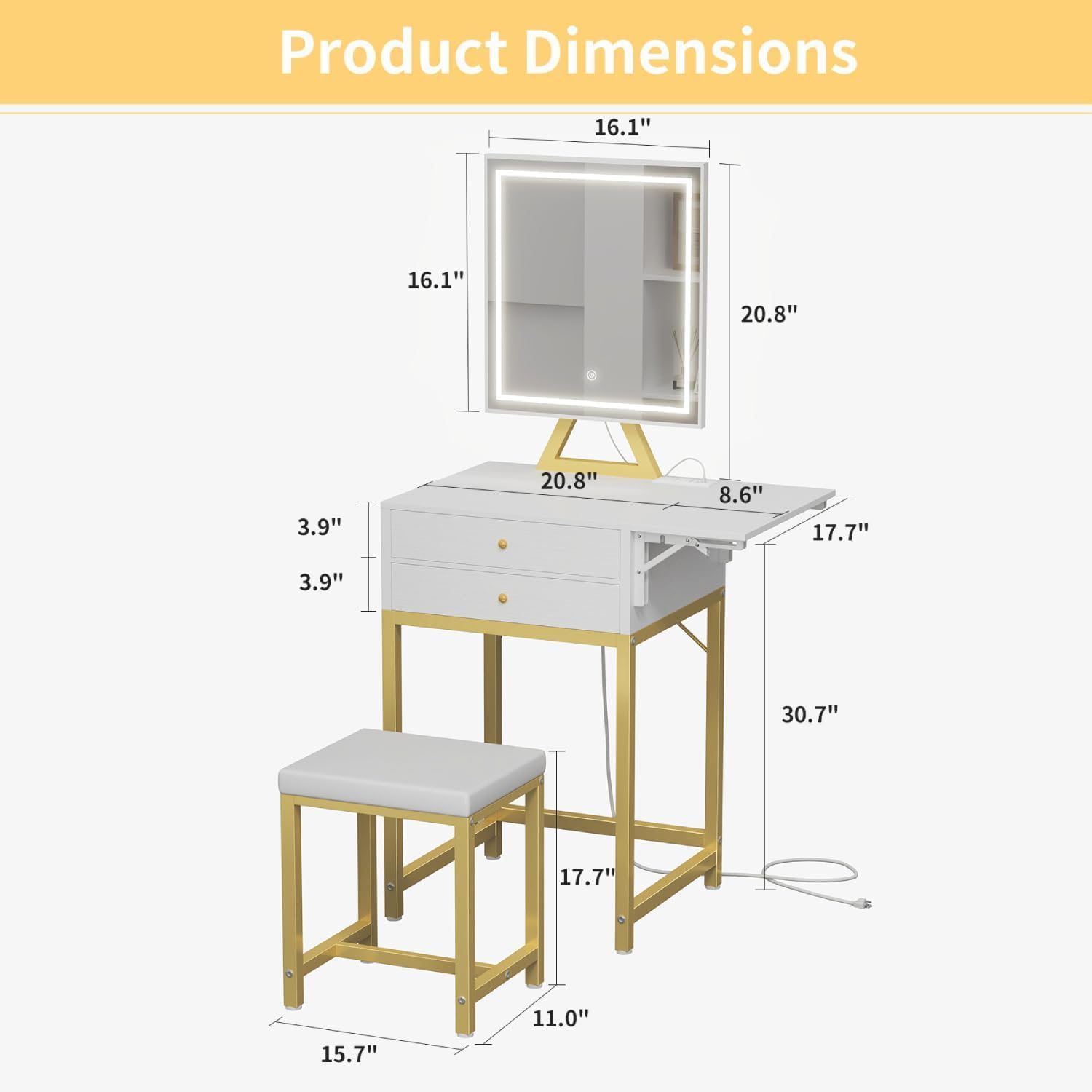
Image 2.2: Product Dimensions Diagram. This diagram illustrates the various measurements of the vanity desk and mirror, including height, width, and depth of each component.
- Dimensi Produk Keseluruhan: 17.7"Panjang x 19.9"Lebar x 52"T
- Kedalaman Barang: 15.7 inci
- Berat Barang: 40 pon
- Tinggi Dudukan: 17.7 inci
3. Pengaturan dan Perakitan
Assembly is required. It is recommended to have two people for easier and safer assembly. Ensure all parts are present before beginning.
- Bongkar Komponen: Carefully remove all parts from the packaging and lay them out on a clean, soft surface to prevent scratches. Verify all hardware is included.
- Merakit Rangka Meja: Attach the metal frame components according to the provided diagrams in the separate assembly guide. Ensure all screws are tightened securely.
- Attach Desk Top: Secure the desk top, which includes the drawers and integrated power outlet, to the assembled metal frame.
- Install LED Mirror: Position and secure the LED mirror to the designated area on the desk top. Connect the mirror's power cable to the integrated power outlet.
- Cara Merakit Bangku: Attach the stool legs to the seat cushion using the provided hardware.
- Hubungkan Daya: Colokkan kabel daya utama meja rias ke stopkontak dinding.
4. Petunjuk Pengoperasian
4.1 Operasi Cermin LED
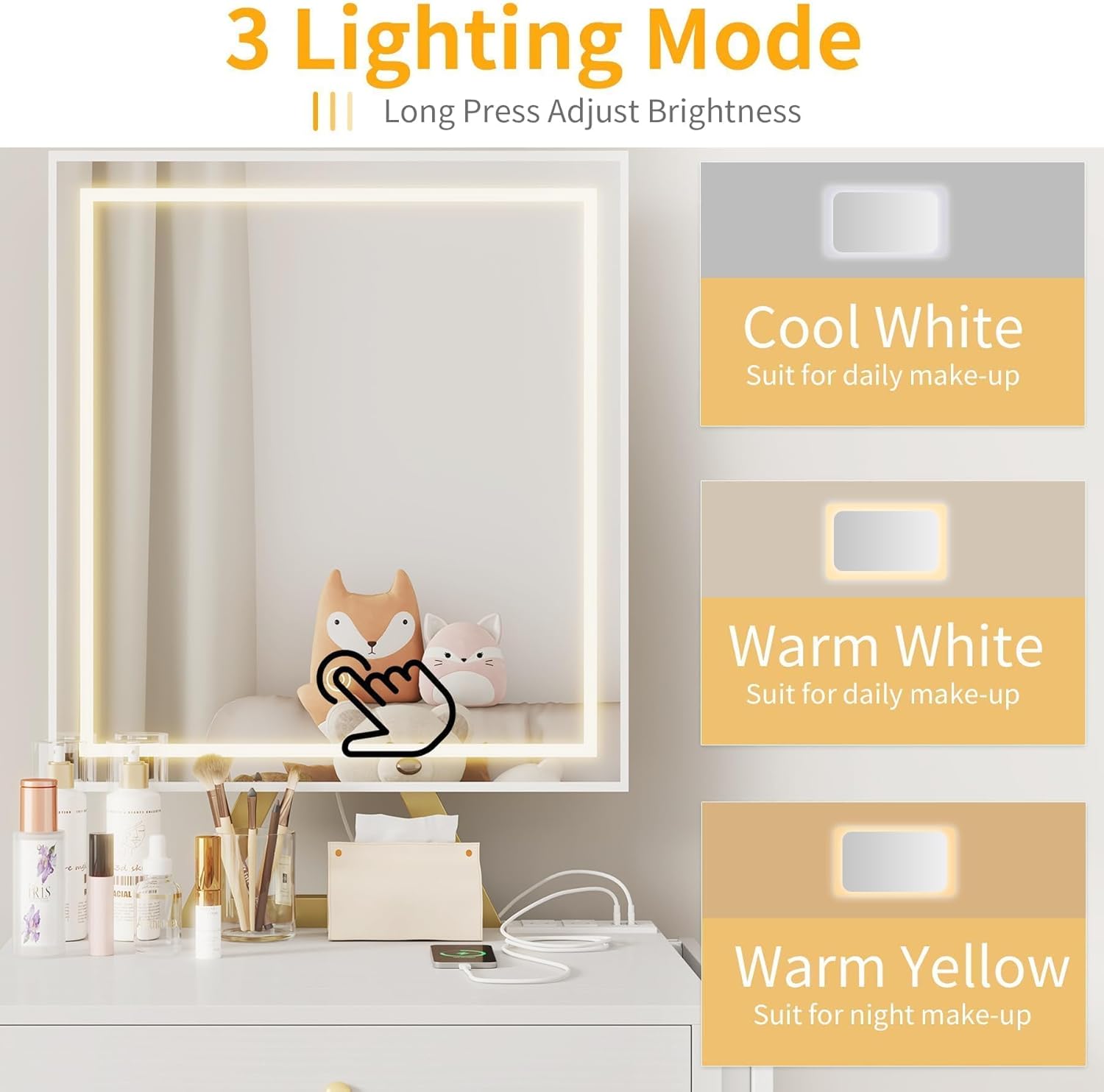
Image 4.1: LED Mirror 3 Lighting Modes. This image shows the mirror's touch control and illustrates the three available light settings: Cool White, Warm White, and Warm Yellow.
- Daya Hidup/Mati: Touch the power icon on the mirror surface to turn the LED lights on or off.
- Ubah Mode Cahaya: Short-press the power icon to cycle through the three lighting modes: Cool White, Warm White, and Warm Yellow.
- Sesuaikan Kecerahan: Long-press the power icon to adjust the brightness level within the selected light mode. Release when desired brightness is achieved.
4.2 Integrated Power Outlet

Image 4.2: Built-in Power Strip Design. This image highlights the integrated power strip on the vanity desk, showing two AC outlets and two USB ports, along with the 4.9-foot power cord.
- The vanity desk includes 2 standard AC outlets (120V/12A) and 2 USB ports (5V/2A) for charging electronic devices and powering beauty tools.
- Plug devices directly into the available outlets. Do not exceed the maximum load capacity.
4.3 Foldable Side Panel

Image 4.3: Drop Leaf Countertop. This image demonstrates the foldable side panel in its extended position, providing additional surface area for items like a hairdryer.
- The side panel can be extended to provide additional countertop space when needed.
- To extend, gently pull the panel outwards and ensure the support mechanism is locked into place.
- To fold, release the support mechanism and push the panel inwards until it is flush with the desk.
4.4 Laci Penyimpanan

Image 4.4: Spacious Drawers for Organization. This image shows the two drawers pulled open, revealing organized compartments for various cosmetic items and accessories.
- The vanity features two large drawers for organizing cosmetics and accessories.
- Pull the gold knobs to open the drawers.
5. Pemeliharaan dan Perawatan
- Pembersihan: Wipe the vanity desk and mirror surfaces with a damp kain. Hindari bahan kimia keras atau pembersih abrasif.
- Perawatan Kotoran: The faux leather seat can be wiped clean with a damp kain.
- Komponen Listrik: Jaga stopkontak dan port USB tetap bersih dari debu dan kotoran. Jangan sampai terkena cairan.
- Perangkat keras: Periksa dan kencangkan semua sekrup dan pengencang secara berkala untuk memastikan stabilitas.
6. Penyelesaian masalah
- LED Mirror Lights Not Working:
- Ensure the vanity's main power cord is securely plugged into a functional wall outlet.
- Check if the mirror's power cable is properly connected to the integrated power outlet.
- Try short-pressing and long-pressing the touch sensor to ensure it responds. - Drawers Do Not Close Fully:
- Inspect the drawer slides for any obstructions.
- Ensure the drawers are correctly aligned on their tracks. - Stool Feels Unstable:
- Check all screws on the stool frame and tighten them if loose. - Stopkontak Tidak Berfungsi:
- Verify the vanity is plugged into a live power source.
- Test with a different device to rule out device issues.
- Avoid overloading the outlets with too many high-power devices.
7. Spesifikasi
| Fitur | Detil |
|---|---|
| Merek | KAI-JALAN |
| Nomor Model | KLYZXVD60G2D-ML |
| Warna | Emas |
| Ukuran | Kecil |
| Bahan Bingkai | Logam |
| Desk Material | Kayu Rekayasa |
| Bahan Dudukan Bangku | Kulit Imitasi |
| Dimensi Produk | 17.7"Panjang x 19.9"Lebar x 52"T |
| Berat Barang | 40 pon |
| Outlet Listrik | 2 AC (120V/12A), 2 USB (5V/2A) |
| Perakitan Diperlukan | Ya |
8. Garansi dan Dukungan
For warranty information or product support, please contact KAI-ROAD customer service. Details are typically provided with your purchase documentation or on the official KAI-ROAD weblokasi.
Please have your model number (KLYZXVD60G2D-ML) and purchase date available when contacting support.