
1. Pendahuluan
This manual provides comprehensive instructions for the installation, operation, and maintenance of your MekedeTech DUDUAUTO DUDU7 Car Multimedia Head Unit. This device is designed for Hyundai Sonata 6 YF models from 2009 to 2014, offering advanced navigation, entertainment, and connectivity features. Please read this manual thoroughly before installation and use to ensure proper function and safety.
The DUDU7 model features a 2K 2000x1200 touch screen, Android 13 operating system, 12GB RAM, and 256GB ROM, providing a high-performance in-car experience.
2. Isi Paket
Pastikan semua barang yang tercantum di bawah ini ada di dalam paket Anda. Jika ada barang yang hilang atau rusak, hubungi layanan pelanggan.

Gambar 2.1: Lebihview of the DUDUAUTO DUDU7 package contents, including the main unit, wiring harnesses, and accessories.
- DUDUAUTO DUDU7 Head Unit (Main Machine)
- Power Cable + Canbus Box
- Mikrofon (MIC)
- RCA Kabel
- Kabel Input Kamera Mundur
- Audio Out Cables
- Fakra 4G Antenna
- Fakra GPS Antenna
- USB Plugs (x3)
- Dash Kit for Hyundai Sonata 6 YF (2009-2014)
3. Spesifikasi Teknis
The DUDUAUTO DUDU7 is equipped with advanced components for optimal performance.

Gambar 3.1: Detailed specifications for the DUDU7 model compared to other DUDU series units.
| Fitur | Spesifikasi |
|---|---|
| Model | DUDU7-12-256 |
| Sistem Operasi | Android 13 |
| prosesor | 8 Core UIS7870 Customized version A76 2.7Ghz 6nm processor |
| Memori (RAM / ROM) | 12GB RAM / 256GB ROM (UFS 3.1) |
| Menampilkan | 9.5 inch 2K QLED Touch Screen (2000x1200 resolution) |
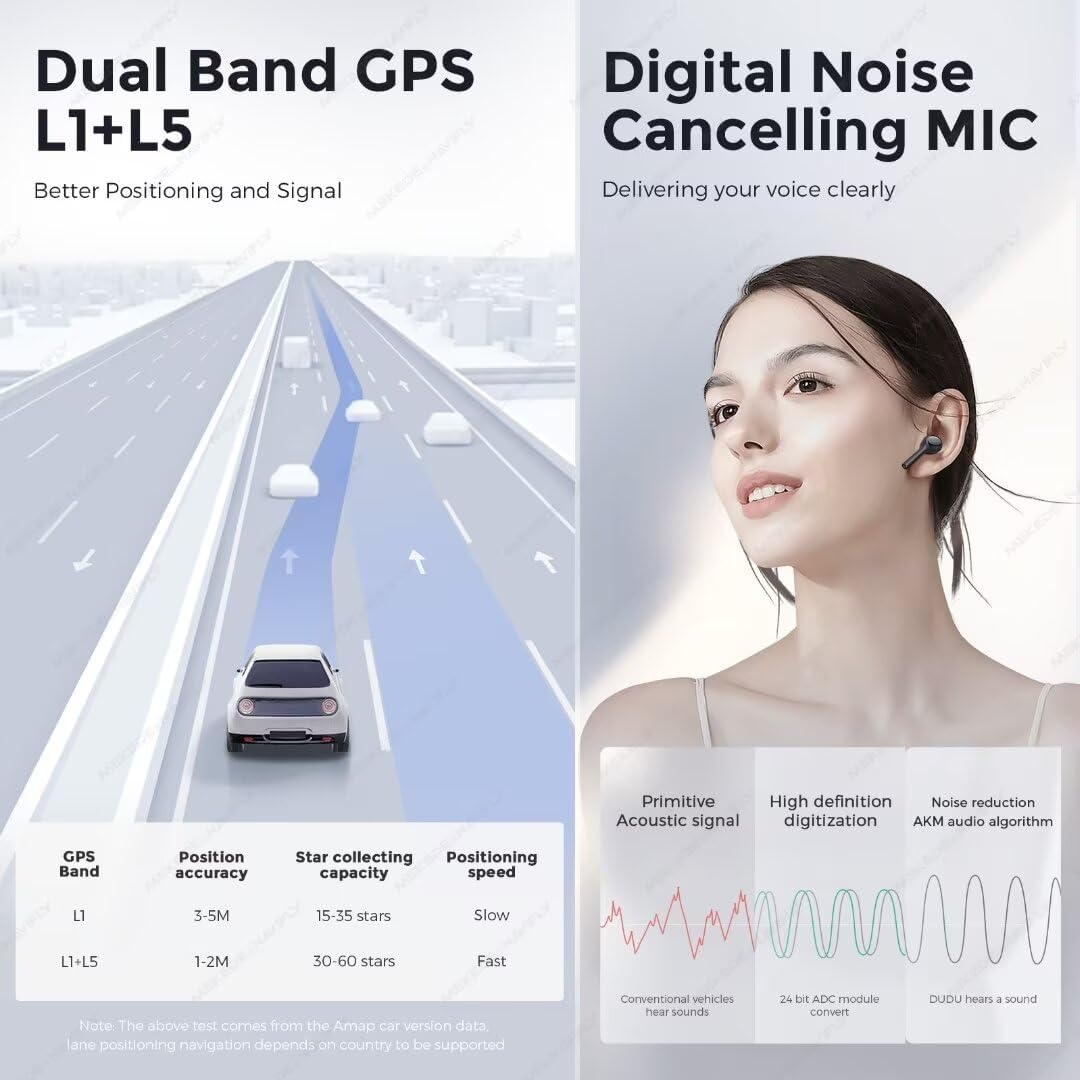
| Bahasa Indonesia: GPS | Dual Band 6 mode L1 L5 B1 B2a E1 E5a |
| Mikropon | Digital Noise Cancellation Microphone |
| Port USB | USB 3.2 GEN1*1 (TYPE-C), USB2.0*3 |
| Kekuatan Amppengangkat | TDA7808 Digital AB type |
| DSP | AKM7739 Velvet Audio Technology |
| Bahasa Indonesia: Bluetooth | Qualcomm 3031, BT5.0, supports aptx HD protocol |
| Keluaran Audio | Optical + Coaxial, RCA 5.1 Channel Outputs |
| Akses Internet Nirkabel | 802.11a/b/g/n/ac, Support 5G WIFI |
| Radio IC | TDA7708 |
| CarPlay / Android Auto | Support Wired and Wireless CarPlay and Android Auto |
| Kompatibilitas Kendaraan | Hyundai Sonata 6 YF (2009-2014) |
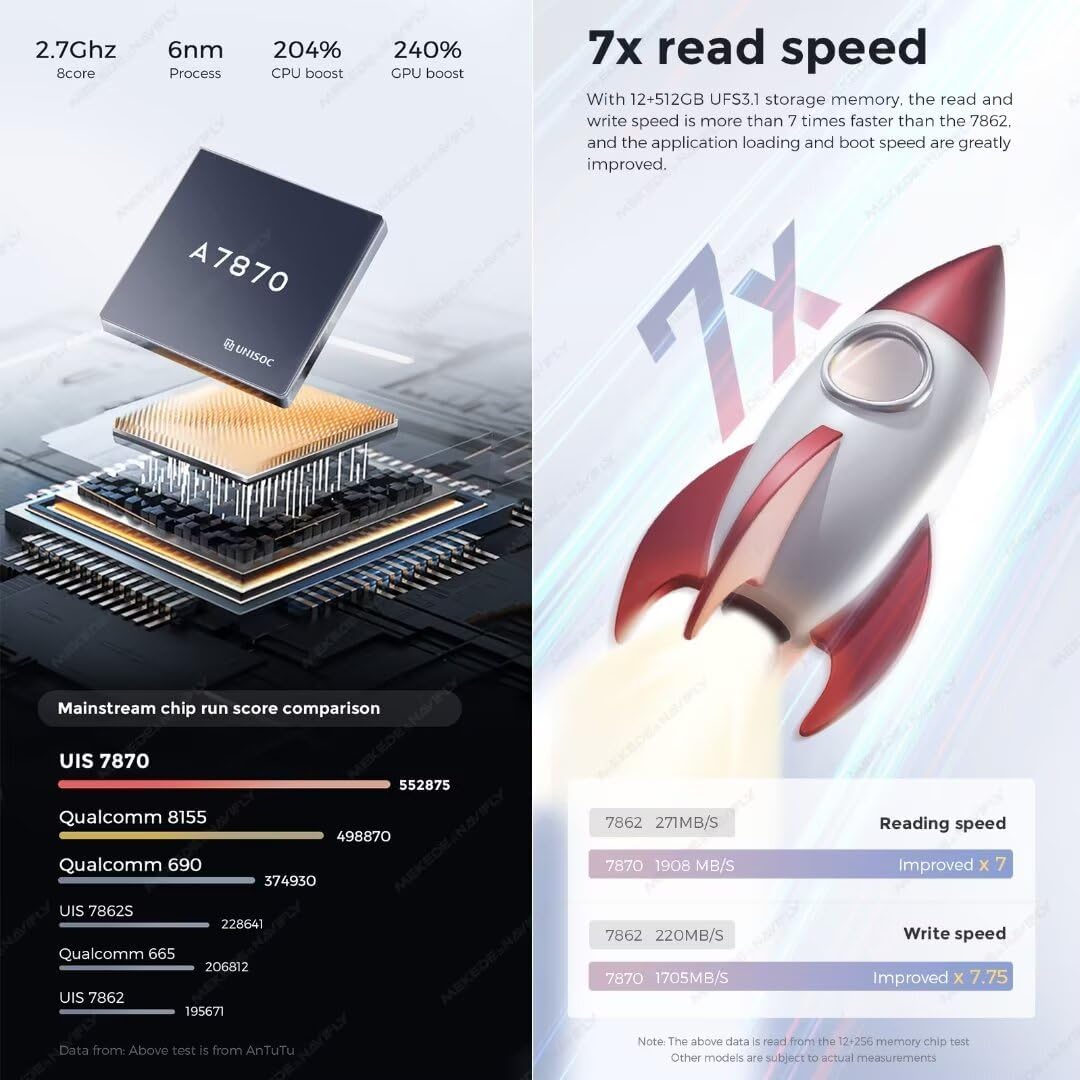
Gambar 3.2: Performance overview of the UIS 7870 processor, highlighting CPU and GPU boost.
Gambar 3.3: Illustration of the UFS 3.1 storage read and write speed improvements.

Gambar 3.4: Explanation of Dual Band GPS L1+L5 for improved positioning and the Digital Noise Cancelling Microphone for clear voice transmission.

Gambar 3.5: Details on the AKM7739 DSP Velvet Audio Technology for enhanced acoustic experience.
4. Panduan Instalasi
Professional installation is recommended. Disconnect the vehicle's battery before beginning installation. Refer to your vehicle's service manual for specific dashboard disassembly instructions.
4.1 Pemeriksaan Pra-Instalasi
- Pastikan kendaraan dimatikan dan rem parkir diaktifkan.
- Disconnect the negative terminal of the car battery to prevent electrical shorts.
- Pastikan semua isi paket lengkap dan tidak rusak.
4.2 Identifikasi Komponen

Gambar 4.1: Belakang view of the DUDU7 head unit, indicating various ports for power, antennas, USB, and audio/video connections.
Familiarize yourself with the rear connections of the DUDU7 unit:
- Power Cable (G): Connects to the vehicle's power harness via the Canbus box.
- Radio Antenna (8): Untuk penerimaan radio FM/AM.
- WIFI Antenna (7): Untuk konektivitas internet nirkabel.
- Antena GPS (6): For navigation and positioning.
- 4G Antenna (4): Untuk konektivitas data seluler.
- Type-C USB 3.2 GEN1 (8): Port USB berkecepatan tinggi.
- 4Pin USB (E) & 6Pin USB (D): Port USB tambahan untuk perangkat periferal.
- Reverse Video Cable (F): For connecting a reversing camera.
- RCA Cable (A): Untuk input/output audio/video.
- Coaxial/Optical Audio Out: Untuk terhubung ke eksternal amplifiers or DSPs.
- mikrofon (0): Masukan mikrofon eksternal.
4.3 Langkah Instalasi
- Carefully remove the original car radio and dashboard trim. Refer to your vehicle's specific disassembly guide.
- Connect the provided power cable and Canbus box to the DUDU7 head unit and the vehicle's wiring harness. Ensure all connections are secure.
- Connect the GPS antenna, 4G antenna, and WiFi antenna to their respective ports on the DUDU7 unit. Position the antennas in locations that provide optimal signal reception, away from metal obstructions.
- If installing a reversing camera or other external devices, connect their cables to the appropriate ports (e.g., Reverse Video Cable, RCA cables).
- Connect the USB cables and route them to a convenient location within the dashboard or glove compartment.
- Mount the DUDU7 head unit into the dashboard opening using the provided dash kit and mounting brackets. Ensure it is securely fastened.
- Hubungkan kembali baterai kendaraan.
- Turn on the vehicle's ignition and test the DUDU7 unit's basic functions (power, audio, touch screen, radio).
- Reassemble the dashboard trim, ensuring no wires are pinched.

Gambar 4.2: Visual comparison of the car's dashboard before and after the DUDU7 head unit installation.
5. Panduan Operasi
The DUDU7 operates on Android 13, offering a user-friendly interface. The touch screen is the primary method of interaction.

Gambar 5.1: The DUDU7 main interface showing navigation, media, and system information.
5.1 Fungsi Dasar
- Daya Hidup/Mati: The unit typically powers on with the vehicle's ignition. A long press on the power button (if available) may turn it off or put it to sleep.
- Kontrol Volume: Atur volume menggunakan kontrol di layar atau kontrol di roda kemudi (jika dikonfigurasi).
- Layar Sentuh: Navigate through menus and applications by tapping, swiping, and pinching on the capacitive touch screen.
5.2 Navigasi
The DUDU7 features a Dual Band 6-mode GPS system for accurate positioning. Pre-installed navigation applications or those downloaded from the app store can be used.
- Pastikan antena GPS memiliki visibilitas yang jelas view langit untuk penerimaan sinyal yang optimal.
- Open your preferred navigation app and follow its instructions for setting destinations and routes.
5.3 CarPlay dan Android Auto
The unit supports both wired and wireless Apple CarPlay and Android Auto.
- Koneksi Nirkabel:
- Aktifkan Bluetooth dan Wi-Fi di ponsel cerdas Anda.
- On the DUDU7, open the CarPlay/Android Auto application.
- Pair your phone via Bluetooth with the DUDU7. Follow the on-screen prompts to establish the wireless connection.
- Koneksi Kabel:
- Connect your smartphone to one of the DUDU7's USB ports using a high-quality USB cable.
- The unit should automatically detect your phone and launch CarPlay or Android Auto.
5.4 Konektivitas Bluetooth
Utilize the Qualcomm 3031 Bluetooth 5.0 chip for hands-free calling and audio streaming.
- Go to the Bluetooth settings on the DUDU7.
- Aktifkan Bluetooth pada perangkat Anda dan cari perangkat yang tersedia.
- Select the DUDU7 from the list and pair. Confirm the pairing code if prompted.
- Once connected, you can make calls, play music, and use other Bluetooth features.
5.5 Pengaturan Audio (DSP)
The AKM7739 DSP with Velvet Audio Technology allows for advanced audio customization.
- Akses pengaturan DSP melalui menu audio atau suara.
- Adjust equalizer settings, sound stage, and other audio parameters to your preference.
Gambar 5.2: Lebihview of the DUDU OS 3.0 user interface, showcasing customizable dynamic wallpapers and application layout.
6. Pemeliharaan
Regular maintenance ensures the longevity and optimal performance of your DUDU7 head unit.
- Pembersihan Layar: Use a soft, lint-free cloth specifically designed for electronics screens. Do not use abrasive cleaners or solvents. Gently wipe the screen to remove dust and fingerprints.
- Pembaruan Perangkat Lunak: Periodically check for system updates through the unit's settings menu or the manufacturer's website. Keeping the software updated can improve performance and add new features.
- Ventilasi: Ensure the cooling fan and ventilation openings on the unit are not obstructed to prevent overheating.
- Koneksi Kabel: Periodically check that all cables are securely connected, especially after driving on rough terrain.
7. Penyelesaian masalah
This section addresses common issues you might encounter with your DUDU7 head unit.
| Masalah | Kemungkinan Penyebab | Larutan |
|---|---|---|
| Unit tidak menyala. | Sambungan listrik longgar, sekering putus, masalah baterai kendaraan. | Periksa sambungan kabel daya. Periksa sekering kendaraan. Pastikan aki mobil terisi penuh. |
| Tidak ada suara dari speaker. | Volume too low, mute activated, incorrect wiring, ampmasalah lifier. | Increase volume. Check if unit is muted. Verify speaker wiring. Check external amppenguat jika digunakan. |
| Sinyal GPS lemah atau tidak akurat. | GPS antenna obstructed or improperly placed, antenna faulty. | Pindahkan antena GPS ke posisi dengan pandangan yang jelas. view of the sky. Ensure antenna cable is securely connected. |
| Masalah koneksi Bluetooth. | Device not discoverable, incorrect pairing, interference. | Pastikan Bluetooth diaktifkan di kedua perangkat. Hapus pasangan sebelumnya dan pasangkan kembali. Mendekatlah ke unit. |
| CarPlay/Android Auto tidak terhubung. | Incorrect settings, faulty USB cable, phone software issue. | Check CarPlay/Android Auto settings on both unit and phone. Try a different USB cable. Restart phone and unit. |
| Layar sentuh tidak responsif. | Gangguan perangkat lunak sementara, kerusakan layar. | Restart perangkat. Jika masalah berlanjut, hubungi dukungan. |
If the problem persists after attempting these solutions, please contact MekedeTech customer support for further assistance.
8. Dukungan Pelanggan dan Garansi
8.1 Dukungan Pelanggan
For technical assistance, troubleshooting beyond this manual, or inquiries regarding your MekedeTech DUDUAUTO DUDU7, please visit the official MekedeTech store or contact their customer service department.
- Dukungan online: Visit the MekedeTech Store on Amazon
- Silakan lihat dokumen pembelian Anda untuk informasi kontak spesifik.
8.2 Informasi Garansi
MekedeTech products are covered by a manufacturer's warranty. The duration and terms of the warranty may vary by region and product. Please retain your proof of purchase for warranty claims.
- Garansi biasanya mencakup cacat pada bahan dan pengerjaan dalam penggunaan normal.
- Damage resulting from improper installation, accident, misuse, unauthorized repair, or modification is generally not covered.
- For detailed warranty terms and conditions, please consult the warranty card included with your product or contact MekedeTech customer support.


