
1. Pendahuluan
Thank you for choosing the DEVAISE Electric Standing Desk. This manual provides detailed instructions for the assembly, operation, and maintenance of your new adjustable height desk. Designed for both home and office environments, this desk features a seamless whole-piece desktop, a robust dual-motor lift system, and convenient memory presets for effortless height adjustments.
Please read this manual thoroughly before assembly and use to ensure proper function and safety.
2. Petunjuk Keselamatan
- Pastikan semua komponen terpasang dengan kencang sebelum digunakan.
- Jauhkan anak-anak dan hewan peliharaan dari meja selama pengoperasian.
- Do not place hands or objects near moving parts during height adjustment.
- Avoid overloading the desk. The maximum weight capacity is 180 lbs.
- Do not modify the desk or its components. Use only original parts.
- Putuskan sambungan daya sebelum membersihkan atau melakukan pemeliharaan apa pun.
- Pastikan kabel listrik tidak terjepit atau rusak.
- The desk is equipped with anti-collision sensors. Do not intentionally obstruct its movement.
3. Isi Paket
Before beginning assembly, verify that all parts are present and undamaged. Refer to the image below for a visual representation of the components included in your package.

Gambar 3.1: All components of the DEVAISE standing desk laid out for quick installation, including the desktop, leg frames, feet, control panel, and various hardware. All holes are pre-drilled and accessories are clearly labeled for easy identification.
The package includes the whole-piece desktop, dual leg frames, desk feet, the electric control box, digital control panel, power adapter, and all necessary screws and tools for assembly.
4. Pengaturan dan Perakitan
The DEVAISE Electric Standing Desk is designed for quick and easy assembly, typically completed within 15 minutes. Follow these steps for a smooth setup:
- Bongkar Komponen: Keluarkan semua bagian dari kemasan dengan hati-hati dan letakkan di atas permukaan yang bersih dan rata. Periksa dengan daftar isi kemasan.
- Pasang Rangka Kaki: Secure the leg frames to the pre-drilled holes on the underside of the desktop using the provided screws. Ensure they are aligned correctly.
- Pasang Kaki Penyangga: Attach the desk feet to the bottom of the leg frames.
- Mount Control Box and Panel: Secure the electric control box and the digital control panel to the designated areas under the desktop.
- Hubungkan Kabel: Connect all motor cables and the power cable to the control box. Ensure all connections are firm.
- Manajemen Kabel: Utilize the integrated cable holes on the desktop and any provided cable ties to manage wires neatly, preventing tangles and ensuring smooth operation.
- Nyalakan: Plug the power adapter into a wall outlet and then into the control box.
For visual guidance, refer to the assembly diagram in the included step-by-step user guide.
5. Petunjuk Pengoperasian
5.1 Panel Kontrol Digital
Your DEVAISE standing desk is equipped with an intuitive digital control panel for easy height adjustments and memory functions. The panel features an LED display, up/down buttons, and three memory preset buttons.

Gambar 5.1: The digital control panel allows for precise height adjustments and saving preferred positions.
- Display LED: Menunjukkan tinggi meja saat ini dalam inci.
- Up & Down Buttons (▲ / ▼): Press and hold to smoothly adjust the desk height upwards or downwards. Release to stop at the desired height.
- Memory Height Buttons (1, 2, 3): These buttons allow you to save and recall up to three preferred desk heights.
- 'S' Button (Set): Used to save a new memory preset.
5.2 Menyesuaikan Ketinggian
To adjust the desk height, simply press and hold the Up (▲) or Down (▼) button until the desk reaches your desired position. The desk can be adjusted between 28.35 inches and 46.46 inches.
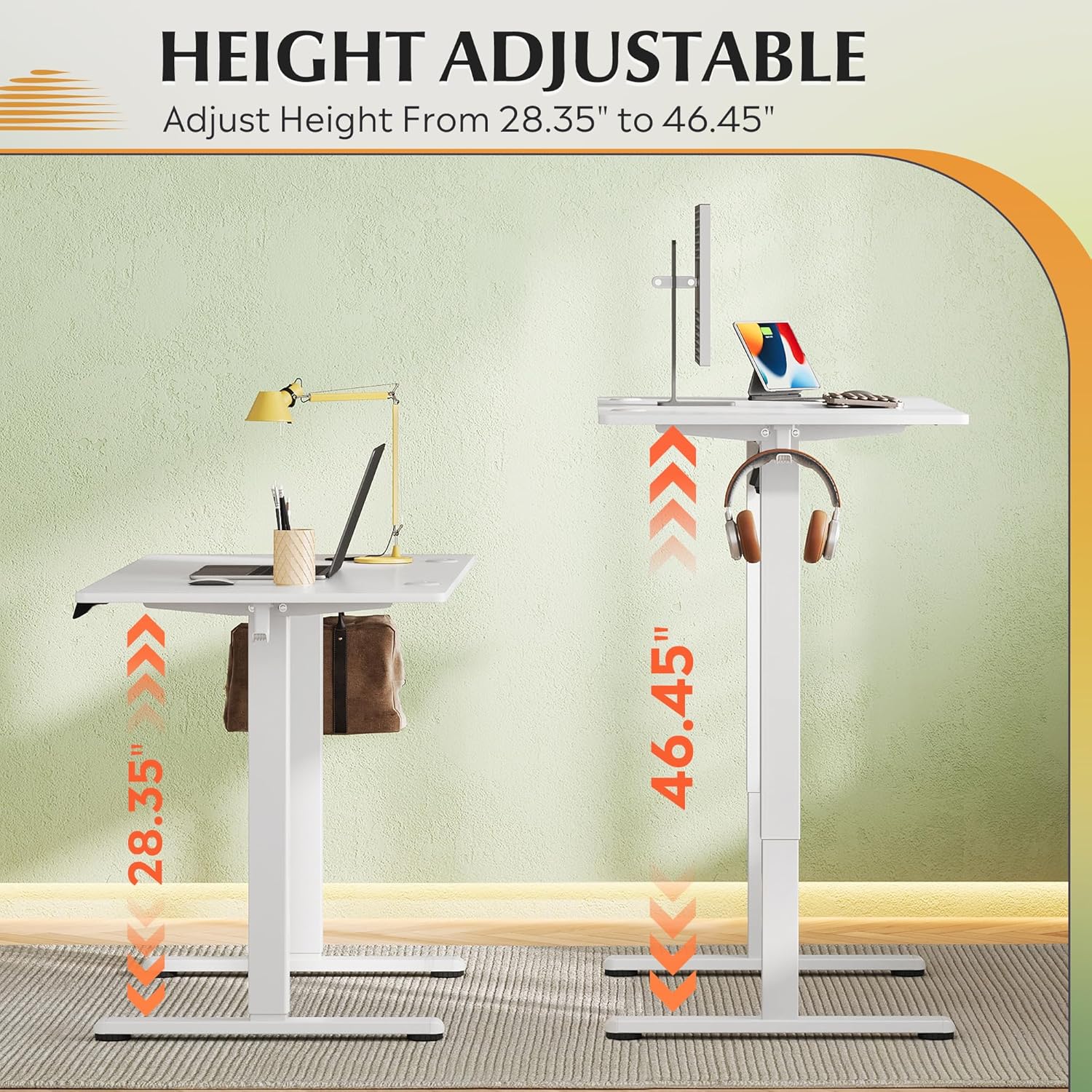
Gambar 5.2: The desk offers a wide height adjustment range from 28.35 inches to 46.46 inches.
5.3 Mengatur Preset Memori
To save a specific height to a memory preset (1, 2, or 3):
- Sesuaikan ketinggian meja sesuai keinginan Anda menggunakan tombol Naik/Turun.
- Press the 'S' button. The LED display will show 'S-'.
- Within 3 seconds, press the desired memory button (1, 2, or 3). The display will show 'S-1', 'S-2', or 'S-3' to confirm the setting.
To recall a saved height, simply press the corresponding memory button (1, 2, or 3). The desk will automatically move to the saved position.
5.4 Anti-Collision Feature
The desk is equipped with an anti-collision system. If the desk encounters an obstacle during height adjustment, it will automatically stop and reverse slightly to prevent damage. Ensure the area around the desk is clear before operation.
6. Pemeliharaan
- Pembersihan: Usap permukaan meja dan bingkai dengan kain lembut.amp kain. Hindari bahan kimia keras atau pembersih abrasif.
- Inspeksi: Periksa semua sekrup dan sambungan secara berkala untuk memastikan kekencangannya. Kencangkan kembali jika perlu.
- Manajemen Kabel: Ensure cables remain tidy and are not caught or pinched by moving parts.
- Pelumasan: The lift mechanism is designed to be maintenance-free and does not require lubrication.
7. Penyelesaian masalah
If you encounter any issues with your DEVAISE Electric Standing Desk, please refer to the following common troubleshooting steps:
| Masalah | Kemungkinan Penyebab | Larutan |
|---|---|---|
| Meja tidak bergerak. | Power cord disconnected; Control box not properly connected; Overload. | Check power connections. Ensure all cables are securely plugged into the control box. Reduce weight on the desk. |
| Meja bergerak tidak rata atau menimbulkan suara yang tidak biasa. | Loose connections; Obstruction; Uneven weight distribution. | Check all screws and connections. Remove any obstructions. Distribute weight evenly on the desktop. |
| Kode kesalahan ditampilkan pada panel kontrol. | Kesalahan sistem tertentu. | Refer to the detailed error code list in the full user manual (if applicable) or contact customer support. Try unplugging and replugging the power after 30 seconds. |
| Anti-collision feature triggers too often. | Sensitivity setting; Obstruction. | Ensure no objects are in the path of the desk's movement. If the issue persists, contact customer support for potential sensitivity adjustment. |
If the problem persists after attempting these solutions, please contact DEVAISE customer service for further assistance.
8. Spesifikasi

Gambar 8.1: Key dimensions and weight capacity of the DEVAISE Electric Standing Desk.
| Fitur | Spesifikasi |
|---|---|
| Merek | MENYINGKIRKAN |
| Dimensi Produk | 23.62"Panjang x 47.24"Lebar x 28.34"T |
| Warna | Putih |
| Gaya | Klasik |
| Bahan Dasar | Besi |
| Jenis Bahan Atas | Kayu Rekayasa |
| Jenis Selesai | Belum selesai |
| Fitur Khusus | 3 Adjustable Height, Cable Hole, Electric, Ergonomic, Whole Piece Desktop |
| Tipe Kamar | Bedroom, Home, Office, Study Room, Writing |
| Penggunaan yang Direkomendasikan | Bekerja, Menulis |
| Kapasitas Berat Maksimum | 180 pon |
9. Garansi dan Dukungan
The DEVAISE Electric Standing Desk comes with a Garansi rangka 1 tahun, ensuring peace of mind regarding the structural integrity of your product.
For any questions, concerns, or technical assistance, our 24/7 US-based customer service team is available to help. Please have your model number and purchase information ready when contacting support.
You can reach DEVAISE customer service through the contact information provided on the official DEVAISE websitus atau melalui platform pembelian Anda.