
1. Pendahuluan
Thank you for choosing the CinusLinus 360-12 Green Laser Level. This device is designed to provide precise and accurate leveling for a wide range of applications, from home DIY projects to professional construction sites. Featuring a 4x360° green laser, self-leveling capabilities, and a versatile tripod, this tool enhances efficiency and accuracy in your work. Please read this manual thoroughly before operation to ensure safe and correct usage.
2. Informasi Keselamatan
Keselamatan Anda adalah yang terpenting. Mohon perhatikan tindakan pencegahan berikut:
- Radiasi Laser: This product emits Class II laser radiation (<1mW power output). Avoid direct eye exposure to the laser beam.
- Perlindungan Mata: Never stare directly into the laser beam. Doing so can cause permanent eye damage.
- Kondisi Lingkungan: Avoid outdoor usage or in environments with intense natural light, as this can significantly impair laser visibility. Direct sunlight will weaken the laser energy. It is best to use the device indoors.
- Anak-anak: Jauhkan perangkat dari jangkauan anak-anak.
- Pemeliharaan: Jangan mencoba membongkar atau memodifikasi level laser. Perbaikan hanya boleh dilakukan oleh petugas servis resmi.
3. Isi Paket
Pastikan semua barang ada saat dibuka kotaknya:
- CinusLinus 360-12 Laser Level Unit
- 46.45" Aluminum Laser Level Tripod
- Rechargeable Lithium-ion Batteries (4800mAh, 2 included)
- Kontrol Jarak Jauh
- Braket Magnetik
- Pangkalan Tripod Mini
- USB-C Charging Cable and Adapter
- Panduan Pengguna
4. Produk Lebihview
The CinusLinus 360-12 Laser Level features a robust design with intuitive controls for ease of use. It projects four 360° green laser lines (two horizontal, two vertical) for comprehensive coverage.
Komponen Utama:
- Pemancar Laser: Project bright green laser lines.
- Panel Kontrol: Features intelligent touch buttons for various modes and brightness adjustment.
- Kompartemen Baterai: Houses the rechargeable lithium-ion batteries.
- Port Pengisian Daya USB-C: Untuk pengisian daya yang mudah.
- Kunci/Buka Kunci Sakelar: Engages self-leveling or manual mode.
- Benang Pemasangan: Standard 1/4" thread for tripod attachment.
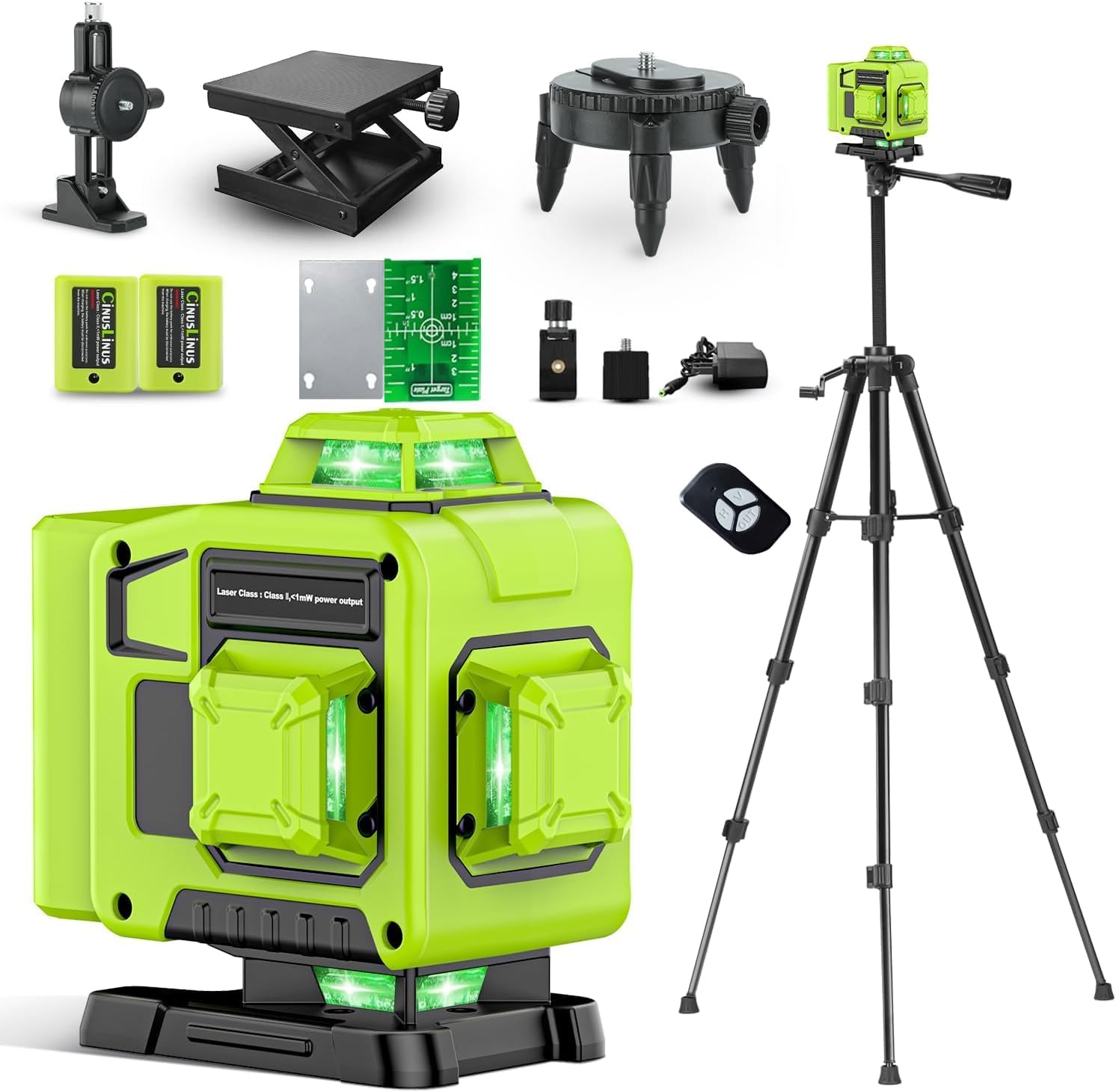
Figure 1: CinusLinus 360-12 Laser Level Unit
5. Pengaturan
5.1. Pemasangan dan Pengisian Baterai
- Buka penutup ruang baterai.
- Insert the two rechargeable lithium-ion batteries, ensuring correct polarity.
- Tutup penutup ruang baterai dengan rapat.
- To charge, connect the USB-C charging cable to the device and a power source using the provided adapter. The battery indicator on the device will show charging status.
Video 1: Unboxing, Setup, and Charging the Laser Level
5.2. Attaching to Tripod or Mount
- Locate the 1/4" mounting thread at the bottom of the laser level.
- Attach the device to the included 46.45" tripod or magnetic bracket by screwing it onto the mounting thread.
- Ensure the tripod legs are fully extended and stable before securing the bracket.

Figure 2: Laser Level mounted on the included tripod.

Figure 3: Different mounting options for the laser level.
6. Mode Operasi
The CinusLinus 360-12 offers multiple operating modes to suit your needs:
6.1. Mode Perataan Mandiri
- Slide the Lock/Unlock switch to the 'unlock' position.
- The tool will automatically adjust to a horizontal position within a ±4° range.
- If the tilt exceeds 4°, a flashing green laser and an auditory signal will indicate that the device is out of level. Adjust the device's position until it self-levels.
6.2. Modus Manual
- To engage Manual Mode, press and hold the central function button (often labeled 'OUT' or similar) for 2-3 seconds.
- In this mode, the self-leveling function is deactivated, allowing you to project laser lines at any desired angle, such as for diagonal lines on stairs.
6.3. Mode Pulsa
- A brief tap of the central function button activates Pulse Mode.
- This mode is intended for use with a laser receiver (not included) in diminished light scenarios or over longer distances to extend the working range.

Figure 4: Visual representation of Self-Leveling, Manual, and Pulse operating modes.
Video 2: Demonstration of Self-Leveling, Manual, and Remote Control Modes
7. Penyesuaian Kecerahan
The laser level allows for brightness adjustment to optimize visibility in various indoor lighting conditions:
- Press the "H" button to increase the green laser brightness.
- Press the "V" button to decrease the green laser brightness.
- Catatan: Brightness adjustment cannot be used simultaneously with Pulse Mode.
8. Operasi Kontrol Jarak Jauh
The included remote control provides convenient operation of the laser level from a distance, allowing you to adjust settings without disturbing the device's position.
- The remote control features buttons corresponding to the laser level's functions (e.g., horizontal line, vertical line, brightness adjustment).
- Simply press the desired function button on the remote to control the laser level.

Figure 5: Remote control in use for various laser level functions.
9. Aplikasi
The CinusLinus 360-12 Laser Level is suitable for a variety of tasks requiring precise alignment:
- Instalasi lantai
- Picture hanging
- Door and window fitting
- Proyek pengerjaan kayu
- Wallpaper installation
- Instalasi kabinet
- General construction and renovation projects

Figure 6: Multi-scenario use of the 4x360° laser level.
10. Pemeliharaan
Perawatan yang tepat memastikan umur panjang dan akurasi alat pengukur laser Anda:
- Pembersihan: Gunakan kain lembut dan kering untuk membersihkan perangkat. Jangan gunakan pembersih atau pelarut abrasif.
- Penyimpanan: Store the laser level in its carrying case in a dry, cool place when not in use. Remove batteries if storing for extended periods.
- Kalibrasi: Regular calibration checks are recommended to ensure continued accuracy. Refer to a professional for calibration services if needed.
- Perawatan Baterai: Charge batteries fully before first use and periodically during long storage to maintain battery health.
11. Penyelesaian masalah
Jika Anda mengalami masalah, lihat solusi umum berikut:
- Garis Laser Tidak Terlihat:
- Check ambient light conditions; green lasers are less visible in bright sunlight.
- Pastikan baterai terisi penuh.
- Adjust brightness using the 'H' button.
- Device Beeps and Laser Flashes in Self-Leveling Mode:
- The device is tilted beyond its ±4° self-leveling range. Adjust the device's position or the tripod until it is within range.
- Kendali Jarak Jauh Tidak Merespons:
- Ensure the remote control batteries are functional.
- Check for obstructions between the remote and the laser level.
12. Spesifikasi
| Fitur | Detil |
|---|---|
| Merek | Bahasa Indonesia: CinusLinus |
| Nomor Model | Nomor telepon 360-12 |
| Kelas Laser | Kelas II, <1mW |
| Warna Laser | Hijau |
| Garis Laser | 4x360° (2 Horizontal, 2 Vertikal) |
| Rentang Self-Leveling | ±4° |
| Indoor Visibility Range | Hingga 165 kaki |
| Sumber Daya | Bertenaga Baterai |
| Jenis Baterai | Lithium Ion (2 CR5 batteries included) |
| Kapasitas Baterai | 4800mAh (approx. 8-hour runtime) |
| Port Pengisian Daya | USB Tipe C |
| Bahan | Aluminium |
| Berat Barang | 2.4 kg |
| Dimensi Paket | Ukuran 40x25.8x12.4 cm |
| Negara Asal | Cina |
13. Garansi dan Dukungan
For warranty information, technical support, or service inquiries, please refer to the contact details provided with your purchase or visit the official CinusLinus websitus. Simpan struk pembelian Anda sebagai bukti pembelian untuk klaim garansi.