
Bietrun DX-GAC2000W
Bietrun 2000W Pure Sine Wave Inverter User Manual
Model: DX-GAC2000W
1. Pendahuluan
This manual provides essential information for the safe and efficient operation of your Bietrun 2000W Pure Sine Wave Inverter. Please read it thoroughly before installation and use, and retain it for future reference.
Isi Paket
Verifikasi bahwa semua item ada dalam paket:
- 1 x Bietrun 2000W Pure Sine Wave Inverter
- 2 x 10AWG 3-foot Battery Cables (Red and Black)
- 1 x Ground Cable
- 1x Kontrol Jarak Jauh
- 4 x Sekering
- 1 x Small Wrench
- Sekrup Pemasangan

Image 1.1: The Bietrun 2000W Pure Sine Wave Inverter with its remote control, battery cables, ground cable, fuses, and wrench.
2. Petunjuk Keselamatan
Observe the following safety precautions to prevent injury and damage to the inverter or connected devices:
- Jangan membuka inverter casing. Tidak ada bagian dalam yang dapat diservis pengguna.
- Pastikan ventilasi yang baik di sekitar inverter. Jangan menghalangi lubang ventilasi pendingin.
- Jauhkan inverter dari air, kelembapan, bahan yang mudah terbakar, dan sinar matahari langsung.
- Hubungkan inverter hanya ke sumber daya DC 12V. Menghubungkan ke tegangan lain akan menyebabkan masalah.tages dapat menyebabkan kerusakan.
- Ensure correct polarity when connecting battery cables (Red to Positive, Black to Negative). Reverse polarity will cause damage.
- Always connect the ground cable to a proper earth ground.
- Do not exceed the inverter's rated continuous power output (2000W) or peak surge power (4000W).
- Lepaskan inverter dari baterai sebelum melakukan perawatan atau pembersihan apa pun.
Fitur Perlindungan Terintegrasi
The inverter includes multiple protection mechanisms:
- Perlindungan Beban Berlebih
- Vol rendahtage Perlindungan
- Perlindungan GFCI
- Berlebihantage Perlindungan
- Perlindungan Suhu Berlebih
- Perlindungan Hubungan Pendek
- Perlindungan Koneksi Terbalik
- Proteksi Arus Lebih

Image 2.1: Visual representation of the inverter's comprehensive safety protection system.
3. Fitur Produk
The Bietrun 2000W Pure Sine Wave Inverter is designed for reliable power conversion with advanced features:
- Keluaran Gelombang Sinus Murni: Provides high-quality AC power (THD < 3%) suitable for sensitive electronics, ensuring stable operation and minimizing damage risk.
- Efisiensi Tinggi: Conversion efficiency exceeding 90% reduces energy loss.
- Daya Berkelanjutan: Delivers 2000W continuous power with a 4000W peak surge capacity.
- Keluaran Serbaguna: Features 4 AC outlets, 1 AC wiring terminal, 2 USB ports (5V/2.1A), and 1 Type-C port (5V/2.1A).
- HD LED Display: Provides real-time status updates including input/output voltage, charging status, battery status, current power, and fault codes.
- Kontrol Jarak Jauh: Allows for convenient power management from a distance.
- Operasi Tenang: High-efficiency cooling system with a low-noise fan maintains optimal operating temperature.
- Desain Kompak dan Tahan Lama: Encased in rugged Aluminum Alloy, with dimensions of 19 x 10 x 7 inches and a weight of 12.5 lbs.

Image 3.1: Key features of the Bietrun 2000W Pure Sine Wave Inverter.
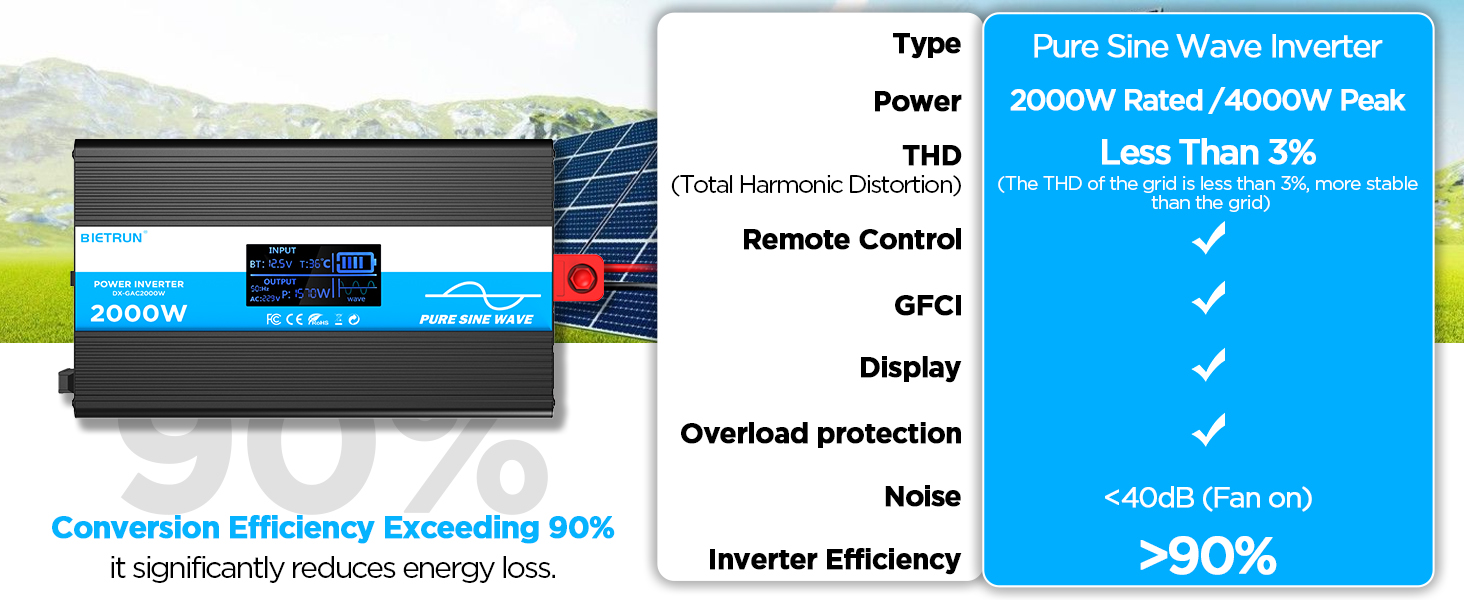
Image 3.2: Illustrates the stable, grid-like output of a pure sine wave inverter compared to unstable power from other types.
4. Pengaturan dan Instalasi
Lokasi dan Pemasangan
Choose a dry, well-ventilated location away from direct sunlight, heat sources, and flammable materials. The inverter can be wall-mounted using the provided screws.
Kompatibilitas Baterai
The inverter is compatible with various 12V battery types, including LiFePO4, LI, SLD, GEL, FLD, and AGM batteries.

Image 4.1: The inverter supports multiple 12V battery chemistries.
Langkah-langkah Koneksi
- Siapkan Kabel: Use the provided 10AWG 3-foot cables. Ensure all connections are secure.
- Connect Ground Cable: Attach the green/yellow ground cable to the inverter's ground terminal and to a reliable earth ground point.
- Hubungkan Kabel Baterai:
- Hubungkan merah kabel baterai ke inverter positif (+) terminal.
- Hubungkan hitam kabel baterai ke inverter negatif (-) terminal.
- Hubungkan ujung lainnya dari merah cable to the battery's positif (+) terminal.
- Hubungkan ujung lainnya dari hitam cable to the battery's negatif (-) terminal.
Penting: Ensure correct polarity. A spark may occur during the final connection, which is normal due to capacitor charging.
- Koneksi Aman: Double-check all connections for tightness to prevent loose contacts and overheating.
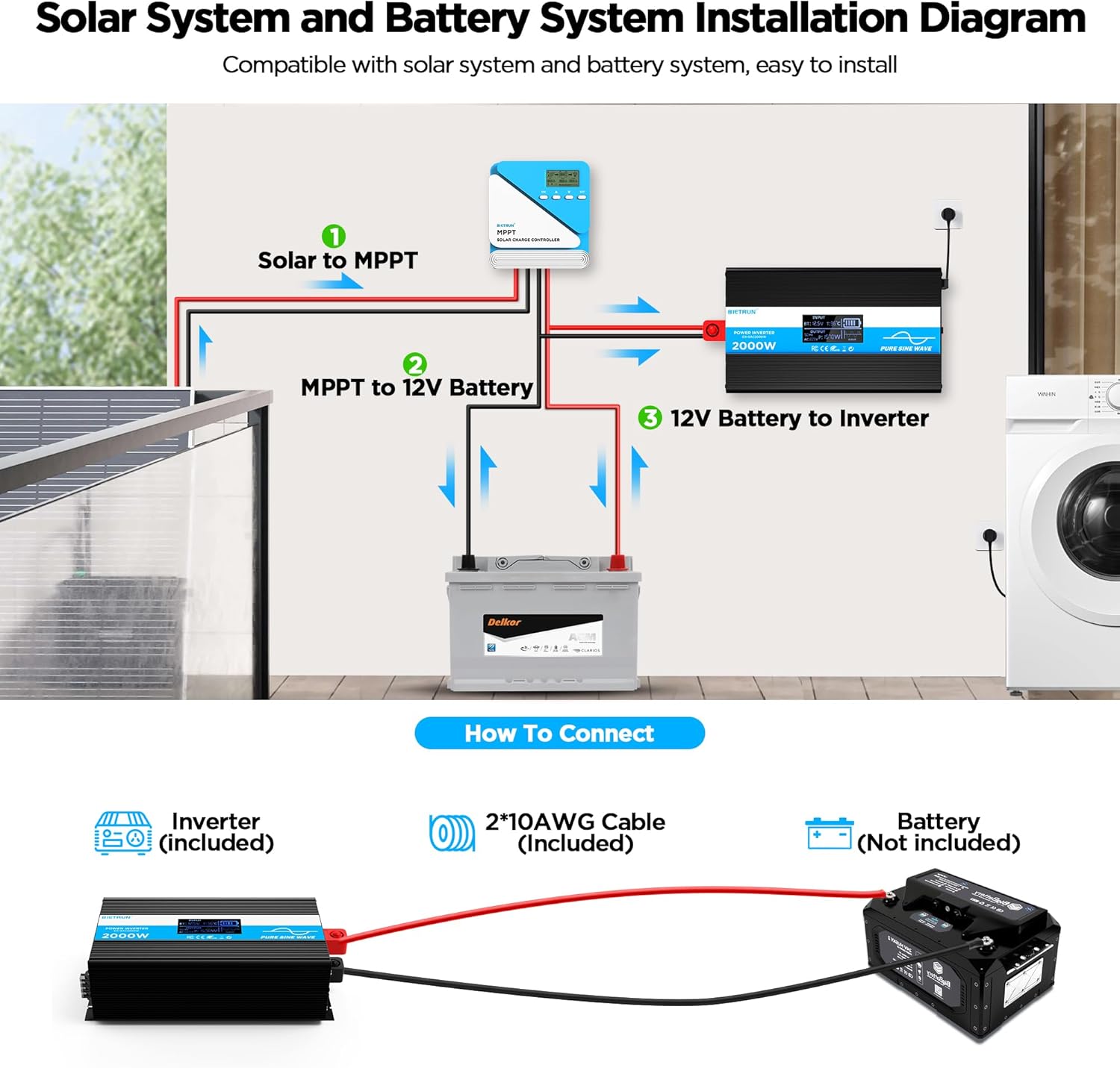
Image 4.2: Basic wiring diagram for connecting the inverter to a 12V battery.
Inverter Interface Overview

Image 4.3: Front panel layout with output interfaces and controls.

Image 4.4: Rear panel layout with battery input terminals and cooling fans.
5. Operasi
Menyalakan/Mematikan
- Operasi Manual: Flip the ON/OFF switch on the inverter to the 'ON' position to power on. Flip to 'OFF' to power off.
- Pengoperasian Remote Control: Ensure the inverter's 'REMOTE' switch is in the 'ON' position. Use the ON/OFF buttons on the remote control to operate the inverter.
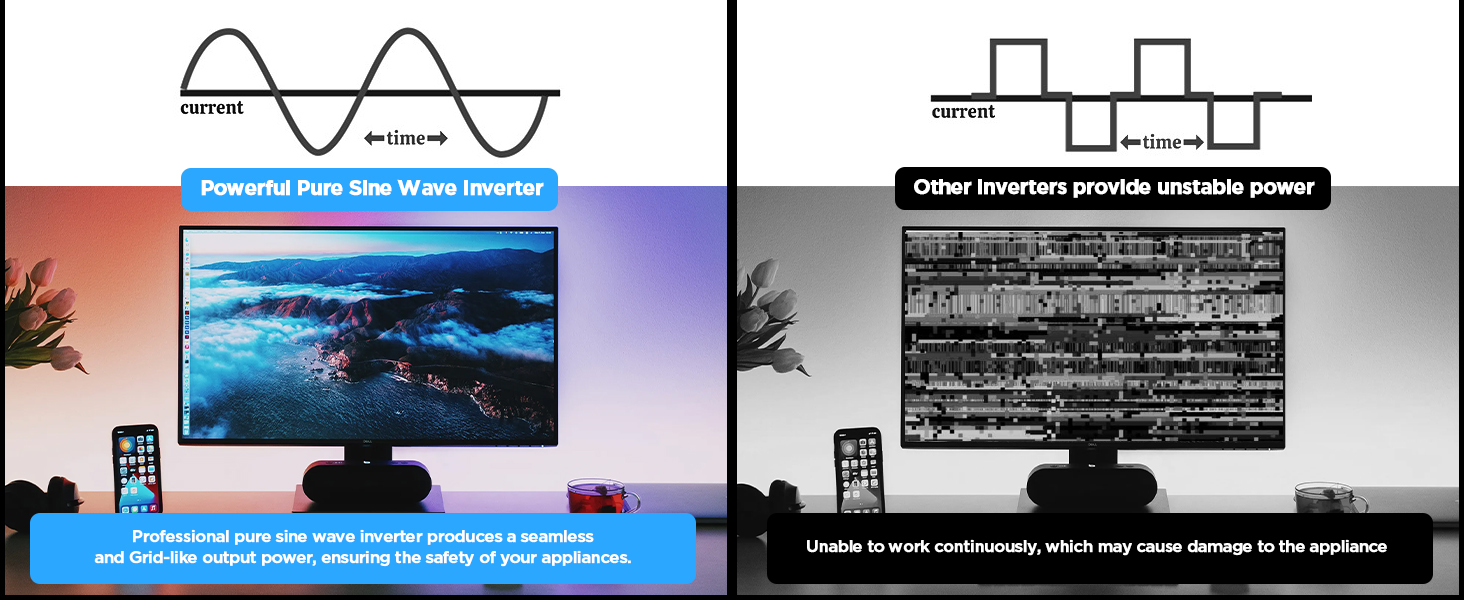
Image 5.1: The remote control allows for convenient operation.
Menghubungkan Perangkat
Once the inverter is powered on, plug your AC devices into the AC outlets or connect to the AC wiring terminal. USB devices can be connected to the USB or Type-C ports.
Ensure the total power consumption of all connected devices does not exceed 2000W continuously.
6. HD Display Information
The integrated HD display provides real-time operational data and fault indications:
- Masukan: Menampilkan volume bateraitage (BT) and internal temperature (T).
- Keluaran: Shows output frequency (Hz), AC voltage (AC), and current power consumption (P).
- Status Baterai: Visual indicator of battery charge level.
- Bentuk gelombang: Indicates pure sine wave output.
- Kode Kesalahan: Numeric codes appear for specific issues, aiding in troubleshooting.

Image 6.1: The HD display provides comprehensive status updates and fault codes.
Deskripsi Kode Kesalahan
- 2: Vol rendahtage Peringatan
- 3: Berlebihantage Perlindungan
- 4: Vol rendahtage Perlindungan
- 5: Peringatan Kelebihan Beban
- 6: Perlindungan Beban Berlebih
- 7: Perlindungan Suhu Berlebih
- 8: Proteksi Sirkuit Pendek Output
7. Penyelesaian masalah
If the inverter is not functioning correctly, refer to the display for fault codes and consult the table below:
| Masalah | Kemungkinan Penyebab | Larutan |
|---|---|---|
| Inverter tidak menyala | Sambungan baterai longgar, volume baterai rendahtage, faulty fuse. | Check battery cable connections. Recharge or replace battery. Check and replace fuses if blown. |
| No AC output (Fault Code 8) | Keluaran hubung singkat. | Disconnect all AC loads. Check for short circuits in connected devices or wiring. Reconnect one by one. |
| Overload warning/protection (Fault Code 5/6) | Beban terhubung melebihi kapasitas inverter. | Reduce the total power of connected devices. Disconnect high-power appliances. |
| Volume rendahtage warning/protection (Fault Code 2/4) | Volume bateraitage terlalu rendah. | Recharge the battery. Check battery health. |
| Berlebihantage protection (Fault Code 3) | Volume masukantage terlalu tinggi. | Verifikasi volume bateraitage is within the 12V range. Disconnect from charging source if overcharging. |
| Overtemperature protection (Fault Code 7) | Inverter is overheating. | Ensure adequate ventilation. Reduce load. Allow inverter to cool down. Clean fan vents if obstructed. |
If the fault persists after attempting the solutions, contact customer support.
8. Spesifikasi
| Fitur | Spesifikasi |
|---|---|
| Nomor Model | DX-GAC2000W |
| Daya Berkelanjutan | 2000W |
| Kekuatan Lonjakan Puncak | 4000W |
| Masukan Voltage | Tegangan DC12V |
| Volume Keluarantage | Tegangan listrik 110V-120V |
| Bentuk Gelombang Keluaran | Gelombang Sinus Murni |
| Distorsi Harmonik Total (THD) | < 3% |
| Efisiensi Konversi | > 90% |
| Outlet AC | 4 |
| Port USB | 2 (5V/2.1A) |
| Port Tipe-C | 1 (5V/2.1A) |
| Dimensi (P x L x T) | 19x10x7 inci |
| Berat Barang | 11.13 pon |
| Sistem Pendingin | Kipas Pendingin Ganda |
9. Pemeliharaan
Perawatan rutin memastikan kinerja optimal dan umur pakai inverter Anda lebih lama:
- Pembersihan: Bersihkan bagian luar inverter secara berkala dengan kain kering dan lembut. Pastikan ventilasi pendingin bebas dari debu dan kotoran. Jangan gunakan cairan pembersih.
- Pemeriksaan Koneksi: Periksa kekencangan dan korosi pada sambungan kabel baterai secara berkala. Bersihkan korosi dengan sikat kawat dan larutan soda kue.
- Ventilasi: Ensure the inverter always has adequate airflow. Do not operate in enclosed spaces without ventilation.
- Penggantian Sekring: If a fuse blows, replace it only with a fuse of the same type and rating as specified in the package contents.
10. Garansi dan Dukungan
For warranty information or technical support, please refer to the contact details provided with your purchase or visit the official Bietrun websitus. Simpan struk pembelian Anda sebagai bukti pembelian.