
Perkenalan
Thank you for choosing the Ensenior 52 Inch Smart Ceiling Fan with Light. This manual provides detailed instructions for the safe installation, operation, and maintenance of your new ceiling fan. Please read this manual thoroughly before installation and keep it for future reference.
Video: Selesaiview of the Ensenior 52 Inch Smart Ceiling Fan with Light, showcasing its features and design in a living space.
Pengaturan dan Instalasi
This ceiling fan is designed for easy installation. Follow the steps below carefully. Professional installation is recommended if you are unsure about any part of the process.
Pertimbangan Pra-Instalasi
- The fan includes 6-inch and 10-inch downrods to accommodate various ceiling heights.
- It supports angled mounts for sloped ceilings up to 10 degrees.
- Ensure the mounting location can support the fan's weight (approximately 12.97 pounds).
Langkah-langkah Instalasi
- Install the Hanger Bracket: Securely attach the hanger bracket to your ceiling's electrical box. Ensure it is firmly mounted to a structural beam.
- Assemble Fan Components: Attach the downrod to the motor housing. Feed the wires through the downrod.
- Pasang Bilah Kipas: Secure each of the five fan blades to the motor housing using the provided screws. The blades are reversible, offering a choice between a dark wood grain and a solid black finish.
- Pasang Lampu LED: Connect the LED light module to the fan's wiring and secure it to the bottom of the motor housing.
- Hubungkan Kipas Angin: Hubungkan kabel listrik kipas ke instalasi listrik rumah Anda sesuai dengan peraturan kelistrikan setempat. Pastikan semua sambungan terpasang dengan aman.
- Gantung Perlengkapannya: Carefully lift the fan assembly and hang it onto the installed hanger bracket. Secure the canopy to cover the wiring.

Image: Step-by-step visual guide for installing the Ensenior 52 Inch Smart Ceiling Fan.
Video: Detailed installation guide for the Ensenior 52 Inch Smart Ceiling Fan.

Image: Downrod options and sloped ceiling compatibility for installation.

Image: Reversible fan blades, allowing choice between dark wood grain and black finishes.
Petunjuk Pengoperasian
Your Ensenior Smart Ceiling Fan offers multiple convenient control methods to enhance your comfort.
Metode Pengendalian
- Kontrol Jarak Jauh: Use the included remote for direct control over fan speeds, light settings, and timer functions.
- Kontrol Aplikasi Cerdas: Connect the fan to the Smartlife/Tuya app (2.4GHz Wi-Fi required) for comprehensive control from your smartphone or tablet.
- Kontrol Suara: Integrate with Alexa or Google Assistant for hands-free operation. Simply say, "Alexa, turn on the fan."

Image: Three ways to control your smart ceiling fan: App, Alexa, and Remote.
Video: Demonstrates the various control options for the Ensenior Ceiling Fan, including remote, app, and voice commands.
Fungsi Kipas
- Motor DC 6 Kecepatan yang Dapat Berputar Balik: Adjust airflow with six fan speeds. The reversible motor allows for downdraft (cooling in summer) and updraft (circulating warm air in winter) modes.
- Operasi Tenang: The DC motor operates at less than 35dB, ensuring a quiet environment.

Image: Fan speed settings and reversible motor function for year-round comfort.
Fitur Pencahayaan
- Suhu Warna yang Dapat Disesuaikan: Choose from 3000K (warm white), 4000K (natural white), and 6000K (clear white) to set the desired ambiance.
- Kecerahan yang Dapat Diredupkan: Adjust the light brightness from 1% to 100% (2500 lumens) to suit your needs.
- Fungsi Memori Ringan: The fan remembers your last light setting when turned off and on.
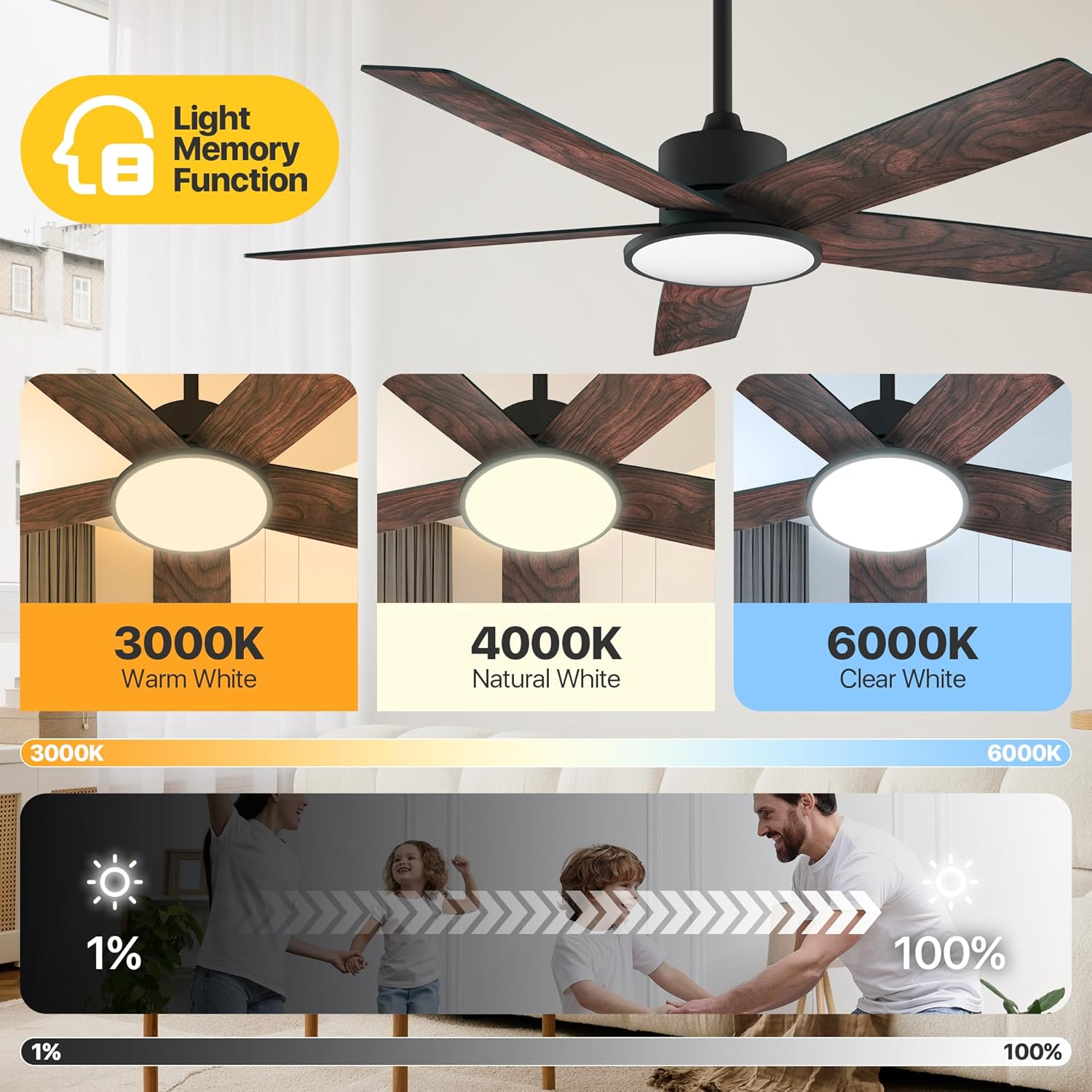
Image: Adjustable color temperatures and dimmable brightness for the integrated LED light.
Pengaturan Timer
Utilize the timer function via the remote or app to schedule fan and light operation, promoting energy efficiency and convenience.

Image: App interface for setting the fan's timer and illustrating quiet operation.
Pemeliharaan
Perawatan rutin memastikan kinerja optimal dan umur kipas langit-langit Anda.
- Pembersihan: Bersihkan bilah kipas dan rumah motor secara berkala dengan kain lembut dan kering.amp cloth. Avoid using abrasive cleaners that may damage the finish.
- Kekencangan Pisau: Check blade screws annually to ensure they are secure. Loose blades can cause wobbling and noise.
- Sumber Cahaya: The integrated LED light module is designed for long-term use and typically does not require replacement.
Penyelesaian Masalah
Jika Anda mengalami masalah dengan kipas Anda, lihat solusi umum berikut:
| Masalah | Kemungkinan Penyebab | Larutan |
|---|---|---|
| Kipas tidak mulai | No power supply; Loose wiring; Remote/App not paired. | Check circuit breaker; Verify all wire connections; Re-pair remote/app. |
| Kipas bergetar | Sekrup bilah longgar; Bilah tidak seimbang; Braket pemasangan longgar. | Tighten all blade screws; Use balancing kit (if included); Ensure mounting bracket is secure. |
| Lampu tidak bekerja | Loose light wiring; Faulty LED module. | Check light connections; Contact customer support if LED module is faulty. |
| Remote tidak berfungsi | Baterai habis; Remote belum dipasangkan. | Replace batteries; Re-pair the remote with the fan. |
Jika masalah berlanjut setelah mencoba solusi ini, hubungi dukungan pelanggan.
Spesifikasi
Detailed technical specifications for the Ensenior 52 Inch Smart Ceiling Fan.
| Fitur | Detil |
|---|---|
| Merek | Senior |
| Nama Model | Kipas Langit-langit dengan Lampu |
| Nomor Model Barang | ZF2-52-5Y-SM |
| Ukuran | 52 inci |
| Dimensi Produk | 51.97"Panjang x 51.97"Lebar x 17.99"T |
| Berat Barang | 12.97 pon |
| Jumlah Bilah | 5 |
| Tipe Motor | DC |
| Jumlah Tingkat Daya | 6 |
| Kapasitas Aliran Udara | 5500 Kaki Kubik Per Menit |
| Tingkat Kebisingan | 35 Desibel |
| Apatage | 33 watt |
| Metode Kontrol | Aplikasi, Remote, Suara |
| Fitur Khusus | App Operable, LED Light, Quiet Reversible DC Motor, Remote Controlled, Timer |
| Suhu Warna Cahaya | 3000K-6000K Dimmable LED |
| Komponen yang Termasuk | Kit Cahaya |
| Penggunaan Dalam/Luar Ruangan | Dalam |
| Jenis Pemasangan | Pemasangan di Langit-langit |
| Sumber Daya | Arus bolak-balik |
| UPC | 769044681834 |

Image: Product dimensions and recommended room size for the 52-inch fan.

Image: Benefits of the high-efficiency DC motor, including energy savings and quiet operation.
Garansi dan Dukungan
The Ensenior 52 Inch Smart Ceiling Fan is backed by a Garansi 3 tahun. For any questions, technical assistance, or warranty claims, please contact our professional customer support team. Refer to your purchase documentation for specific contact details.