
1. Pendahuluan
This manual provides detailed instructions for the setup, operation, maintenance, and troubleshooting of your Transformers TF-Crystal 85 Keys Mechanical Keyboard. Please read this manual thoroughly before using the product to ensure proper functionality and longevity.
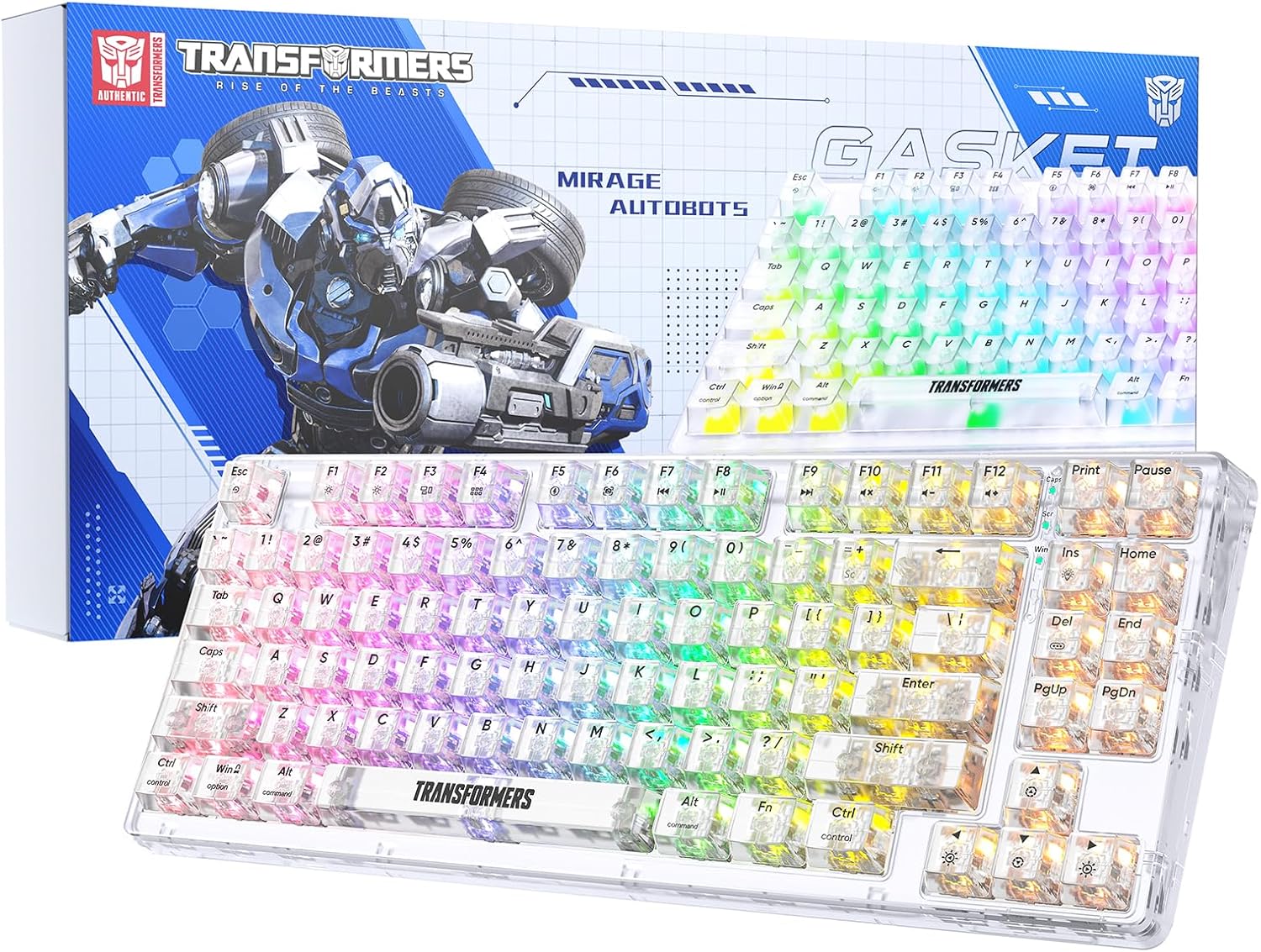
Image 1.1: Transformers TF-Crystal 85 Keys Mechanical Keyboard with its packaging, showcasing the transparent design and RGB lighting.
2. Produk Lebihview
2.1 Fitur Utama
- Tata Letak 85 Tombol: Compact 75% design retaining essential functions, arrow, and navigation keys.
- Konektivitas Tiga Mode: Mendukung Bluetooth 5.0, nirkabel 2.4GHz, dan koneksi kabel USB-C.
- PCB yang dapat dilepas pasang saat beroperasi (Hot-Swappable PCB): Compatible with most 3-pin and 5-pin mechanical switches, allowing for easy customization and replacement.
- Linear Switches: Pre-lubricated switches with a 50 million keystroke lifespan for durability and smooth operation.
- Struktur Gasket: Incorporates high-quality gasket materials and a silicone pad to absorb vibrations and reduce typing noise.
- Lampu latar RGB yang dapat disesuaikan: Features 20 built-in backlight modes, 16.8 million color options, and dynamic music rhythm effects.
- Programmable Driver: Enables macro customization, key function remapping, and advanced lighting control.
- Daya Tahan Baterai yang Lama: Equipped with a 4000mAh battery, providing up to 240 hours of continuous use in 2.4GHz mode without backlighting.
- Kompatibilitas Luas: Supports Mac, Windows, iOS, Android, PC, Laptop, Smartphone, Tablet, Switch, Xbox, and PlayStation.
- Desain Transparan: Features transparent keycaps and base for enhanced aesthetic appeal.
3. Pengaturan
3.1 Mengisi Daya Keyboard
Before initial use, fully charge the keyboard. Connect the provided USB-C cable to the keyboard's USB-C port and the other end to a powered USB port (e.g., computer, wall adapter). The charging indicator will show the charging status.
3.2 Menghubungkan melalui Mode Nirkabel 2.4GHz
- Cari penerima USB 2.4 GHz, yang biasanya tersimpan di dalam kompartemen pada keyboard.
- Colokkan penerima USB ke port USB yang tersedia di komputer Anda.
- Toggle the mode switch on the keyboard to the 2.4G posisi.
- The keyboard will automatically connect to your device.
3.3 Connecting via Bluetooth 5.0 Mode
- Toggle the mode switch on the keyboard to the BT posisi.
- Tekan dan tahan Fn + 1 (atau Fn + 2, Fn + 3Tekan selama 3-5 detik hingga lampu indikator berkedip cepat, menandakan mode pemasangan.
- Pada perangkat Anda (komputer, tablet, telepon pintar), aktifkan Bluetooth dan cari perangkat baru.
- Select "TF-Crystal 85" from the list of available devices to pair.
- Once paired, the indicator light will stop flashing and remain solid. You can pair up to three Bluetooth devices using Fn + 1, Fn + 2, Dan Fn + 3.
3.4 Connecting via USB-C Wired Mode
- Hubungkan kabel USB-C yang disediakan ke port USB-C keyboard.
- Hubungkan ujung lain kabel USB-C ke port USB yang tersedia di komputer Anda.
- The keyboard will automatically switch to wired mode and function without battery power.

Image 3.1: Diagram illustrating the three connection modes: Bluetooth 5.0, 2.4GHz wireless, and USB-C wired, compatible with various devices.
4. Petunjuk Pengoperasian
4.1 Beralih Antar Mode
Use the physical switch located on the keyboard to select between BT (Bluetooth), 2.4G (2.4GHz wireless), and USB Tipe C (wired) modes.
4.2 Kontrol Lampu Latar RGB
The keyboard features customizable RGB backlighting. Use the following key combinations to adjust:
- Fn + In: Cycle through 20 different backlight effects.
- Fn + Hapus: Switch backlight colors within certain modes.
- Fn + ↑ / ↓: Sesuaikan kecerahan lampu latar (5 level).
- Fn + ← / →: Adjust backlight effect speed (5 levels).
- Fn + Esc (hold for 3s): Reset backlight settings to default.

Image 4.1: Visual guide for controlling RGB backlight effects, brightness, and speed using Fn key combinations.
4.3 Programmable Driver Usage
The keyboard includes a programmable driver for advanced customization. This driver allows you to:
- Pengeditan Makro: Record and edit complex key sequences.
- Key Redefinition: Customize the function of individual keys.
- RGB Effect Customization: Fine-tune lighting modes, colors, and speeds, including music rhythm lighting effects.
Refer to the software's dedicated user interface for detailed instructions on using these features.

Image 4.2: Screenshot of the programmable driver interface, showing options for macro editing, RGB effects, and key redefinition.
4.4 Sakelar Hot-Swapping
The TF-Crystal 85 keyboard features a hot-swappable PCB, allowing you to change mechanical switches without soldering. This supports most 3-pin and 5-pin mechanical switches.
- Matikan keyboard atau cabut kabelnya dari perangkat Anda.
- Gunakan alat pelepas keycap yang disediakan untuk melepaskan keycap yang diinginkan dengan hati-hati.
- Use the provided switch puller to gently grip the switch from its top and bottom clips, then pull it straight up to remove it.
- Sejajarkan pin sakelar baru dengan lubang pada PCB. Pastikan pin-pin tersebut lurus.
- Tekan sakelar baru dengan lembut hingga terpasang dengan aman dan berbunyi klik. Jangan dipaksa.
- Ganti penutup tombol.

Image 4.3: Illustration of the hot-swappable feature, showing how to remove and insert 3-pin/5-pin switches and the linear switch specifications.
5. Pemeliharaan
5.1 Membersihkan Keyboard
- Lepaskan keyboard dari semua sumber listrik sebelum membersihkan.
- Gunakan kain lembut dan bebas serat untuk sedikit membersihkannya.ampdibersihkan dengan air atau larutan pembersih ringan untuk menyeka penutup tombol dan rangka.
- Untuk membersihkan debu dan kotoran di antara tombol, gunakan udara bertekanan atau sikat kecil.
- Avoid using harsh chemicals or abrasive materials that could damage the keyboard's surface.
5.2 Perawatan Baterai
- Hindari mengosongkan baterai sepenuhnya secara sering.
- Simpan keyboard di tempat yang sejuk dan kering bila tidak digunakan dalam jangka waktu lama.
- If the keyboard will not be used for a long time, charge it to about 50% before storage.
6. Penyelesaian masalah
| Masalah | Kemungkinan Penyebab | Larutan |
|---|---|---|
| Keyboard tidak merespons dalam mode nirkabel. | Low battery, incorrect mode selected, receiver not connected, Bluetooth not paired. | Charge the keyboard. Ensure the mode switch is set correctly (2.4G or BT). Re-insert the 2.4G receiver. Re-pair Bluetooth. |
| Kunci tidak terdaftar atau salah ketik. | Saklar rusak, kotoran di bawah penutup tombol, masalah perangkat lunak. | Clean under the keycap. Try hot-swapping the switch with a known working one. Restart your computer. |
| RGB backlight not working or incorrect. | Backlight turned off, incorrect settings, software conflict. | Sesuaikan kecerahan menggunakan Fn +. Cycle modes with Fn + In. Reset backlight with Fn + Esc (hold 3s). Check programmable driver settings. |
| Keyboard not charging. | Faulty USB-C cable, power source issue, keyboard port damage. | Try a different USB-C cable. Use a different USB port or power adapter. Ensure the cable is fully inserted. |
7. Spesifikasi
| Fitur | Detil |
|---|---|
| Nomor Model | TF-Crystal 85 |
| Tata Letak Kunci | 85 Tombol (75% Ringkas) |
| Konektivitas | Bluetooth 5.0, Nirkabel 2.4GHz, Kabel USB-C |
| Jenis Sakelar | Pre-lubricated Linear Mechanical Switches |
| Ganti Umur | 50 Juta penekanan tombol |
| Dapat Ditukar Panas | Yes (3-pin/5-pin compatible) |
| Lampu latar | RGB (20 mode, 16.8 juta warna) |
| Kapasitas Baterai | 4000 mAh |
| Battery Life (2.4G, no light) | Hingga 240 jam |
| Daya Tahan Baterai (Lampu Latar Menyala) | Sekitar 22 jam |
| Dimensi (P x L x T) | Ukuran 34.7x14x4.5cm |
| Kesesuaian | Mac, Windows, iOS, Android, PC, Laptop, Smartphone, Tablet, Switch, Xbox, PlayStation |

Image 7.1: Visual representation of the keyboard's battery life: 240 hours with backlight off, 22 hours with backlight on, powered by a 4000mAh battery.
8. Garansi dan Dukungan
Transformers is committed to providing exceptional customer service. If you encounter any problems with your TF-Crystal 85 Keys Mechanical Keyboard, our after-sales support team is available to assist you. This includes technical support, exchanges, or installation guidance.
Please contact our customer service for assistance. We guarantee a hassle-free service experience.