1. Produk Lebihview
The Grandstream WP816 is a compact, portable Wi-Fi phone designed for clear communication. It features dual-band Wi-Fi 6 for reliable connectivity, supports two SIP accounts and two lines, and delivers HD voice quality with dual microphones, Acoustic Echo Cancellation (AEC), and Noise Shield Technology. The phone includes integrated Bluetooth for headset connectivity, a long-lasting 1500mAh rechargeable battery providing 6 hours of talk time and 120 hours of standby time, and a configurable push-to-talk button. It is equipped with a Type C USB port for fast charging and a 3.5mm headset jack. Additional features include an accelerometer and an emergency button.
Fitur Utama:
- Dual-band Wi-Fi 6 with efficient antenna design and advanced roaming support.
- Supports 2 SIP accounts and 2 lines.
- HD voice with dual MIC design, AEC, and Noise Shield Technology.
- Integrated Bluetooth for headset connection.
- Rechargeable 1500mAh battery: 6 hours talk time, 120 hours standby.
- Configurable button for push-to-talk functionality.
- Type C USB port (supports fast charging) and 3.5mm headset jack.
- Built-in accelerometer and emergency button.
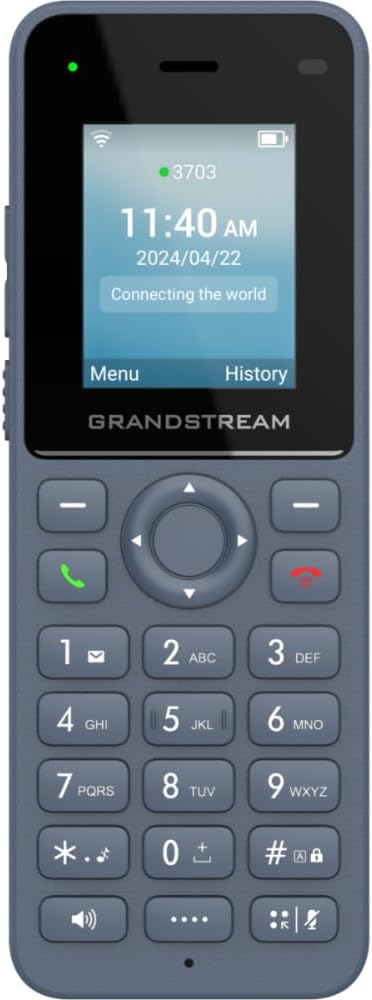
Gambar 1: Depan view of the Grandstream WP816 Wi-Fi Phone, displaying its screen, keypad, and branding.
2. Pengaturan
2.1. What's in the Box:
- Grandstream WP816 Wi-Fi Phone
- (Additional accessories such as power adapter, charging cradle, and battery are typically included but not explicitly detailed in the provided 'whats_in_the_box' field, which only states "Phone". Assuming standard phone accessories.)
2.2. Mengisi Daya Ponsel:
- Connect the power adapter to the charging cradle and a power outlet.
- Place the WP816 phone into the charging cradle. Ensure the phone is seated correctly and the charging indicator illuminates.
- Allow the phone to charge fully before initial use. This typically takes several hours. The Type C USB port also supports fast charging.
2.3. Pengaturan Awal:
- Nyalakan: Tekan dan tahan tombol Daya/Akhiri Panggilan hingga layar menyala.
- Koneksi Wi-Fi: Navigate to the "Settings" menu, then "Wi-Fi". Select your desired Wi-Fi network and enter the password if prompted. The phone supports dual-band Wi-Fi 6.
- Konfigurasi Akun SIP: Access the "Settings" menu to configure your SIP accounts. The phone supports 2 SIP accounts. Refer to your VoIP service provider for specific SIP settings (SIP server, User ID, Password).
- Tanggal dan Waktu: Ensure the date and time are correctly set, either manually or via network synchronization.
3. Petunjuk Pengoperasian
3.1. Melakukan Panggilan:
- Panggilan: Masukkan nomor telepon menggunakan papan tombol.
- Mulai Panggilan: Press the Green Call button to place the call.
- Akhiri Panggilan: Press the Red End Call button to terminate the conversation.
3.2. Menerima Panggilan:
- Saat telepon berdering, tekan tombol Panggil berwarna hijau untuk menjawab.
- To reject an incoming call, press the Red End Call button.
3.3. Speakerphone Function:
- During a call, press the Speaker button (often indicated by a speaker icon) to activate the speakerphone.
- Press the Speaker button again to switch back to the earpiece.
3.4. Push-to-Talk (PTT):
- The WP816 features a configurable button for Push-to-Talk functionality.
- Consult your system administrator or service provider for configuration details and usage of the PTT feature.
3.5. Bluetooth Headset Connectivity:
- Ensure your Bluetooth headset is in pairing mode.
- On the WP816, navigate to "Settings" > "Bluetooth".
- Turn Bluetooth on and scan for available devices.
- Select your headset from the list and follow any on-screen prompts to complete pairing.
4. Pemeliharaan
4.1. Perawatan Baterai:
- Untuk memaksimalkan masa pakai baterai, hindari suhu ekstrem.
- Charge the phone regularly. Do not let the battery completely drain for extended periods.
- If the phone will not be used for a long time, charge it to about 50% and store it in a cool, dry place.
4.2. Pembersihan:
- Use a soft, dry cloth to clean the phone's exterior.
- Hindari penggunaan bahan kimia keras, pelarut pembersih, atau deterjen kuat.
5. Penyelesaian masalah
5.1. Tidak Ada Daya:
- Pastikan baterai dimasukkan dan terisi dengan benar.
- Verify the charging cradle is properly connected to a power source.
5.2. Cannot Connect to Wi-Fi:
- Check if the Wi-Fi network is active and within range.
- Confirm the Wi-Fi password is entered correctly.
- Restart the phone and the Wi-Fi router.
5.3. Poor Call Quality:
- Ensure you are within good Wi-Fi signal range.
- Periksa kecepatan dan stabilitas koneksi internet Anda.
- Verify SIP account settings with your service provider.
5.4. Phone Not Responding:
- Perform a soft reset by removing and reinserting the battery.
- If the issue persists, a factory reset might be necessary (refer to advanced settings, note this will erase all data).
6. Spesifikasi
| Fitur | Detil |
|---|---|
| Model | WP816 |
| Merek | Arus Besar |
| Dimensi Produk | 7x5x4 inci |
| Berat Barang | 13.8 ons (390 gram) |
| Baterai | 1 Baterai Nonstandar diperlukan |
| Konektivitas | Dual-band Wi-Fi 6, Integrated Bluetooth |
| Akun SIP | 2 SIP accounts, 2 lines |
| Fitur Suara | HD voice, Dual MIC design with AEC and Noise Shield Technology |
| Kapasitas Baterai | 1500 mAh |
| Waktu Bicara | 6 Jam |
| Waktu Siaga | 120 Jam |
| Pelabuhan | Type C USB (fast charging support), 3.5mm headset jack |
| Fitur Tambahan | Accelerometer, Emergency button, Configurable Push-to-Talk button |
| Warna | Abu-abu |
| Bahan | Plastik |
| Jenis Telepon | Tanpa kabel |
| Jenis Pemanggil | Panggilan Nada |
| Operasi Multiline | Operasi Multi-Jalur |
7. Garansi dan Dukungan
Untuk informasi garansi dan dukungan teknis, silakan merujuk ke dokumentasi yang disertakan dengan pembelian Anda atau kunjungi situs resmi Grandstream. websitus. Simpan bukti pembelian Anda untuk klaim garansi.