
1. Pendahuluan
This manual provides essential instructions for the setup, operation, maintenance, and troubleshooting of your Actualia R36S PRO Handheld Game Console. Please read this manual thoroughly before using the device to ensure optimal performance and longevity.
2. Isi Paket
Verifikasi bahwa semua item yang tercantum di bawah ini ada dalam paket Anda:
- Actualia R36S PRO Handheld Game Console x 1
- Tas Penyimpanan x 1
- Screen Film x 1
- Kabel Data Tipe-C x 1
- Buku Petunjuk x 1
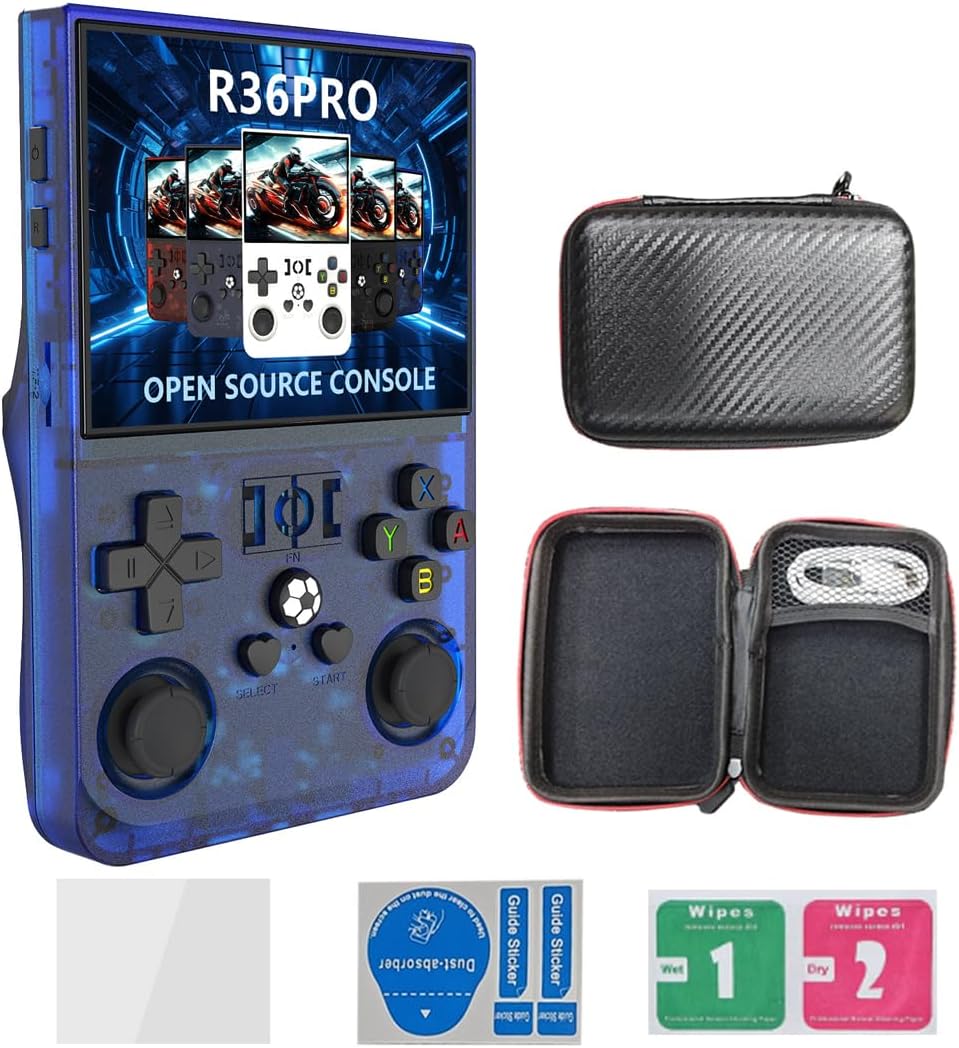
Gambar 2.1: The Actualia R36S PRO Handheld Game Console shown with its included accessories: a storage bag, screen protector, and Type-C charging cable.
3. Produk Lebihview
The Actualia R36S PRO is a portable retro video game console featuring an open-source Linux system. It is designed for an immersive gaming experience with its high-quality display and ergonomic controls.

Gambar 3.1: Depan dan belakang view of the R36S PRO console, detailing the location and function of buttons, joysticks, and ports.
3.1 Kontrol dan Port
- Tombol Daya: Located on the top left. Press and hold to power on or off.
- Tombol Reset: Tombol kecil untuk mengatur ulang sistem.
- Volume Keys (+/-): Sesuaikan output audio.
- Papan Arah (D-Pad): Untuk input arah dalam game dan navigasi menu.
- Left/Right Rockers (Analog Sticks): For analog control in compatible games.
- ABYX Buttons: Tombol tindakan standar.
- Tombol Pilih/Mulai: For game functions and menu selections.
- Tombol Fungsi (FN): Special function button, often used in combination with other buttons.
- L1/L2/R1/R2 Trigger Buttons: Located on the back for additional game controls. These are spring-loaded for improved tactile feedback.
- TF-OS (TF Card Slot for Operating System): Slot for the system's operating system card.
- TF-Game (TF Card Slot for Games): Slot for the game storage card.
- BOX Audio Hole: Keluaran pengeras suara.
- Tipe-C Port: For charging and data transfer (Type-C-OTG supported).
- 3.5mm Headphone Interface: Untuk menghubungkan headphone.

Gambar 3.2: Detail of the ergonomic spring trigger buttons (L1/L2/R1/R2) and the TF card slot on the console.

Gambar 3.3: Detail of the double cross key (D-pad) and separate ABYX buttons, designed for precise control.
4. Pengaturan
4.1 Pengisian Awal
Before first use, fully charge the console.
- Connect the provided Type-C data cable to the console's Type-C port.
- Hubungkan ujung kabel lainnya ke adaptor daya USB yang kompatibel (tidak termasuk) atau port USB komputer.
- Indikator pengisian daya akan menyala. Pengisian daya penuh biasanya memakan waktu sekitar 2 jam.
- Setelah terisi penuh, indikator dapat berubah warna atau mati.

Gambar 4.1: The console is equipped with a 4000mAh battery, providing extended gameplay.
4.2 Inserting TF Cards
Your console comes with a 128GB TF card pre-installed for games. If you wish to use a different card or add more storage:
- Locate the TF-OS and TF-Game card slots on the console.
- Gently insert the TF card(s) into the appropriate slot(s) until it clicks into place. Ensure the card is oriented correctly.
- Untuk melepasnya, dorong kartu perlahan ke dalam hingga terlepas.
5. Petunjuk Pengoperasian
5.1 Daya Hidup/Mati
- Untuk menghidupkan: Tekan dan tahan tombol daya hingga layar menyala.
- Untuk mematikan: Press and hold the Power button. A menu may appear allowing you to select "Shutdown" or "Reboot". Select "Shutdown" to power off completely.
- Untuk mengatur ulang: Use the small Reset button if the system becomes unresponsive. Note that this may result in unsaved data loss.
5.2 Navigating the System
The console runs on an open-source Linux system, offering a user-friendly interface for game selection and system settings.
- Gunakan Papan tombol D or Left/Right Rockers to navigate through menus and game lists.
- Tekan tombol Sebuah tombol untuk mengkonfirmasi pilihan.
- Tekan tombol tombol B untuk kembali atau membatalkan.
- Itu Memilih Dan Awal buttons often have specific functions within games or system menus.
5.3 Bermain Game
Your console supports over 30 emulators and comes with a large library of pre-installed games.

Gambar 5.1: The R36S PRO supports over 30 emulators, allowing for a wide variety of game types and styles.
- From the main menu, navigate to the desired emulator or game category.
- Select a game from the list using the D-Pad and A button.
- The game will load. Controls will typically map to the console's buttons.
- Saving/Loading Games: Most emulators offer in-game save states or traditional game saves. Refer to the specific emulator's documentation or in-game menus for details.
5.4 Wireless Connectivity (Bluetooth & Wi-Fi)
The R36S PRO includes built-in Bluetooth and Wi-Fi for enhanced functionality.
- Bluetooth dapat digunakan untuk berbagai keperluan, seperti: Access the system settings to pair Bluetooth controllers or other compatible devices.
- Wifinya: Connect to a wireless network to access online features, update software (if available), or transfer files.
6. Pemeliharaan
6.1 Pembersihan
- Use a soft, dry cloth to clean the console's exterior.
- Untuk noda membandel, sedikit dampBilas kain dengan air. Hindari bahan kimia keras atau bahan abrasif.
- Keep the screen free of dust and fingerprints using the provided screen film and cleaning wipes, or a microfiber cloth.
6.2 Perawatan Baterai
- Hindari mengosongkan baterai sepenuhnya secara sering.
- Store the console in a cool, dry place when not in use for extended periods.
- Isi daya baterai setidaknya sekali setiap tiga bulan untuk mencegah pengosongan daya yang terlalu dalam.
6.3 Pembaruan Perangkat Lunak
As an open-source Linux system, firmware updates or custom firmware options may be available from the community. Refer to online forums or the manufacturer's website for information on how to safely update your device. Proceed with caution when installing unofficial software.
7. Penyelesaian masalah
- Konsol tidak menyala:
- Ensure the battery is sufficiently charged. Connect the console to a power source and try again.
- If unresponsive, press the Reset button.
- Layar kosong atau berkedip:
- Mulai ulang konsol.
- Ensure the TF-OS card is properly inserted.
- Games are not loading or performing poorly:
- Ensure the TF-Game card is properly inserted and not corrupted.
- Some games or emulators may require specific settings or may not be fully compatible with the console's hardware.
- Verify the game files are in the correct format and location on the TF card.
- Tidak dapat menyimpan kemajuan permainan:
- Some emulators or games may have specific save procedures. Consult the emulator's documentation.
- Ensure there is sufficient space on the TF-Game card for saves.
- Catatan: A user review indicated difficulty saving games. This may be an issue with specific game ROMs or emulator configurations.
- Tombol tidak responsif:
- Mulai ulang konsol.
- Pastikan tidak ada kotoran yang tersangkut di bawah tombol.
8. Spesifikasi
| Fitur | Detil |
|---|---|
| Model | R36S PRO |
| Sistem | Open-source Linux System |
| Layar | 3.5-inch IPS OCA fully laminated HD MIPI screen |
| Resolusi | 640*480 |
| prosesor | RK3326, ARM 64-bit quad-core Cortex-A35, up to 1.5GHz |
| GPU | MALI-G31MP2 (520MHz) |
| Kapasitas Penyimpanan Memori | 128 GB (TF-Game card) |
| Pembicara | 8W cavity speaker |
| Baterai | 4000mAh Lithium-ion |
| Daya Tahan Baterai | Hingga 6 jam |
| Waktu Pengisian Daya | Sekitar 2 jam |
| Antarmuka | Type-C (charging, OTG), 3.5mm headphone jack |
| Konektivitas | Bluetooth, WiFi |
| Dimensi Produk | 13.1cm x 8.3cm x 3.5cm (5.16 x 3.27 x 1.38 inci) |
| Berat Barang | 375 Gram (13.2 ons) |
| Bahan | ABS + Komponen Elektronik |
| Usia yang Direkomendasikan Produsen | 15 tahun ke atas |

Gambar 8.1: The console is powered by the RK3326 professional gaming chip, designed for smooth performance.

Gambar 8.2: The upgraded processor ensures smooth graphics and high-speed response for an optimized gaming experience.
9. Garansi dan Dukungan
For warranty information, please refer to the documentation provided at the time of purchase or contact the retailer.
For technical support or further assistance, please visit the official Actualia brand store or contact their customer service channels.Actualia Store on Amazon