
1. Pendahuluan
The CUQI 7 Inch IPS Portable Monitor is a compact display designed for versatility and ease of use. Featuring a 1024 x 600 resolution IPS screen, it offers wide viewing angles and accurate color reproduction. This monitor is compatible with a variety of devices, including Raspberry Pi, laptops, PCs, and gaming consoles, making it suitable for various applications such as dual monitor setups, embedded systems, or portable entertainment.
2. Isi Paket
Pastikan semua barang yang tercantum di bawah ini termasuk dalam paket Anda. Jika ada barang yang hilang atau rusak, silakan hubungi layanan pelanggan.
- Layar 7 inci
- Leather stand
- Kabel HDMI ke Mini HDMI
- Adaptor Mikro HDMI ke HDMI
- Dual Type-A to Type-C Cable
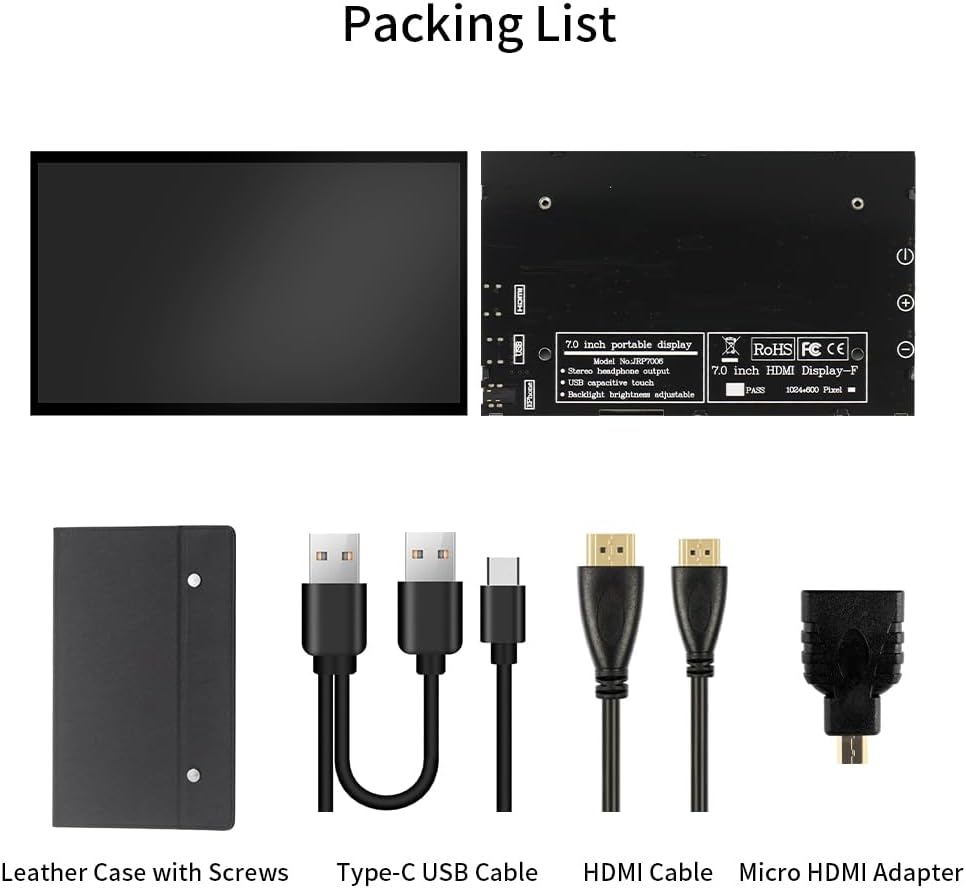
Figure 2.1: Included accessories with the CUQI 7 Inch Portable Monitor.
3. Fitur
The CUQI 7 Inch IPS Portable Monitor offers a range of features designed for optimal performance and user convenience:
- IPS Screen: Provides a clear and high-quality display with 178-degree full viewing angles, 1024 x 600 resolution, and accurate color reproduction.
- Pasang dan mainkan: Connects via HDMI and USB ports without requiring driver or software installation.
- Kecerahan yang Dapat Disesuaikan: Screen brightness can be adjusted, and a backlight off button allows the screen to be switched off when not in use.
- Portable Leather Stand: Includes a lightweight leather protective case that doubles as a stand with two adjustable angles. The case is removable via two screws.
- Kompatibilitas Luas: Supports Raspberry Pi 5/4/4B/3B+/3B, Banana Pi, Windows 7/8/10 PC, Mac, Microsoft, and systems like Retro Pi, NOOBS, Raspbian, Ubuntu, and Kodi.

Figure 3.1: IPS 178-degree wide viewsudut.
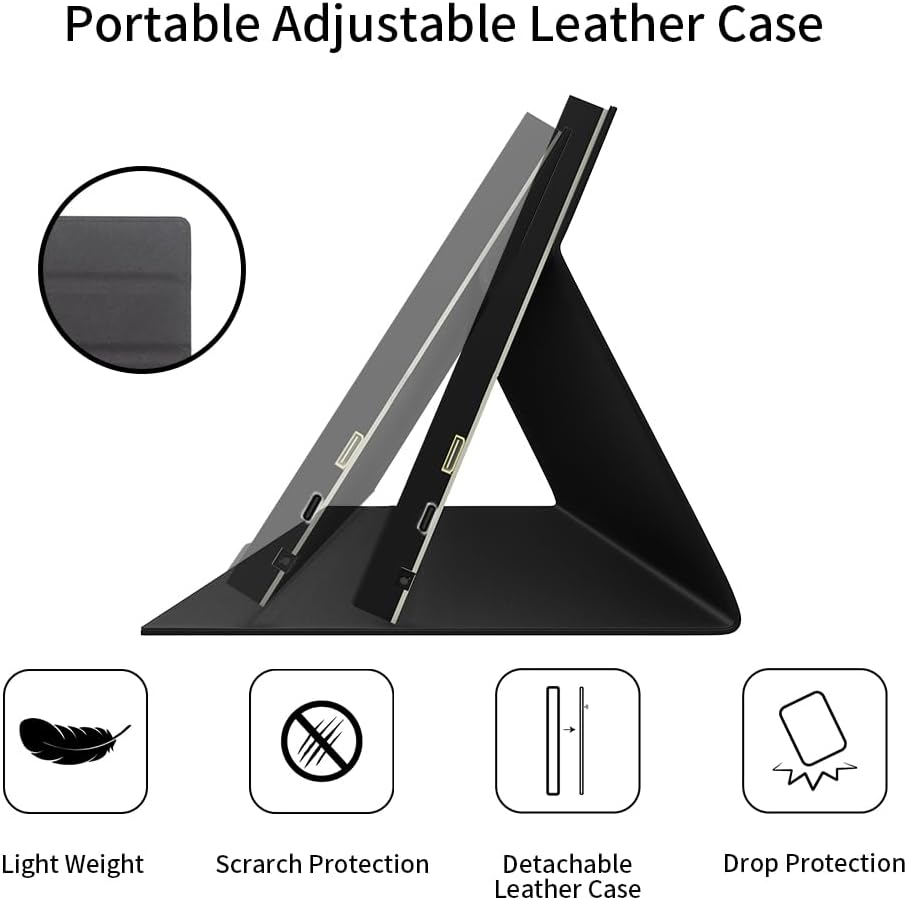
Figure 3.2: Portable adjustable leather case features.
4. Petunjuk Penyiapan
Follow these steps to set up your CUQI 7 Inch IPS Portable Monitor:
- Attach the Leather Stand: If not already attached, secure the leather stand to the monitor using the two removable screws on the back. The stand allows for two adjustable viewsudut ing.
- Hubungkan Sumber Video: Use the provided HDMI to Mini HDMI Cable (and Micro HDMI to HDMI Adapter if needed) to connect the monitor's Mini HDMI interface to your device (e.g., Raspberry Pi, laptop, PC, gaming console).
- Hubungkan Daya: Use the provided Dual Type-A to Type-C Cable to connect the monitor's Type-C Power port to a 5V/3A power source (e.g., a USB port on your device or a USB power adapter).
- Nyalakan: Press the power button on the side of the monitor to turn it on. The monitor should automatically detect the video input.

Figure 4.1: Connecting the monitor to a Raspberry Pi.

Figure 4.2: Monitor ports and control buttons.
5. Petunjuk Pengoperasian
Once connected, the monitor operates as a secondary display for your device.
- Daya Hidup/Mati: Use the dedicated power button on the side of the monitor to turn it on or off.
- Penyesuaian Kecerahan: Use the '+' and '-' buttons on the side of the monitor to adjust the screen brightness.
- Lampu Latar Mati: The backlight off button allows you to turn off the screen display while keeping the monitor powered, useful for power saving or when the display is not needed temporarily.
- Keluaran Audio: If your source device transmits audio via HDMI, you can connect headphones or external speakers to the 3.5mm Audio Interface for sound output.

Figure 5.1: Monitor in use as a gaming display.
6. Pemeliharaan
Untuk memastikan umur panjang dan kinerja optimal monitor Anda, ikuti panduan perawatan berikut:
- Pembersihan: Gunakan kain lembut dan bebas serat untuk menyeka layar dengan lembut. Untuk noda membandel, sedikit gosok.ampBilas kain dengan air atau larutan pembersih yang aman untuk layar. Hindari bahan kimia keras atau bahan abrasif.
- Penyimpanan: When not in use, store the monitor in a cool, dry place, preferably in its protective leather case, to prevent dust accumulation and physical damage.
- Penanganan: Avoid dropping the monitor or subjecting it to strong impacts. Handle it by the edges to prevent fingerprints on the screen.
- Suhu: Do not expose the monitor to extreme temperatures or direct sunlight for extended periods.
7. Penyelesaian masalah
Jika Anda mengalami masalah dengan monitor Anda, lihat masalah umum dan solusi berikut:
- Tidak Ada Tampilan/Layar Hitam:
- Ensure both the HDMI (or equivalent video) cable and the USB-C power cable are securely connected.
- Verify that the power source provides sufficient power (5V/3A).
- Check if the monitor is powered on using the power button.
- Confirm your source device is outputting video correctly.
- Gambar Berkedip/Tidak Stabil:
- Periksa kabel video apakah ada kerusakan atau sambungan yang longgar.
- Pastikan pasokan daya stabil.
- Try a different video cable or port on your source device.
- Image Retention/Ghosting:
- If static images are displayed for very long periods, temporary image retention may occur. This is common with some display technologies.
- To mitigate, display a dynamic image or turn off the monitor for a period. Avoid displaying static images for extended durations.
- Monitor Disconnecting/Reconnecting:
- Ensure the power cable and video cable connections are firm.
- Test with a different USB power source or cable to rule out power supply issues.
- Check for updated drivers for your source device's graphics card.
If these steps do not resolve the issue, please contact CUQI technical support.
8. Spesifikasi
| Fitur | Spesifikasi |
|---|---|
| Dimensi Produk | 6.58x0.39x4.06 inci |
| Berat Barang | 14.9 ons |
| Pabrikan | CUQI |
| Nomor Model Barang | 7 inch leather |
| Ukuran Tampilan Layar Berdiri | 7 inci |
| Rasio Aspek | 1.60:1 |
| Resolusi | 1024 x 600 Piksel |
| Kecerahan Gambar | 500 Candela |
| Jumlah Port USB | 1 (Type-C for power) |
| Deskripsi Permukaan Layar | Tidak mengkilap |
9. Garansi dan Dukungan
CUQI provides professional technical support for this product. If you have any questions, require assistance with setup, operation, or troubleshooting that is not covered in this manual, please contact us via email. Refer to your purchase documentation for specific warranty details and contact information.