
1. Pendahuluan
This manual provides essential information for the safe and efficient operation of your FrSara X18 Portable Misting Fan. Please read this manual thoroughly before using the product and retain it for future reference.
The FrSara X18 is a versatile, rechargeable misting fan designed for both indoor and outdoor use. It features a 6-liter water tank, multiple fan speeds, misting functions, oscillation, and an integrated LED light, all controllable via a remote.
2. Produk Lebihview
2.1 Komponen
- Unit Kipas Utama
- 6L Water Bucket
- Kontrol Jarak Jauh
- Kabel Pengisian Daya USB-C
- Panduan Pengguna (Dokumen ini)
2.2 Fitur Utama
- Baterai Isi Ulang: Integrated 20000mAh battery for cordless operation.
- Fungsi Pengabutan: Three nozzles provide a fine mist for enhanced cooling.
- Osilasi: 90-degree oscillation for wide area coverage.
- Kecepatan Kipas yang Dapat Disesuaikan: Multiple speed settings for customized airflow.
- Lampu LED: Integrated light with multiple brightness levels.
- Kontrol Jarak Jauh: Pengoperasian yang mudah dari jarak jauh.
- Desain Portabel: Detachable fan unit and 6L water bucket for easy transport.

Gambar 1: Lebihview of the FrSara X18 Portable Misting Fan, showing the main fan unit, 6L water bucket, remote control, and hanging configuration.
3. Pengaturan
3.1 Mengisi Daya Kipas
- Locate the USB-C charging port on the fan unit.
- Connect the provided USB-C cable to the fan and a compatible USB power adapter (not included).
- The charging indicator lights will illuminate, showing the battery level. Charge until all indicators are solid.

Figure 2: Illustration of the fan's internal battery, indicating its 20000mAh capacity for extended runtime.
3.2 Filling the Water Bucket
- Ensure the fan unit is detached from the water bucket.
- Open the water inlet on the 6L bucket.
- Fill the bucket with clean, cool water. Do not exceed the maximum fill line.
- Securely close the water inlet.
- Carefully place the fan unit back onto the filled water bucket, ensuring a stable connection.

Figure 3: The fan unit positioned on the 6L water tank, illustrating the water capacity and the 90-degree oscillation capability.
4. Operasi
4.1 Panel Kontrol dan Kontrol Jarak Jauh
The fan can be operated using the control buttons on the unit or the included remote control.

Gambar 4: Rinci view of the fan's control panel, showing buttons for light/oscillation, fan speed, and misting functions, along with battery and speed indicators.
4.2 Power On/Off and Fan Speed
- Press the Power button on the fan unit or remote to turn the fan on.
- Press the Speed button repeatedly to cycle through the available fan speeds (e.g., Low, Medium, High, VFD mode).
- Press the Power button again to turn the fan off.
4.3 Fungsi Penyemprotan Kabut
- Ensure the water bucket is filled and the fan unit is properly seated.
- Press the Misting button on the fan unit or remote to activate the misting function.
- Press the Misting button again to turn it off.
4.4 Osilasi
- Press the Oscillation button on the fan unit or remote to start the 90-degree oscillation.
- Press the Oscillation button again to stop the oscillation at the desired position.
4.5 Lampu LED
- Press the Light button on the fan unit or remote to turn on the LED light.
- Press the Light button repeatedly to cycle through the three brightness levels.
- Press the Light button again after the highest brightness level to turn the light off.
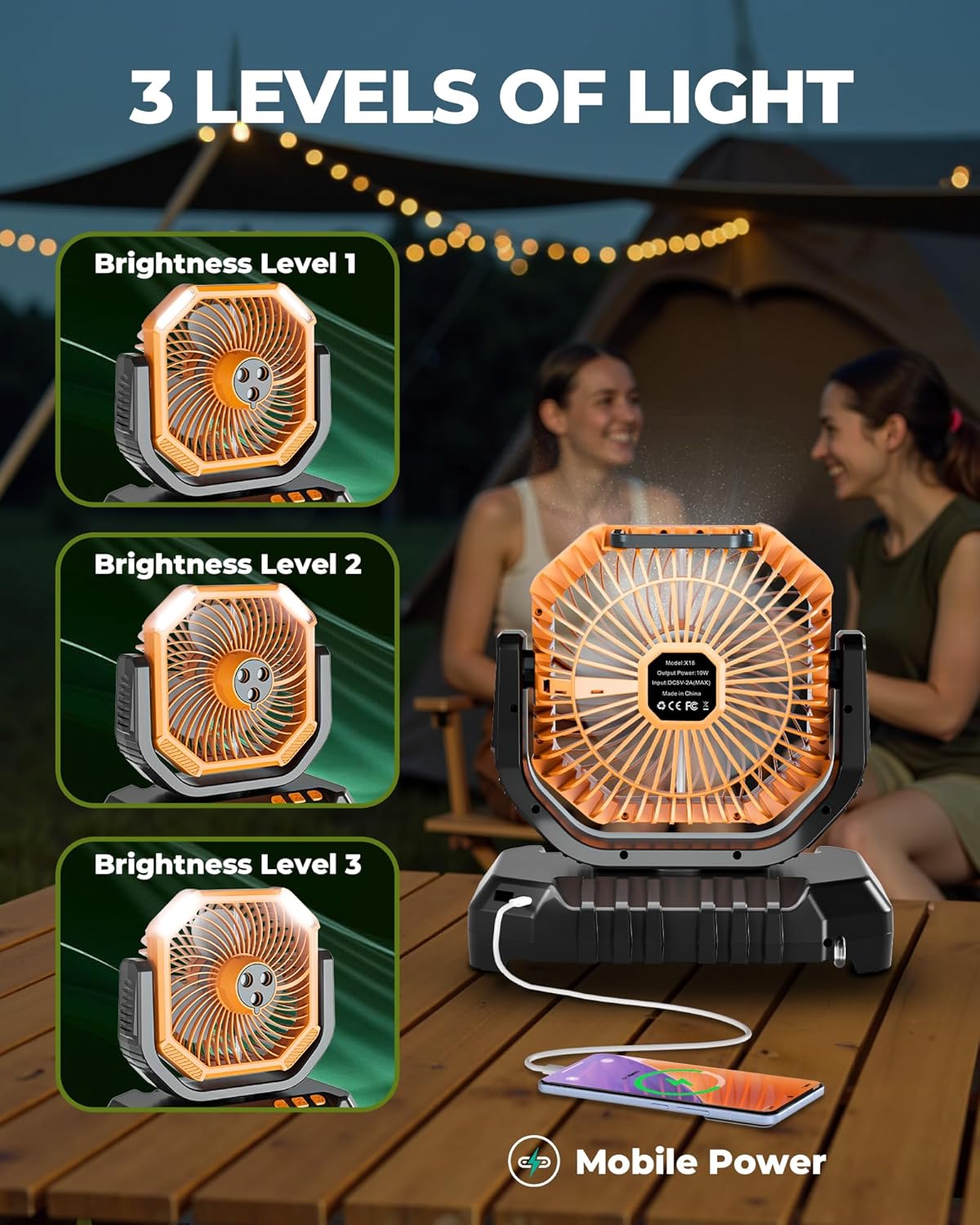
Figure 5: The fan demonstrating its three levels of LED light brightness, also showing its capability as a mobile power source.
5. Pemeliharaan
5.1 Pembersihan
- Always ensure the fan is turned off and unplugged before cleaning.
- Wipe the exterior of the fan unit with a soft, damp kain. Jangan gunakan pembersih atau pelarut yang bersifat abrasif.
- For the water bucket, empty any remaining water and rinse thoroughly. Allow it to air dry completely before refilling or storing.
- Periodically clean the misting nozzles to prevent mineral buildup. Use a soft brush or cotton swab if necessary.
5.2 Penyimpanan
When not in use for extended periods, ensure the fan is clean, dry, and fully charged. Store it in a cool, dry place away from direct sunlight and extreme temperatures.
6. Penyelesaian masalah
| Masalah | Kemungkinan Penyebab | Larutan |
|---|---|---|
| Kipas tidak menyala. | Baterai habis. | Isi daya kipas menggunakan kabel USB-C. |
| Fungsi penyemprotan tidak berfungsi. | Water bucket is empty or improperly seated. | Refill the water bucket and ensure it is correctly attached. |
| Misting nozzles are clogged. | Clean the misting nozzles as described in the Maintenance section. | |
| Kontrol jarak jauh tidak merespons. | Baterai remote lemah atau habis. | Replace the remote control battery. Ensure line of sight to the fan's receiver. |
| Fan oscillation is erratic or not working. | Obstruction or internal issue. | Ensure no physical obstructions. If the problem persists, contact customer support. |
7. Spesifikasi
| Fitur | Detil |
|---|---|
| Nama Model | X18 |
| Merek | FrSara |
| Sumber Daya | Bertenaga Baterai |
| Kapasitas Baterai | 20000mAh (termasuk) |
| Kapasitas Tangki Air | 6 liter |
| Dimensi Produk | 9"Panjang x 6"Lebar x 14"T |
| Berat Barang | 4.03 pon |
| Sudut osilasi | 90 derajat |
| Jumlah Kecepatan Kipas | Multiple (including VFD mode) |
| Nozel Pengabutan | 3 |
| Tingkat Cahaya LED | 3 |
| Tingkat Kebisingan | 48dB |
| Metode Kontrol | Tombol Tekan, Jarak Jauh |
| Konektor Daya Utama | USB Tipe C |
| Penggunaan Dalam/Luar Ruangan | Ya |
8. Garansi dan Dukungan
For warranty information and customer support, please refer to the official FrSara websitus web atau hubungi penjual Anda. Simpan struk pembelian Anda sebagai bukti pembelian.
Untuk bantuan lebih lanjut, silakan kunjungi FrSara Store on Amazon.