
Perkenalan
Thank you for choosing the Pro Breeze 25L Smart Dehumidifier. This appliance is designed to efficiently remove excess moisture from your indoor environment, helping to prevent mold, mildew, and dampness. Featuring smart Wi-Fi connectivity, a digital display, and multiple operating modes, this dehumidifier offers advanced control and convenience. Please read this manual thoroughly before operation to ensure safe and optimal performance.
Petunjuk Keselamatan Penting
Selalu ikuti tindakan pencegahan keselamatan dasar saat menggunakan peralatan listrik untuk mengurangi risiko kebakaran, sengatan listrik, dan cedera.
- Pastikan catu daya sesuai dengan voltage yang ditentukan pada label peringkat.
- Jangan mengoperasikan dehumidifier dengan kabel atau steker yang rusak.
- Keep the appliance at least 20 cm (8 inches) away from walls and other objects to ensure proper airflow.
- Jangan merendam unit, kabel daya, atau steker dalam air atau cairan lainnya.
- Cabut steker alat pengering udara sebelum membersihkan, melakukan perawatan, atau saat tidak digunakan.
- Peralatan ini hanya untuk penggunaan di dalam ruangan.
- Jangan menghalangi saluran masuk atau keluar udara.
- Awasi anak-anak dan pastikan mereka tidak bermain dengan alat tersebut.
- Jangan mencoba memperbaiki atau memodifikasi unit sendiri. Hubungi teknisi servis yang berkualifikasi.
Fitur Produk

Image: The Pro Breeze 25L Smart Dehumidifier, showcasing its compact design and highlighting features such as Wi-Fi compatibility, 25L extraction rate, energy efficiency, and laundry mode. Dimensions are also indicated.
- Pengeringan Udara yang Ampuh: Extracts up to 25 liters of moisture per day, effectively combating persistent humidity, mold, and condensation in large rooms.
- Tangki Air Besar: Features a 5.5-liter water tank with automatic shut-off when full. A drainage hose is included for continuous operation.
- Hemat Energi: Utilizes a high-performance compressor, 24-hour timer, and automatic stop system to reduce energy consumption.
- Operasi Tenang: Designed with silent technology, making it suitable for use in bedrooms, living rooms, offices, and other quiet environments.
- Kontrol Cerdas melalui Aplikasi: Manage all functions remotely using the free Pro Breeze app or voice commands with Alexa and Google Home (compatible with iPhone and Android).
- Digital Display & Humidity Sensor: An intuitive LED screen allows selection of fan speed and humidity levels between 30% and 80%. The smart sensor displays real-time humidity and automatically stops the dehumidifier once the target is reached.
- Beberapa Mode Pengoperasian: Includes a 24-hour timer and 4 operating modes, including a dedicated Mode Pengeringan Binatu. Also features a Kunci Anak, Automatic Defrost Mode, Dan Tampilan Malam.

Image: The Pro Breeze dehumidifier positioned next to a large 25-liter water bottle, visually representing its daily moisture extraction capacity and the benefit of fewer tank emptying cycles.
Isi Paket
Harap centang kotak untuk item berikut:
- Pro Breeze 25L Smart Dehumidifier Unit
- Selang Drainase Kontinu
- Panduan Pengguna
Pengaturan
- Membongkar: Keluarkan alat pengering udara dari kemasannya dengan hati-hati. Simpan kemasan tersebut untuk penyimpanan atau pengangkutan di masa mendatang.
- Penempatan: Place the dehumidifier on a firm, level surface. Ensure there is at least 20 cm (8 inches) of clear space around the air inlet and outlet to allow for efficient airflow. Avoid placing it near heat sources or in direct sunlight.
- Sambungan Daya: Hubungkan kabel daya ke stopkontak yang diarde. Pastikan volumetage sesuai dengan persyaratan unit.
- Instalasi Tangki Air: Ensure the water tank is correctly inserted into the unit. The dehumidifier will not operate if the tank is not properly seated or is full.
- Drainase Berkelanjutan (Opsional): For continuous operation without emptying the tank, connect the provided drainage hose to the continuous drainage port on the back of the unit. Route the hose to a suitable drain, ensuring it is sloped downwards to allow water to flow freely.
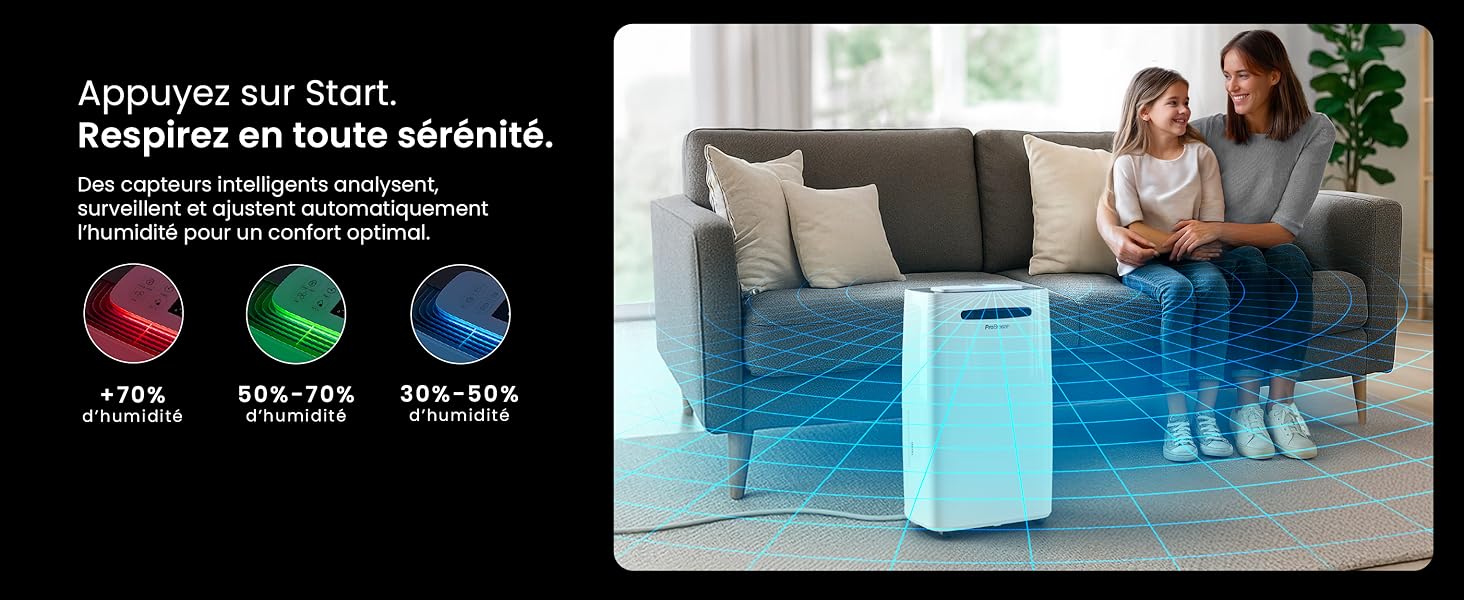
Image: The dehumidifier shown in different environments such as a garage, home office, and laundry room, illustrating its versatility and suitability for various spaces. Icons for continuous drainage and automatic defrost are also present.
Petunjuk Pengoperasian
Panel Kontrol Berakhirview

Gambar: Detail view of the dehumidifier's illuminated digital control panel, showing buttons for power, mode, fan speed, timer, child lock, and humidity settings, along with the LED display.
The intuitive LED display and touch controls allow for easy operation.
- Tombol Daya: Tekan untuk menghidupkan atau mematikan unit.
- Tombol Mode: Cycle through available operating modes: Normal, Laundry Drying, Dan Mode Malam.
- Tombol Kecepatan Kipas: Adjust the fan speed between Rendah Dan Tinggi.
- Humidity Setting (SET %): Use the up/down arrows to set your desired humidity level (30% - 80%). The unit will operate until this level is reached.
- Tombol pengatur waktu: Set a 24-hour timer for automatic power ON or OFF.
- Tombol Kunci Anak: Tekan dan tahan untuk mengaktifkan/menonaktifkan kunci anak, mencegah perubahan pengaturan yang tidak disengaja.
- Tombol Tampilan: Turn the LED display lights ON or OFF, useful for night mode.
Kontrol Wi-Fi dan Aplikasi

Image: A user interacting with the Pro Breeze mobile application on a smartphone, demonstrating remote control capabilities for the dehumidifier. The app shows current humidity and temperature settings.
The Pro Breeze 25L Smart Dehumidifier can be controlled remotely via the Pro Breeze app. Download the app from your smartphone's app store and follow the in-app instructions to connect your device to your home Wi-Fi network. Once connected, you can control all functions, set schedules, and monitor humidity levels from anywhere.
The unit is also compatible with Amazon Alexa and Google Home for voice control. Refer to the app's help section for detailed instructions on integrating with these smart home platforms.
Pemeliharaan
Mengosongkan Tangki Air
When the water tank is full, the dehumidifier will automatically shut off and an indicator light will illuminate. Carefully remove the water tank from the unit, empty the collected water, and reinsert the tank securely. The unit will resume operation.
Membersihkan Filter Udara
A clogged filter can reduce efficiency. It is recommended to clean the air filter every two weeks or more frequently depending on usage and air quality.
- Matikan dehumidifier dan cabut dari stopkontak.
- Locate and remove the air filter (usually on the back or side of the unit).
- Bersihkan filter dengan penyedot debu atau cuci perlahan dengan air hangat dan sabun.
- Bilas hingga bersih dan biarkan filter mengering sepenuhnya sebelum memasangnya kembali ke dalam unit.
Membersihkan Bagian Luar
Lap bagian luar dehumidifier dengan lembut, damp kain. Jangan gunakan bahan kimia keras, pembersih abrasif, atau pelarut, karena dapat merusak permukaan.
Penyimpanan
If storing the unit for an extended period, ensure the water tank is empty and clean, and the filter is clean and dry. Store the dehumidifier in a cool, dry place, preferably in its original packaging.
Penyelesaian Masalah
| Masalah | Kemungkinan Penyebab | Larutan |
|---|---|---|
| Dehumidifier tidak menyala. | No power; water tank full or incorrectly inserted; ambient temperature too low. | Check power connection; empty and reinsert water tank; ensure room temperature is above 5°C (41°F). |
| Unit berjalan tetapi tidak mengumpulkan air. | Humidity level too low; air filter clogged; room temperature too low; unit size too small for space. | Adjust desired humidity setting lower; clean air filter; ensure room temperature is adequate; consider if unit is appropriate for room size. |
| Unit berisik. | Unit not on a level surface; air filter clogged; internal components vibrating. | Place on a flat, stable surface; clean air filter; if noise persists, contact support. |
| Masalah koneksi Wi-Fi. | Incorrect Wi-Fi password; unit too far from router; router issues; app issues. | Verify Wi-Fi password; move unit closer to router; restart router; reinstall Pro Breeze app. |
| Embun beku muncul di kumparan. | Suhu lingkungan rendah. | Unit ini memiliki fungsi pencairan es otomatis. Jika embun beku masih ada, naikkan suhu ruangan. |
Spesifikasi
| Spesifikasi | Detil |
|---|---|
| Nomor Model | PB-D-37W-W-EU |
| Merek | Angin Pro |
| Moisture Extraction Capacity | 25 Liter/hari |
| Kapasitas Tangki Air | 5.5 liter |
| Dimensi (P x L x T) | Ukuran 38.6x26x50cm |
| Berat | 15.1 Kilogram |
| Kecepatan Kipas | 2 |
| Fitur Khusus | Adjustable Humidity Control, Night Mode, Continuous Drainage, Wi-Fi Connectivity, Digital Display, 24h Timer, Laundry Drying Mode, Child Lock, Automatic Defrost |
| Luas Lantai yang Direkomendasikan | Hingga 322 kaki persegi (30 m²) |

Image: The Pro Breeze dehumidifier highlighting its elegant and discreet design, along with its dimensions (50cm H, 38.6cm L, 26cm P) and four easy-to-move caster wheels.
Garansi dan Dukungan
Pro Breeze products are manufactured to the highest standards. This product comes with a standard manufacturer's warranty. For specific warranty details, please refer to the warranty card included in your package or visit the official Pro Breeze weblokasi.
If you encounter any issues or have questions regarding your dehumidifier, please contact Pro Breeze customer support. Contact information can typically be found on the Pro Breeze websitus atau pada kemasan produk.


