
1. Pendahuluan
This manual provides essential information for the M5Stack ATOMS3R Compact ESP32-S3 Development Kit. The ATOMS3R is a highly integrated, compact programmable controller designed for various embedded smart device applications. It features an ESP32-S3 main controller, a 0.85-inch color IPS screen, and multiple integrated sensors and expansion capabilities.
Harap baca manual ini dengan saksama sebelum mengoperasikan perangkat untuk memastikan penggunaan yang benar dan memaksimalkan potensinya.
2. Produk Lebihview
The M5Stack ATOMS3R is built around the ESP32-S3-PICO-1-N8R8 main controller, offering built-in WiFi, 8MB onboard FLASH, and 8MB PSRAM. Its compact size (24x24x12.9mm) makes it ideal for space-constrained projects.
2.1 Fitur Utama
- ESP32-S3-PICO-1-N8R8 main controller with integrated WiFi.
- 8MB onboard FLASH and 8MB PSRAM for enhanced performance.
- 0.85-inch color IPS screen (128x128px) for visual feedback.
- Programmable button located beneath the screen.
- Integrated 3-axis BMM150 geomagnetic sensor and 6-axis BMI270 attitude sensor.
- Type-C interface for power supply and firmware downloads.
- HY2.0-4P expansion port (Port.A) for I2C/GPIO/ADC/UART.
- Six GPIO and power pins reserved at the bottom for easy expansion.
- Enhanced 3D antenna for improved wireless performance and stability.
- Infrared (IR) emission function.
2.2 Identifikasi Komponen
The following image illustrates the main components and interfaces of the ATOMS3R development kit.

Deskripsi Gambar: This diagram shows the M5Stack ATOMS3R from an angled top-front perspective, highlighting its key features. Labels point to the 0.85-inch IPS LCD screen, the internal button, the USB-C port for power and programming, the HY2.0-4P Port.A for expansion, and the six external GPIO pins. It also indicates the internal BMI270 and BMM150 sensors, IR LED, and the ESP32-S3-PICO controller with 8MB Flash and 8MB PSRAM. Dimensions are noted as 24x24x12.9mm.
A closer look at the pinout and expansion ports:
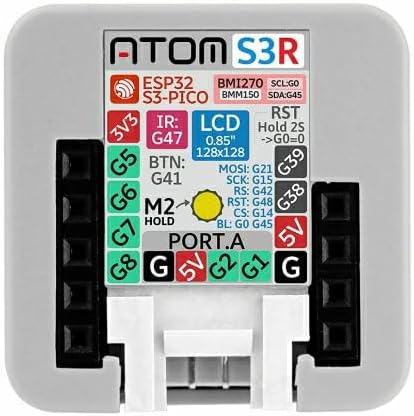
Deskripsi Gambar: Gambar ini memberikan gambaran dari atas ke bawah view of the M5Stack ATOMS3R, clearly showing the pinout configuration. Labels indicate the 3V3, 5V, and Ground (G) pins, as well as specific GPIO pins (G1, G2, G5, G6, G7, G8, G38, G39, G41, G42, G45, G47, G48). It also details the connections for the LCD (MOSI, SCK, RS, CS, BL), IR LED, and the button (BTN). The Port.A connector is visible at the bottom center.
3. Apa yang ada di dalam kotak
Setelah membuka kemasan, Anda akan menemukan barang berikut:
- 1x M5Stack ATOMS3R Development Kit
The ATOMS3R is typically packaged as shown:
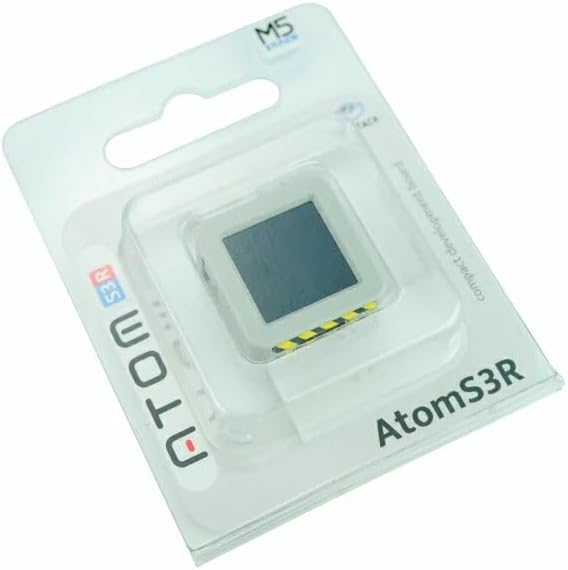
Deskripsi Gambar: The M5Stack ATOMS3R is shown in its clear blister packaging, with the device visible through the plastic. The packaging features the 'ATOM S3R' branding and the M5Stack logo.
4. Pengaturan
4.1 Menyalakan Perangkat
The ATOMS3R is powered via its USB Type-C port. Connect a standard USB Type-C cable to the device and to a 5V power source (e.g., a computer USB port or a USB wall adapter).

Deskripsi Gambar: This image displays the bottom side of the M5Stack ATOMS3R, clearly showing the USB Type-C port for power and data, and the HY2.0-4P Port.A connector for external peripherals. A yellow and black striped warning label is visible near the USB-C port.
4.2 Pengaturan Lingkungan Perangkat Lunak
The ATOMS3R supports various development environments. Choose one based on your preference and project requirements:
- Arduino IDE: For C/C++ programming. You will need to install the ESP32 board support package for Arduino. Refer to the official M5Stack documentation for detailed installation instructions.
- UIFlow: A web-based graphical programming platform, ideal for beginners. Access UIFlow through your web browser and connect your ATOMS3R.
- Micropython: For Python-based programming. You will need to flash the Micropython firmware onto the device and use a serial terminal or IDE to interact with it.
Detailed guides for setting up each environment can be found on the official M5Stack weblokasi: M5Stack Documentation.
4.3 Unduhan Firmware
Firmware can be downloaded to the ATOMS3R via the USB Type-C interface. Depending on your chosen development environment, specific tools (e.g., ESP-IDF, Arduino IDE uploader, UIFlow desktop IDE) will be used for this process.
5. Petunjuk Pengoperasian
5.1 Operasi Dasar
- Nyalakan: Connect the ATOMS3R to a 5V power source via the USB Type-C port. The device will power on automatically.
- Layar: The 0.85-inch IPS screen will display information as programmed.
- Tombol yang Dapat Diprogram: A button is located beneath the screen. Its function is determined by the loaded firmware. Typically, a short press might trigger an event, while a long press (e.g., 2 seconds) might initiate a reset or enter a specific mode.
5.2 Using Expansion Ports and Pins
- Port.A (HY2.0-4P): This port provides I2C, GPIO, ADC, and UART capabilities. It is compatible with M5Stack's Grove-compatible units for easy expansion.
- Bottom GPIO Pins: Six GPIO and power pins are exposed at the bottom of the device, allowing for custom connections to breadboards or other peripherals. Refer to the pinout diagram in Section 2.2 for specific pin assignments.
5.3 Integrated Sensors
- BMM150 Geomagnetic Sensor: Provides 3-axis magnetic field data, useful for compass applications.
- BMI270 Attitude Sensor: Provides 6-axis inertial measurement unit (IMU) data (3-axis gyroscope and 3-axis accelerometer), useful for motion sensing and orientation tracking.
Accessing data from these sensors requires appropriate libraries and programming within your chosen development environment.
6. Spesifikasi
| Fitur | Detil |
|---|---|
| Pengendali Utama | ESP32-S3-PICO-1-N8R8 |
| Memori Flash | 8MB onboard |
| Bahasa Indonesia: PSRAM | 8MB onboard |
| Menampilkan | 0.85-inch Color IPS Screen (128x128px) |
| Konektivitas Nirkabel | Wi-Fi (802.11bgn) |
| Sensor | BMM150 (3-axis geomagnetic), BMI270 (6-axis attitude) |
| Antarmuka | USB Type-C, HY2.0-4P (Port.A), 6x GPIO/Power Pins |
| Dukungan Sistem Operasi | Arduino, UIFlow, Micropython |
| Dimensi (P x L x T) | 0.95 x 0.95 x 0.5 inci (24 x 24 x 12.9 mm) |
| Berat | 0.24 ons (sekitar 6.8g) |
| Warna | Putih |
7. Penyelesaian masalah
7.1 Perangkat Tidak Menyala
- Ensure the USB Type-C cable is securely connected to both the ATOMS3R and the power source.
- Verify that the power source (e.g., computer USB port, wall adapter) is functional and providing 5V.
- Try a different USB Type-C cable.
7.2 Firmware Upload Issues
- Confirm that the correct drivers for the ESP32-S3 are installed on your computer.
- Select the correct COM port in your development environment (Arduino IDE, etc.).
- Ensure the correct board type (e.g., ESP32-S3 Dev Module) is selected in your IDE.
- Check for any error messages in the IDE's output console.
7.3 Layar Tidak Menampilkan
- Verify that your code includes the necessary display initialization and drawing commands.
- Ensure the display library is correctly configured for the 0.85-inch IPS screen.
7.4 Masalah Konektivitas Wi-Fi
- Double-check your Wi-Fi SSID and password in your code.
- Ensure the ATOMS3R is within range of your Wi-Fi access point.
- Confirm that your Wi-Fi network is operating on a 2.4GHz band, as ESP32-S3 typically supports this band.
8. Pemeliharaan
- Pembersihan: Gunakan kain lembut dan kering untuk membersihkan perangkat. Hindari penggunaan cairan atau pembersih abrasif.
- Penyimpanan: Store the ATOMS3R in a cool, dry place away from direct sunlight and extreme temperatures.
- Penanganan: Handle the device with care to avoid physical damage to the screen, ports, or pins.
- Pembaruan Firmware: Periksa situs resmi M5Stack secara berkala. website for the latest firmware and library updates to ensure optimal performance and access to new features.
9. Garansi dan Dukungan
Untuk informasi garansi terperinci, dukungan teknis, dan sumber daya tambahan, silakan kunjungi situs resmi M5Stack. weblokasi:
- Resmi Weblokasi: m5stack.com
- Dokumentasi: docs.m5stack.com
- Forum Komunitas: Engage with other users and find solutions on M5Stack's community platforms.
Harap simpan bukti pembelian Anda untuk klaim garansi apa pun.


