
1. Pendahuluan
This manual provides detailed instructions for the setup, operation, maintenance, and troubleshooting of your Yeabomy Smart Bluetooth Glasses E13C. Please read this manual thoroughly before using the product to ensure proper function and longevity.

A pair of black smart Bluetooth sunglasses, viewdilihat dari sudut tertentu, menunjukkanasing the integrated technology in the temples.
2. Produk Lebihview
2.1 Isi Paket
Verifikasi bahwa semua item ada dalam paket:
- Smart Bluetooth Glasses (E13C)
- Kabel Pengisi Daya Magnetik
- Kain Pembersih
- Eyeglasses Storage Bag
- Kotak Kacamata
- User Manual (dokumen ini)
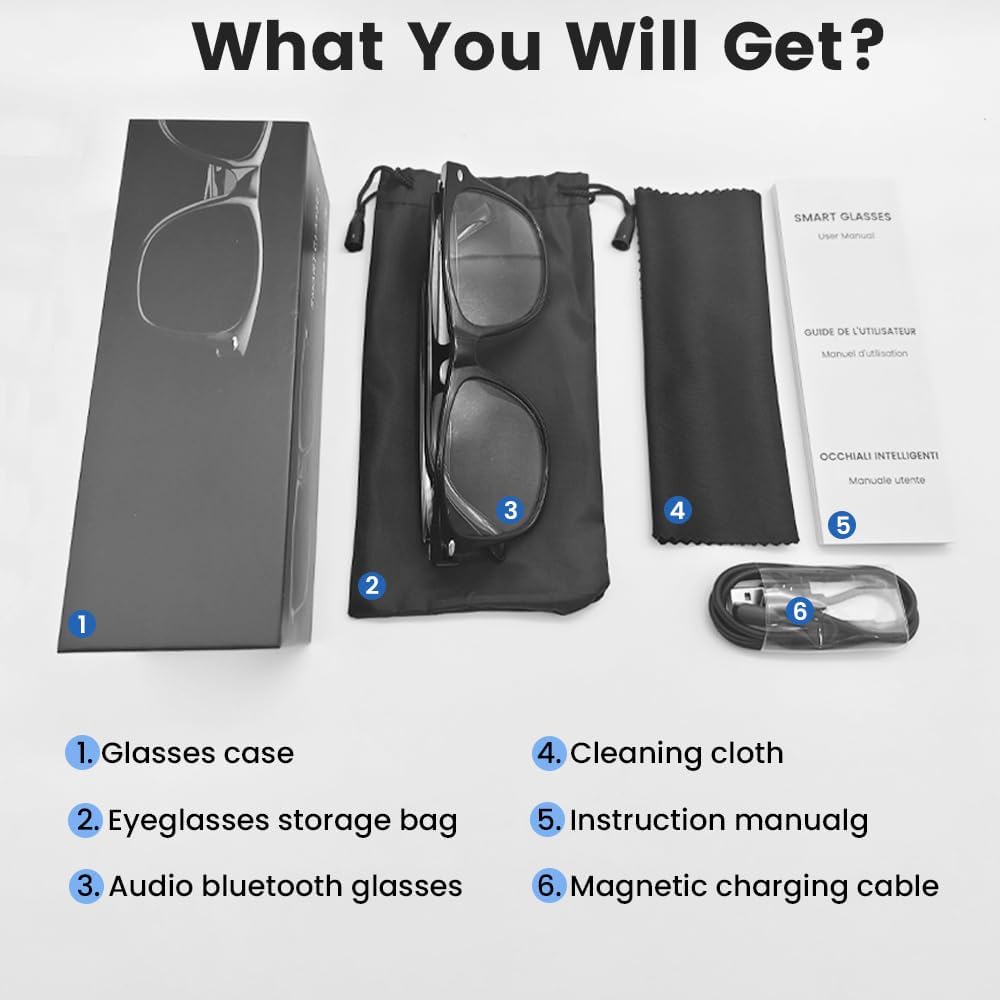
An image displaying the package contents: a glasses case, an eyeglasses storage bag, the audio Bluetooth glasses, a cleaning cloth, an instruction manual, and a magnetic charging cable.
2.2 Fitur Utama
- Kontrol Suara Cerdas: Operate functions using voice commands.
- Lensa Terpolarisasi: Effective blue light filtering and 100% UV protection. Lenses are replaceable with prescription lenses.
- Kompatibilitas Luas: Connects with various devices including smartphones (Android, iOS) and computers via Bluetooth 5.4.
- Pemasangan Satu Langkah: Automatic reconnection to the last paired device.
- Tahan air (IPX5): Tahan terhadap keringat dan hujan.
- Desain Ringan: Weighs approximately 27g for comfortable extended wear.
- Dual Magnetic Charging: Efficient and secure charging.
- Kontrol Sentuh Intuitif: For media playback, calls, and voice assistant activation.
3. Pengaturan
3.1 Mengisi Daya Kacamata
Before first use, fully charge the smart glasses. Use the provided magnetic charging cable.
- Connect the magnetic charging cable to the charging contacts on the temple of the glasses.
- Connect the USB end of the cable to a standard USB power adapter (not included) or a computer's USB port.
- The indicator light will show yellow during charging.
- Charging is complete when the indicator light turns green. A full charge takes approximately 1.5 hours.
The glasses provide approximately 4-6 hours of media playback and over 300 hours of standby time on a full charge.

An illustration showing the magnetic charging cable connecting to the glasses' temple, with indicators for charging (yellow light) and fully charged (green light). Battery capacity, charging time, playback time, and calling time are also displayed.
3.2 Pemasangan Bluetooth
To connect your smart glasses to a device:
- Pastikan kacamata sudah terisi daya dan menyala.
- Aktifkan Bluetooth di ponsel cerdas Anda atau perangkat lain.
- Pencarian untuk available Bluetooth devices. The glasses will appear as "E13".
- Select "E13" to pair. Once paired, the glasses will automatically reconnect to this device when powered on and within range (up to 33 feet).

A person wearing the smart glasses while running, with a smartphone screen showing Bluetooth settings and the glasses (E13) connected. The image highlights the 33ft Bluetooth 5.4 transmission range and voice control functionality.
4. Petunjuk Pengoperasian
4.1 Daya Hidup/Mati
- Nyalakan: Long touch the control area for 5 seconds.
- Matikan: Long touch the control area for 5 seconds.
4.2 Kontrol Sentuh
The smart glasses feature intuitive touch controls located on the temples:
- Putar/Jeda Musik: Once-Tap
- Lagu Berikutnya: Twice-Tap
- Lagu Sebelumnya: Twice-Tap
- Menjawab Panggilan: Once-Tap
- Tutup Panggilan: Once-Tap
- Aktifkan Voice Assistant: Long Touch for 2 seconds
- Fotografi Jarak Jauh: Double click to control your smartphone's camera.

A diagram illustrating the touch control gestures on the smart glasses for various functions: pick up calls, turn on music, open navigation, take photos, previous/next track, play/pause, voice assistant, answer/hang up calls, and power on/off.
4.3 Kontrol Suara
After activating the voice assistant (Long Touch for 2 seconds), you can use voice commands for various functions, such as:
- Making calls (e.g., "Call [Contact Name]")
- Playing music (e.g., "Play [Song Title]")
- Mengirim pesan
- Opening navigation
5. Pemeliharaan
- Pembersihan: Use the provided cleaning cloth to gently wipe the lenses and frame. Avoid harsh chemicals or abrasive materials.
- Tahan Air: The glasses are IPX5 water-resistant, meaning they can withstand sweat and light rain. Do not submerge them in water or expose them to strong jets of water.
- Penyimpanan: When not in use, store the glasses in the provided eyeglasses storage bag or glasses case to protect them from scratches and dust.
- Suhu: Hindari memaparkan kacamata pada suhu ekstrem (panas atau dingin) karena hal ini dapat memengaruhi masa pakai baterai dan komponen elektronik.

A pair of smart glasses resting on a surface, emphasizing their lightweight design (27g) and comfort for extended wear. A magnified inset shows the dual magnetic charging contacts.
6. Penyelesaian masalah
- Tidak Dapat Menyala: Ensure the glasses are fully charged. Connect to the magnetic charging cable and check the indicator light.
- Tidak dapat dipasangkan dengan perangkat:
- Pastikan Bluetooth diaktifkan pada perangkat Anda.
- Make sure the glasses are within the 33-foot Bluetooth range.
- Turn the glasses off and on again, then try pairing.
- Lupakan perangkat tersebut dari pengaturan Bluetooth ponsel Anda dan coba pasangkan lagi.
- Tidak Ada Suara/Volume Rendah:
- Check the volume settings on both the glasses (if applicable via touch control) and your connected device.
- Pastikan kacamata terhubung dengan benar melalui Bluetooth.
- Confirm that the audio output on your device is set to the smart glasses.
- Kontrol Sentuh Tidak Merespons: Ensure the glasses are powered on and connected. Try restarting the glasses.
7. Spesifikasi
| Model | E13C |
| Merek | Yeabomy |
| Teknologi Konektivitas | Bluetooth 5.4 |
| Kompatibilitas Sistem Operasi | Android, iOS Devices |
| Fitur Khusus | Music Player, Phone Call, Voice Control, UV Protection, Polarized Lenses, Remote Photography |
| Kapasitas Baterai | 1 Amp Hours (80mAh per temple) |
| Waktu Pengisian Daya | Sekitar 1.5 jam |
| Continuous Playback Time (Music) | Sekitar 5 jam |
| Continuous Calling Time | Sekitar 4 jam |
| Waktu Siaga | Lebih dari 300 jam |
| Berat Barang | 0.07 pon (sekitar 27g) |
| Tahan Air | Tingkat IPX5 |
| Dimensi Paket | 6.65x2.4x2.24 inci |
| Ukuran Layar | 1.96 Inches (Visible screen diagonal) |
| Kapasitas Penyimpanan Memori | 128MB |
| Bahasa Indonesia: GPS | Tidak ada GPS |

An image detailing the physical dimensions of the smart glasses, including lens width, frame width, and temple length. It also shows various face shapes (oval, triangle, round, square, diamond) indicating suitability.
8. Garansi dan Dukungan
For warranty information or technical support, please refer to the contact details provided with your purchase documentation or visit the official Yeabomy websitus. Simpan bukti pembelian Anda untuk klaim garansi apa pun.