
1. Pendahuluan
This manual provides essential information for the safe and efficient use of your CANDY Smart Inverter Washer Dryer, model CSWS496TWMRRE/FR. Please read these instructions carefully before installing, operating, or performing maintenance on the appliance. Keep this manual for future reference.
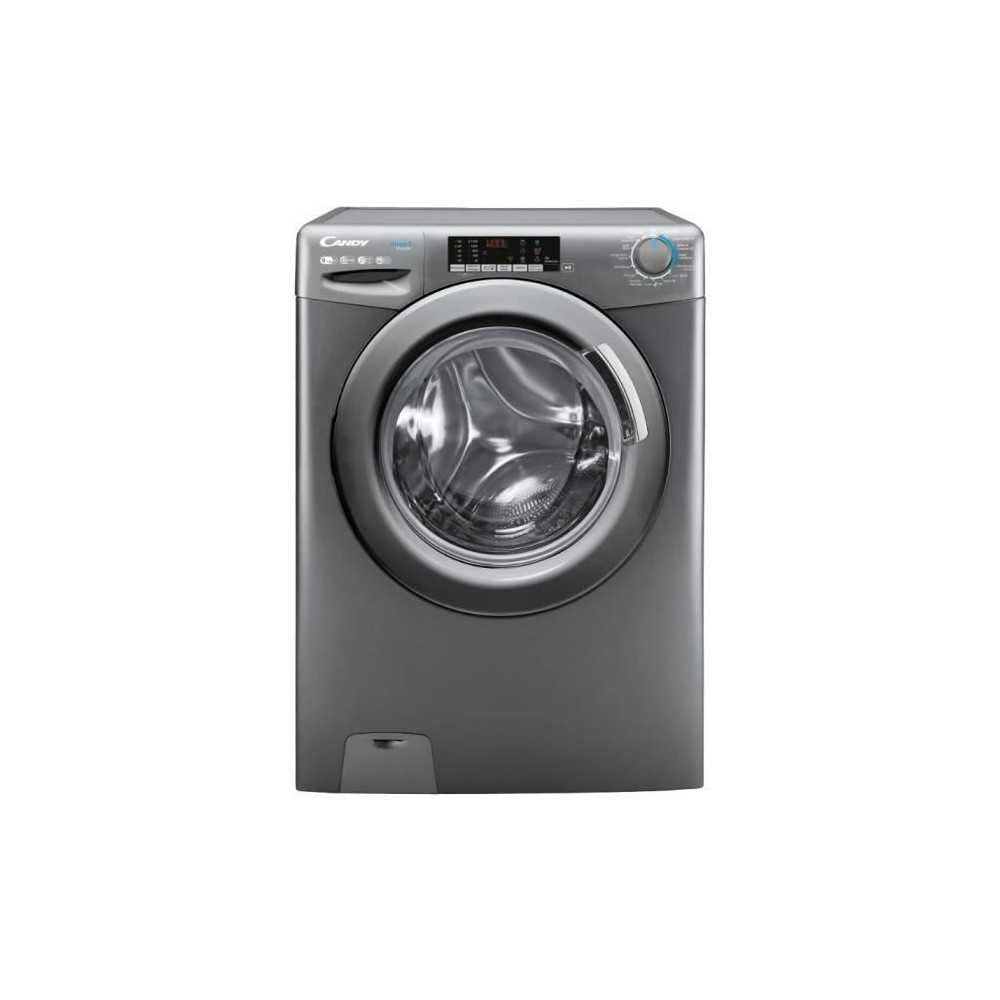
Gambar 1.1: Depan view of the CANDY Smart Inverter Washer Dryer.
2. Informasi Keselamatan
Selalu ikuti tindakan pencegahan keselamatan dasar saat menggunakan peralatan listrik untuk mengurangi risiko kebakaran, sengatan listrik, dan cedera pada orang. Peralatan ini hanya ditujukan untuk penggunaan rumah tangga.
- Pastikan alat diardekan dengan benar.
- Jangan biarkan anak-anak bermain atau mengoperasikan alat ini.
- Jangan menyentuh peralatan dengan tangan basah.
- Cabut steker peralatan sebelum membersihkan atau melakukan perawatan apa pun.
- Jangan mencuci atau mengeringkan barang yang telah dibersihkan, dicuci, direndam, atau terkena zat yang mudah terbakar atau meledak.
- Keep the area around the exhaust opening free from the accumulation of lint, dust, and dirt.
3. Produk Lebihview
3.1. Komponen
- Panel Kontrol: Features a program selector dial, digital display, and touch buttons for various functions.
- Laci Deterjen: Terletak di bagian kiri atas, untuk menambahkan deterjen dan pelembut pakaian.
- Jalan: Stainless steel interior for washing and drying clothes.
- Pintu: Pintu bukaan depan dengan pengunci yang aman.
- Menyaring: Located at the bottom front, for collecting lint and foreign objects.
3.2. Panel Kontrol

Gambar 3.1: Detail view dari panel kontrol.
The control panel allows you to select wash and dry programs, adjust settings, and monitor the cycle status. Key elements include:
- Tombol Pemilih Program: Used to choose from 15 available wash and dry programs.
- Tampilan digital: Menampilkan waktu yang tersisa, kode kesalahan, dan opsi yang dipilih.
- Pemilihan Suhu: Adjusts wash water temperature.
- Pemilihan Kecepatan Putaran: Modifies the spin cycle speed up to 1400 rpm.
- Penundaan Mulai: Sets a delayed start time for the cycle (1-24 hours).
- Options Buttons: Activates special functions like Steam, Mix Power System, and quick cycles.
3.3. Laci Deterjen
The detergent drawer has compartments for pre-wash detergent, main wash detergent, and fabric softener. Refer to the markings on the drawer for correct placement.
3.4. Drum Interior

Image 3.2: Interior of the washer dryer drum.
The stainless steel drum is designed for effective washing and drying. Ensure no foreign objects are left inside before starting a cycle.
4. Instalasi
4.1. Membongkar
- Singkirkan semua bahan kemasan, termasuk alas polistiren dan semua sisipan di dalam drum.
- Remove the transport bolts from the rear of the appliance. Keep these bolts for future transport.
4.2. Penempatan
- Letakkan alat tersebut di lantai yang kokoh dan rata.
- Adjust the feet to ensure the machine is stable and level.
- Ensure there is adequate space around the appliance for ventilation.

Gambar 4.1: Contohample of washer dryer placement in a domestic environment.
4.3. Sambungan Air dan Listrik
- Hubungkan selang air masuk ke keran air dingin.
- Position the drain hose into a standpipe or sink, ensuring it is securely fixed to prevent displacement during operation.
- Sambungkan kabel daya ke stopkontak listrik yang diarde (230 Volt).
5. Petunjuk Pengoperasian
5.1. Sebelum Penggunaan Pertama
Run a short wash cycle without laundry and detergent to clean the drum and remove any manufacturing residues.
5.2. Memuat Cucian
- Open the door and load laundry into the drum, ensuring not to overload (max 9 kg for wash, 6 kg for dry).
- Tutup pintunya rapat-rapat.
5.3. Menambahkan Deterjen dan Pelembut
Pull out the detergent drawer and add appropriate amounts of detergent and fabric softener to their respective compartments. Close the drawer.
5.4. Pemilihan Program
- Turn the program selector dial to choose the desired wash or dry program. The appliance offers 15 programs, including 7 quick cycles.
- Layar digital akan menampilkan pengaturan default untuk program yang dipilih.
5.5. Adjusting Settings and Special Functions
- Suhu: Press the temperature button to adjust the wash temperature (e.g., 20°, 30°, 40°, 60°, 90°).
- Berputar cepat: Press the spin speed button to select the desired spin speed (e.g., 400, 800, 1000, 1400 rpm).
- Penundaan Mulai: Press the delay start button repeatedly to set a delay from 1 to 24 hours.
- Fungsi Uap: Activates the steam option to reduce wrinkles and refresh clothes.
- Sistem Daya Campuran: Ensures thorough cleaning by pre-mixing water and detergent.
- Siklus Cepat: Select one of the 7 rapid cycles, including a full load program in 59 minutes.
5.6. Memulai Siklus
Tekan tombol Mulai/Jeda untuk memulai program yang dipilih. Layar akan menampilkan waktu yang tersisa.
5.7. Akhir Siklus
At the end of the cycle, the appliance will signal with an audible alert and/or a message on the display. Open the door and remove the laundry.
6. Pemeliharaan
6.1. Membersihkan Laci Deterjen
Regularly clean the detergent drawer to prevent residue buildup. Remove the drawer, rinse it under running water, and clean any stubborn deposits with a brush. Reinsert the drawer.
6.2. Membersihkan Drum
Use the dedicated 'Drum Cleaning' program (if available) or run an empty hot wash cycle with a descaling agent or white vinegar to maintain drum hygiene.
6.3. Membersihkan Filter
Periodically clean the drain pump filter to ensure proper drainage. Place a shallow container under the filter cover, unscrew the filter, remove any lint or debris, and then securely replace it.
6.4. Pembersihan Eksterior
Usap permukaan luar alat tersebut dengan kain lembut dan kering.amp kain. Jangan gunakan pembersih atau pelarut yang bersifat abrasif.
7. Penyelesaian masalah
If you encounter issues with your appliance, consult the table below for common problems and solutions. If the problem persists, contact customer support.
| Masalah | Kemungkinan Penyebab | Larutan |
|---|---|---|
| Peralatan tidak dapat dinyalakan | Power cord unplugged; door not closed; program not selected; Start/Pause button not pressed. | Periksa sambungan daya; pastikan pintu terkunci; pilih program; tekan Mulai/Jeda. |
| Tidak ada asupan air | Keran air tertutup; selang masuk air tertekuk; filter air tersumbat. | Buka keran air; luruskan selang; bersihkan filter saluran masuk air. |
| Air tidak mengalir | Selang pembuangan tertekuk atau tersumbat; filter pompa pembuangan tersumbat. | Luruskan atau bersihkan selang pembuangan; bersihkan filter pompa pembuangan. |
| Getaran berlebihan | Peralatan tidak rata; baut pengangkut tidak dilepas; beban tidak merata. | Adjust leveling feet; remove transport bolts; redistribute laundry. |
| Pakaian tidak kering dengan benar | Overloaded; incorrect drying program; lint filter blocked. | Kurangi beban; pilih program pengeringan yang sesuai; bersihkan filter serat. |
8. Spesifikasi
| Fitur | Spesifikasi |
|---|---|
| Nama Model | C SWS496TWMRRE/FR |
| Merek | PERMEN |
| Dimensi Produk (P x L x T) | Ukuran 54P x 60P x 86T cm |
| Kapasitas Cuci | 9 Kilogram |
| Kapasitas Kering | 6 Kilogram |
| Kecepatan Putaran Maks | 1400rpm |
| Jumlah Program | 15 |
| Energy Class (Wash) | A |
| Tingkat Kebisingan | 76dB |
| Jil.tage | 230 Volt |
| Bahan (Drum) | Baja tahan karat |
| Berat | 65 Kilogram |
| Jenis Instalasi | Freestanding |
| Jenis Kontrol | Menyentuh |
9. Garansi dan Dukungan
9.1. Informasi Garansi
This CANDY appliance comes with a Garansi pabrik 2 tahun. Please retain your proof of purchase for warranty claims. The warranty covers defects in materials and workmanship under normal domestic use.
9.2. Dukungan Pelanggan
For technical assistance, spare parts, or to schedule a service appointment, please contact CANDY customer support. Refer to the contact information provided in the separate warranty card or on the official CANDY weblokasi.
The user manual is included with the product for detailed instructions and further support.