
1. Pendahuluan
Welcome to the user manual for your new Nubia Flip 5G smartphone. This guide provides essential information to help you set up, operate, and maintain your device. The Nubia Flip 5G combines a compact, foldable design with advanced features, including a dual AMOLED display, a versatile external screen, and AI-powered functionalities.
Key features of your Nubia Flip 5G include:
- Dual AMOLED Displays: Enjoy a fluid 120 Hz refresh rate on both the 6.9-inch internal display and the 3-inch external display.
- Fully Functional External Display: Access 100% of your applications directly from the external screen without unfolding the phone.
- Sistem Kamera Canggih: Capture high-quality photos with the 50 MP main camera, supported by AI features and 4K stabilized video recording. Utilize the external screen for high-resolution selfies.
- AI-Powered Enhancements: Benefit from features like AI Magic Photos for editing and live translation for voice calls.
- Baterai Tahan Lama: Equipped with a 4325 mAh battery and 33W fast charging, allowing 50% charge in under 20 minutes.
2. Pengaturan
2.1. Unboxing dan Pemeriksaan Awal
Keluarkan semua barang dari kemasan dengan hati-hati. Pastikan komponen-komponen berikut ada:
- Ponsel pintar Nubia Flip 5G
- Kabel USB
- Sarung Telepon
- Film Pelindung
Inspect the device for any visible damage. If any components are missing or damaged, contact customer support.
2.2. Memasukkan Kartu SIM
- Matikan perangkat.
- Temukan tempat kartu SIM di sisi telepon.
- Use the SIM ejector tool (not included, typically found with your SIM card) to open the tray.
- Masukkan kartu Nano-SIM Anda ke dalam baki dengan kontak emas menghadap ke bawah. Perangkat ini mendukung Dual SIM.
- Masukkan kembali baki ke dalam telepon dengan hati-hati.
2.3. Menyalakan dan Konfigurasi Awal
- Press and hold the Power button until the Nubia logo appears.
- Ikuti petunjuk di layar untuk memilih bahasa Anda, terhubung ke jaringan Wi-Fi, dan menyiapkan akun Google Anda.
- Anda akan dipandu untuk mengatur fitur keamanan seperti pembukaan kunci sidik jari dan pengenalan wajah.
3. Mengoperasikan Perangkat
3.1. Understanding the Dual Display

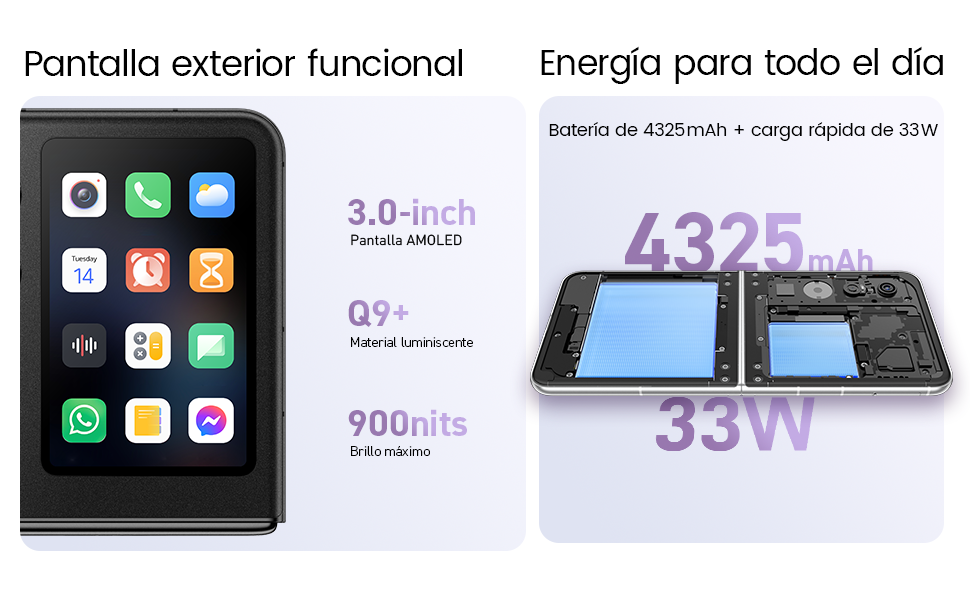
Your Nubia Flip 5G features two displays: a large 6.9-inch internal foldable AMOLED screen and a compact 3-inch external AMOLED screen. Both screens offer a smooth 120 Hz refresh rate for an enhanced visual experience.
- Tampilan Internal: Ideal for immersive content consumption, gaming, and detailed tasks.
- Tampilan Eksternal: Provides quick access to notifications, widgets, music controls, and even full applications without needing to unfold the phone. Swipe left or right to navigate through different functions.
3.2. Fungsionalitas Kamera

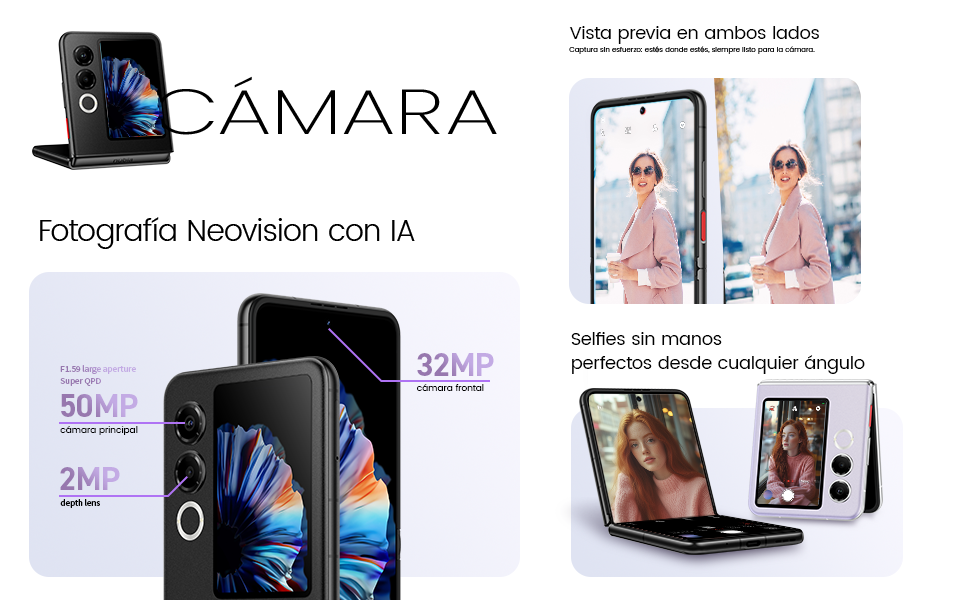
The Nubia Flip 5G is equipped with a powerful 50 MP main camera and a secondary portrait camera, enhanced with AI for superior image quality. The 32 MP front camera ensures clear video calls and selfies.
- High-Resolution Selfies: Use the external screen as a viewfinder to take selfies with the high-quality rear cameras.
- Hands-Free Photography: Partially fold the phone and place it on a flat surface to capture photos and videos without needing a tripod.
- 4K Stabilized Video: Record smooth, high-definition videos with advanced stabilization.
3.3. Fitur AI
The device integrates several AI functions to enhance user experience:
- AI Magic Photos: Utilize AI for intelligent photo editing and enhancement.
- Live Call Translation: Experience real-time translation during voice calls, breaking down language barriers.
3.4. Video Selesaiview
Pertunjukan video produk resmiasing the Nubia Flip 5G's design, versatile external display, hands-free selfie capabilities, and long-lasting battery.
4. Baterai dan Pengisian Daya

The Nubia Flip 5G is equipped with a 4325 mAh battery, designed to provide extended usage. It supports 33W fast charging, allowing you to quickly replenish the battery. A 50% charge can be achieved in less than 20 minutes.
- Use the provided USB cable and a compatible 33W charger for optimal fast charging.
- Hindari penggunaan pengisi daya atau kabel yang tidak bersertifikat untuk mencegah kerusakan pada perangkat.
5. Pemeliharaan
Proper care ensures the longevity and optimal performance of your Nubia Flip 5G.
- Perawatan Layar: The foldable screen is delicate. Avoid pressing hard on the screen, especially near the crease. Keep sharp objects away from the display.
- Pembersihan: Gunakan kain lembut dan bebas serat untuk membersihkan layar dan bodi. Hindari bahan kimia keras atau bahan abrasif.
- Tahan Air: While the device may have some level of splash resistance, it is not fully waterproof. Avoid submerging the phone in water or exposing it to excessive moisture.
- Suhu: Operasikan perangkat dalam rentang suhu yang direkomendasikan. Suhu yang terlalu panas atau terlalu dingin dapat memengaruhi masa pakai dan kinerja baterai.
- Pembaruan Perangkat Lunak: Regularly update your device's software to ensure you have the latest features, security patches, and performance improvements.
6. Penyelesaian masalah
If you encounter issues with your Nubia Flip 5G, try the following common troubleshooting steps:
- Perangkat Tidak Menyala: Pastikan baterai terisi daya. Hubungkan pengisi daya dan tunggu beberapa menit sebelum mencoba menyalakannya kembali.
- Layar Tidak Responsif: Restart the device by pressing and holding the Power button. If unresponsive, perform a forced restart (refer to device-specific instructions if standard restart fails).
- Aplikasi mogok: Bersihkan cache aplikasi yang bermasalah atau instal ulang. Pastikan perangkat lunak perangkat Anda sudah diperbarui.
- Daya Tahan Baterai Buruk: Adjust screen brightness, disable unnecessary background apps, and turn off features like GPS or Bluetooth when not in use.
- Masalah Konektivitas (Wi-Fi/Bluetooth): Toggle Wi-Fi or Bluetooth off and on. Restart your router or the connected device.
- Terlalu panas: Close demanding applications, reduce screen brightness, and avoid direct sunlight. If overheating persists, contact support.
For more complex issues, refer to the official Nubia support websitus atau hubungi layanan pelanggan mereka.
7. Spesifikasi
Below are the detailed technical specifications for the Nubia Flip 5G (Model: 123447101014):
| Fitur | Spesifikasi |
|---|---|
| Sistem Operasi | Android 14 |
| Berat Barang | 193 gram |
| Dimensi Paket | 21.1 x 9 x 3.2 cm; 193 gram |
| Baterai | Diperlukan baterai 1 C. (termasuk) |
| Nomor Model | 123447101014 |
| Teknologi Konektivitas | Bluetooth, NFC, USB, Wi-Fi |
| Bahasa Indonesia: GPS | BENAR |
| Fitur Khusus | Stereo speakers, Mobile Hotspot capability, Dual SIM, Built-in GPS |
| Fitur Tampilan Lainnya | Nirkabel |
| Masukan Antarmuka Manusia | Layar sentuh |
| Resolusi Pemindai | Ukuran 2790x1188 |
| Fitur Kamera Lainnya | Depan belakang |
| Soket Audio | Tidak dikenal |
| Faktor Bentuk | Layar Lipat |
| Warna | Hitam |
| Peringkat Daya Baterai | 4325 mAh |
| Waktu Bicara Telepon | 24 Jam |
| Ukuran RAM | 8 GB |
| Model CPU | Mediatek Dimensity 9000 |
| Kecepatan CPU | 2 GHz |
| Kapasitas Memori | 8 GB |
| Ukuran Layar | 6.9 inci |
| Tingkat Penyegaran | 120Hz |
| Nama Model | ZTE Nubia Flip |
8. Garansi dan Dukungan
Your Nubia Flip 5G smartphone comes with a standard manufacturer's warranty. Please refer to the warranty card included in your product packaging for specific terms and conditions, including coverage duration and claim procedures.
For technical support, service, or additional information, please visit the official Nubia website or contact their authorized customer service channels. Keep your purchase receipt and device serial number handy when seeking support.