
Perkenalan
Thank you for choosing the Jacuate Open Ear Earbuds M115. These Bluetooth 5.4 headphones are designed for comfort, clear sound, and durability, making them ideal for various activities including sports and daily use. This manual provides detailed instructions for setup, operation, and maintenance to ensure optimal performance.
Apa yang ada di dalam kotak
- Over Ear Earbuds (Left and Right)
- Casing Pengisian Daya Nirkabel
- Kabel Pengisian Daya USB-C
- Panduan Pengguna
- Bantalan Telinga

Image: Contents of the Jacuate M115 earbud package.
Produk Selesaiview dan Fitur
Open Ear Design for Comfort
The M115 earbuds feature an open-ear design that allows sound to enter the ear naturally, reducing pressure on the eardrum. This ergonomic design ensures comfort for extended listening sessions and maintains awareness of your surroundings.

Image: Jacuate M115 earbuds demonstrating the open ear design and comfortable fit.
Clear Sound Quality and Surrounding Awareness
Equipped with a large dynamic speaker driver and directional acoustic technology, these earbuds deliver deep bass and clear stereo sound. The open design allows you to hear your music while remaining aware of your environment, enhancing safety during outdoor activities.

Image: Features of Jacuate M115 earbuds including sound quality and awareness.
Extended Playtime and LED Power Display
Enjoy up to 4 hours of playback on a single charge, with the charging case providing an additional 36 hours, totaling 40 hours of listening time. The charging case features an LED display to show the remaining battery power for both the case and individual earbuds.

Image: Jacuate M115 charging case with LED display and battery life.
Bluetooth 5.4 and Smart Touch Control
Utilizing Bluetooth 5.4 technology, the earbuds offer a stable connection up to 10 meters. Smart touch controls allow for easy management of music playback, volume adjustments, and hands-free calls. Earbuds automatically reconnect after initial pairing.

Image: Jacuate M115 earbuds connected via Bluetooth 5.4.
IPx4 Waterproof Rating
With an IPx4 waterproof rating, these earbuds are resistant to sweat and splashes, making them suitable for workouts, running, cycling, and other outdoor activities.

Image: Jacuate M115 earbuds in use during cycling, highlighting waterproof feature.
Pengaturan dan Penyandingan
- Isi daya earbud: Before first use, place both earbuds into the charging case and connect the case to a power source using the provided USB-C cable. Ensure the LED display indicates charging.
- Nyalakan: Buka casing pengisi daya. Earbud akan otomatis menyala dan masuk ke mode berpasangan.
- Aktifkan Bluetooth: Pada perangkat Anda (ponsel pintar, tablet, laptop), aktifkan Bluetooth.
- Pilih Earbud: In your device's Bluetooth settings, look for "Jacuate M115" (or similar) in the list of available devices and select it to pair.
- Konfirmasi: Once paired, you will hear an audio prompt, and the earbuds' indicator lights will change. The earbuds will automatically reconnect to the last paired device when removed from the case.
Petunjuk Pemakaian
For optimal sound and comfort, ensure the earbuds are correctly positioned on your ears.
- Hook the Earbud: Gently hook the earbud end over the helix of your ear.
- Rotate Backward: Rotate the earbud backward along the auricle until it sits comfortably.
- Sesuaikan agar pas: Adjust the ear hook to ensure a stable and secure fit. The lightweight design should make them barely noticeable.

Image: Step-by-step guide for wearing the earbuds.
Instruksi Pengoperasian: Kontrol Sentuh
The Jacuate M115 earbuds feature intuitive touch controls on each earbud. Refer to the following table for common functions:
| Fungsi | Aksi (Earbud Kiri/Kanan) |
|---|---|
| Putar/Jeda | Double click (L/R) |
| Lagu Sebelumnya/Berikutnya | Triple click (L/R) |
| Menjawab/Mengakhiri Panggilan | Double click (L/R) |
| Tolak Panggilan Masuk | Long press 2 seconds (L/R) |
| Suara +/- | Single click (L/R) |
| Aktifkan Asisten Suara | Long press (L) |
| Music/Gaming Mode Toggle (Connected) | Quadruple click (L/R) |
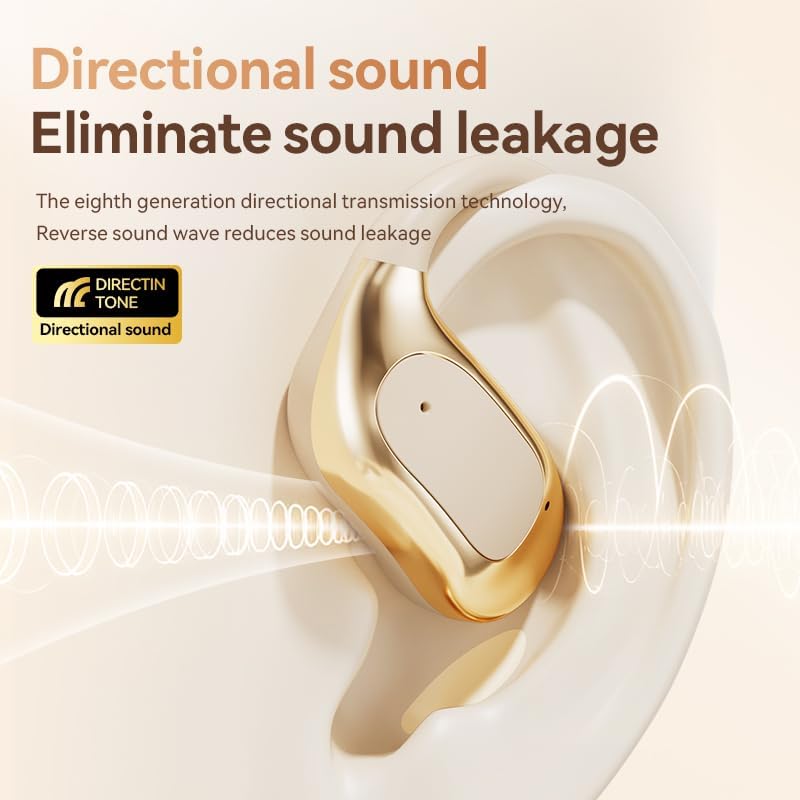
Image: Touch control guide for Jacuate M115 earbuds.
Pengisian daya
To charge your Jacuate M115 earbuds and charging case:
- Tempatkan earbud ke dalam slotnya masing-masing di wadah pengisi daya.
- Hubungkan kabel pengisian daya USB-C ke port pengisian daya pada casing dan ujung lainnya ke adaptor daya USB (tidak disertakan).
- The LED display on the charging case will show the current battery level and charging status.
- A full charge for the earbuds provides approximately 4 hours of use, and the fully charged case provides multiple recharges for a total of up to 40 hours of playtime.
Pemeliharaan
Untuk memastikan daya tahan dan kinerja optimal earbud Anda:
- Pembersihan: Bersihkan earbud dan wadah pengisi daya secara teratur dengan kain lembut dan kering. Hindari penggunaan bahan kimia keras atau bahan abrasif.
- Penyimpanan: Jika tidak digunakan, simpan earbud dalam kotak pengisi dayanya untuk melindunginya dari debu dan kerusakan.
- Paparan Air: While IPx4 waterproof, avoid submerging the earbuds in water. Dry them thoroughly if they get wet from sweat or splashes.
- Port Pengisian Daya: Jaga agar port pengisian daya USB-C tetap bersih dan bebas dari kotoran.
Penyelesaian Masalah
| Masalah | Larutan |
|---|---|
| Earbud tidak dapat dipasangkan | Pastikan earbud terisi daya. Matikan dan hidupkan kembali Bluetooth perangkat Anda. Lupakan perangkat di pengaturan Bluetooth dan pasangkan kembali. |
| Tidak ada suara dari satu earbud | Check if both earbuds are charged. Try placing both back in the case, closing it, and then reopening to reset. |
| Casing pengisi daya tidak mengisi daya | Verify the USB-C cable is securely connected to both the case and power source. Try a different cable or power adapter. |
| Volume rendah atau kualitas suara buruk | Adjust volume on both your device and the earbuds. Ensure earbuds are clean and properly seated on your ears. |
Spesifikasi
| Fitur | Detil |
|---|---|
| Merek | Jacuate |
| Nomor Model | Pesawat M115 |
| Penempatan Telinga | Telinga Terbuka |
| Teknologi Konektivitas | Bluetooth 5.4, Nirkabel |
| Jangkauan Bluetooth | 10 Meter |
| Metode Kontrol | Menyentuh |
| Daya Tahan Baterai (Earbud) | Sekitar 4 jam |
| Total Waktu Bermain (dengan Casing Pengisi Daya) | Hingga 40 jam |
| Tingkat Tahan Air | IPx4 (Sweat and splash resistant) |
| Berat Barang | 1.9 Ons (total) |
| Bahan | Akrilonitril Butadiena Stirena (ABS) |
| Fitur Tambahan | LED Power Display, Directional Acoustic Technology, AI Noise Reduction for calls |
Garansi dan Dukungan
Jaminan: This product comes with a 2-Year Manufacturer Warranty, covering defects in materials and workmanship under normal use. Please retain your proof of purchase for warranty claims.
Dukungan Pelanggan: For technical assistance, troubleshooting, or warranty inquiries, please contact Jacuate customer support through the retailer's platform or visit the official Jacuate websitus untuk informasi kontak.


