
1. Pendahuluan
This manual provides detailed instructions for the setup, operation, and maintenance of your Transformers GK01 Wireless Mechanical Keyboard. The GK01 is a versatile keyboard featuring tri-mode connectivity (Bluetooth 5.0, 2.4GHz wireless, and USB-C wired), a 101-key layout, RGB backlighting, and hot-swappable switches for a customizable typing experience.

Figure 1.1: Transformers GK01 Wireless Mechanical Keyboard.
2. Isi Paket
Harap verifikasi bahwa semua item yang tercantum di bawah ini disertakan dalam paket Anda:
- Transformers GK01 Wireless Mechanical Keyboard
- Kabel USB-C ke USB-A
- Dongle USB Nirkabel 2.4GHz
- 2-in-1 Keycap dan Switch Puller
- User Manual (dokumen ini)
- Saklar Cadangan (2 buah)
- Penutup Keyboard
3. Pengaturan dan Koneksi
3.1. Tri-Mode Connection Overview
The GK01 keyboard supports three connection modes: USB-C wired, 2.4GHz wireless, and Bluetooth 5.0. You can connect to up to five devices simultaneously and switch between them seamlessly.

Figure 3.1: Tri-Mode Connection Capabilities.
3.2. Koneksi Kabel USB-C
- Temukan port USB-C pada keyboard.
- Hubungkan salah satu ujung kabel USB-C yang tersedia ke keyboard.
- Hubungkan ujung kabel USB-C lainnya ke port USB-A yang tersedia di komputer Anda.
- Keyboard akan otomatis dikenali dan siap digunakan.
3.3. Koneksi Nirkabel 2.4GHz
- Locate the 2.4GHz wireless USB dongle.
- Colokkan dongle ke port USB-A yang tersedia di komputer Anda.
- On the keyboard, ensure the mode switch (usually on the side or back) is set to 2.4GHz mode.
- Keyboard seharusnya terhubung secara otomatis. Jika tidak, tekan Fn + R untuk memulai pemasangan.

Figure 3.2: USB-C Port and 2.4GHz Dongle Location.
3.4. Koneksi Bluetooth 5.0
Keyboard ini mendukung koneksi hingga tiga perangkat Bluetooth (BT1, BT2, BT3).
- On the keyboard, set the mode switch to Bluetooth mode.
- Untuk masuk ke mode pemasangan untuk saluran Bluetooth tertentu, tekan dan tahan Fn + Q (untuk BT1), Fn + W (untuk BT2), atau Fn + E (for BT3) for 3-5 seconds until the indicator light flashes rapidly.
- On your device (PC, tablet, smartphone), open Bluetooth settings and search for new devices.
- Select "Transformers GK01" from the list of available devices.
- Once connected, the indicator light on the keyboard will stop flashing.
- Untuk beralih antara perangkat Bluetooth yang terhubung, cukup tekan Fn + Q, Fn + W, atau Fn + E.
4. Operasi Dasar
4.1. Keyboard Layout and Anti-Ghosting
The GK01 features a 101-key layout, providing a full set of keys including a numeric keypad. All keys are equipped with anti-ghosting technology, ensuring that every keystroke is registered accurately, even when multiple keys are pressed simultaneously.
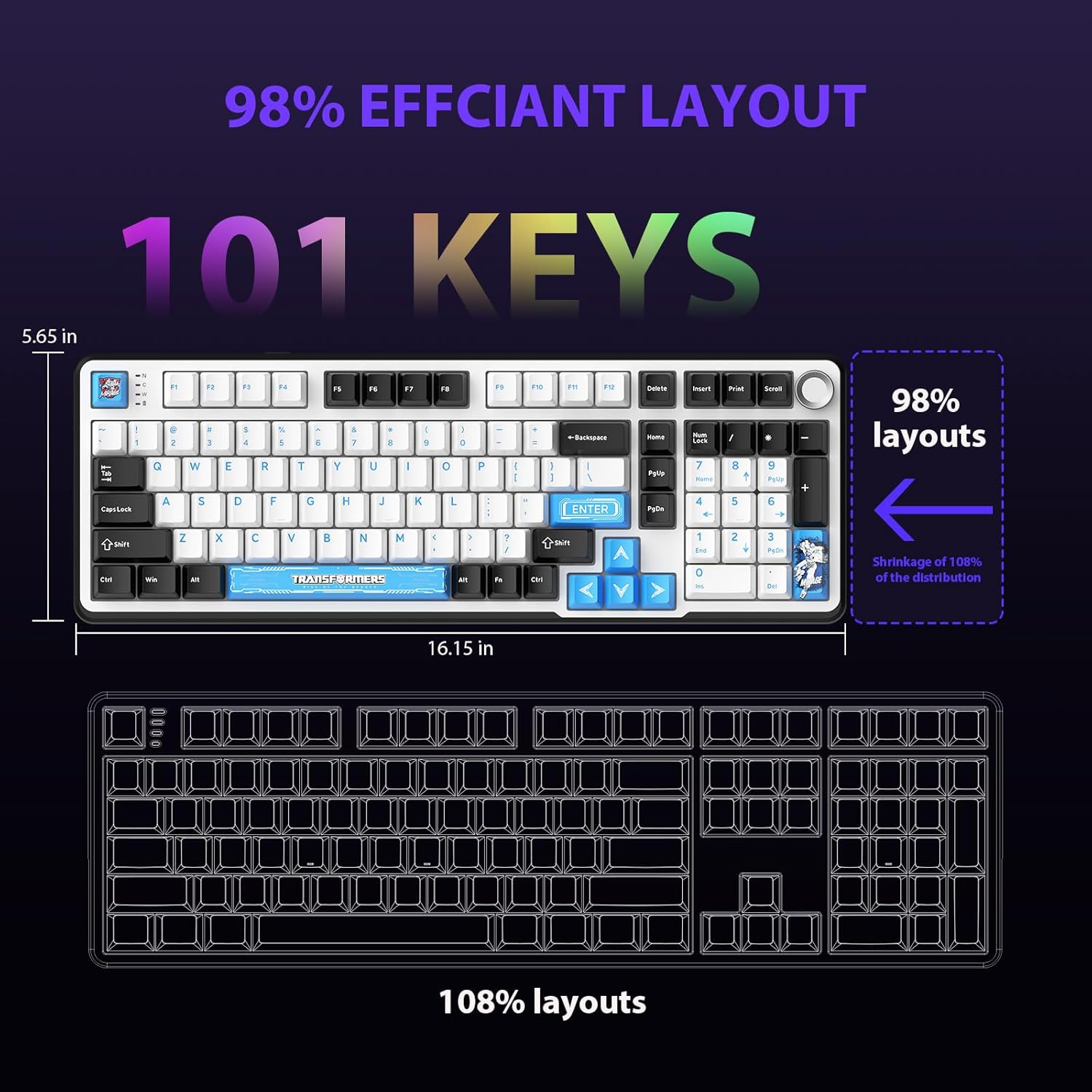
Figure 4.1: 101-Key Layout.
4.2. Tombol Kontrol Multimedia
The dedicated knob located on the top right of the keyboard provides convenient multimedia control:
- Putar searah jarum jam: Tingkatkan volume.
- Putar Berlawanan Arah Jarum Jam: Kurangi volume.
- Tekan ke bawah: Nonaktifkan/Nonaktifkan suara.
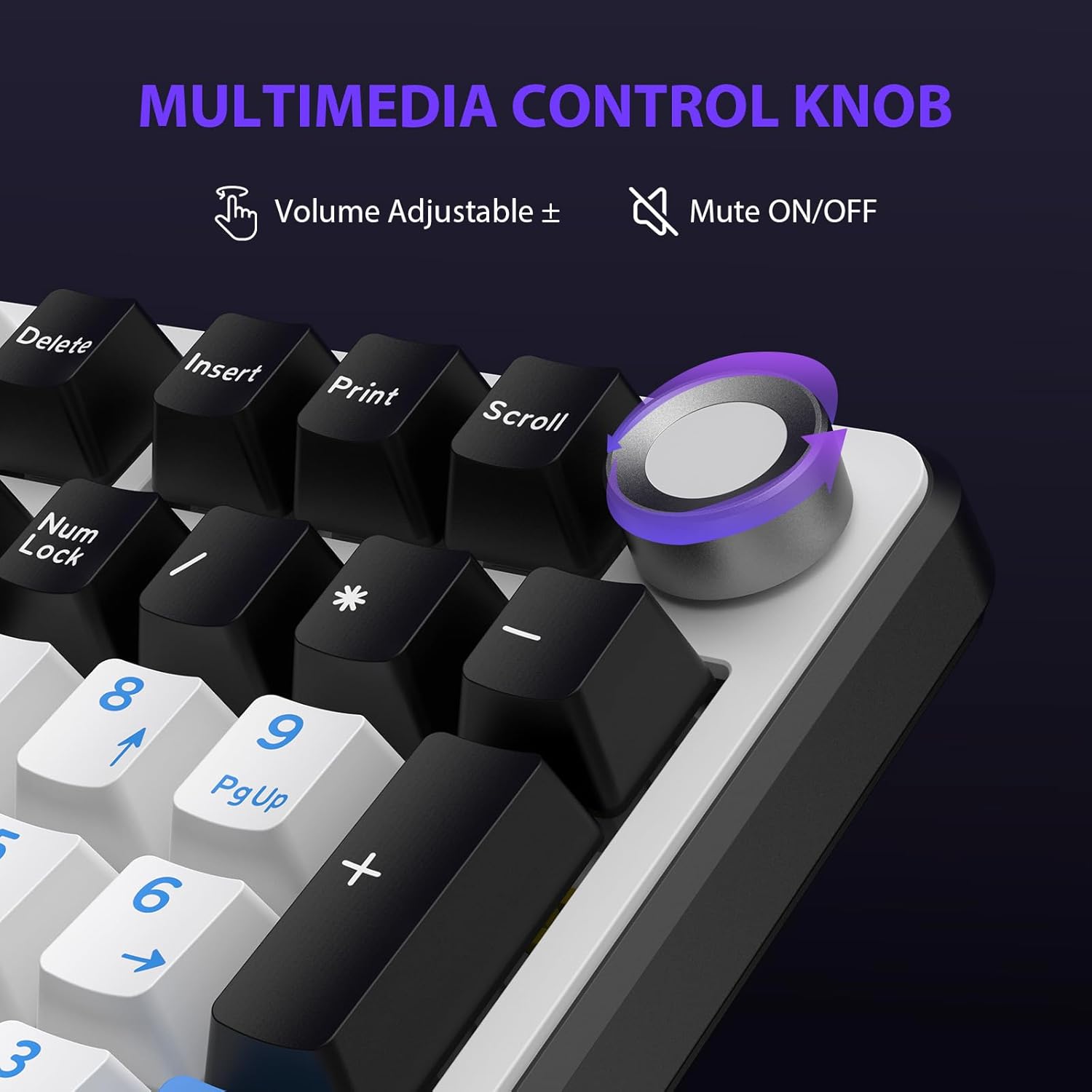
Figure 4.2: Multimedia Control Knob.
4.3. Kontrol Lampu Latar RGB
The GK01 keyboard features 16.8 million color RGB backlighting with various effects.
- Fn+ [Right Arrow]: Adjust 5 brightness levels.
- Fn+ [Left Arrow]: Adjust 5 speed levels for dynamic effects.
- Fn+ [Menyisipkan]: Beralihlah di antara 20 mode lampu latar yang berbeda.
- Fn+ [Memasuki]: Switch color order within certain modes.
- Fn+ [X]: Turn off light / activate power-saving mode.
- Fn+ [Menghapus spasi]: Switch color order within certain modes.

Figure 4.3: RGB Backlight Controls.
5. Fitur Lanjutan
5.1. Sakelar yang Dapat Diganti Saat Beroperasi (Hot-Swappable Switches)
The GK01 keyboard is equipped with pre-lubricated Cybertron linear switches and supports solder-free hot-swapping. This allows you to easily replace switches with compatible 3-pin or 5-pin mechanical switches without soldering.
Untuk mengganti sakelar:
- Using the provided 2-in-1 keycap and switch puller, gently remove the keycap from the desired switch.
- Insert the switch puller onto the switch, ensuring it grips the top and bottom clips of the switch.
- Tarik sakelar perlahan ke atas untuk melepaskannya dari PCB.
- Sejajarkan pin sakelar baru dengan lubang pada PCB. Pastikan pin lurus agar tidak bengkok.
- Tekan sakelar baru dengan kuat hingga berbunyi klik.
- Pasangkan kembali penutup tombol.

Figure 5.1: Hot-Swappable Switch Replacement.
5.2. Programmable Software
The GK01 supports custom software for advanced customization, including key remapping, macro creation, and detailed RGB lighting effects.
- The software is compatible only with the Windows operating system.
- The keyboard must be connected via USB-C wired mode to use the software.
- For driver download, please visit the official Transformers Keyboard website or refer to the link provided in the product packaging.
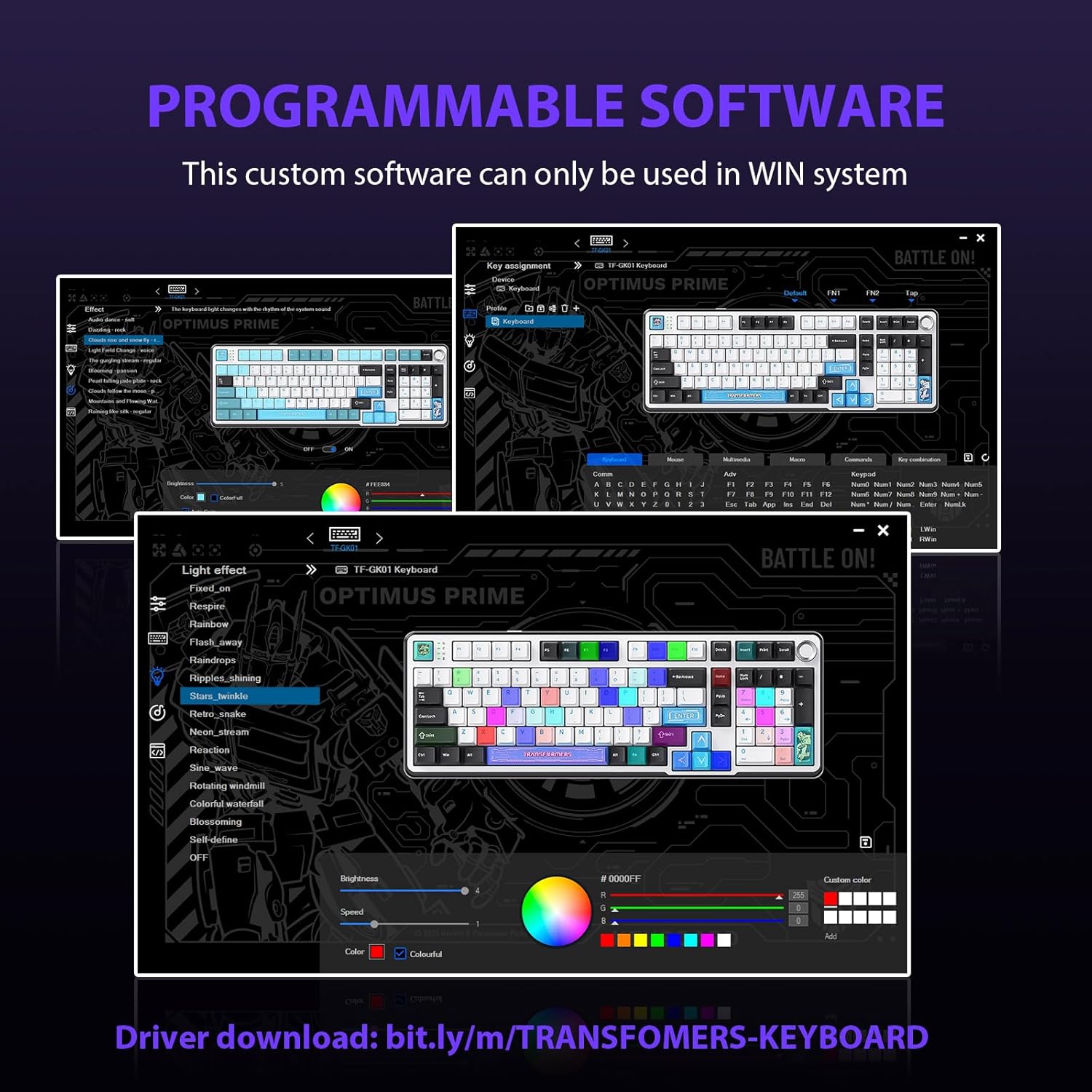
Figure 5.2: Programmable Software Interface.
5.3. Gasket Mounted Structure
The keyboard features a five-layer sound-absorbing and shock-absorbing gasket mounted structure. This design effectively reduces hollow noise and provides a softer, more consistent typing feel by isolating the plate from the case.
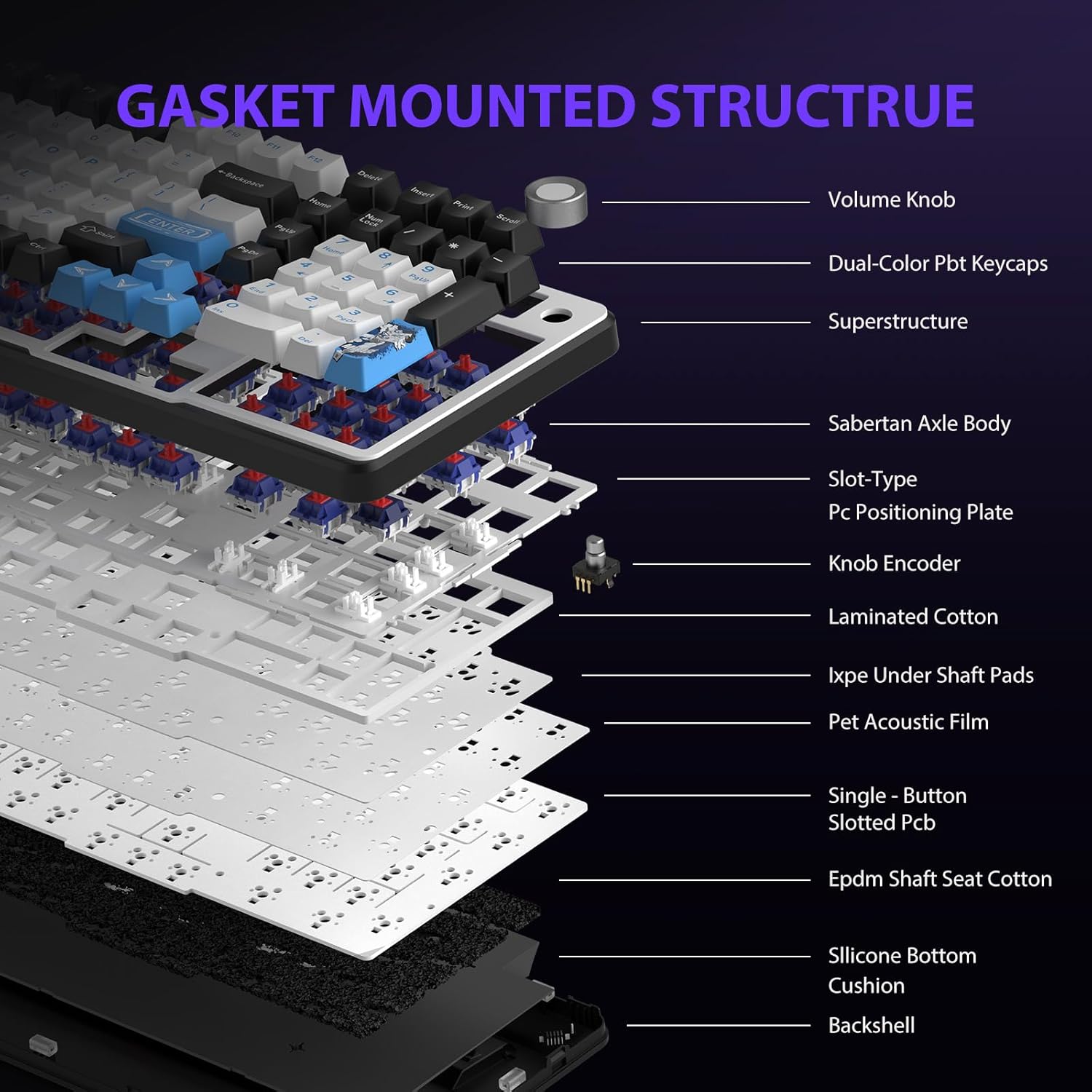
Figure 5.3: Gasket Mounted Structure Components.
6. Manajemen Baterai
The GK01 keyboard is equipped with a 4000mAh rechargeable battery.
- Pengisian daya: Connect the keyboard to a USB power source using the provided USB-C cable. The indicator light will show charging status.
- Daya Tahan Baterai: A fully charged battery provides extended usage time. Actual battery life may vary based on usage patterns and RGB lighting intensity.
- Penghematan energi: The keyboard will enter a power-saving sleep mode after a period of inactivity to conserve battery. Press any key to wake it up.
7. Pemeliharaan
7.1. Membersihkan Keyboard
- Lepaskan keyboard dari semua sumber listrik sebelum membersihkan.
- Gunakan kain lembut dan bebas serat untuk sedikit membersihkannya.ampdibersihkan dengan air atau larutan pembersih ringan untuk menyeka penutup tombol dan rangka.
- Untuk membersihkan debu dan kotoran di antara tombol keyboard, gunakan udara bertekanan atau sikat kecil.
- Hindari penggunaan bahan kimia keras atau bahan abrasif.
7.2. Perawatan Tutup Tombol dan Sakelar
- The PBT keycaps are designed for durability and fade resistance.
- Refer to Section 5.1 for instructions on safely removing and replacing keycaps and switches.
- Ensure the keyboard feet are clean and free of debris for stable placement.

Figure 7.1: Adjustable Keyboard Feet.
8. Penyelesaian masalah
| Masalah | Kemungkinan Penyebab | Larutan |
|---|---|---|
| Keyboard tidak merespons dalam mode nirkabel. | Low battery, incorrect mode selected, dongle not connected, Bluetooth not paired. | Charge the keyboard. Ensure the mode switch is set correctly (2.4GHz or BT). Re-insert the 2.4GHz dongle. Re-pair Bluetooth connection. Try wired mode to confirm keyboard functionality. |
| Kunci tidak terdaftar atau salah ketik. | Loose switch, software issue, debris under keycap. | Ensure switches are fully seated. Clean under keycaps. If using programmable software, ensure it's updated or try resetting keyboard settings. |
| Lampu latar RGB tidak berfungsi atau macet. | Backlight turned off, software conflict. | Tekan Fn + X to toggle backlight. Check programmable software settings. |
| Tidak dapat terhubung melalui Bluetooth. | Keyboard tidak dalam mode pemasangan, Bluetooth perangkat mati, gangguan. | Ensure keyboard is in Bluetooth pairing mode (Fn + Q/W/E long press). Ensure device Bluetooth is on and discoverable. Move closer to the device. |
9. Spesifikasi
| Fitur | Detil |
|---|---|
| Nomor Model | TF-GK01 |
| Konektivitas | Bluetooth 5.0, Nirkabel 2.4GHz, Kabel USB-C |
| Jenis Papan Ketik | Mekanis |
| Tata Letak | 101 Tombol (Ukuran penuh) |
| Saklar | Pre-lubed Cybertron Linear Switches, Hot-Swappable (3-pin/5-pin compatible) |
| Kartu kunci | Heat-sublimated PBT |
| Pencahayaan latar | RGB (16.8 Million Colors, 20 modes, music rhythm effects via driver) |
| Kapasitas Baterai | 4000 mAh |
| Dimensi Produk | 16.15 x 5.65 x 1.63 inci (41.02 x 14.35 x 4.14 cm) |
| Berat Barang | 2.24 pon (1.02 kg) |
| Perangkat yang Kompatibel | Laptop, PC, Ponsel Pintar, Tablet |
| Fitur Khusus | Anti-Ghosting (all keys), Multimedia Control Knob, Programmable Keys (via software), Rechargeable |
10. Garansi dan Dukungan
For information regarding warranty coverage, technical support, or service inquiries, please refer to the warranty card included with your product or visit the official Transformers Keyboard weblokasi.
Pabrikan: Transformator


