
1. Pendahuluan
This manual provides detailed instructions for the safe and efficient use of your Rfiver Mobile TV Stand with Power Outlet, Model B0F89BJFHH. Please read this manual thoroughly before assembly and operation to ensure proper setup and to prevent damage or injury. Keep this manual for future reference.
2. Fitur Produk
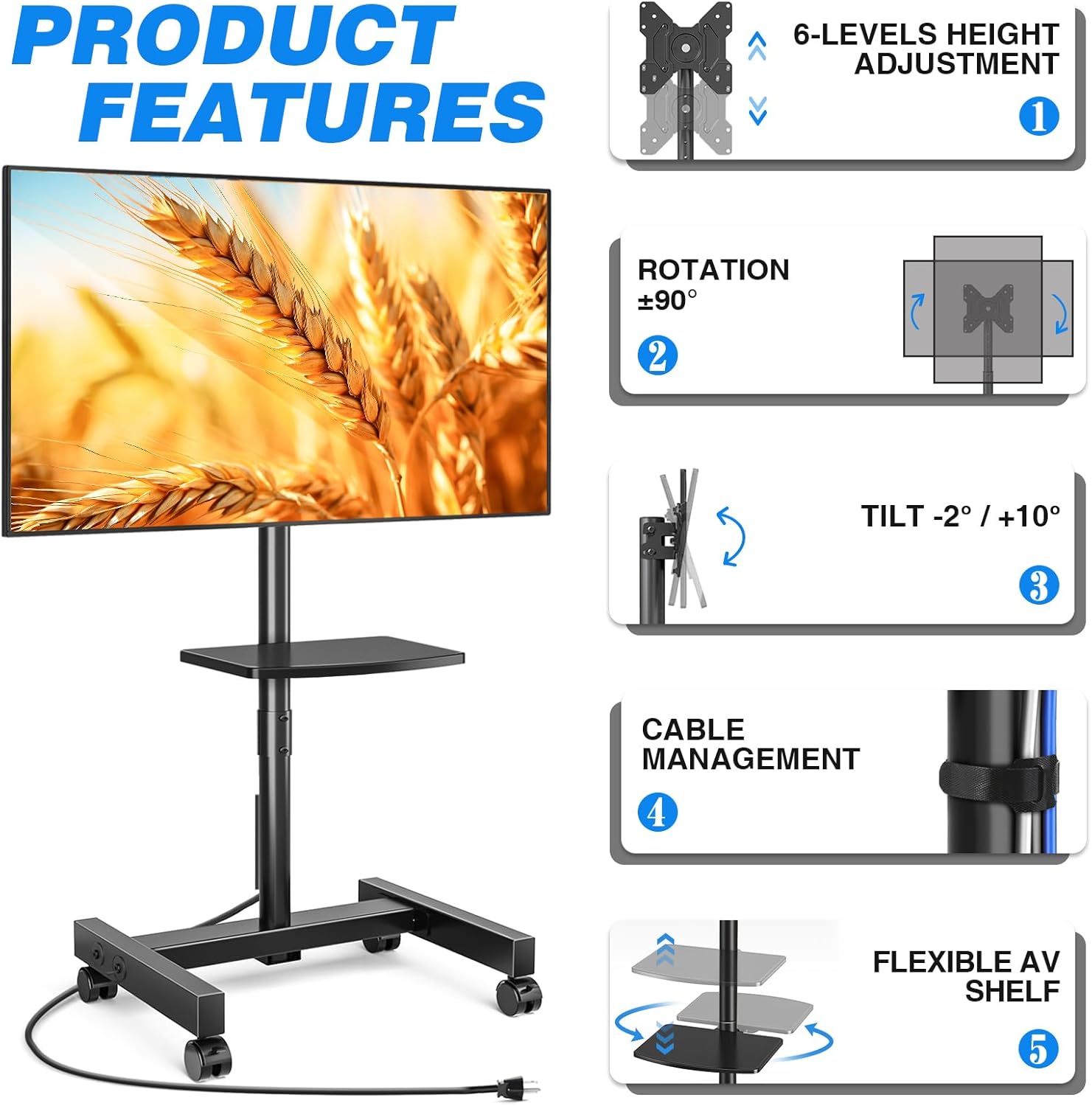
The Rfiver Mobile TV Stand is designed for versatility and convenience, offering a range of features to enhance your viewpengalaman ing.
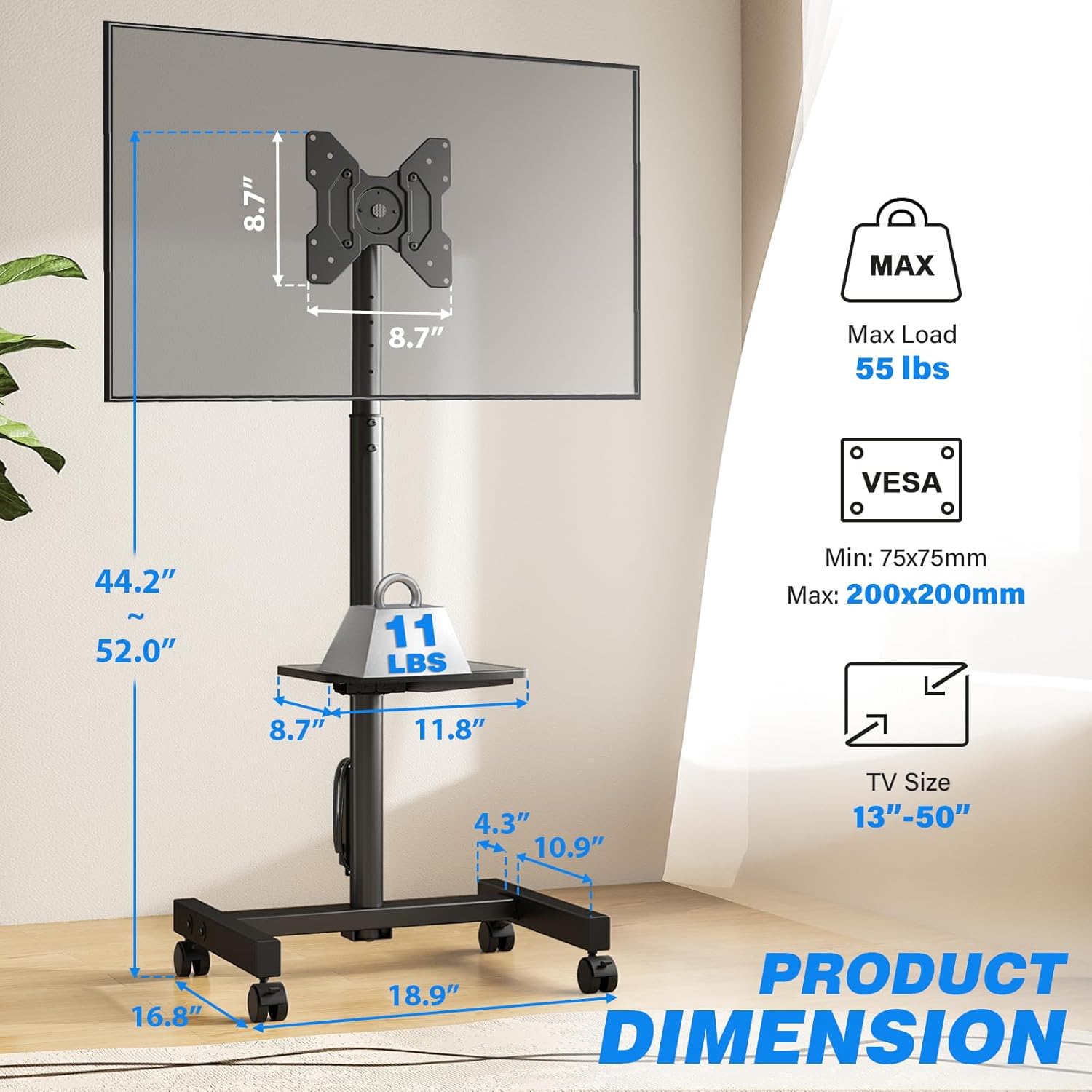
- Kompatibilitas Luas: Supports most 13-50 inch LCD/LED/OLED Flat/Curved screens or monitors with a maximum load capacity of 55 lbs. Compatible with VESA mounting patterns from 75x75mm to 200x200mm.
- Stopkontak Terintegrasi: Features a built-in power strip with 4 AC outlets (120V/12A) and a 6.5-foot heavy-duty extension cord. Includes a one-touch power switch for electrical safety.
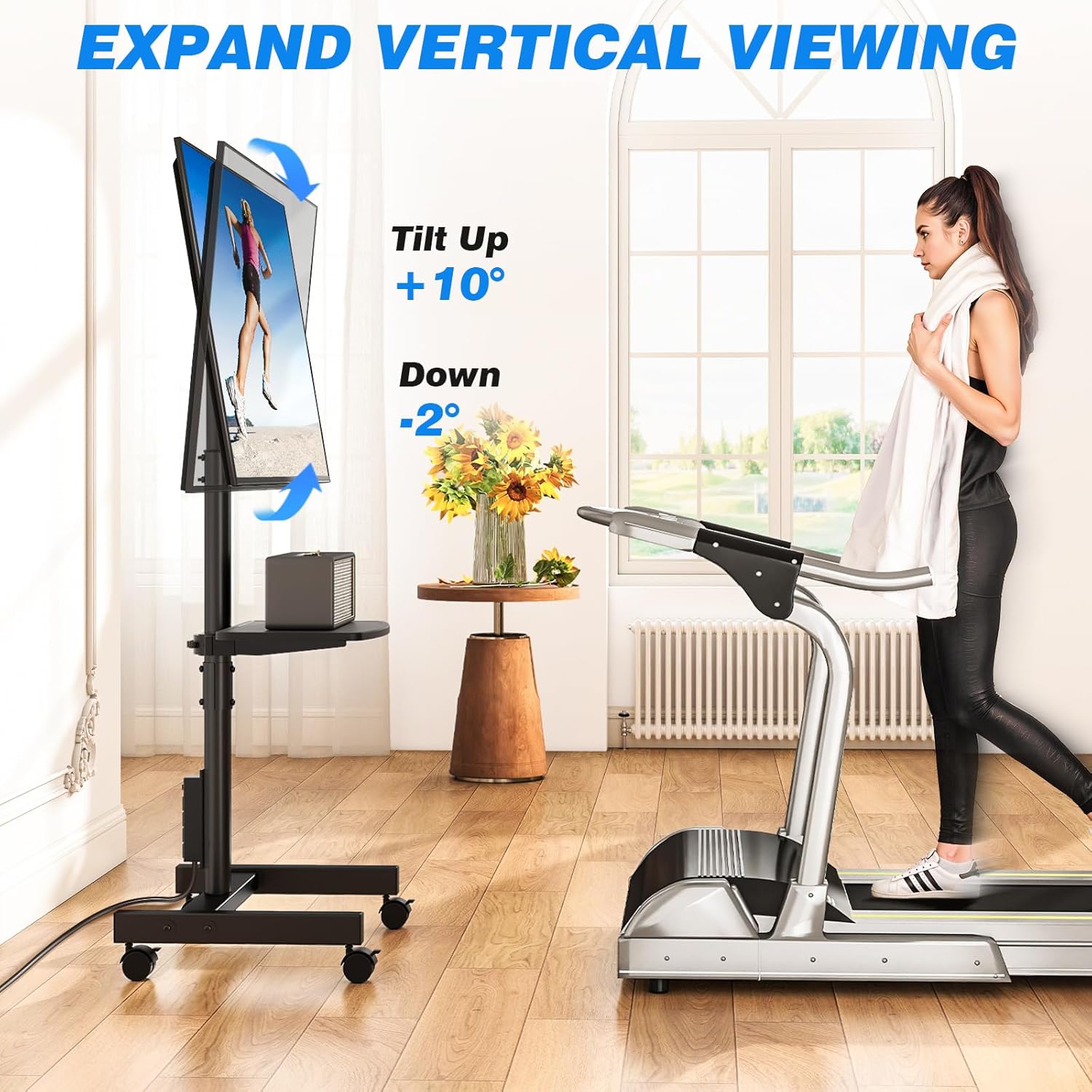
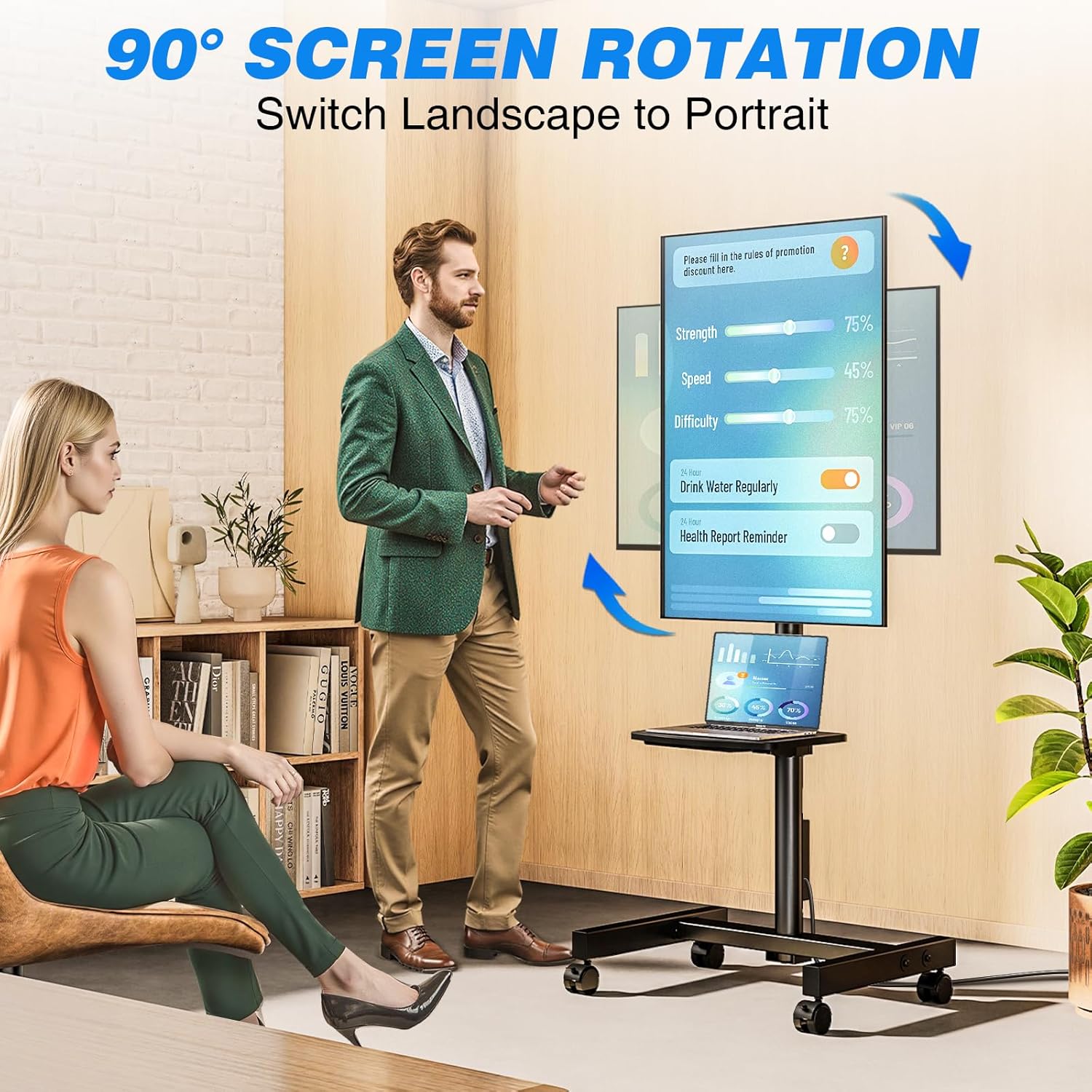
- Penyesuaian Sudut Fleksibel: Allows TV rotation between portrait and landscape modes (90 degrees). Tilt angle adjustment from +10° to -2° for optimal viewing.
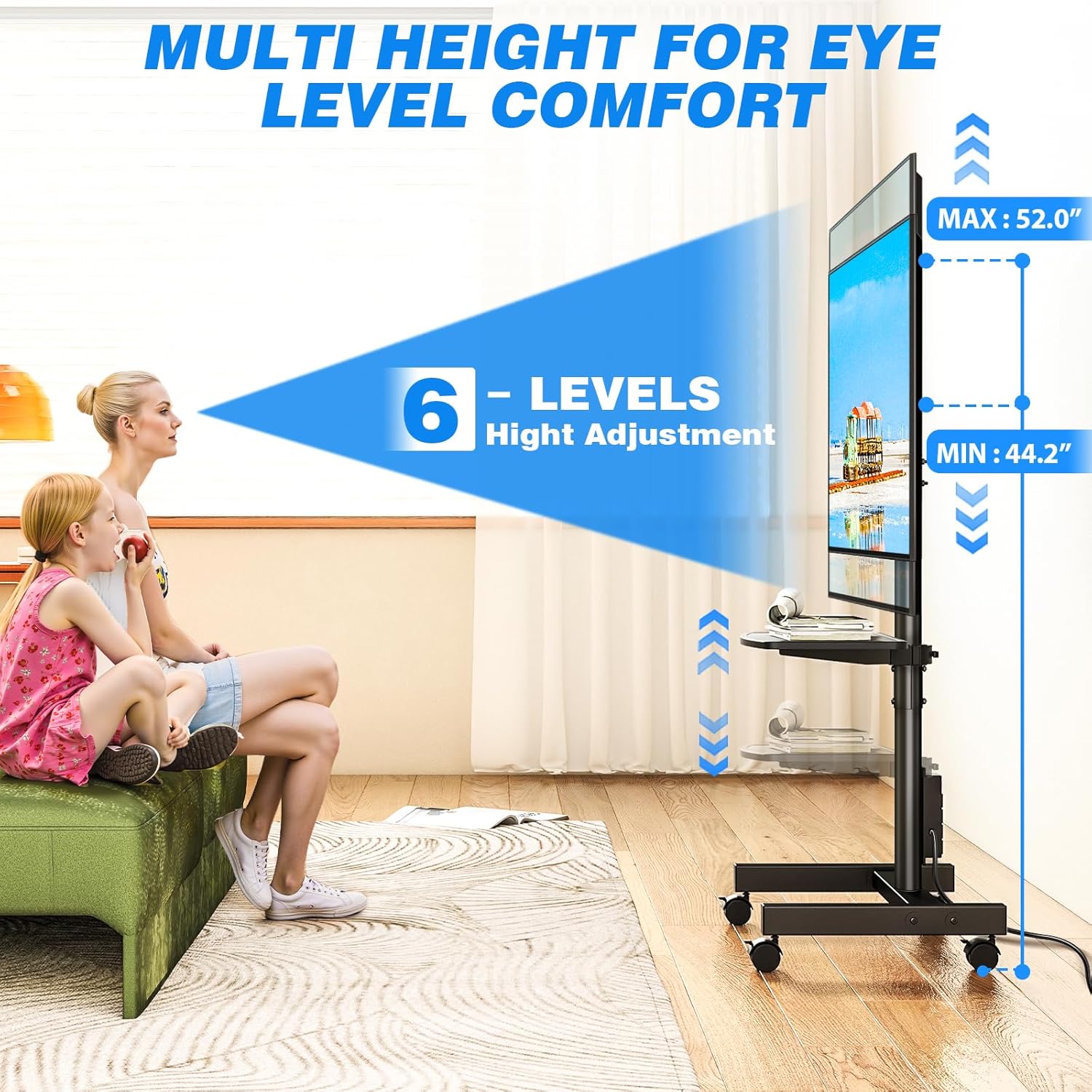
- Penyesuaian Ketinggian: Offers 6 levels of height adjustment to position the screen at eye level.
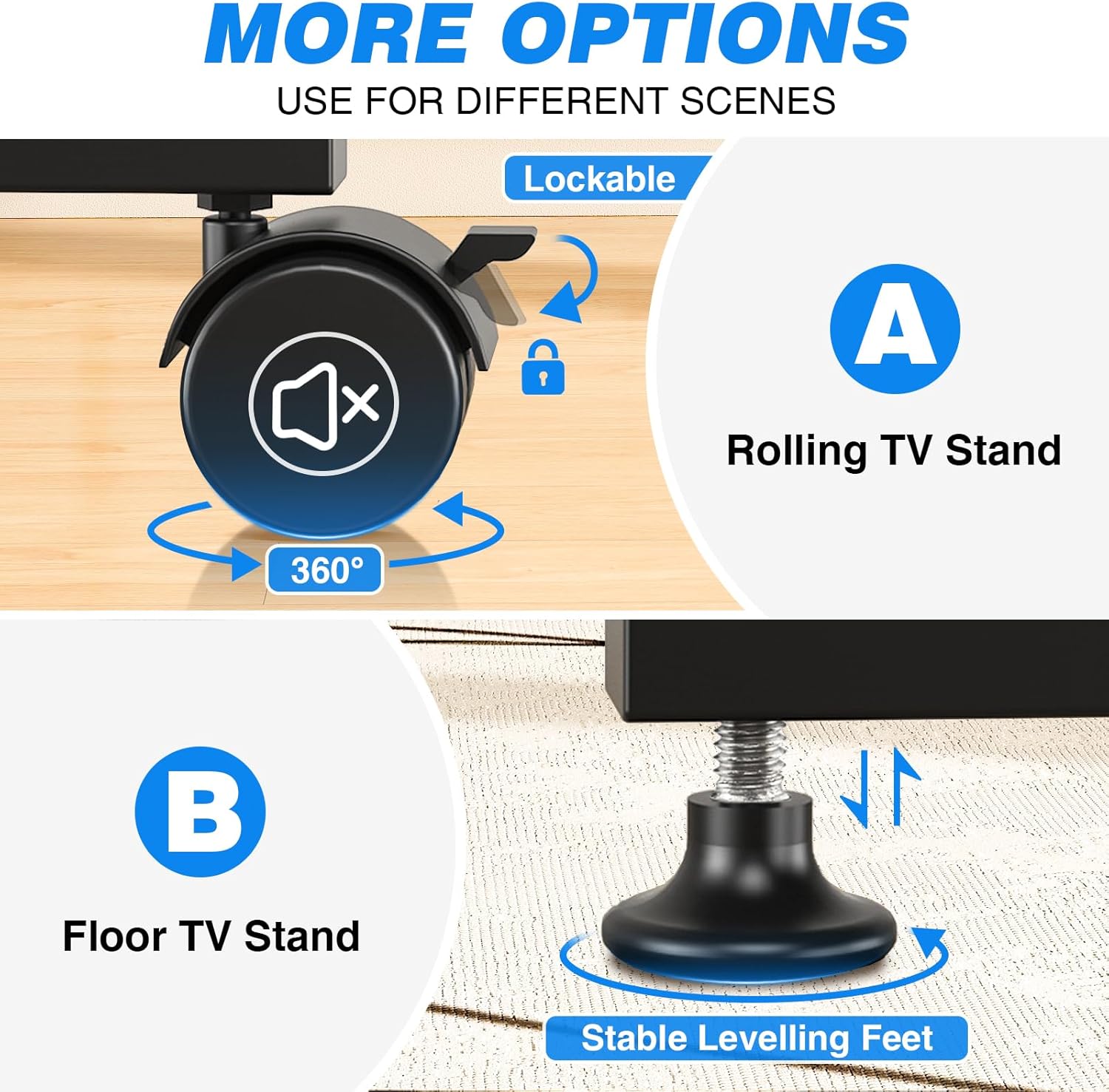
- Mobile or Fixed Use: Comes with both 360° rotating lockable castors for easy mobility and adjustable feet for stable, stationary use on various surfaces.
- Desain Hemat-Ruang: Compact design allows placement close to walls or behind furniture. Integrated cable management system keeps wires organized.
- Adjustable Media Shelf: Includes a shelf for media devices or accessories.
Fitur Berakhirview
Stopkontak Terintegrasi

Dapat disesuaikan Viewing sudut
Opsi Mobilitas
Product Dimensions and VESA Compatibility
Rentang Penyesuaian Ketinggian
Video Produk
Video ini memberikan gambaran visualview of the Rfiver Rolling TV Stand's features, including height adjustment, adjustable storage shelf, 90-degree vertical assembly, tilt functionality, cable management, integrated power outlet, and VESA compatibility.
3. Spesifikasi
| Atribut | Nilai |
|---|---|
| Merek | Rfiver |
| Nomor Model | B0F89BJFHH |
| Berat Barang | 12.45 pon |
| Dimensi Produk | 18.8x16.8x52 inci |
| Warna | Hitam |
| Bahan | Logam |
| Jenis Pemasangan | Lantai Mount |
| Jenis Gerakan | Memutar |
| Perangkat yang Kompatibel | Monitor, Televisi |
| Sudut Kemiringan Maksimum | +10° / -2° |
| Kompatibilitas Ukuran TV | 13-50 inci |
| Kapasitas Beban Maksimum | 55 pon |
| Kompatibilitas VESA | 75x75mm hingga 200x200mm |
| Stopkontak | 4 AC outlets (120V/12A), 6.5ft cord |
4. Informasi Keselamatan
Harap perhatikan tindakan pencegahan keselamatan berikut untuk mencegah cedera atau kerusakan pada produk:
- Jangan melebihi kapasitas beban maksimum 55 lbs (25 kg).
- Ensure your TV's VESA mounting pattern is within the supported range (75x75mm to 200x200mm).
- Always follow assembly instructions carefully. Incorrect assembly can lead to product failure.
- Distribute weight evenly on the media shelf. Do not overload.
- When moving the stand, ensure all wheels are unlocked. Lock wheels when the stand is in its desired position to prevent accidental movement.
- Jauhkan anak-anak dan hewan peliharaan dari dudukan selama perakitan dan penyetelan.
- Jangan mencoba memodifikasi produk. Modifikasi apa pun dapat membatalkan garansi dan menimbulkan bahaya keselamatan.
- Ensure the power outlet is properly grounded and rated for the connected devices. Do not exceed the power strip's electrical limits (120V/12A).
5. Isi Paket
Before beginning assembly, verify that all parts are present and undamaged. Refer to the included assembly instructions for a complete list of components and hardware.
- TV Stand Base (with pre-installed power outlet)
- Vertical Support Pole
- Braket Pemasangan TV
- Adjustable Media Shelf
- Set of 360° Rotating Lockable Castors
- Set of Adjustable Leveling Feet
- Hardware Kit (screws, washers, spacers for TV mounting and stand assembly)
- Assembly Tools (e.g., Allen wrench, open-end wrench)
- Panduan Pengguna
6. Petunjuk Perakitan
Assembly typically requires two people. Follow the step-by-step instructions provided in the separate assembly guide included with your product. Ensure all connections are secure before mounting your TV.
- Bongkar dan Verifikasi: Carefully unpack all components and compare them against the parts list in your assembly guide.
- Merakit Basis: Attach the vertical support pole to the base. Decide whether to install the lockable castors for mobility or the adjustable leveling feet for a stationary setup.
- Pasang Rak Media: Secure the adjustable media shelf to the vertical support pole at your desired height.
- Pasang Braket TV: Secure the TV mounting brackets to the back of your television using the appropriate screws, washers, and spacers from the hardware kit. Ensure VESA compatibility.
- Pasang TV: Carefully lift and attach the TV (with brackets) to the main mounting plate on the stand. Secure it according to the assembly guide.
- Manajemen Kabel: Route all cables through the integrated cable management system to maintain a tidy appearance.
Note: Detailed diagrams and specific hardware identifiers are found in the dedicated assembly manual.
7. Petunjuk Pengoperasian
7.1 Menyesuaikan Ketinggian
The TV stand offers 6 levels of height adjustment. To adjust the height:
- Loosen the locking mechanisms on the vertical support pole.
- Angkat atau turunkan TV dengan hati-hati ke posisi yang diinginkan. viewtinggi.
- Securely tighten all locking mechanisms to prevent the TV from slipping.
7.2 Tilting the TV
The TV mount allows for a tilt range of +10° (up) to -2° (down).
- Locate the tilt adjustment knobs or bolts on the TV mounting bracket.
- Kendurkan sedikit.
- Adjust the TV to your preferred tilt angle.
- Tighten the knobs/bolts firmly to secure the TV in place.
7.3 Rotating the TV (Portrait/Landscape)
The TV can be rotated 90 degrees to switch between portrait and landscape orientations.
- Ensure there is sufficient clearance around the TV to rotate it without hitting obstacles.
- Carefully rotate the TV to the desired orientation.
- The mount is designed to hold the TV securely in both positions.
7.4 Menggunakan Stop Kontak Terintegrasi
The stand includes a power strip with 4 AC outlets.
- Plug the stand's 6.5-foot power cord into a wall outlet.
- Connect your TV and other media devices to the 4 AC outlets on the power strip.
- Use the one-touch power switch to turn the power strip on or off, conserving energy when devices are not in use.
7.5 Moving the Stand (with Castors)
If you have installed the lockable castors:
- Ensure all castor locks are disengaged before moving.
- Gently push the stand to its new location.
- Once in position, engage all castor locks to prevent unwanted movement.

8. Pemeliharaan
- Pembersihan: Bersihkan dudukan dengan kain lembut dan kering.amp kain. Hindari pembersih atau pelarut abrasif yang dapat merusak lapisan akhir.
- Pemeriksaan Perangkat Keras: Periodically check all bolts and screws to ensure they remain tight and secure. Retighten as necessary.
- Manajemen Kabel: Ensure cables are neatly routed and not pinched or stressed.
- Castors/Feet: If using castors, keep them free of debris. If using leveling feet, ensure they are stable and adjusted correctly.
9. Penyelesaian masalah
| Masalah | Kemungkinan Penyebab | Larutan |
|---|---|---|
| TV is not stable/wobbles | Loose bolts; uneven floor; overloaded. | Check and tighten all assembly bolts. Ensure the stand is on a level surface. If using leveling feet, adjust them. Do not exceed weight capacity. |
| TV cannot be tilted/rotated | Mekanisme penguncian terlalu kencang; ada hambatan. | Loosen tilt/rotation bolts slightly. Check for any cables or objects obstructing movement. |
| Stopkontak tidak berfungsi | Stand's power cord unplugged; power switch off; circuit breaker tripped. | Ensure the stand's power cord is securely plugged into a live wall outlet. Press the one-touch power switch on the power strip. Check your home's circuit breaker. |
| Stand is difficult to move (with castors) | Castor locks engaged; debris in castors. | Disengage all castor locks. Clean any hair or debris from the castor wheels. |
10. Garansi dan Dukungan
Rfiver products are designed for durability and performance. For warranty information, technical support, or to order replacement parts, please refer to the warranty card included with your product or visit the official Rfiver website. Please have your model number (B0F89BJFHH) ready when contacting support.
Informasi Kontak:
- Weblokasi: Rfiver Official Store on Amazon
- E-mail: Lihat kemasan produk atau keterangan resmi webSitus untuk email layanan pelanggan.