
1. Pendahuluan
This manual provides detailed instructions for the assembly, operation, and maintenance of your DEVAISE AMGZ 60 Inch L-Shaped Gaming Desk. Please read this manual thoroughly before assembly and use to ensure proper function and safety. Keep this manual for future reference.

Figure 1.1: The DEVAISE AMGZ 60 Inch L-Shaped Gaming Desk in a typical setup, showcasing its monitor stand, LED lighting, and integrated storage.
2. Informasi Keselamatan
Perhatikan tindakan pencegahan keselamatan berikut untuk mencegah cedera atau kerusakan pada produk:
- Baca semua instruksi dengan seksama sebelum perakitan.
- Pastikan semua bagian ada dan tidak rusak sebelum memulai perakitan.
- Rakit meja di atas permukaan yang lembut dan bersih untuk mencegah goresan.
- Jangan mengencangkan sekrup terlalu kencang selama perakitan, karena hal ini dapat merusak material.
- Jauhkan bagian-bagian kecil dari jangkauan anak-anak untuk menghindari bahaya tersedak.
- Do not exceed the maximum weight capacity of the desk (100 lbs).
- Ensure the power cord for the integrated outlets is properly routed and not pinched.
- Avoid spilling liquids directly onto the power outlets or LED light strip.
- Periksa secara berkala semua sambungan dan pengencang untuk memastikan semuanya tetap aman.
3. Pengaturan & Perakitan
Assembly typically requires two people and takes approximately 1-2 hours. All necessary tools are usually included. Follow the numbered steps provided in your packaging for detailed assembly instructions.
3.1 Membongkar dan Identifikasi Bagian
Carefully unpack all components and lay them out on a protected surface. Refer to the parts list in your package to identify each piece. Ensure all hardware (screws, bolts, etc.) is accounted for.
3.2 Perakitan Bingkai
Begin by assembling the metal frame components. Attach the main support beams to the leg frames using the provided screws. Do not fully tighten screws until all frame pieces are loosely connected.
3.3 Desktop Panel Installation
Once the frame is stable, carefully place the desktop panels onto the frame. Secure them using the designated screws. Ensure the L-shape orientation is correct for your desired setup.

Figure 3.1: The assembled DEVAISE L-Shaped Desk, ready for use in a home office environment.
3.4 Monitor Stand and Storage Shelf Attachment
Attach the monitor stand to the main desktop panel. Install the open storage shelves on the side frame. The headphone hook can be attached to the side of the desk as desired.

Figure 3.2: Detail of the iron hook for headphones and the open storage shelf for CPU or other items.
3.5 Drawer Unit Assembly
Assemble the fabric drawers according to the instructions. Insert the drawers into the designated cabinet space. The bottom drawer is designed to hold A4/legal files.
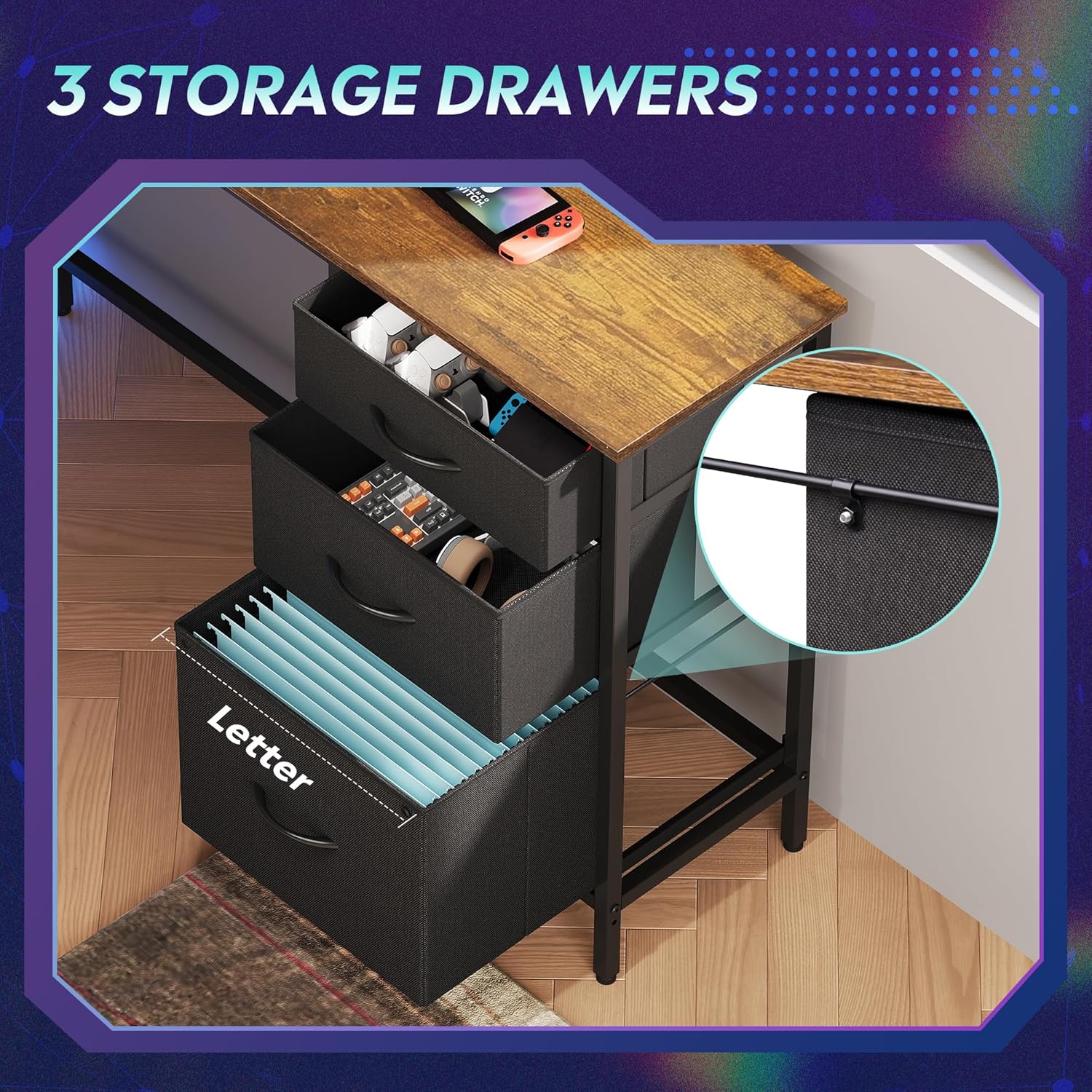
Figure 3.3: The three fabric storage drawers, illustrating their capacity for various items, including file folders in the bottom drawer.
3.6 Power Outlet and LED Light Installation
Integrate the recessed power strip into its designated slot on the desktop. Connect the LED light strip to its power source and route the cables neatly. Ensure all electrical connections are secure before plugging into a wall outlet.

Figure 3.4: The recessed power strip, featuring two AC outlets and two USB ports for convenient device charging.
3.7 Penyesuaian Akhir
Once fully assembled, tighten all screws. Adjust the non-slip footpads at the bottom of the desk legs to ensure stability on uneven floors.

Figure 3.5: Detail showing the desk's durable board material and the adjustable footpads for stability.
4. Petunjuk Pengoperasian
4.1 Sistem Pencahayaan LED
The integrated LED lighting system offers various modes and colors. It can be controlled via a smart controller or a dedicated app (if applicable, refer to specific instructions in your package for app details).
- Daya Hidup/Mati: Single short press the controller button to turn on. Long press for 3 seconds to turn off.
- Change Light Color/Mode: Single short press (again) to cycle through 31 light modes and colors.
- Sinkronisasi Musik: Some models support music rhythm synchronization. Refer to the specific LED controller instructions for activation.
- Fungsi Timer: Some models include timer functions for automatic shut-off. Refer to the specific LED controller instructions.

Figure 4.1: The smart controller for the LED lighting system, indicating features like 31 light modes, color palette switch, music rhythm, and timer.

Figure 4.2: Instructions for operating the smart controller for the LED lights.
4.2 Stopkontak Listrik
The desk includes a recessed power strip with 2 AC outlets (125V/12A) and 2 USB ports (5V/2.1A). Plug the desk's main power cord into a wall outlet. You can then plug your devices directly into the desk's integrated outlets for convenient power access.
- Do not overload the power strip. Ensure the total wattage of connected devices does not exceed the strip's capacity.
- Use the USB ports for charging compatible devices.
4.3 Storage Drawers and Shelves
Utilize the three fabric drawers for organizing office supplies, gaming accessories, or personal items. The bottom drawer is designed with rails for hanging A4/legal size file folders. The open storage shelves provide space for a CPU tower, books, or decorative items. The headphone hook keeps your headset easily accessible.
5. Pemeliharaan
- Pembersihan: Bersihkan permukaan meja dengan kain lembut dan kering.amp kain. Hindari bahan kimia keras atau pembersih abrasif yang dapat merusak lapisan akhir.
- debu: Regularly dust the desk and LED light strip to maintain optimal appearance and function.
- Pengencang: Periksa semua sekrup dan baut secara berkala untuk memastikan semuanya kencang. Kencangkan kembali jika perlu untuk menjaga kestabilan meja.
- Komponen Listrik: Keep the power outlets and LED light strip dry. If any electrical component appears damaged, discontinue use and contact support.
6. Penyelesaian masalah
6.1 Meja Goyang
- Pastikan semua sekrup perakitan dikencangkan sepenuhnya.
- Adjust the non-slip footpads on the bottom of the legs to compensate for uneven flooring.
6.2 Lampu LED Tidak Berfungsi
- Check if the desk's main power cord is securely plugged into a functional wall outlet.
- Ensure the LED light strip's connector is properly attached to its power source.
- Verify the smart controller is functioning correctly and not damaged.
- Try pressing the power button on the controller.
6.3 Power Outlets Not Providing Power
- Confirm the desk's main power cord is securely plugged into a functional wall outlet.
- Periksa apakah stopkontak dinding berfungsi dengan mencolokkan perangkat lain.
- Ensure the power strip is properly seated in its desktop slot and its internal connections are secure.
- Hindari membebani soket ekstensi dengan terlalu banyak daya tinggitagperangkat e.
6.4 Laci Tidak Meluncur dengan Lancar
- Ensure the fabric drawers are correctly assembled and inserted into their slots.
- Check for any obstructions within the drawer cabinet.
7. Spesifikasi
| Merek | MENYINGKIRKAN |
| Nomor Model | AMGZ |
| Dimensi Produk (P x L x T) | 46.5" x 59" x 29.4" |
| Warna | Coklat Pedesaan |
| Bahan | Kayu Rekayasa, Logam |
| Berat Barang | 55.8 pon |
| Fitur Khusus | LED Lights, Power Outlets (2 AC, 2 USB), Monitor Stand, Storage Drawers, Headphone Hook, Open Storage Shelf, Adjustable Footpads |
| Kapasitas Berat Maksimum | 100 pon |
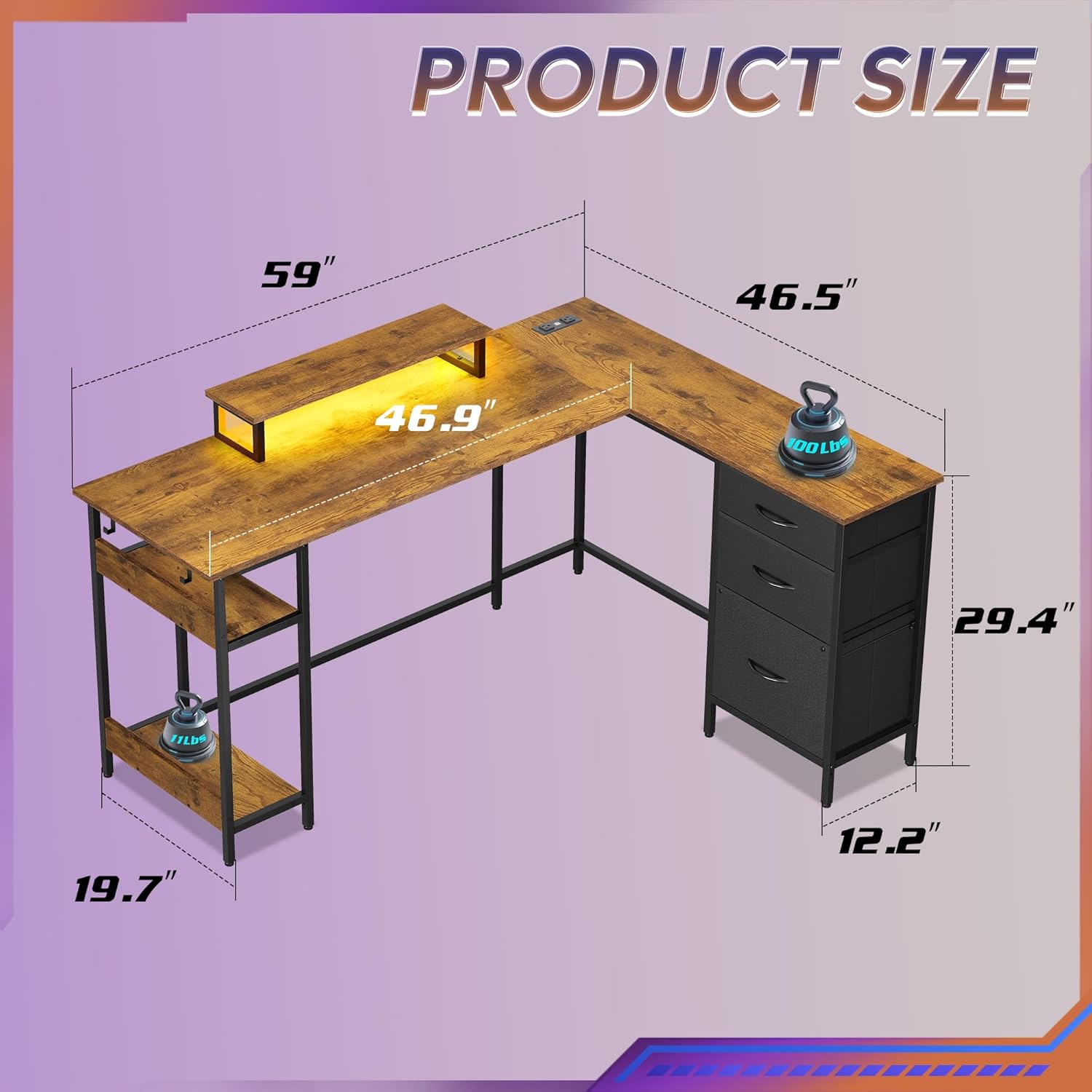
Figure 7.1: Detailed product dimensions of the DEVAISE AMGZ 60 Inch L-Shaped Gaming Desk.
8. Informasi Garansi
For detailed warranty information, please refer to the warranty card included with your product packaging or visit the official DEVAISE websitus. Simpan struk pembelian Anda sebagai bukti pembelian untuk klaim garansi apa pun.
9. Dukungan Pelanggan
If you encounter any issues or have questions regarding your DEVAISE AMGZ 60 Inch L-Shaped Gaming Desk, please contact DEVAISE customer support through the following channels:
- E-mail: Refer to your product packaging or the official DEVAISE websitus untuk email kontak.
- Weblokasi: Visit the official DEVAISE websitus untuk FAQ, sumber daya dukungan, dan formulir kontak.
- Telepon: Check your product documentation for a customer service phone number.
When contacting support, please have your model number (AMGZ) and purchase information ready.