
1. Pendahuluan
This manual provides detailed instructions for the setup, operation, maintenance, and troubleshooting of your CORBOBO LINGBAO K98 PRO Mechanical Keyboard. Please read this manual thoroughly to ensure proper use and to maximize your keyboard's functionality.

Image 1.1: LINGBAO K98 PRO Mechanical Keyboard in Gradient Black Pink.
2. Isi Paket
Verifikasi bahwa semua item ada dalam paket:
- LINGBAO K98 PRO Mechanical Keyboard
- User Manual (dokumen ini)
- Kabel USB-C
- Penarik Keycap

Gambar 2.1: Selesaiview of the LINGBAO K98 PRO keyboard and included accessories.
3. Pengaturan
3.1 Pengisian Awal
Before first use, it is recommended to fully charge the keyboard. Connect the supplied USB-C cable to the keyboard's USB-C port and the other end to a powered USB port on your computer or a USB wall adapter. The keyboard features a 10,000mAh battery.
3.2 Menghubungkan Keyboard
The LINGBAO K98 PRO supports three connection modes: 2.4GHz Wireless, Bluetooth 5.0, and USB-C Wired.
3.2.1 Koneksi Kabel USB-C
- Hubungkan kabel USB-C ke keyboard dan komputer Anda.
- Ensure the keyboard's mode switch (usually on the back or side) is set to USB-C (often indicated by a cable icon or "Wired").
- Keyboard akan dikenali secara otomatis oleh sistem operasi Anda.
3.2.2 Koneksi Nirkabel 2.4GHz
- Locate the 2.4GHz USB receiver (dongle), typically stored in a compartment on the keyboard.
- Colokkan penerima USB ke port USB yang tersedia di komputer Anda.
- Set the keyboard's mode switch to 2.4GHz (often indicated by a wireless icon or "2.4G").
- Keyboard akan terhubung secara otomatis.
3.2.3 Koneksi Bluetooth 5.0
The keyboard can pair with up to 3 Bluetooth devices.
- Set the keyboard's mode switch to Bluetooth (often indicated by a Bluetooth icon or "BT").
- Di komputer atau perangkat Anda, aktifkan Bluetooth dan cari perangkat baru.
- Pada keyboard, tekan Fn + 1, Fn + 2, atau Fn + 3 to select a Bluetooth channel. The indicator light for the selected channel will flash, indicating pairing mode.
- Select "LINGBAO K98 PRO" from the list of available devices on your computer/device to complete pairing.
- Untuk beralih di antara perangkat Bluetooth yang dipasangkan, tekan Fn+1/2/3.

Image 3.1: Illustration of the keyboard's tri-mode connectivity options (USB-C, 2.4GHz, Bluetooth).
3.3 Sakelar Kompatibilitas Sistem
The keyboard supports various operating systems. Use the following key combinations to switch modes:
- Fn + Q: For Android System
- Fn + E: For macOS System
- Fn + W: For Windows System
4. Petunjuk Pengoperasian
4.1 Smart LCD Display and Multi-Functional Knob
The keyboard features a smart LCD display and a multi-functional knob for quick adjustments.
- The LCD display shows real-time information such as time, date, battery level, and current keyboard settings.
- Catatan: Time and date must be set via the driver software.
- The multi-functional knob controls various settings:
- Penyesuaian Volume: Rotate the knob to adjust volume. Press down to mute/unmute.
- Kontrol Pencahayaan RGB: Rotate the knob to cycle through RGB effects. Press down to confirm.
- Pengaturan Tampilan LCD: Long press the Fn+ knob to enter display settings. Turn the knob to select options (e.g., brightness, speed, effect, color, language) and press to confirm. Long press Fn+ knob again to return to default settings.

Image 4.1: Close-up of the smart digital display and intuitive knob for customization.
4.2 Kustomisasi Pencahayaan RGB
The keyboard features multi-zone RGB lighting with 16 backlighting effects, 6 side-lighting modes, and a dedicated RGB strip.
- Efek Lampu Latar: When the screen is on, rotate the knob to "Effect" to browse 16 vibrant backlight effects.
- Fn + Shift Kanan: Switch side lighting modes (Flowing Light / Aurora / Constant Brightness / Breathing Mode) and toggle the light effects on/off.
- Fn + Left Shift: Switch RGB light strip modes (Flowing Light / Aurora / Constant Brightness / Breathing Mode / Turn Off).
- For deeper customization with over 16 million colors, music-responsive lighting, and personalized animations, use the dedicated software.

Gambar 4.2: Contohamples of 16 RGB backlight effects and 6 side-lighting modes.
4.3 Sakelar dan Tutup Tombol yang Dapat Ditukar Saat Panas
The K98 PRO features a gasket mount, fully hot-swappable PCB, supporting both 3-pin and 5-pin mechanical switches. This allows for switch replacement without soldering.
- Penggantian Sakelar: Use the included keycap puller to gently remove the keycap. Then, use a switch puller (not included, but often comes with replacement switches) to carefully remove the switch. Align the pins of the new switch with the holes on the PCB and press firmly until it clicks into place.
- Penggantian Penutup Tombol: Use the included keycap puller to gently remove keycaps. Press new keycaps onto the switch stems until secure.

Image 4.3: Illustration of the hot-swappable switch feature, showing switches being removed and inserted.
4.4 Personalization Software
The included customization software allows for fine-tuning of lighting, macros, and key mapping. This software is essential for setting the time and date on the LCD display.
- Download Software: The software can typically be found on the CORBOBO official website or via the link provided in the product documentation. Ensure you download software only from official and trusted sources.
- Fitur:
- Customize RGB lighting with over 16 million colors.
- Create music-responsive lighting effects.
- Design personalized animated lighting profiles.
- Set up macros for gaming or productivity.
- Remap keys to suit typing habits.
- Simpan beberapa profiles for different uses.
- Calibrate time and date for the LCD display.

Image 4.4: Screenshot of the personalization software interface for key mapping and RGB customization.
5. Pemeliharaan
5.1 Membersihkan Keyboard
- Lepaskan keyboard dari semua sumber listrik sebelum membersihkan.
- Gunakan kain lembut dan bebas serat untuk sedikit membersihkannya.ampDibersihkan dengan air atau larutan pembersih ringan untuk menyeka tombol dan permukaan keyboard.
- Untuk membersihkan debu dan kotoran di antara tombol keyboard, gunakan udara bertekanan atau sikat kecil.
- Hindari penggunaan bahan kimia keras, bahan abrasif, atau kelembapan berlebihan.
5.2 Perawatan Baterai
- To prolong battery life, avoid fully discharging the keyboard frequently.
- Simpan keyboard di tempat yang sejuk dan kering bila tidak digunakan dalam jangka waktu lama.
- The keyboard features a smart sleep mode to extend battery life when idle.
6. Penyelesaian masalah
If you encounter issues with your LINGBAO K98 PRO keyboard, refer to the following common problems and solutions:
| Masalah | Kemungkinan Penyebab | Larutan |
|---|---|---|
| Keyboard tidak merespons (Berkabel) | Loose USB-C cable connection; incorrect mode switch setting. | Ensure USB-C cable is securely connected. Verify mode switch is set to USB-C. Try a different USB port or cable. |
| Keyboard not responding (2.4GHz Wireless) | USB receiver not plugged in; incorrect mode switch setting; low battery. | Plug in the USB receiver. Verify mode switch is set to 2.4GHz. Charge the keyboard. |
| Keyboard tidak merespons (Bluetooth) | Bluetooth not enabled on device; not paired; incorrect channel selected; low battery. | Enable Bluetooth on your device. Ensure keyboard is in pairing mode (Fn+1/2/3 flashing). Re-pair if necessary. Select the correct Bluetooth channel. Charge the keyboard. |
| LCD Display shows incorrect time/date | Time/date not calibrated via software. | Download and install the personalization software. Use the software to set the correct time and date. |
| Pencahayaan RGB tidak berfungsi atau salah | Lighting effects turned off; incorrect settings. | Check lighting settings using the knob or personalization software. Ensure lighting is enabled. |
| Kunci tidak terdaftar atau salah ketik ganda | Faulty switch; debris under keycap/switch. | Remove keycap and switch, clean the area. Replace the switch if it is faulty (due to hot-swappable design). |
If the problem persists after trying these solutions, please contact CORBOBO customer support for further assistance.
7. Spesifikasi
| Fitur | Detil |
|---|---|
| Model | K98 Pro |
| Tata Letak | Tata Letak 96%, 97 Tombol |
| Konektivitas | Tri-Mode: 2.4GHz Wireless, Bluetooth 5.0, USB-C Wired |
| Tingkat Polling | 1000Hz (in wired mode, typically) |
| Kapasitas Baterai | 10,000 mAh |
| Daya Tahan Baterai | Up to 55 hours (RGB on), Up to 666 hours (power-saving mode) |
| Saklar | Lubricated Linear Switches (Hot-Swappable, supports 3-pin and 5-pin) |
| Kartu kunci | High-quality PBT Keycaps |
| Gaya Pemasangan | Dudukan Gasket |
| Menampilkan | Smart LCD Display (shows time, date, battery, settings) |
| Fungsi Tombol | Multi-functional (volume, RGB, display settings) |
| Pencahayaan RGB | 16 Backlighting Effects, 6 Side-lighting Modes, Dedicated RGB Strip, 16 Million Colors (via software) |
| Kesesuaian | Windows, macOS, Linux, Android |
| Dimensi Produk | 16 x 5.63 x 1.61 inci (40.64 x 14.30 x 4.09 cm) |
| Berat Barang | 3.65 pon (1.66 kg) |
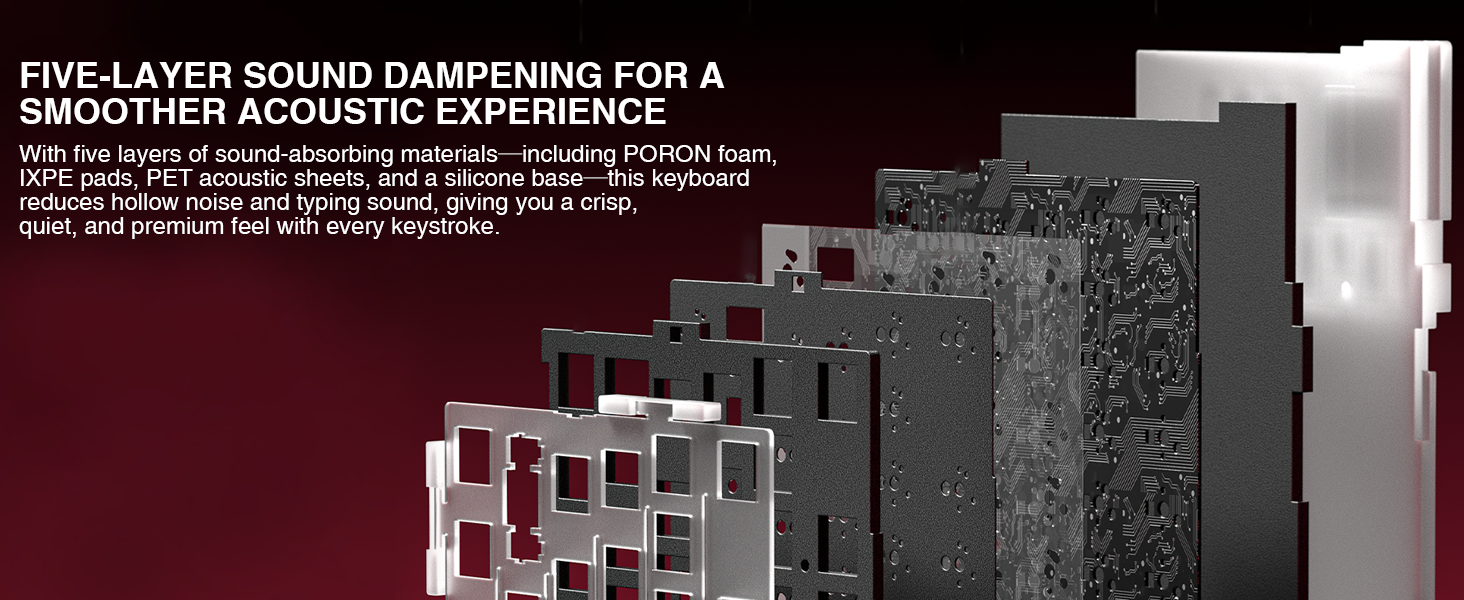
Image 7.1: Diagram illustrating the five-layer sound dampening structure of the keyboard.
8. Garansi dan Dukungan
For warranty information, please refer to the documentation included with your purchase or visit the official CORBOBO webSyarat dan ketentuan garansi dapat bervariasi berdasarkan wilayah dan pengecer.
For technical support, troubleshooting assistance beyond this manual, or inquiries about replacement parts, please contact CORBOBO customer service through their official websitus atau pengecer tempat produk dibeli.
Pabrikan: KORBOBO
Toko Merek: CORBOBO Store on Amazon