
1. Pendahuluan
This manual provides comprehensive instructions for the operation and maintenance of your BAOFENG UV-32 Ham Radio. Please read this manual thoroughly before using the device to ensure proper function and safety.

Image: The BAOFENG UV-32 Ham Radio, showcasing its display and robust design.
2. Fitur Produk
- Dual GPS/BeiDou Tracking: Share and request location coordinates in real-time, essential for off-grid communication.
- Bluetooth APP Programming: Wirelessly configure up to 1000 channels using a mobile application.
- Output Daya yang Dapat Diatur: Select between 10W, 5W, or 1W to optimize range and battery life.
- One-touch Frequency Scan: Quickly clone channels for efficient setup.
- Audio HD: Equipped with a 40mm speaker for clear communication in noisy environments.
- Multi-band Monitoring: Supports AM/FM/VHF/UHF bands, including 108-136MHz for aviation.
- 1000-Channel Storage: Organize channels across 10 zones for various operational needs.
- Pengisian USB-C: Convenient charging via USB-C ports, power banks, or car adapters.
- Dual Display/Dual Guard: Memantau dua frekuensi secara bersamaan.

Image: Visual representation of the BAOFENG UV-32's key functions and features.
3. Isi Paket
Verifikasi bahwa semua item ada dalam paket Anda:
- BAOFENG UV-32 Radio Unit
- Antena
- Battery (Nonstandard Battery)
- Charger (Desktop Dock and AC Adapter)
- Tali gantungan
- User Manual (dokumen ini)
- Back Clip (for "1 Pack Black+Back Clip" variant)

Image: The BAOFENG UV-32 radio with its back clip, demonstrating portability.
4. Panduan Pengaturan
4.1 Pemasangan Baterai
- Sejajarkan baterai dengan alur di bagian belakang radio.
- Geser baterai ke atas hingga berbunyi klik dan terpasang dengan benar.
- Untuk melepaskannya, tekan kait pelepas baterai (jika ada) dan geser baterai ke bawah.
4.2 Pemasangan Antena
- Pasang antena searah jarum jam ke konektor di bagian atas radio hingga kencang dengan tangan. Jangan terlalu kencang.
4.3 Mengisi Baterai
The UV-32 supports two charging methods:
- Pengisi Daya Desktop: Place the radio (with battery installed) into the charging dock. Ensure the charging contacts align. The indicator light will show charging status.
- Pengisian Daya Langsung USB-C: Connect a USB-C cable to the port on the side of the radio and to a power source (e.g., computer, wall adapter, power bank, car charger).
Isi daya baterai hingga penuh sebelum penggunaan pertama. Pengisian daya penuh biasanya memakan waktu beberapa jam.

Image: Demonstrates the versatility of Type-C charging for the BAOFENG UV-32.
5. Petunjuk Pengoperasian
5.1 Daya Hidup/Mati dan Volume
- Nyalakan: Putar DAYA/VOLUME knob clockwise until you hear a click.
- Sesuaikan Volume: Continue rotating the knob to increase or decrease the volume.
- Matikan: Rotate the knob counter-clockwise until you hear a click.
5.2 Pemilihan Saluran
Gunakan ATAS/BAWAH arrow keys or the numeric keypad to select a channel. The display will show the current channel number and frequency.
5.3 Mengirim (PTT)
Untuk mengirim, tekan dan tahan tombol PTT (Tekan-To-Talk) button on the side of the radio. Speak clearly into the microphone. Release the PTT button to receive.
5.4 Dual Display / Dual Guard
The UV-32 can monitor two frequencies simultaneously. Activate the Dual Guard function through the radio's menu or a dedicated button (refer to the on-screen interface for specific options).

Image: The radio's screen displaying the Dual Watch feature, allowing simultaneous monitoring of two channels.
5.5 APP Programming (Bluetooth)
- Download the "Radio Frequency Programmer" mobile application from your device's app store.
- Enable Bluetooth on your mobile device and the UV-32 radio.
- Buka aplikasi dan ikuti petunjuk di layar untuk terhubung ke radio Anda.
- You can then wirelessly edit channel information, frequencies, and other settings.

Image: The BAOFENG UV-32 in programming mode, with a smartphone displaying the channel programming application.
5.6 One-touch Frequency Scan / Copy Frequency
This feature allows for quick cloning of frequencies from another radio. Press and hold the designated scan button (e.g., SK1) to initiate the smart scan and copy process. The radio will detect and store the active frequency.

Image: Illustration of the one-key frequency pairing feature between two BAOFENG UV-32 radios.
5.7 Output Daya yang Dapat Diatur
Access the menu to select your desired power output: 10W (High), 5W (Mid), or 1W (Low). Higher power provides greater range but consumes more battery. Lower power conserves battery for shorter distances.
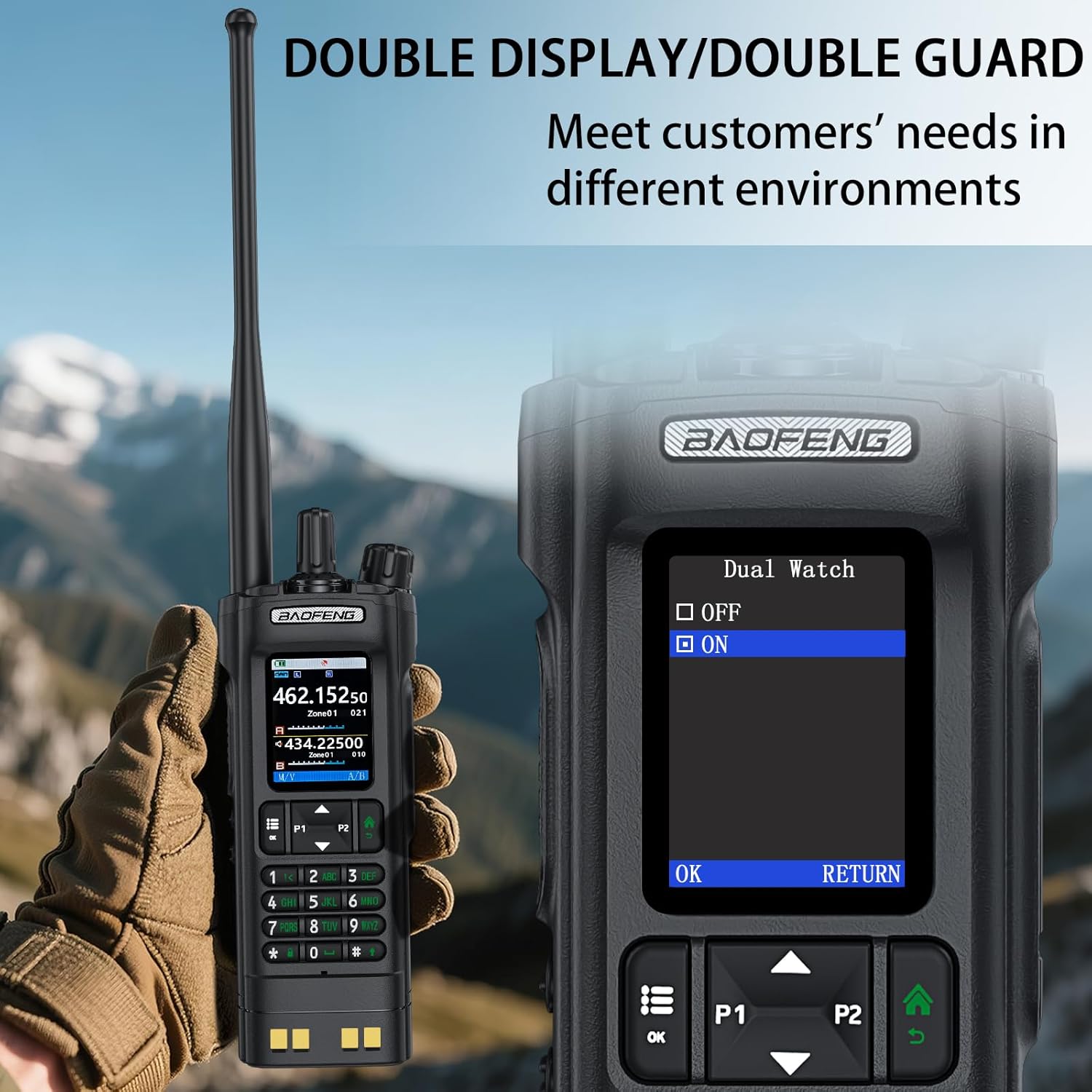
Image: The BAOFENG UV-32's power adjustment menu, showing options for 10W, 5W, and 1W output.
5.8 GPS/BeiDou Tracking
The integrated GPS/BeiDou module allows for real-time location sharing. Refer to the radio's menu for GPS functions, including sending your coordinates and requesting those of other UV-32 users.
6. Pemeliharaan
- Pembersihan: Gunakan yang lembut, damp kain untuk membersihkan bagian luar radio. Jangan gunakan bahan kimia atau pelarut keras.
- Perawatan Baterai: Hindari menguras baterai sepenuhnya secara sering. Simpan radio dan baterai di tempat yang sejuk dan kering saat tidak digunakan dalam jangka waktu lama.
- Antena: Pastikan antena terpasang dengan aman tetapi jangan terlalu kencang. Hindari membengkokkan atau memberi tekanan pada antena.
- Tahan Air: Perangkat ini adalah Tidak Tahan Air. Protect it from rain, splashes, and immersion in water.
7. Penyelesaian masalah
| Masalah | Kemungkinan Penyebab | Larutan |
|---|---|---|
| Radio tidak menyala. | Baterai lemah atau tidak terpasang dengan benar. | Isi daya baterai atau pasang kembali dengan aman. |
| Tidak dapat mengirim atau menerima. | Frekuensi/saluran tidak tepat, baterai lemah, atau masalah antena. | Verify frequency, charge battery, check antenna connection. Ensure you are within range of other radios. |
| Kualitas audio yang buruk. | Kekuatan sinyal rendah, interferensi, atau pengaturan squelch yang salah. | Move to an area with better signal, adjust squelch level, check for sources of interference. |
| APP programming fails to connect. | Bluetooth not enabled, app not updated, or radio not in programming mode. | Ensure Bluetooth is on for both devices, update the app, and follow app instructions to put the radio in programming mode. |
8. Spesifikasi
| Merek | BAOFENG |
| Nomor Model | UV-32 |
| Jumlah Saluran | 1000 |
| Rentang Frekuensi | UHF350-390/400-520MHz, VHF136-174MHz/220-260MHz |
| Jangkauan Bicara Maksimum | 10 Kilometer (sekitar 6.2 mil) |
| Daya Keluaran | 10W / 5W / 1W (Dapat disesuaikan) |
| Jil.tage | 7.4 Volt (DC) |
| Tingkat Tahan Air | Tidak Tahan Air |
| Protokol Konektivitas | Bahasa Indonesia: Bluetooth |
| Jenis Pengisian Daya | USB-C, Desktop Dock |
| Dimensi (Perkiraan) | Height: 6.26", Width: 2.28", Depth: 1.57" |
| Berat (Perkiraan) | 13.58 ons |

Image: Detailed dimensions and weight of the BAOFENG UV-32 radio.
9. Garansi dan Dukungan
Your BAOFENG UV-32 Ham Radio comes with a Garansi 1 tahun sejak tanggal pembelian. Garansi ini mencakup cacat produksi dalam penggunaan normal.
For technical support, warranty claims, or service inquiries, please contact BAOFENG customer service through their official webSitus web atau pengecer tempat produk tersebut dibeli. Harap simpan bukti pembelian Anda untuk validasi garansi.