
1. Pendahuluan
The Genérico NA4 is a professional 4-channel audio mixer designed for a variety of applications including music production, podcasts, DJ performances, live streaming, and home recording. This analog mixer integrates a digital sound card, offering versatile connectivity options such as USB and Bluetooth, along with 48V phantom power for condenser microphones. It features 24 DSP effects, custom function settings, and a convenient console design to enhance your mixing experience.
Equipped with a high-speed ARM chip, the NA4 mixer ensures ultra-low background noise and high-fidelity sound quality, delivering clear and bright vocals. Its robust processing capabilities include variable sound, reverb, delay, and electric sound effects.
2. Informasi Keselamatan
- Bacalah semua petunjuk dengan saksama sebelum mengoperasikan perangkat.
- Do not expose this device to rain or moisture to prevent fire or electric shock.
- Pastikan voltase catu dayatage cocok dengan persyaratan yang ditentukan pada perangkat.
- Jangan membuka casing. Serahkan semua servis kepada personel yang berkualifikasi.
- Keep the device away from heat sources such as radiators, heat registers, or other heat-producing appliances.
- Gunakan hanya perlengkapan/aksesoris yang ditentukan oleh produsen.
3. Produk Lebihview
Familiarize yourself with the various inputs, outputs, and controls of your NA4 mixer.

Figure 3.1: Front Panel Controls and Connections
Key Controls and Ports:
- Input MIC/LINE (Saluran 1-2): Combo jacks for musical instruments, dynamic microphones, or 48V phantom power microphones.
- +48V PHANTOM (CH1-2) Switch: Activates 48V phantom power for condenser microphones on channels 1 and 2.
- HPF (Filter Lolos Tinggi): Mengurangi kebisingan frekuensi rendah.
- Penyesuaian GAIN: Controls the input sensitivity for each channel.
- HIGH/LOW Adjustments: Treble and Bass equalization for each channel.
- FX/PC REC: Effect send and PC recording level.
- Indikator PEAK: Lights up when the input signal is too high, indicating potential clipping.
- Channel Volume Knobs: Adjust the output level for individual channels.
- Keluaran REKAM: RCA outputs for recording.
- LINE Input (3/L, 4/R): RCA inputs for line-level devices.
- MAIN OUT (L/R): Main stereo output for connecting to amplifier atau speaker bertenaga.
- PC/USB Input: Connects to a computer for audio interface functions or USB playback.
- 24 DSP: Digital Signal Processor with 24 built-in effects.
- Function Selection Buttons (UP/DOWN/MODE): Navigate and select DSP effects and input modes.
- Digital Signal Volume Control: Adjusts the volume of digital inputs (USB, Bluetooth).
- MAIN FX Volume: Controls the overall level of the effects sent to the main mix.
- Tombol MUTE: Mutes the main output.
- Mobile Live Stream Input: Connects to a mobile phone for live streaming.
- Headphone Monitoring Connector: 3.5mm jack for headphone monitoring.
- Memantau Volume: Adjusts the headphone monitoring level.
- Volume UTAMA: Controls the overall main output level.
- Masukan Pengiring: Input for external accompaniment audio.
4. Pengaturan
4.1 Sambungan Daya
The NA4 mixer is powered via USB, offering flexibility with various power sources.
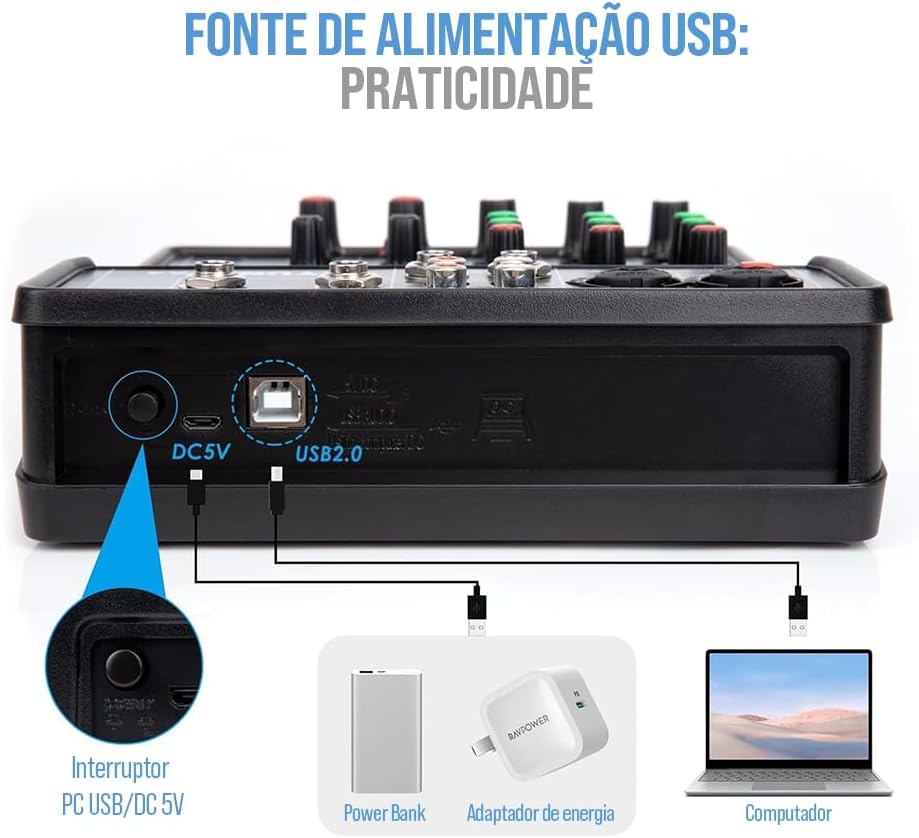
Figure 4.1: USB Power Supply Options
Connect the mixer to a power source using the provided USB cable. You can use a power bank, a standard USB power adapter (DC 5V), or a computer's USB port.
4.2 Menghubungkan Perangkat Audio
The NA4 mixer offers broad compatibility with various audio devices.

Gambar 4.2: Kompatibilitas Perangkat
- Mikrofon: Connect dynamic microphones or 48V condenser microphones to the MIC/LINE inputs (Channels 1-2). Activate the +48V PHANTOM switch for condenser microphones.
- Instrumen: Connect musical instruments like guitars or synthesizers to the MIC/LINE inputs or LINE inputs (3/L, 4/R).
- Sumber Audio Eksternal: Connect CD players, media players, or other line-level devices to the LINE inputs (3/L, 4/R).
- Komputer: Use the PC/USB port to connect the mixer to your computer for digital audio input/output and recording.
- Perangkat Seluler: Connect your mobile phone to the dedicated live stream input for broadcasting.
- Perangkat Output: Connect the MAIN OUT (L/R) to your amplifier, powered speakers, or recording interface. Use the Headphone Monitoring Connector for personal monitoring.
5. Petunjuk Pengoperasian
5.1 Operasi Dasar
- Nyalakan: Connect the mixer to a power source. The power indicator will light up.
- Penyesuaian Level Input: For each connected channel, adjust the GAIN knob to achieve an optimal input level. The PEAK indicator should flash only occasionally, not constantly.
- Hal menyamakan: Use the HIGH and LOW knobs to adjust the treble and bass frequencies for each channel to shape your sound.
- Volume Saluran: Adjust the individual channel volume knobs to balance the levels of all inputs.
- Volume Keluaran Utama: Use the MAIN volume knob to control the overall output level of the mixer.
5.2 Koneksi Bluetooth
The NA4 mixer supports wireless Bluetooth connectivity for audio playback from mobile devices.
Gambar 5.1: Pemasangan Bluetooth
- Press the MODE button on the mixer's digital display panel until 'BLUE' appears, indicating Bluetooth mode.
- On your electronic device (smartphone, tablet), enable Bluetooth and search for available devices.
- Select the mixer (usually named 'NA4' or similar) from the list to pair.
- Once connected, you can play audio from your device through the mixer. Adjust the digital signal volume control for Bluetooth playback.
5.3 Pemutaran dan Perekaman USB
- Pemutaran USB: Insert a USB 2.0 compatible audio device into the USB port. The mixer supports lossless audio playback. Use the function selection buttons to navigate and play tracks.
- Konektivitas Komputer: Connect the mixer to your PC via the PC/USB port. The mixer will function as a digital sound card, allowing you to record audio directly to your computer or play audio from your computer through the mixer. The flexible LOOPBACK function is ideal for recording and webpengecoran.
5.4 Efek DSP
The NA4 mixer includes 24 Digital Signal Processor (DSP) effects to enhance your audio.
- Use the UP/DOWN buttons to cycle through the 24 available DSP effects.
- Adjust the FX/PC REC knob on each channel to send the desired amount of signal to the effects processor.
- Control the overall volume of the effects using the MAIN FX Volume knob.
6. Pemeliharaan
- Pembersihan: Use a soft, dry cloth to clean the mixer's surface. Do not use liquid cleaners or aerosols.
- Penyimpanan: Simpan mixer di tempat yang sejuk dan kering, jauhkan dari sinar matahari langsung dan suhu ekstrem.
- Penanganan: Hindari menjatuhkan atau membenturkan mixer ke benda keras.
- Ventilasi: Pastikan ventilasi yang baik di sekitar mixer untuk mencegah panas berlebih.
7. Penyelesaian masalah
| Masalah | Kemungkinan Penyebab | Larutan |
|---|---|---|
| Tidak ada daya | Kabel daya tidak terhubung; sumber daya listrik rusak. | Check power cable connection; try a different USB power source. |
| Tidak ada keluaran suara | Main volume too low; output cables disconnected; incorrect input selection. | Increase MAIN volume; check all output cable connections; ensure correct input mode is selected. |
| Suara terdistorsi | Input GAIN too high; output volume too high. | Reduce GAIN for the affected channel; lower MAIN volume. Ensure PEAK indicators are not constantly lit. |
| Bluetooth tidak terhubung | Mixer tidak dalam mode Bluetooth; perangkat terlalu jauh; gangguan. | Ensure mixer is in 'BLUE' mode; bring device closer; restart both devices. |
| Daya phantom tidak berfungsi | +48V switch not activated. | Ensure the +48V PHANTOM switch is engaged for channels 1-2. |
8. Spesifikasi
- Merek: Genérico
- Model: NA4
- Jumlah Saluran: 4
- Teknologi Konektivitas: USB, Bluetooth
- Masukan Audio: USB, Bluetooth, Microphone (XLR with 48V support)
- Efek DSP: 24 efek bawaan
- Catu Daya: DC 5V melalui USB
9. Garansi dan Dukungan
Untuk informasi garansi dan dukungan teknis, silakan merujuk ke dokumentasi yang diberikan saat pembelian atau hubungi penjual Anda. Simpan bukti pembelian Anda untuk klaim garansi.