
1. Produk Lebihview
The WESECUU Light Bulb Security Camera offers comprehensive home surveillance with easy installation. Designed for both indoor and outdoor use, this camera provides a 360° panoramic view, motion tracking, and AI detection for enhanced security.
- Instalasi Mudah: Screws into a standard light bulb socket, requiring no drilling or complex wiring.
- 360 ° Panoramik View & Auto Motion Tracking: Provides full-area coverage and automatically follows detected movement.
- Deteksi AI Cerdas: Distinguishes between people and other movements to reduce false alerts.
- Audio Dua Arah: Features a built-in speaker and microphone for real-time communication.
- 24/7 Day & Night Monitoring: Ensures continuous surveillance in various lighting conditions.

2. Isi Paket
Harap verifikasi bahwa semua item ada dalam paket Anda:
- WESECUU Light Bulb Security Camera
- Instruksi Manual (dokumen ini)
3. Petunjuk Penyiapan
3.1 Instalasi Fisik
The camera is designed for simple installation into a standard E27/E26 light bulb socket.
- Ensure the power to the light socket is turned off at the circuit breaker before installation.
- Carefully screw the WESECUU Light Bulb Security Camera into the light bulb socket until it is secure. Do not overtighten.
- Turn the power back on at the circuit breaker. The camera will power on and initiate its startup sequence.
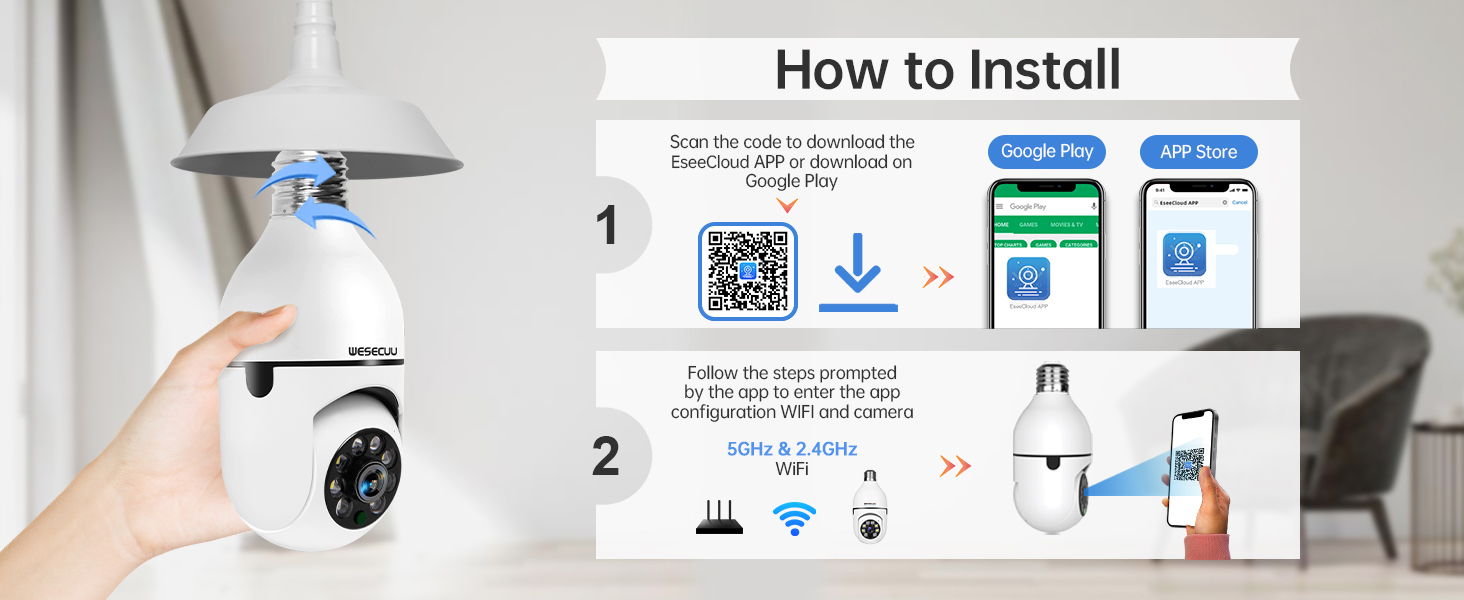
3.2 App Download and Camera Pairing
To operate your camera, you need to download the EseeCloud APP and pair the device.
- Download the EseeCloud APP from the Google Play Store or Apple App Store. You can also scan the QR code provided in the installation image below or visit http://www.e-seenet.com/download/indexm.php?p=tjesee.
- Open the EseeCloud APP and create an account or log in.
- Follow the in-app instructions to add your new camera. Ensure your smartphone is connected to a 2.4GHz or 5GHz Wi-Fi network during the pairing process. The camera supports both 2.4GHz and 5GHz Wi-Fi.
- Once successfully paired, you can access the live feed and camera settings through the app.
4. Petunjuk Pengoperasian
4.1 Langsung View dan Pemutaran
Access the EseeCloud APP to view the live feed from your camera. You can also review rekaman footage from the SD card (if installed) or cloud storage (if subscribed).

4.2 Deteksi dan Pelacakan Gerakan
The camera features advanced motion detection and automatic tracking. When motion is detected, the camera will pan and tilt to follow the subject, ensuring continuous coverage. Alerts will be sent to your smartphone.

4.3 AI Detection Alerts
The integrated AI technology helps differentiate between human movement and other sources of motion, such as pets or passing vehicles, reducing irrelevant notifications.

4.4 Audio Dua Arah
Utilize the two-way audio feature to communicate through the camera. This allows you to speak to visitors, deter intruders, or comfort pets remotely.

4.5 Penglihatan Malam
The camera provides both full-color night vision and infrared night vision modes for clear monitoring in low-light conditions.

4.6 Opsi Penyimpanan
The camera supports local storage via an SD card (16-128GB, not included) and offers optional cloud storage plans for continuous recording and advanced features.

5. Pemeliharaan
To ensure optimal performance and longevity of your WESECUU Light Bulb Security Camera, follow these maintenance guidelines:
- Pembersihan Lensa: Gently wipe the camera lens with a soft, dry microfiber cloth to remove dust or smudges. Avoid abrasive cleaners.
- Catu Daya: Ensure the camera receives a stable power supply. Avoid frequent power interruptions.
- Pembaruan Firmware: Regularly check the EseeCloud APP for available firmware updates to ensure your camera has the latest features and security enhancements.
- Kondisi Lingkungan: While designed for outdoor use, avoid direct exposure to extreme weather conditions if possible, and ensure the light socket is weather-protected.
6. Penyelesaian masalah
If you encounter issues with your WESECUU Light Bulb Security Camera, refer to the following common solutions:
- Kamera Tidak Terhubung ke Wi-Fi:
- Ensure your Wi-Fi network is 2.4GHz or 5GHz and stable.
- Pastikan kata sandi Wi-Fi yang dimasukkan di aplikasi sudah benar.
- Move the camera closer to your Wi-Fi router during setup.
- Mulai ulang router dan kamera Anda.
- Tidak ada gambar atau layar hitam:
- Check if the camera is properly powered on and the light socket has power.
- Pastikan lensa kamera tidak terhalang.
- Nyalakan ulang kamera dengan mematikan dan menghidupkan kembali daya ke stopkontak.
- Deteksi Gerakan Tidak Berfungsi:
- Check motion detection settings in the EseeCloud APP.
- Ensure the detection sensitivity is set appropriately.
- Verify that notification permissions are enabled for the app on your smartphone.
- Kualitas Gambar Buruk:
- Bersihkan lensa kamera.
- Ensure adequate lighting for optimal image clarity, especially for color night vision.
- Periksa kecepatan koneksi internet Anda, karena koneksi yang lambat dapat memengaruhi kualitas streaming.

Figure 10: Visual comparison demonstrating the superior clarity of WESECUU's 3MP resolution compared to other standard resolutions.
7. Spesifikasi
| Fitur | Spesifikasi |
|---|---|
| Nomor Model | TP-8052BW3 |
| Merek | WESECU |
| Penggunaan Dalam/Luar Ruangan | Luar ruangan |
| Teknologi Konektivitas | Nirkabel (Wi-Fi) |
| Protokol Konektivitas | Wi-Fi (2.4GHz dan 5GHz) |
| Sumber Daya | Listrik Kabel |
| Resolusi Pengambilan Video | 4K |
| Jenis Pemasangan | Pemasangan di Langit-langit |
| Fitur Khusus | Dapat disesuaikan |
| Perangkat yang Kompatibel | Kontak Amazon.com |
| Tipe Pengendali | Kontak Amazon.com |
| Dimensi Produk (P x L x T) | 1x1x1 inci |
| Berat Barang | 7.2 ons (0.21 Kilogram) |
8. Informasi Garansi
For detailed warranty information, please refer to the warranty card included with your product packaging or visit the official WESECUU websitus. Syarat dan ketentuan garansi dapat bervariasi berdasarkan wilayah dan tanggal pembelian.
9. Dukungan Pelanggan
If you require further assistance or have questions not covered in this manual, please contact WESECUU customer support:
- Hotline Pelanggan: +1-888-9716718
- Jam Kerja: Waktu Standar Pasifik 6:00 - 3:00, Senin sampai Jumat
- Dukungan online: Visit the official WESECUU websitus untuk FAQ, sumber daya dukungan, dan formulir kontak.