
1. Petunjuk Keselamatan
Demi keselamatan Anda dan mencegah kerusakan produk, harap patuhi panduan berikut:
- Pastikan semua bagian terpasang dengan benar sebelum digunakan. Periksa semua pengencang secara teratur untuk memastikannya tetap kencang.
- Berhati-hatilah saat bergerak di permukaan yang tidak rata untuk mencegah terguling. Always push the island slowly and steadily.
- Be careful around sharp edges. Handle all components with care during assembly and use.
- Jangan izinkan anak-anak bermain di atas, dengan, atau di sekitar gerobak. Produk ini bukan mainan.
- Jangan membebani rak atau laci secara berlebihan. Sebarkan berat secara merata untuk menjaga stabilitas.
- Avoid placing hot items directly on the countertop. Use heat-resistant pads or trivets.
- Ensure the power outlet is used with compatible devices and within specified electrical limits. Jangan melebihi batas air maksimumtage.
2. Produk Lebihview dan Fitur
The chartustriable Extendable Kitchen Island is designed to enhance kitchen efficiency and provide versatile functionality. It features a robust construction and thoughtful design elements to maximize utility in various living spaces.
- Extendable Dining Table: The countertop extends from 48 inches to 80 inches, allowing it to function as a compact island or a full dining table for multiple people.
- Stopkontak Terintegrasi: Equipped with 2 standard power outlets (125V/12A) and 2 USB ports (5V/2A) for convenient charging of kitchen appliances and electronic devices. The power cord measures 78.75 inches (200cm).
- Ample Penyimpanan: Includes two large storage drawers, four-door cabinets with interior shelves, and three rows of additional open shelves under the side retractable tabletop.
- Desain Seluler: Features 360° swivel wheels for easy movement and 2 lockable wheels for stability when stationary.
- Konstruksi Tahan Lama: Made from sturdy P2 engineered wood and metal, designed for long-term use.
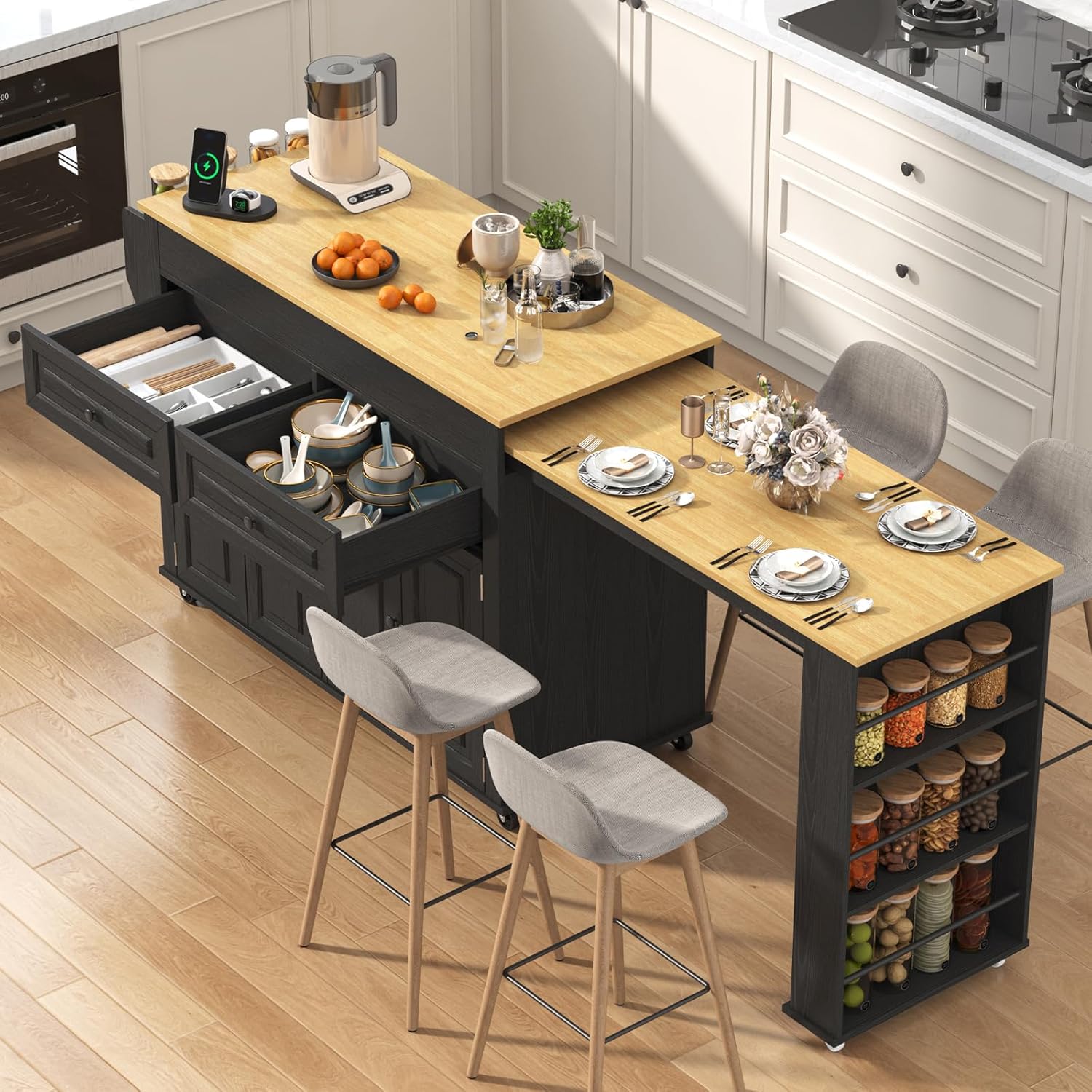
Image 1: The chartustriable Extendable Kitchen Island in its extended configuration, showcasing its versatile design and storage options.
3. Daftar Komponen
Before beginning assembly, ensure all components listed in your product packaging are present and undamaged. A detailed parts list with corresponding labels is typically included in the box. Common components include various wooden panels, drawers, cabinet doors, shelves, wheels, a power outlet unit, and assorted hardware (screws, dowels, hinges, drawer slides).
4. Petunjuk Perakitan
For a comprehensive visual guide to assembling your kitchen island, please refer to the official installation video below. It provides step-by-step instructions for each component.
Video 1: Official installation guide for the chartustriable Extendable Kitchen Island. This video demonstrates the complete assembly process from unboxing to final setup.
Langkah-langkah Majelis Umum:
- Persiapan: Clear a spacious area for assembly. It is recommended to assemble on a soft surface like a carpet to prevent scratches. Sort all parts and hardware according to the included manual.
- Konstruksi Dasar: Assemble the main frame of the island, attaching side panels and internal dividers.
- Drawer and Shelf Installation: Install drawer slides and construct the drawers. Insert fixed and adjustable shelves into the cabinet sections.
- Integrasi Stopkontak: Secure the power outlet unit into its designated slot on the side panel.
- Extendable Table Assembly: Attach the components for the extendable dining table mechanism.
- Door and Hardware Attachment: Install hinges and attach cabinet doors. Secure handles to drawers and doors.
- Pemasangan Roda: Attach the swivel and lockable wheels to the base of the island.
- Final Top Placement: Carefully place and secure the main countertop and the extendable table top.
Refer to the numbered parts and hardware in your manual and the video for precise placement and fastening.
5. Petunjuk Pengoperasian
5.1 Extending and Retracting the Dining Table
- Untuk Memperluas: Gently pull the extendable tabletop outwards from the main island body. Ensure it slides smoothly along its tracks until fully extended and stable.
- Untuk Mencabut: Push the extendable tabletop back towards the main island body until it is fully nested and flush.

Image 2: The extendable dining table feature, shown pulled out to provide additional surface area.
5.2 Using the Power Outlet and USB Ports
- Plug your kitchen appliances or electronic devices into the standard 3-prong outlets or USB ports located on the side of the island.
- Ensure the island's main power cord is securely plugged into a wall outlet.
- Do not exceed the maximum electrical load specified for the outlets.

Image 3: Detail of the built-in charging socket, offering convenient power access.
5.3 Utilizing Storage and Mobility
- Drawers and Cabinets: Use the drawers for utensils and smaller items, and the cabinets for larger kitchenware or appliances.
- Rak Terbuka: The side shelves are ideal for spices, bottles, or frequently accessed items.
- Roda: Unlock the wheels to move the island freely. Lock the wheels when the island is in its desired position to ensure stability.

Image 4: The island's interior storage, including drawers and cabinets, along with a view of the lockable wheels.
6. Pemeliharaan
- Pembersihan: Lap permukaan dengan lembut, damp kain. Hindari bahan kimia keras atau pembersih abrasif yang dapat merusak lapisan akhir.
- Pemeriksaan Perangkat Keras: Periodically inspect all screws and fasteners to ensure they are tight. Tighten as necessary to maintain structural integrity.
- Perawatan Kayu: For the engineered wood surfaces, avoid prolonged exposure to moisture or direct sunlight to prevent warping or discoloration.
- Geser Laci: Jika laci menjadi macet, oleskan sedikit pelumas silikon pada rel laci.
- Perawatan Roda: Keep wheels free of debris to ensure smooth operation.
7. Penyelesaian masalah
- Pulau ini Goyang: Check all assembly screws and ensure they are fully tightened. Verify that the island is on a level surface.
- Drawers are Sticking: Ensure drawer slides are correctly aligned and free of obstructions. Lubricate slides if needed.
- Roda Tidak Berjalan Mulus: Check for any debris (hair, lint) caught in the wheels. Ensure lockable wheels are disengaged.
- Extendable Table is Difficult to Move: Check the tracks for obstructions. Ensure the table is pulled or pushed evenly.
- Stopkontak Listrik Tidak Berfungsi: Ensure the main power cord is securely plugged into a functional wall outlet. Check if the wall outlet itself is receiving power.
8. Spesifikasi
| Dimensi Produk (P x L x T) | 19.7" x 80" x 34.7" (Diperpanjang) |
| Extendable Width Range | 48" - 80.7" |
| Berat Barang | 133 pon |
| Bahan | Engineered Wood, Acacia Wood (Frame) |
| Warna | Hitam |
| Stopkontak | 2 x 125V/12A, 2 x 5V/2A USB Ports |
| Panjang Kabel Daya | 78.75 inci (200cm) |
| Jumlah Rak | 3 (open side shelves) + internal cabinet shelves |
| Perakitan Diperlukan | Ya |

Image 5: Detailed dimensions of the kitchen island, illustrating its compact and extended configurations.
9. Garansi dan Dukungan
For warranty information, product support, or to report any issues, please refer to the documentation included with your purchase or contact the seller directly through the platform where the product was acquired. Ensure you have your purchase details and model number (DJ0877) available for faster assistance.