
1. Pendahuluan
Terima kasih sudah membeliasing the 7artisans 10mm F3.5 Ultra Wide Angle APS-C Mirrorless Lens. This manual provides essential information for the proper use, maintenance, and care of your new lens. Please read it thoroughly before use to ensure optimal performance and longevity of the product.

Image 1.1: 7artisans 10mm F3.5 Lens Overview
2. Isi Paket
Verifikasi bahwa semua item yang tercantum di bawah ini disertakan dalam paket Anda:
- 7artisans 10mm F3.5 Lens x1
- Lens Front Cover x1
- Lens Back Cover x1
- Panduan Pengguna x1
- Lens Packaging Box x1

Gambar 2.1: Isi Paket
3. Lens Components
Familiarize yourself with the main components of your 7artisans 10mm F3.5 lens:
- Filter Installation Latch: For attaching filters.
- Cincin Fokus: Used to manually adjust the focus.
- Cincin Bukaan: Used to manually set the aperture (F3.5 to F16/F22).
- Dudukan Lensa: Menghubungkan lensa ke bodi kamera.
- Depth of Field Scale: Provides a visual guide for depth of field at various apertures.

Image 3.1: Lens Structure and Components
4. Pengaturan dan Instalasi
To attach the 7artisans 10mm F3.5 lens to your Fuji X-mount camera:
- Pastikan kamera Anda dimatikan.
- Remove the rear lens cap from the 7artisans lens and the body cap from your camera.
- Align the red dot on the lens mount with the corresponding mark on your camera's lens mount.
- Masukkan lensa dengan hati-hati ke dalam dudukan kamera dan putar searah jarum jam hingga berbunyi klik dan terpasang dengan benar. Jangan memaksakan lensa.
- Replace the front lens cap when not in use.
Compatible Fuji X-Mount Camera Models:
- X-H series: X-H1, X-H2, X-H2S, X-T5
- X-T series: X-T5, X-T4, X-T3, X-T2, X-T1, X-T50, X-T30, X-T30 II, X-T20, X-T200, X-T100
- X-S series: X-S10, X-S20
- X-PRO series: X-PRO2, X-Pro3
- X-E series: X-E4, X-E3, X-E2, X-E1
- X-A series: X-A1, X-A2, X-A3, X-A5, X-A7, X-A10, X-A20, X-M5
Video 4.1: Demonstrates the mounting of the 7artisans 10mm F3.5 lens onto various mirrorless camera bodies, showcasing its compact size and ease of attachment.
5. Mengoperasikan Lensa
5.1 Fokus Manual
This is a manual focus lens. Rotate the focusing ring to achieve sharp focus. Utilize your camera's focus peaking or magnification features for precise focusing, especially at wider apertures.
5.2 Kontrol Bukaan
The lens features a variable aperture from F3.5 to F22. Rotate the aperture ring to select your desired f-stop. A wider aperture (smaller f-number like F3.5) allows more light and creates a shallower depth of field, while a narrower aperture (larger f-number like F16/F22) allows less light, increases depth of field, and can produce a distinct 10-point starburst effect from bright light sources.
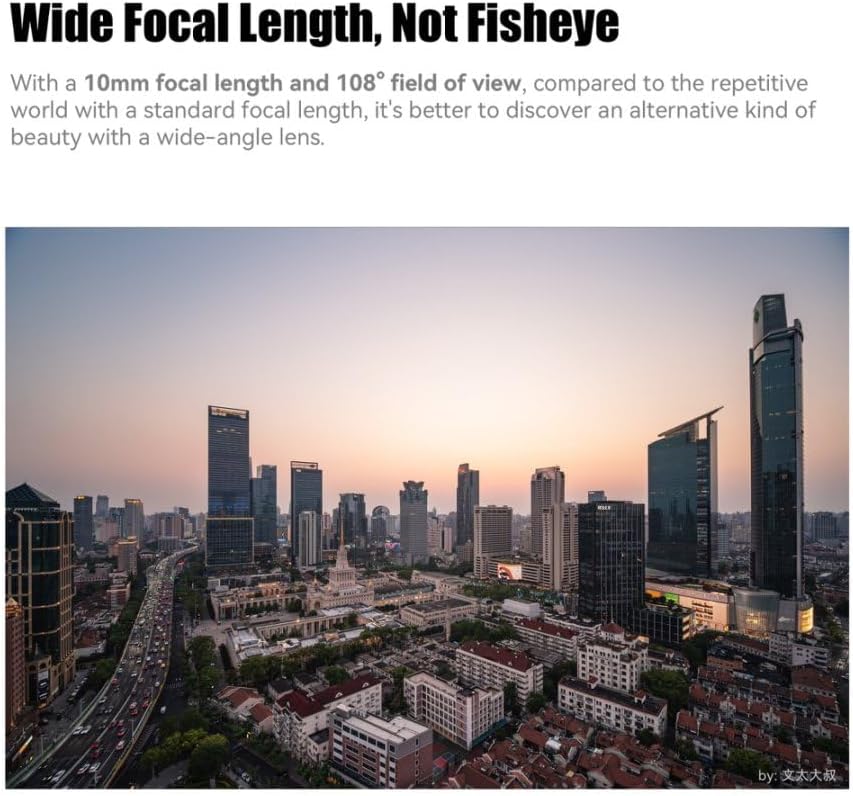
Image 5.1: Wide Focal Length, Not Fisheye

Image 5.2: Wide-angle Style Portrait

Image 5.3: Ten Needles of Brilliant Starlight
5.3 Non-Fisheye Wide-Angle Perspective
The 10mm focal length provides an ultra-wide field of view (109.5 degrees) without the typical distortion of a fisheye lens. This makes it suitable for architectural photography, landscapes, and creative portraits where straight lines and natural perspectives are desired.

Image 5.4: Straight Out Aesthetics
6. Pemeliharaan dan Perawatan
Proper care will extend the life and performance of your lens:
- Pembersihan: Use a soft, clean microfiber cloth specifically designed for optics to clean the lens elements. For stubborn smudges, use a small amount of lens cleaning fluid applied to the cloth, not directly to the lens.
- Debu: Use a blower brush to remove dust from the lens surface before wiping.
- Penyimpanan: Store the lens in a dry, cool place away from direct sunlight and extreme temperatures. Always attach the front and rear lens caps when not in use.
- Hindari Kelembaban: The lens is not water-resistant. Avoid exposure to rain, splashes, or high humidity.
7. Penyelesaian masalah
If you encounter issues with your lens, consider the following:
- Gambar Lembut: Ensure accurate manual focus. At wider apertures (e.g., F3.5), corners may exhibit some softness, which is common for ultra-wide lenses. Stopping down the aperture (e.g., to F5.6 or F8) can improve corner sharpness.
- Lens Flare/Ghosting: When shooting directly into strong light sources, some lens flare or ghosting may occur. This can be used creatively or minimized by adjusting your shooting angle or using a lens hood (if compatible).
- Koreksi Distorsi: While designed to be non-fisheye, minor optical distortions can be further corrected in post-processing using a lens correction profile.
Koreksi Lensa File Penggunaan:
For optimal results, a lens correction file can be applied in post-processing software like Adobe Camera Raw or Lightroom. This helps to correct any minor optical distortions and chromatic aberrations.
- Windows Storage Path: C:Users\Administrator\AppData\Roaming\Adobe\CameraRaw\LensProfiles\1.0
- Mac OS Storage Path: Macintosh HD/Library/Application Support/Adobe/CameraRaw/LensProfiles/1.0
In CameraRaw, select "7artisans" for creation and "7artisans 10mm F3.5" for the model.

Image 7.1: Lens Correction Example
8. Spesifikasi
| Fitur | Keterangan |
|---|---|
| Merek | 7pengrajin |
| Nama Model | 7artisans 10mm F3.5 |
| Panjang Fokus | 10 Milimeter |
| Bukaan Maksimum | F3.5 |
| Bukaan Minimum | F22 |
| Jenis Lensa | Sudut Lebar, Utama |
| Pemasangan yang Kompatibel | FUJIFILM X MOUNT APS-C |
| Tipe Fokus | Fokus Manual |
| Stabilisasi Gambar | Tidak ada stabilisasi gambar |
| Real Angle Of View | 109.5 Derajat |
| Tingkat Tahan Air | Tidak Tahan Air |
| Berat (kira-kira) | 130 grams (from product description) |
9. Garansi dan Dukungan
The 7artisans 10mm F3.5 lens comes with a Garansi 1 tahun sejak tanggal pembelian. Harap simpan bukti pembelian Anda untuk klaim garansi.
For further assistance, technical support, or warranty inquiries, please visit the official 7artisans store or contact their customer service: