
1. Pendahuluan
Thank you for choosing the HUTACT Portable Digital Microscope. This device is designed to introduce young explorers to the fascinating microscopic world with its 100-1000X magnification, 2.0-inch IPS screen, and versatile 2-in-1 handheld and desktop functionality. This manual provides essential information for safe and effective use, setup, operation, maintenance, and troubleshooting.
Harap baca manual ini secara menyeluruh sebelum menggunakan produk dan simpan untuk referensi di masa mendatang.
2. Informasi Keselamatan Penting
- Pengawasan Orang Dewasa: This product is recommended for children aged 5 and above and should always be used under adult supervision.
- Keamanan Baterai: The device contains a rechargeable lithium-polymer battery. Do not attempt to replace the battery. Do not expose the device to extreme temperatures, direct sunlight, or fire.
- Pengisian daya: Use only the provided Type-C charging cable. Ensure the charging port is dry before connecting.
- Pembersihan: Clean the lens and screen with a soft, dry cloth. Avoid using abrasive cleaners or solvents.
- Penanganan: Handle the microscope with care. Avoid dropping or subjecting it to strong impacts.
- Bagian-bagian kecil: The kit contains small parts that may pose a choking hazard for young children. Keep out of reach of children under 3 years old.
3. Isi Paket
Verifikasi bahwa semua item yang tercantum di bawah ini ada dalam paket Anda:
- Portable Digital Microscope with integrated screen
- Microscope Holder (for desktop use)
- Kabel Pengisi Daya USB Type-C
- Tali gantungan
- 5 Prepared Specimen Slides
- 5 Slide Kosong
- Collection Bottles (2)
- Collection Boxes (2)
- Blenders (2)
- Pengaduk Plastik
- Pinset
- Manual Instruksi
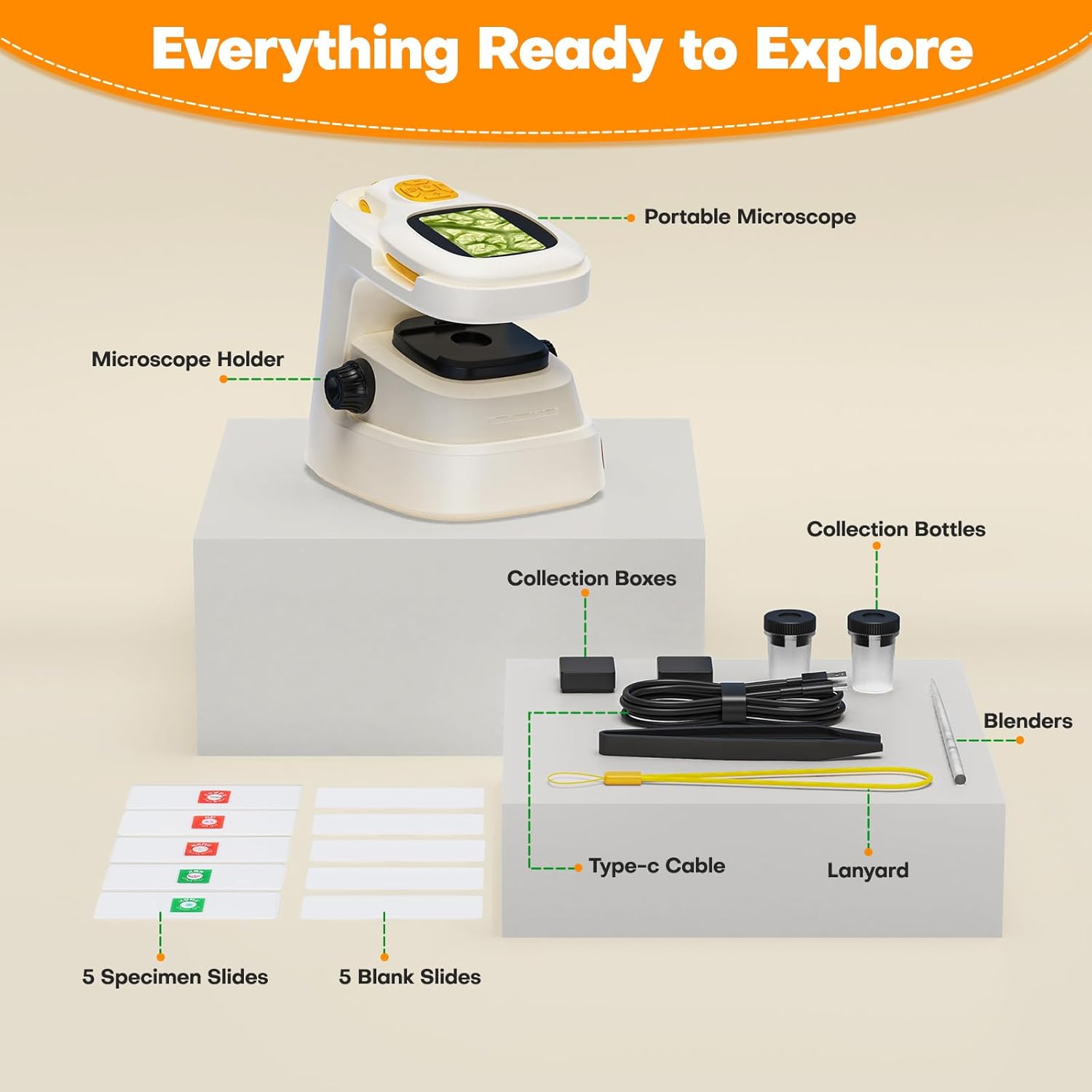
Gambar 3.1: All components included in the HUTACT Portable Digital Microscope kit, neatly arranged. This image displays the portable microscope unit, the desktop stand, various tools like tweezers and stirrers, collection bottles, a Type-C cable, a lanyard, and both prepared and blank specimen slides.
4. Produk Lebihview
The HUTACT Digital Microscope offers a versatile design for both handheld and desktop observation. Familiarize yourself with its main components:
- Layar IPS 2.0": Displays real-time magnified images and videos.
- Kenop Fokus: Menyesuaikan kejernihan gambar.
- Tombol Pembesaran: Cycles through 10 levels of digital zoom (100X-1000X).
- Tombol Tangkap: Mengambil foto atau memulai/menghentikan perekaman video.
- Pencahayaan LED: Provides light for observing specimens.
- Tipe-C Port: Untuk mengisi daya dan menghubungkan ke komputer.
- Slot Kartu TF: For optional external storage (TF card not included).

Gambar 4.1: The HUTACT Digital Microscope demonstrating its 2-in-1 functionality. The image shows the main microscope unit being used in handheld mode by a child, and also placed into its stable desktop stand for more detailed observation. This highlights the flexibility of the device for various exploration scenarios.

Gambar 4.2: Sebuah close-up view of the HUTACT Digital Microscope's screen and focus knob, illustrating the 10 levels of adjustable magnification. The image displays examples of a ladybug at 100X, a leaf vein at 500X, and a detailed cellular structure at 1000X, demonstrating the clarity and range of magnification.
5. Pengaturan
5.1 Mengisi Daya Perangkat
- Connect the provided Type-C USB cable to the microscope's charging port.
- Plug the other end of the cable into a standard USB power adapter (not included) or a computer's USB port.
- The charging indicator light will illuminate. A full charge takes approximately 1.5 hours and provides up to 1.5 hours of continuous use.
5.2 Assembling the Microscope (Desktop Mode)
- Take the portable microscope unit and the microscope holder.
- Gently slide the portable microscope into the designated slot on the holder until it is securely seated.
- Ensure the microscope is stable on a flat surface before use.
5.3 Memasang Kartu TF (Opsional)
The microscope has 16 internal storage slots for photos. For extended storage of photos and videos, a TF (MicroSD) card (up to 64GB, not included) can be inserted.
- Locate the TF card slot on the side of the microscope.
- Insert the TF card with the metal contacts facing down until it clicks into place.
- Untuk melepasnya, dorong kartu perlahan kembali hingga terlepas.
6. Petunjuk Pengoperasian
6.1 Daya Hidup/Mati
- Nyalakan: Tekan dan tahan tombol daya selama beberapa detik hingga layar menyala.
- Matikan: Tekan dan tahan tombol daya lagi hingga layar mati.
6.2 Menyesuaikan Pembesaran
The microscope offers 10 levels of digital magnification, ranging from 100X to 1000X.
- Use the magnification buttons (usually marked with '+' and '-') to cycle through the different zoom levels.
- Observe the change in magnification on the 2.0" IPS screen.
6.3 Pemfokusan
Untuk mencapai gambar yang jelas:
- Place your specimen directly under the microscope lens.
- Slowly rotate the focus knob until the image on the screen becomes sharp and clear.
6.4 Mode Genggam
For outdoor exploration or examining larger objects:
- Remove the microscope unit from its desktop holder.
- Hold the microscope firmly and position the lens over the object you wish to observe.
- Adjust the focus knob for clarity.
6.5 Mode Desktop
For detailed observation of slides or stationary objects:
- Ensure the microscope unit is securely placed in its holder.
- Place a specimen slide or object on the stage directly under the lens.
- Adjust the focus knob and magnification as needed.
6.6 Mengambil Foto dan Video
The microscope features a 100W pixel camera for documenting your discoveries.
- Untuk mengambil foto: Press the Capture button once. The image will be saved to internal memory or the TF card if inserted.
- Untuk merekam video: Press and hold the Capture button to start recording. Press and hold again to stop. Videos require a TF card for storage.

Gambar 6.1: The microscope's screen displaying both photo and video recording functions. The top image shows a still capture of red cup fungi, while the bottom image shows a video recording in progress of an insect, indicating the device's capability to document observations.
6.7 Menghubungkan ke Komputer
For larger screen viewing or sharing, connect the microscope to a Windows or Mac computer:
- Pastikan mikroskop dalam keadaan menyala.
- Connect the microscope to your computer using the Type-C USB cable.
- Mikroskop harus diakui sebagai webcam or storage device. You may need to select the appropriate mode on the microscope's menu or use a standard webcam application on your computer.
6.8 Using Specimen Slides
The kit includes both prepared and blank slides for diverse experiments.
- Prepared Slides: Place a prepared slide directly onto the microscope stage for immediate observation.
- Blank Slides: Use the provided laboratory gadgets (tweezers, stirrers, collection bottles) to collect and prepare your own specimens on the blank slides.

Gambar 6.2: Two children, wearing safety glasses, engaged in scientific exploration using the HUTACT Digital Microscope. One child uses the microscope in desktop mode to examine a slide, while the other holds a blank slide, demonstrating the process of preparing and observing specimens.
7. Pemeliharaan
- Pembersihan: Use a soft, lint-free cloth to clean the microscope body. For the lens and screen, use a specialized lens cleaning cloth. Do not use liquid cleaners directly on the device.
- Penyimpanan: Store the microscope and its accessories in a cool, dry place, away from direct sunlight and extreme temperatures. Keep it in its original packaging or a protective case when not in use.
- Perawatan Baterai: Untuk memperpanjang masa pakai baterai, hindari sering-sering mengosongkan baterai sepenuhnya. Isi daya perangkat secara teratur, meskipun tidak digunakan dalam waktu lama.
8. Penyelesaian masalah
Jika Anda menemui masalah, lihat tabel berikut untuk masalah umum dan solusinya:
| Masalah | Kemungkinan Penyebab | Larutan |
|---|---|---|
| Mikroskop tidak menyala. | Baterai lemah atau perangkat mati. | Charge the microscope fully. Press and hold the Power button for a few seconds. |
| Gambarnya buram. | Out of focus or lens is dirty. | Rotate the focus knob until the image is clear. Clean the lens with a soft cloth. |
| Cannot record videos. | No TF card inserted or TF card is full. | Insert a TF card. Ensure the TF card has sufficient free space. |
| Tidak dapat terhubung ke komputer. | Incorrect cable, port, or software. | Ensure you are using the correct Type-C cable. Try a different USB port on your computer. Check computer settings for webcam or storage device recognition. |
9. Spesifikasi
| Fitur | Detil |
|---|---|
| Merek | HUTAK |
| Model | NHKJ-TV3-927 |
| Pembesaran | 100X - 1000X |
| Ukuran Layar | 2.0 inci IPS |
| Resolusi Kamera | 100W pixels (for photos/videos) |
| Penyimpanan Internal | 16 photo slots |
| Penyimpanan Eksternal | Kartu TF (hingga 64GB, tidak termasuk) |
| Baterai | Baterai Lithium-polimer 450mAh (termasuk) |
| Daya Tahan Baterai | Sekitar 1.5 jam |
| Port Pengisian Daya | Type-C USB |
| Konektivitas | USB to Windows/Mac PC |
| Bahan | ABS |
| Berat Barang | 290 gram |
| Dimensi Produk (P x L x T) | Ukuran 12.5x11x9 cm |
10. Garansi dan Dukungan
HUTACT is committed to providing quality products. For any questions, concerns, or technical support regarding your Portable Digital Microscope, please contact our customer service. Please refer to your purchase documentation for specific warranty details and contact information.
We encourage you to register your product on our official websitus untuk menerima pembaruan dan dukungan.