
Perkenalan
Thank you for choosing the Activa Digital ACW2100-003 Digital Quartz Watch. This manual provides essential information for the proper setup, operation, and maintenance of your new timepiece. Please read it thoroughly to ensure optimal performance and longevity of your watch.
Informasi Keselamatan
- Hindari memaparkan jam tangan pada suhu ekstrem (panas atau dingin) dalam jangka waktu lama.
- Jangan mencoba membuka casing jam tangan atau mengganti baterai sendiri, karena hal ini dapat membatalkan garansi dan merusak jam tangan.
- Jauhkan jam tangan dari medan magnet yang kuat, karena dapat memengaruhi keakuratan pergerakan kuarsa.
- Bersihkan jam tangan dengan kain lembut dan kering. Hindari penggunaan pembersih kimia.
Produk Selesaiview
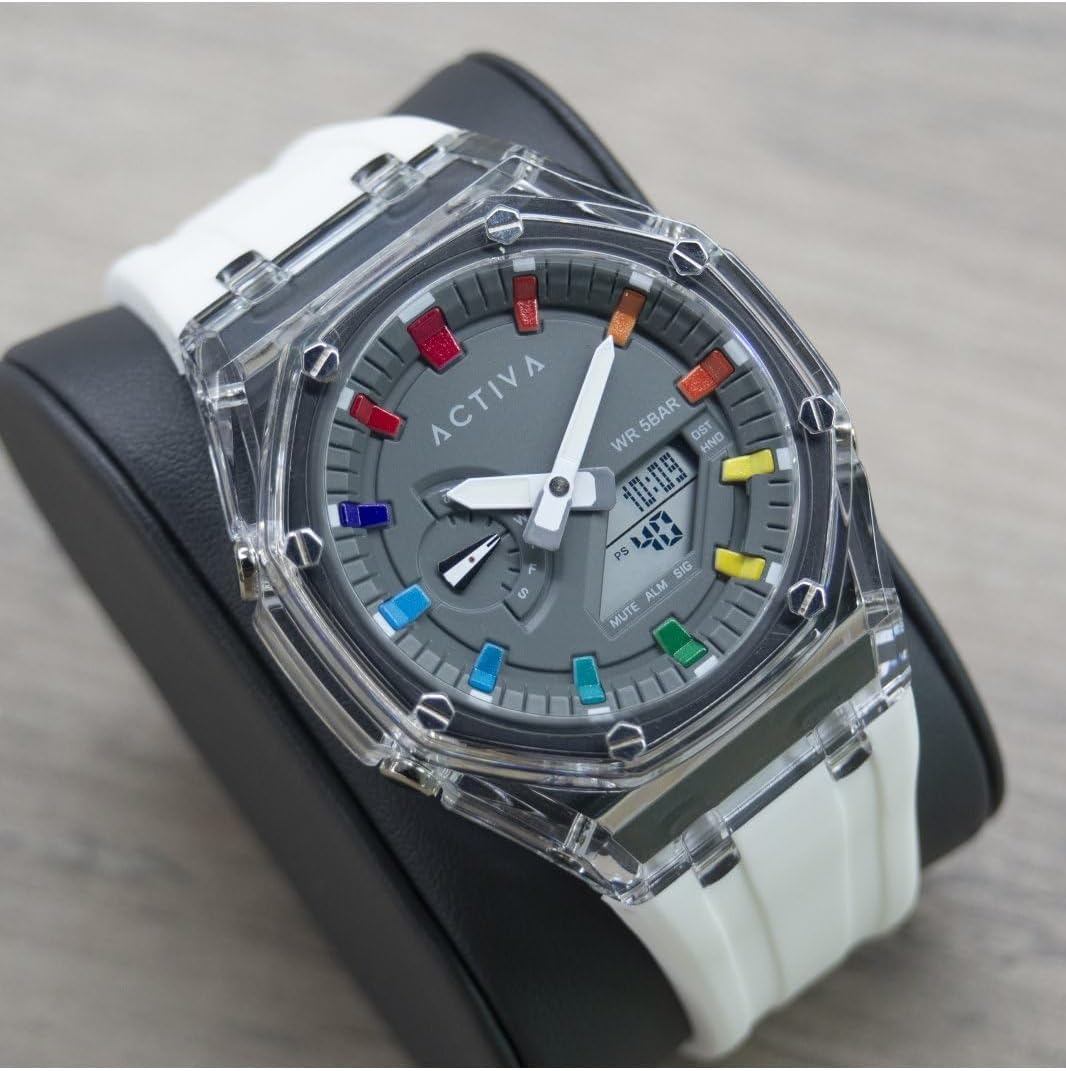
The Activa Digital ACW2100-003 is a robust digital quartz watch designed for daily wear. It features a durable plastic case, a clear digital display, and a comfortable silicone band. The watch is water-resistant up to 5 bars (50 meters), making it suitable for showering and swimming in shallow water, but not for diving.

Komponen Utama:
- Tampilan digital: Shows time, date, and other functions.
- Tombol Fungsi: Typically located on the sides of the watch for setting and mode changes. (Specific button functions will be detailed in the 'Operating' section).
- Kotak Jam Tangan: Terbuat dari plastik tahan lama.
- Tali Jam Tangan: Made of comfortable silicone.
Pengaturan
Pengaturan Waktu dan Tanggal:
The exact procedure for setting the time and date may vary slightly depending on the specific button configuration. Generally, digital watches follow these steps:
- Masuk ke Mode Pengaturan: Press and hold the 'MODE' or 'SET' button (usually on the bottom left or top left) until a digit on the display starts flashing.
- Sesuaikan Nilai: Use the 'ADJUST' or 'START/STOP' button (usually on the top right or bottom right) to increase or decrease the flashing digit (e.g., hours, minutes, year, month, day).
- Navigate Between Settings: Press the 'MODE' or 'SET' button again to move to the next setting (e.g., from hours to minutes, then to date).
- Keluar dari Mode Pengaturan: Once all settings are adjusted, press the 'MODE' or 'SET' button one last time, or wait for a few seconds for the watch to automatically exit the setting mode.
Pengoperasian
Fungsi Dasar:
- Tampilan Waktu: The primary mode shows the current time (hours, minutes, seconds) and often the day of the week and date.
- Fungsi Alarm: To set an alarm, navigate to the alarm mode (often indicated by 'ALM'). Use the setting buttons to set the desired alarm time. An alarm icon will typically appear when activated.
- Fungsi stopwatch: To use the stopwatch, navigate to the stopwatch mode (often indicated by 'STW' or 'CHR'). Press a designated button (e.g., 'START/STOP') to begin and end timing, and another (e.g., 'RESET') to clear the time.
- Lampu latar: Many digital watches include a backlight for visibility in low-light conditions. Press a specific button (often labeled 'LIGHT' or a dedicated button on the top left) to activate it.
Tahan Air:
Your Activa Digital ACW2100-003 watch has a water resistance rating of 5 bars (50 meters). This means it is suitable for:
- Penggunaan sehari-hari dan cipratan yang tidak disengaja.
- Mandi.
- Berenang di air dangkal.
Dia bukan cocok untuk:
- Snorkeling atau menyelam.
- Operating buttons while submerged in water.
- Exposure to hot water or steam (e.g., hot tubs, saunas), as this can compromise the seals.
Pemeliharaan
Pembersihan:
Untuk menjaga tampilan jam tangan Anda:
- Wipe the watch case and band regularly with a soft, slightly damp kain.
- For the silicone band, mild soap and water can be used, then rinse thoroughly and dry completely.
- Avoid harsh chemicals, solvents, or abrasive cleaners, as these can damage the watch materials.
Penggantian Baterai:
The watch is powered by a long-lasting quartz battery. When the display becomes dim or the watch stops functioning, it's time for a battery replacement. It is highly recommended to have the battery replaced by a qualified watch technician to ensure the water resistance seal is properly maintained.
Penyimpanan:
Saat tidak digunakan, simpan jam tangan Anda di tempat yang sejuk dan kering, jauh dari sinar matahari langsung dan suhu ekstrem.
Penyelesaian Masalah
| Masalah | Kemungkinan Penyebab | Larutan |
|---|---|---|
| Layar jam tangan kosong atau redup. | Baterai lemah atau mati. | Ganti baterai (disarankan oleh profesional). |
| Waktu tidak akurat. | Pengaturan waktu yang salah; paparan medan magnet yang kuat. | Reset the time; keep away from magnets. |
| Air di dalam jam tangan. | Ketahanan air terganggu (misalnya, tombol tertekan di dalam air, terkena air/uap panas, segel rusak). | Segera bawa jam tangan tersebut ke ahlinya untuk diperiksa dan diperbaiki. Jangan mencoba mengeringkannya sendiri. |
| Tombol tidak responsif. | Dirt or debris under buttons; internal malfunction. | Clean around buttons; if issue persists, contact support. |
Spesifikasi
| Fitur | Detil |
|---|---|
| Nomor Model | ACW2100-003 |
| Merek | Invicta (Activa Digital Collection) |
| Jenis Gerakan | Electronic Quartz |
| Jenis Tampilan | Digital |
| Bahan Kasus | PC (Plastik) |
| Diameter Kasus | 44.2 Milimeter |
| Ketebalan casing | 14.1 Milimeter |
| Jenis Bahan Pita | Silikon |
| Lebar Pita | 20 Milimeter |
| Kedalaman Tahan Air | 50 Meters (5 Bar) |
| Berat Barang | 353.8 Grams (packaged) |
Jaminan
Your Activa Digital ACW2100-003 watch comes with a 2-year Activa warranty. This warranty covers manufacturing defects under normal use. It does not cover damage resulting from improper handling, accidents, unauthorized repairs, or normal wear and tear. Please retain your proof of purchase for warranty claims.
Mendukung
For further assistance, technical support, or warranty claims, please refer to the contact information provided with your purchase or visit the official Invicta/Activa website. When contacting support, please have your watch model number (ACW2100-003) and proof of purchase readily available.
Kemasan
