
Perkenalan
Thank you for choosing the Lvifur 71-inch Glass Display Cabinet. This modern curio cabinet is designed to elegantly showcase your collectibles, figures, and decorative items. It features tempered glass doors, adjustable shelves, a human body sensing system for lighting, and a secure locking mechanism. Please read this manual thoroughly before assembly and use to ensure proper installation and safe operation.
Informasi Keselamatan
Selalu patuhi pedoman keselamatan berikut:
- Assemble the cabinet strictly according to the provided instructions.
- Jauhkan kabinet dari sumber panas langsung.
- Avoid placing excessively heavy objects on any shelf.
- Do not allow children to play near or with the cabinet.
- Be aware that the human body sensing system may activate the lights unexpectedly when approached.
- Utilize the included anti-tipping device to secure the cabinet to a wall, preventing accidental tipping and ensuring stability.
Dimensi Produk
Understand the dimensions of your cabinet for proper placement.
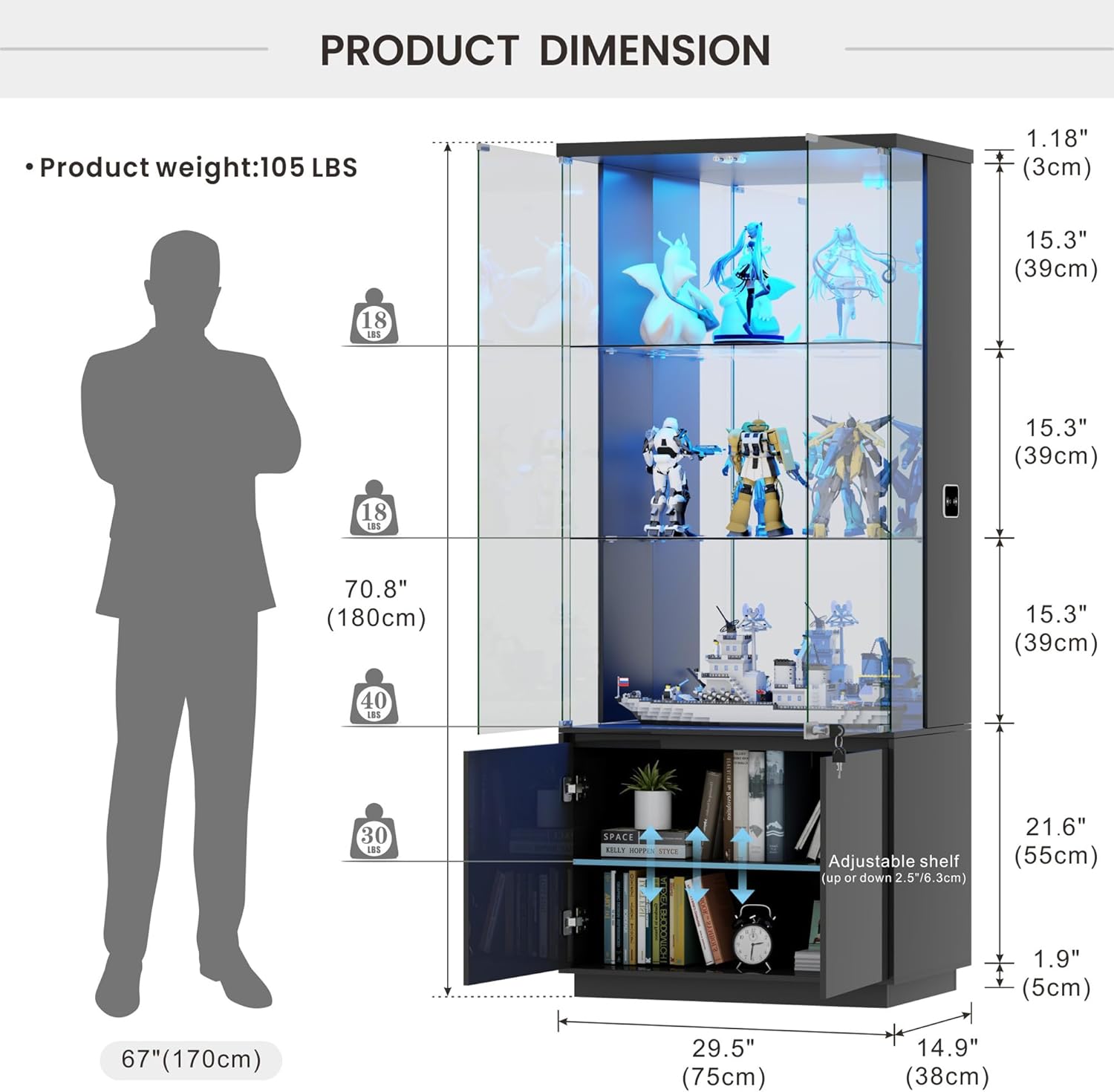
Image: Detailed diagram illustrating the product's height, width, and depth, along with shelf spacing and weight capacities.
Petunjuk Perakitan
Assembly typically requires two people due to the weight of the glass components. All parts are clearly labeled for ease of identification.
- Bongkar dan Identifikasi Bagian-bagiannya: Carefully unpack all components. Each part and hardware bag is labeled with a number or letter corresponding to the instruction manual.
- Merakit Basis: Follow the manual to connect the base panels using the provided hardware. Ensure all connections are secure.
- Install Side Panels and Back Panel: Attach the side panels and the mirrored back panel to the base. The mirrored back panel enhances the display of your items.
- Insert Glass Shelves: Carefully place the tempered glass shelves into the designated slots. Ensure they are level and stable.
- Attach Top Panel and Lighting: Secure the top panel. Install the LED light strips as per the instructions, ensuring all wiring is correctly connected.
- Memasang Pintu Kaca: Attach the pop-up tempered glass doors. These doors feature a no-handle design for a sleek look and magnetic catch closures for secure closing.
- Pasang Mekanisme Pengunci: Attach the key-locking security design to the glass doors to prevent unauthorized access.
- Secure with Anti-Tipping Device: Attach the anti-tipping device to the top of the cabinet and secure it to a wall stud to prevent accidental tipping.
- Pemeriksaan Akhir: Ensure all parts are correctly assembled and tightened.

Image: All cabinet components, including wooden panels and glass shelves, are laid out and clearly labeled for easy identification during assembly.

Image: A visual guide to attaching the main structural panels of the cabinet, including the mirrored back for enhanced display.

Image: Detail of the magnetic catch mechanism that ensures the glass doors close securely and smoothly.

Image: The key-locking mechanism on the glass door, providing security for displayed items.

Image: The anti-tipping device, crucial for securing the tall cabinet to a wall.
Perakitan Selesaiview Video
Video: This official Lvifur-US video provides a visual guide to the assembly process and highlights key features of the display cabinet.
Petunjuk Pengoperasian
Sistem Pencahayaan LED
The cabinet features 3-color LED lights (Warm, Blue, White) with adjustable brightness.
- Mengubah Warna: Use the control panel located on the side of the cabinet to cycle through the different light colors.
- Menyesuaikan Kecerahan: Long press the brightness control on the panel to adjust the intensity of the lights from 0% to 100%.

Image: Illustration of the three available LED light colors and the brightness adjustment feature.
Human Body Sensing System
The cabinet is equipped with a smart human body sensing system that automatically turns the lights on/off.
- Pengaktifan: The lights will automatically turn on when a person approaches within a 3-meter range.
- Penonaktifan: The lights will automatically turn off when no motion is detected for a period.

Image: Demonstrates the human body sensor activating the cabinet lights upon approach.
Mekanisme Penguncian
The glass doors can be locked to secure your valuable items.
- Penguncian: Insert the key into the lock on the glass door and turn to secure.
- Membuka kunci: Insert the key and turn in the opposite direction to unlock.
Pemeliharaan
To keep your Lvifur display cabinet in optimal condition, follow these maintenance tips:
- Membersihkan Permukaan Kaca: Use a soft, lint-free cloth and a non-abrasive glass cleaner. Spray the cleaner onto the cloth, not directly onto the glass, to avoid streaks and damage to internal components.
- Cleaning Wooden Surfaces: Wipe wooden parts with a soft, damp cloth. Avoid harsh chemicals that may damage the high-gloss finish.
- debu: Bersihkan debu semua permukaan secara teratur dengan kain kering dan lembut untuk mencegah penumpukan.
- Periksa Koneksi: Periksa semua sekrup dan sambungan secara berkala untuk memastikannya tetap kencang dan aman.
Penyelesaian Masalah
If you encounter any issues with your display cabinet, refer to the following common solutions:
| Masalah | Kemungkinan Penyebab | Larutan |
|---|---|---|
| Lampu tidak menyala. | Power cable disconnected; sensor obstructed; light setting off. | Check power connection; ensure sensor is clear; press light control button. |
| Pintu tidak menutup dengan benar. | Obstruction in hinge; magnetic catch misaligned. | Clear any obstructions; adjust magnetic catches if necessary. |
| Kabinet terasa tidak stabil. | Loose connections; anti-tipping device not installed. | Tighten all assembly screws; ensure anti-tipping device is securely fastened to the wall. |
Spesifikasi
| Fitur | Detil |
|---|---|
| Merek | Lvifur |
| Nama Model | Nomor telepon 97087-27 |
| Dimensi Produk | 15.8"Panjang x 29.5"Lebar x 70.9"T |
| Berat Barang | 104.3 pon |
| Bahan | Kaca, Kayu |
| Jenis Selesai | Berkilau Tinggi |
| Jumlah Rak | 4 |
| Fitur Khusus | 3-Meters Human Body Induction, 4 Sleek Pop-Up Glass Doors, Ample Storage Space with drawer and mirrored backs for 360-degree views, Illuminated, Lockable |
| Perakitan Diperlukan | Ya |
| Penggunaan yang Direkomendasikan | Books, Toys, Figures, Collectibles, Decorative items |
Garansi dan Dukungan
For specific warranty information and customer support, please refer to the documentation included with your purchase or contact Lvifur customer service directly. Keep your proof of purchase for any warranty claims.