
1. Selamat datang
Thank you for choosing the AWEI T1 Pro Wireless Bluetooth Headphones. This manual provides detailed instructions for setting up, operating, and maintaining your new earbuds. Please read this manual carefully before use to ensure optimal performance and longevity of your device.
2. Produk Lebihview
2.1. Isi Paket
- Earbud Nirkabel (Kiri dan Kanan)
- Kotak Pengisian Daya
- Kabel Pengisian Daya USB
- Ujung telinga (berbagai ukuran)
- Panduan Pengguna
2.2. Earbud and Charging Case Components
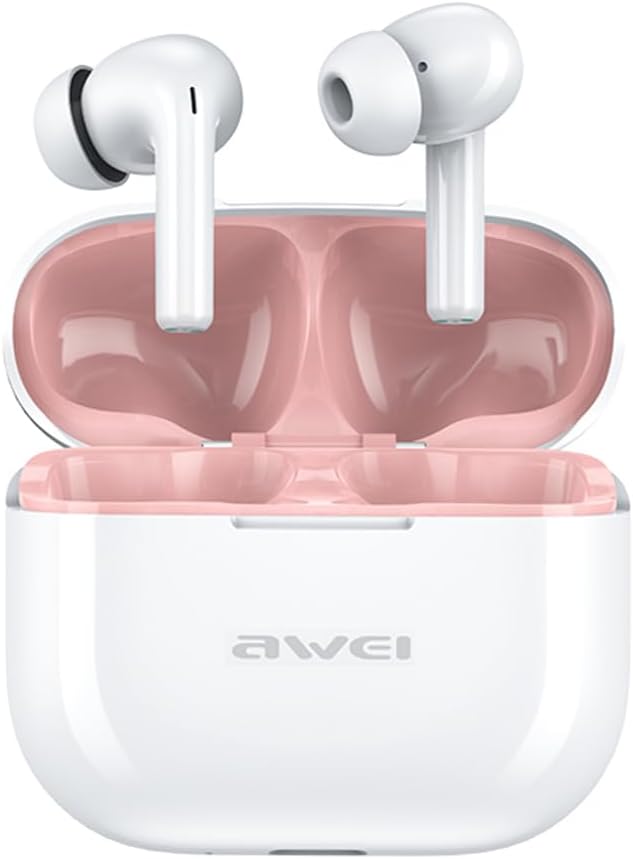
Image: The AWEI T1 Pro wireless earbuds are shown in their open charging case. The earbuds are white with a stem design, and the interior of the charging case is a light pink color. The AWEI logo is visible on the front of the white charging case.
The AWEI T1 Pro earbuds feature an ergonomic in-ear design for a comfortable and secure fit. The compact charging case not only protects the earbuds but also provides multiple charges on the go.
2.3. Fitur Utama
- Kualitas Suara Hi-Fi: Equipped with 13mm speakers for an immersive audio experience and clear call performance.
- Teknologi Bluetooth 5.4: Ensures a faster, more stable signal transmission with low latency and a wireless range of up to 10 meters. (Note: Some packaging may indicate Bluetooth 5.3, but the device supports 5.4 for enhanced performance).
- Kontrol Sentuh Cerdas: Intuitive touch sensors on each earbud allow for easy control of music playback, calls, and voice assistant activation.
- Daya Tahan Baterai yang Lama: Enjoy up to 7 hours of continuous playback per charge. The 300mAh charging case extends total playtime to 36 hours in dual-ear mode or up to 60 hours in single-ear mode. The case fully charges in approximately 1 hour via Type-C.
- Desain Tahan Air IPX6: Resistant to sweat and rain, making them suitable for sports and outdoor activities.

Image: A detailed diagram illustrating the internal components of an earbud speaker, labeled as 'Drive Units HiFi Stereo', highlighting the layered structure of the audio driver for high-fidelity sound.

Image: A stylized depiction of a microchip labeled '5.3 Bluetooth', surrounded by circuit board elements, emphasizing lower latency and increased stability in wireless communication.

Image: A black earbud is shown next to a smartphone displaying a music player interface. Text indicates 'Touch Control Wake up Voice Assistant', illustrating how touch gestures on the earbud can control phone functions like answering calls or activating a voice assistant.

Image: A smartphone displaying a music player is shown alongside a transparent block, symbolizing extended power. Text highlights 'Full of Energy Long Battery Life', indicating the 300mAh charging case provides 7 hours of continuous use per charge.

Image: Two black earbuds are depicted, one dry and the other surrounded by water droplets, illustrating the 'No Fear of Sweat & Rain IPX6 Waterproof Rate' feature, which prevents water penetration during sports.
3. Pengaturan
3.1. Pengisian Awal
- Sebelum penggunaan pertama, masukkan kedua earbud ke dalam wadah pengisi daya.
- Connect the provided USB Type-C charging cable to the charging port on the case and a power source (e.g., USB wall adapter, computer USB port).
- The indicator lights on the charging case will show charging status. A full charge for the case takes approximately 1 hour.
- Pastikan earbud terisi penuh sebelum pemasangan pertama.
3.2. Memasangkan dengan Perangkat
- Buka casing pengisi daya. Earbud akan otomatis menyala dan masuk ke mode berpasangan.
- Pada perangkat Anda (ponsel pintar, tablet, laptop), aktifkan Bluetooth.
- Pencarian untuk perangkat Bluetooth yang tersedia.
- Select "AWEI T1 Pro" from the list of devices.
- Setelah terhubung, Anda akan mendengar nada konfirmasi, dan earbud siap digunakan.
- Earbud akan secara otomatis tersambung kembali ke perangkat terakhir yang dipasangkan saat dikeluarkan dari casing, jika Bluetooth diaktifkan pada perangkat.
4. Petunjuk Pengoperasian
4.1. Daya Hidup/Mati
- Nyalakan: Buka casing pengisi daya, atau tekan lama area sentuh pada kedua earbud selama 3 detik.
- Matikan: Letakkan kembali earbud ke dalam wadah pengisi daya dan tutup kembali, atau tekan lama area sentuh pada kedua earbud selama 5 detik.
4.2. Kontrol Sentuh
| Fungsi | Tindakan |
|---|---|
| Putar/Jeda Musik | Ketuk satu kali di salah satu earbud |
| Lagu Berikutnya | Ketuk dua kali pada earbud kanan |
| Lagu Sebelumnya | Ketuk dua kali pada earbud kiri |
| Volume Naik | Ketuk tiga kali pada earbud kanan |
| Volume Turun | Ketuk tiga kali pada earbud kiri |
| Menjawab/Mengakhiri Panggilan | Ketuk satu kali di salah satu earbud |
| Tolak Panggilan | Long press on either earbud for 2 seconds |
| Aktifkan Asisten Suara | Long press on either earbud for 2 seconds (when not on a call) |
4.3. Melakukan dan Menerima Panggilan
When a call comes in, you can answer or reject it using the touch controls as described above. During a call, a single tap will end the conversation.
4.4. Pemutaran Musik
Control your music directly from the earbuds. Use single, double, or triple taps to play, pause, skip tracks, or adjust volume.
5. Pemeliharaan
5.1. Pembersihan
- Bersihkan earbud dan casing pengisi daya secara teratur dengan kain yang lembut, kering, dan tidak berbulu.
- Jangan gunakan pembersih abrasif, alkohol, atau pelarut kimia.
- Bersihkan kotoran telinga atau serpihan apa pun dari jaring earbud dan kontak pengisian daya dengan lembut menggunakan kapas kering atau sikat kecil yang lembut.
5.2. Penyimpanan
- Saat tidak digunakan, selalu simpan earbud di dalam wadah pengisian dayanya untuk melindunginya dari debu dan kerusakan.
- Simpan perangkat di tempat yang sejuk dan kering, jauhkan dari suhu ekstrem dan sinar matahari langsung.
5.3. Tahan Air
The AWEI T1 Pro earbuds are rated IPX6 waterproof, meaning they are protected against high-pressure water jets from any direction. This makes them suitable for workouts and light rain. However, they are not designed for swimming or submersion in water. Ensure the earbuds are dry before placing them back into the charging case to prevent damage.
6. Penyelesaian masalah
6.1. Masalah Umum dan Solusinya
- Earbud tidak berpasangan dengan perangkat:
Ensure both earbuds are charged. Turn off and on your device's Bluetooth. Forget "AWEI T1 Pro" from your device's Bluetooth list and try pairing again. - Hanya satu earbud yang berfungsi:
Place both earbuds back into the charging case, close the lid, wait a few seconds, then open the lid and take them out. This should reset their connection. If the issue persists, try resetting the earbuds (refer to manufacturer's web(Lihat situs web untuk petunjuk pengaturan ulang spesifik jika diperlukan). - Tidak ada suara atau volume rendah:
Check the volume level on both your device and the earbuds. Ensure the earbuds are properly seated in your ears. Try cleaning the earbud mesh for any obstructions. - Casing pengisi daya tidak mengisi daya:
Ensure the USB cable is securely connected to both the case and the power source. Try a different charging cable or power adapter. - Earbud tidak mengisi daya di dalam wadah:
Ensure the charging contacts on both the earbuds and the case are clean and free of debris. Make sure the earbuds are correctly seated in the case.
7. Spesifikasi

Image: A graphic displaying the technical specifications of the AWEI T1 Pro, including basic information, horn details, Bluetooth version, and battery capacities.
| Informasi Umum | |
|---|---|
| Nama Model | T1 Profesional |
| Tipe Produk | Earbud TWS Stereo |
| Berat Bersih | 36 gram |
| Dimensi (Kasus) | Ukuran 58*50*24mm |
| Penempatan Telinga | Di Telinga |
| Jenis Kontrol | Kontrol Sentuh |
| Tingkat Tahan Air | Tahan Air IPX6 |
| Kontrol Kebisingan | Peredam Kebisingan Adaptif |
| Spesifikasi Audio | |
| Diameter Pembicara | ukuran 13mm |
| Kepekaan | 100±3dB |
| Rentang Respon Frekuensi | 20Hz~20,000Hz |
| Impedansi | Tegangan 32 ohm |
| Konektivitas | |
| Versi Bluetooth | 5.4 (Image shows 5.3) |
| Range Nirkabel | Hingga 10 meter |
| Protokol yang Didukung | HSP, HFP, A2DP, AVRCP |
| Perangkat yang Kompatibel | Laptop, Tablet, Ponsel |
| Baterai & Pengisian Daya | |
| Baterai Kotak Pengisian Daya | 300mAh / 3.7V |
| Kapasitas Baterai Earbud | 45mAh * 2 |
| Waktu Bermain Musik | Hingga 7 jam (per pengisian daya) |
| Waktu Bicara | Hingga 8 jam |
| Waktu Siaga | Hingga 300 jam |
| Waktu Pengisian Daya (Kasus) | Sekitar 1 jam |
| Port Pengisian Daya | USB Tipe-C |
8. Garansi dan Dukungan
AWEI products are designed and manufactured to the highest quality standards. For information regarding warranty coverage, please refer to the warranty card included in your product packaging or visit the official AWEI website. If you encounter any issues or require technical assistance, please contact AWEI customer support through the contact information provided on the official websitus atau platform pembelian Anda.